SQL Joins Explained: INNER, LEFT, RIGHT, and FULL JOIN Diagrams
For someone writing their first queries over two tables; each join type is shown with the rows it returns and the rows it drops.
On this page
The rows you need sit in two tables, tied together by one shared column. A join reads both tables in a single query and pairs the rows whose values match. The join type you write decides what happens to the rows that find no partner, and that is the only real difference between INNER, LEFT, RIGHT, and FULL.
The six join types, by what each one does with rows that have no partner:
| JOIN type | Matching rows | Unmatched left rows | Unmatched right rows | Best for |
|---|---|---|---|---|
INNER JOIN | kept | excluded | excluded | only matched data |
LEFT JOIN | kept | kept | excluded | all rows from the first table |
RIGHT JOIN | kept | excluded | kept | all rows from the second table |
FULL JOIN | kept | kept | kept | full comparison between both tables |
CROSS JOIN | every left row pairs with every right row | not applicable | not applicable | all combinations |
SELF JOIN | depends on the condition | depends on the condition | depends on the condition | comparing rows within the same table |
What SQL JOINs do
A join takes two tables and a condition, usually an equality between a column on the left and a column on the right, and returns one row for every pair that satisfies it. Rows with no partner are where the four types part company: one type drops them, two keep them from one side, and one keeps them from both.
For a refresher on the rest of the query around a join, read SQL SELECT, SQL WHERE Clause, and What Is a Foreign Key?.
Sample tables used in the examples
Every query below runs against two tables, three employees and three departments:
CREATE TABLE Departments (
    department_id   INT PRIMARY KEY,
    department_name VARCHAR(50)
);

CREATE TABLE Employees (
    employee_id   INT PRIMARY KEY,
    name          VARCHAR(50),
    department_id INT,
    manager_id    INT
);

INSERT INTO Departments VALUES
    (10, 'Engineering'),
    (20, 'Sales'),
    (30, 'HR');

INSERT INTO Employees VALUES
    (1, 'Sarah James', 10,   NULL),
    (2, 'Mark White',  20,   1),
    (3, 'Olivia Reed', NULL, 1);
SELECT * FROM Employees;
| employee_id | name | department_id | manager_id |
|---|---|---|---|
| 1 | Sarah James | 10 | NULL |
| 2 | Mark White | 20 | 1 |
| 3 | Olivia Reed | NULL | 1 |
SELECT * FROM Departments;
| department_id | department_name |
|---|---|
| 10 | Engineering |
| 20 | Sales |
| 30 | HR |
Olivia Reed has no department yet, and nobody works in HR. Those two gaps are what tell the join types apart, so watch for them in every result below. manager_id points back into the same table and comes up in the self join.



INNER JOIN
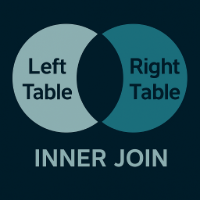
INNER JOIN returns only rows that match in both tables.
SELECT e.name, d.department_name
FROM Employees e
INNER JOIN Departments d
  ON e.department_id = d.department_id;
| name | department_name |
|---|---|
| Sarah James | Engineering |
| Mark White | Sales |
Two of the three employees came back. Olivia Reed is missing because her department_id is NULL, which matches no department, and HR is missing because no employee carries department 30. Write INNER JOIN when a row without a partner has nothing to say in the result: an invoice line needs its invoice, an order line needs its product.
Practice this: Lesson 9 of the SQL tutorial runs JOIN over two and three tables of a shop database in your browser, with exercises.
LEFT JOIN
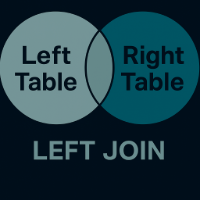
LEFT JOIN returns every row from the left table, plus any matching rows from the right table.
SELECT e.name, d.department_name
FROM Employees e
LEFT JOIN Departments d
  ON e.department_id = d.department_id;
| name | department_name |
|---|---|
| Sarah James | Engineering |
| Mark White | Sales |
| Olivia Reed | NULL |
Olivia Reed is back, with NULL where the department name would go. The left table decides the row count here, so this is the join for a question whose subject is that table: every customer and their orders if they have any, every employee and their department if they have one.
Practice this: Lesson 10 of the SQL tutorial runs LEFT JOIN on a shop database in your browser, with exercises.
RIGHT JOIN
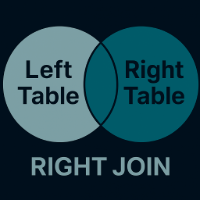
RIGHT JOIN is the mirror image of LEFT JOIN: it returns every row from the right table and any matching rows from the left table.
SELECT e.name, d.department_name
FROM Employees e
RIGHT JOIN Departments d
  ON e.department_id = d.department_id;
| name | department_name |
|---|---|
| Sarah James | Engineering |
| Mark White | Sales |
| NULL | HR |
HR appears with no employee name, and Olivia Reed has dropped out: the department table is the one being preserved now. Swapping the two tables and writing LEFT JOIN Employees instead gives exactly these rows, which is the version to prefer, because the table you care about then reads first in the query.
FULL JOIN
FULL JOIN returns all rows from both tables. When a row does not match, the missing side is filled with NULL.

SELECT e.name, d.department_name
FROM Employees e
FULL OUTER JOIN Departments d
  ON e.department_id = d.department_id;
| name | department_name |
|---|---|
| Sarah James | Engineering |
| Mark White | Sales |
| Olivia Reed | NULL |
| NULL | HR |
Both gaps show up at once, which is what makes this the join for reconciliation work:
- rows that exist in one system and not in the other
- an import compared against the live data
- orphan rows on both sides of a relationship, in a single pass
FULL JOIN workaround for MySQL
MySQL 8.4 has no FULL OUTER JOIN in its join syntax. Combine a LEFT JOIN with the reversed one and let UNION merge them:
SELECT e.name, d.department_name
FROM Employees e
LEFT JOIN Departments d
  ON e.department_id = d.department_id

UNION

SELECT e.name, d.department_name
FROM Departments d
LEFT JOIN Employees e
  ON e.department_id = d.department_id;
The first half returns the three employee rows, the second half returns the three department rows, and UNION drops the two pairs they have in common. What comes back is the same set of four rows as the FULL OUTER JOIN above. For more on that set operation, read SQL UNION Operator.
CROSS JOIN and SELF JOIN
Two more join types have no ON condition in the usual sense, and both come up often enough to be worth knowing.
CROSS JOIN
CROSS JOIN produces every possible combination of rows from both tables, with no condition at all:
SELECT e.name, d.department_name
FROM Employees e
CROSS JOIN Departments d;
| name | department_name |
|---|---|
| Sarah James | Engineering |
| Sarah James | Sales |
| Sarah James | HR |
| Mark White | Engineering |
| Mark White | Sales |
| Mark White | HR |
| Olivia Reed | Engineering |
| Olivia Reed | Sales |
| Olivia Reed | HR |
Three employees against three departments gives nine rows, and the count is the product of the two row counts every time. Use it deliberately, to build combinations such as every size in every color, a matrix report, or a row per day of a calendar. Watch for it arriving by accident too: an older comma-separated FROM list without a matching condition in WHERE produces the same Cartesian product, at the same cost.
SELF JOIN
A SELF JOIN joins a table to itself, which is how a hierarchy stored in one table gets read. manager_id in Employees holds an employee_id from the same table, so the table appears twice under two aliases:
SELECT e.name,
       m.name AS manager_name
FROM Employees e
LEFT JOIN Employees m
  ON e.manager_id = m.employee_id;
| name | manager_name |
|---|---|
| Sarah James | NULL |
| Mark White | Sarah James |
| Olivia Reed | Sarah James |
LEFT JOIN keeps Sarah James, who has no manager. The same pattern reads category trees, comment threads, and any other structure where a row points at another row of its own table.
How to choose the right JOIN
| If you need... | Use this JOIN |
|---|---|
| only rows that match in both tables | INNER JOIN |
| every row from the first table, matched where possible | LEFT JOIN |
| every row from the second table, matched where possible | RIGHT JOIN |
| every row from both tables | FULL JOIN |
| every possible row combination | CROSS JOIN |
| relationships within one table | SELF JOIN |
Start from the table you cannot afford to lose rows from. If that is the first table, you want LEFT JOIN; if losing unmatched rows on either side is fine, INNER JOIN is smaller and faster to read. Only reach for FULL JOIN when both sides are equally the subject of the question.
Common mistakes and database differences
1. Duplicates after a JOIN
A fourth employee joins Engineering, and stays in the table for the rest of this section:
INSERT INTO Employees VALUES (4, 'Tom Vance', 10, 1);
SELECT d.department_name, e.name
FROM Departments d
INNER JOIN Employees e
  ON e.department_id = d.department_id;
| department_name | name |
|---|---|
| Engineering | Sarah James |
| Engineering | Tom Vance |
| Sales | Mark White |
Engineering now appears twice. Nothing is broken: the relationship is one-to-many, and a join returns one row per matching pair, so a department with five employees comes back five times. When you want one row per department, count the employees with GROUP BY, or ask whether any employee exists at all with EXISTS, rather than reaching for DISTINCT to hide the repetition.
2. Filtering away outer-join rows by mistake
The query below is written as a LEFT JOIN, and returns what an INNER JOIN would:
SELECT e.name, d.department_name
FROM Employees e
LEFT JOIN Departments d
  ON e.department_id = d.department_id
WHERE d.department_name = 'Sales';
| name | department_name |
|---|---|
| Mark White | Sales |
The join padded the unmatched employees with NULL, then WHERE tested that NULL against 'Sales', which is never true, and dropped them. Move the condition into the ON clause and it is applied while the tables are matched, before any padding:
SELECT e.name, d.department_name
FROM Employees e
LEFT JOIN Departments d
  ON e.department_id = d.department_id
 AND d.department_name = 'Sales';
| name | department_name |
|---|---|
| Sarah James | NULL |
| Mark White | Sales |
| Olivia Reed | NULL |
| Tom Vance | NULL |
Every employee survives, and only Mark White gets a department name. A condition on the right-hand table belongs in ON; a condition on the left-hand table belongs in WHERE.
3. Database support differs
| Database | INNER | LEFT | RIGHT | FULL OUTER |
|---|---|---|---|---|
| PostgreSQL 17 | yes | yes | yes | yes |
| MySQL 8.4 | yes | yes | yes | no |
| SQL Server 2022 | yes | yes | yes | yes |
| SQLite 3.39 and later | yes | yes | yes | yes |
SQLite gained RIGHT and FULL OUTER JOIN in release 3.39.0, dated 2022-06-25; against an older SQLite file you still swap the tables for a LEFT JOIN and emulate the full join with UNION. MySQL 8.4 is the one engine here that needs the UNION workaround today.
4. Joining on the wrong key
A join on the wrong pair of columns returns rows, which is what makes it hard to notice: too many rows, too few, or the wrong ones. Read the relationship before you write the condition. DbSchema draws the foreign keys between tables as lines on the diagram, so the pair of columns that belongs in the ON clause is the line you are looking at, and its foreign key documentation covers the composite case where the join needs two columns on each side.
Build JOIN queries visually in DbSchema
DbSchema builds a join from the diagram, so the relationship and the generated SQL sit in the same window.
- Download DbSchema and connect through the PostgreSQL JDBC driver, MySQL JDBC driver, or SQL Server JDBC driver. DbSchema reverse-engineers the schema into a diagram, both in the free Community Edition.
- Click a table header in the diagram to open the Query Builder with that table loaded, then follow the arrow icon next to a column to add the table its foreign key points at.
- Click the join type label on the connecting line to set the type of the join, and tick the columns you want in the
SELECTlist. - Read the SQL DbSchema generates at the bottom of the builder, run it, and check the rows that came back against the ones you expected.
The Query Builder is saved inside the model file and reopens with it, while the query you run goes to the connected database. Both it and the Relational Data Editor, which walks from a parent row to its child rows through the same foreign keys, are in the Pro edition.
The six joins above run as written in the SQL editor of the free DbSchema Community Edition, which also covers the connection and the diagram; the Query Builder that assembles a join for you is in Pro. Download DbSchema at https://dbschema.com/download.html, point it at two related tables of your own, and run the six against them one after another, watching which rows appear and which drop out. From here, SQL UNION Operator and What Is an Entity Relationship Diagram? are the two next steps.
FAQ
What is the difference between INNER JOIN and LEFT JOIN?
INNER JOIN returns only matching rows from both tables. LEFT JOIN returns all rows from the left table, even when no match exists on the right, filling the right-hand columns with NULL.
When should I use LEFT JOIN instead of RIGHT JOIN?
Use LEFT JOIN when the table you cannot lose rows from is the first one in the query. Any RIGHT JOIN becomes a LEFT JOIN by swapping the two tables, and the query reads better that way.
Why does my JOIN return more rows than expected?
One row on one side matched several rows on the other, which is normal for a one-to-many relationship. Count with GROUP BY or test with EXISTS when you need one row per parent.
Can I JOIN more than two tables?
Each JOIN adds one table to what the previous joins produced, so you can chain them, and the same table can appear twice under two aliases:
SELECT e.name, d.department_name, m.name AS manager_name
FROM Employees e
INNER JOIN Departments d ON e.department_id = d.department_id
INNER JOIN Employees m ON e.manager_id = m.employee_id;
| name | department_name | manager_name |
|---|---|---|
| Mark White | Sales | Sarah James |
| Tom Vance | Engineering | Sarah James |
Does SQLite support RIGHT JOIN or FULL OUTER JOIN?
SQLite has both, since release 3.39.0 of 2022-06-25. On an older SQLite build, swap the tables for a LEFT JOIN and emulate the full join with UNION.









