SQL GROUP BY Explained with Examples
For someone who can write a SELECT and now needs one row per customer instead of one row per order.
On this page
The report wants one line per customer and the table stores one line per order, so the rows have to be folded down before anything can be printed. GROUP BY does the folding: rows carrying the same value in the grouping column become a single row, and COUNT, SUM, AVG, MIN and MAX each turn the rows of one group into one number. HAVING then throws away whole groups you did not want.
Example tables
Every query below starts from one table of five orders:
CREATE TABLE Orders (
    order_id     INTEGER PRIMARY KEY,
    customer_id  INTEGER,
    product      VARCHAR(30),
    total_amount INTEGER
);

INSERT INTO Orders VALUES
    (101, 1, 'Bread',   50),
    (102, 2, 'Milk',    30),
    (103, 1, 'Oranges', 70),
    (104, 2, 'Cheese',  40),
    (105, 3, 'Apples',  20);
Two of the five orders belong to customer 1, two to customer 2 and one to customer 3, so every grouped query on this page returns three rows. The clause order that puts GROUP BY after WHERE, and the rules deciding which columns may sit beside an aggregate, are worked through in SQL GROUP BY statement explained.
GROUP BY with COUNT
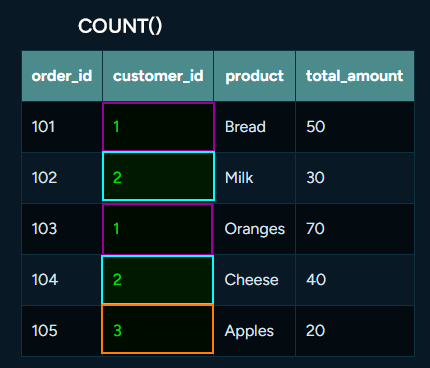
COUNT(*) counts the rows that landed in each group.
SELECT customer_id, COUNT(*) AS order_count
FROM Orders
GROUP BY customer_id;
| customer_id | order_count |
|---|---|
| 1 | 2 |
| 2 | 2 |
| 3 | 1 |
Five rows go in and three come out, one per distinct customer_id. Counting is the one aggregate that ignores what the other columns hold, which is why COUNT(*) needs no column name. The other four are covered outside a grouping in SQL aggregate functions.
GROUP BY with SUM
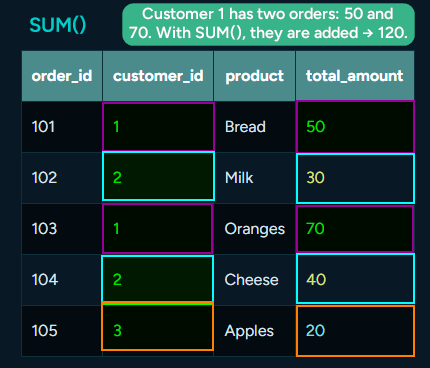
SUM adds one column across the rows of each group.
SELECT customer_id, SUM(total_amount) AS total_spent
FROM Orders
GROUP BY customer_id;
| customer_id | total_spent |
|---|---|
| 1 | 120 |
| 2 | 70 |
| 3 | 20 |
Customer 1 placed the orders worth 50 and 70, so the group totals 120. The AS total_spent alias names the computed column; leave it out and the header is whatever the engine decides to call the expression.
Customers table
The Orders table stores an id where a report needs a name, and a second table maps one to the other:
CREATE TABLE Customers (
    customer_id INTEGER PRIMARY KEY,
    name        VARCHAR(40)
);

INSERT INTO Customers VALUES
    (1, 'Sarah James'),
    (2, 'Mark White'),
    (3, 'Olivia Reed');
Joining Orders to Customers on customer_id puts the name next to the number, and every query from here on does that.
GROUP BY with AVG
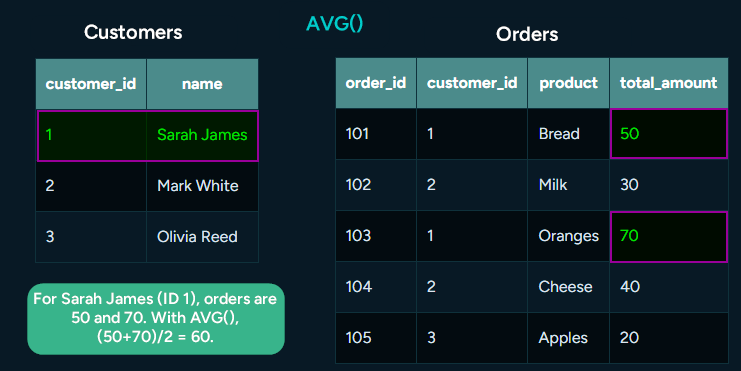
AVG divides the sum of a group by the number of rows in it.
SELECT c.name, AVG(o.total_amount) AS avg_order
FROM Customers c
JOIN Orders o ON c.customer_id = o.customer_id
GROUP BY c.name;
| name | avg_order |
|---|---|
| Sarah James | 60 |
| Mark White | 35 |
| Olivia Reed | 20 |
Sarah James placed two orders, 50 and 70, which average 60. Olivia Reed placed one, so her single amount is also her average, and a group of one row is still a group.
GROUP BY with HAVING

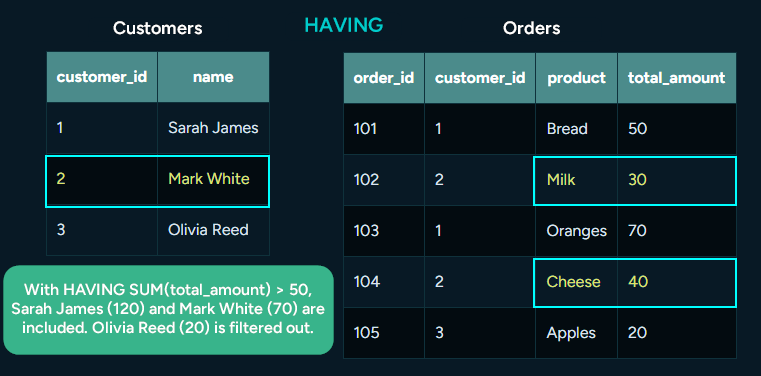
HAVING tests each group after its aggregate has been computed.
SELECT c.name, SUM(o.total_amount) AS total_spent
FROM Customers c
JOIN Orders o ON c.customer_id = o.customer_id
GROUP BY c.name
HAVING SUM(o.total_amount) > 50;
| name | total_spent |
|---|---|
| Sarah James | 120 |
| Mark White | 70 |
Olivia Reed's group totals 20 and disappears entirely, both of her columns with it. The condition repeats SUM(o.total_amount) because a group total is what it tests, and a WHERE clause cannot do this job: WHERE runs before the grouping, on single rows, where no total exists yet.
GROUP BY with JOIN
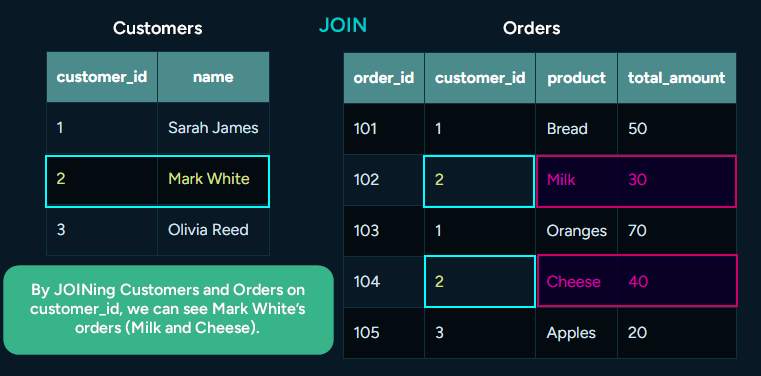
The join runs first and the grouping folds its result, so the rows being folded already carry the name.
SELECT c.name, SUM(o.total_amount) AS total_spent
FROM Customers c
JOIN Orders o ON c.customer_id = o.customer_id
GROUP BY c.name;
| name | total_spent |
|---|---|
| Sarah James | 120 |
| Mark White | 70 |
| Olivia Reed | 20 |
Grouping by c.name is what makes the report readable, and it is also the line to watch: two customers who happen to share a name fall into one group and their totals are added together. Writing GROUP BY c.customer_id, c.name groups by the key and keeps the name in the output, returning the same three rows here. SQL joins explained covers the join itself.
GROUP BY with MIN
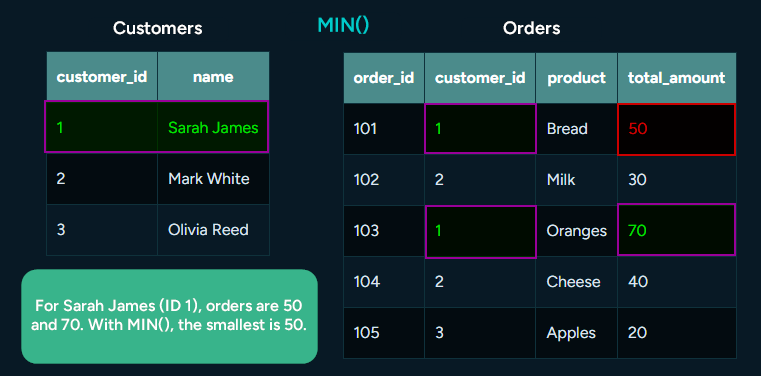
MIN returns the smallest value of one column inside each group.
SELECT c.name, MIN(o.total_amount) AS min_order
FROM Customers c
JOIN Orders o ON c.customer_id = o.customer_id
GROUP BY c.name;
| name | min_order |
|---|---|
| Sarah James | 50 |
| Mark White | 30 |
| Olivia Reed | 20 |
The value comes from a real row of the group, so a minimum is always an amount somebody was actually charged.
GROUP BY with MAX
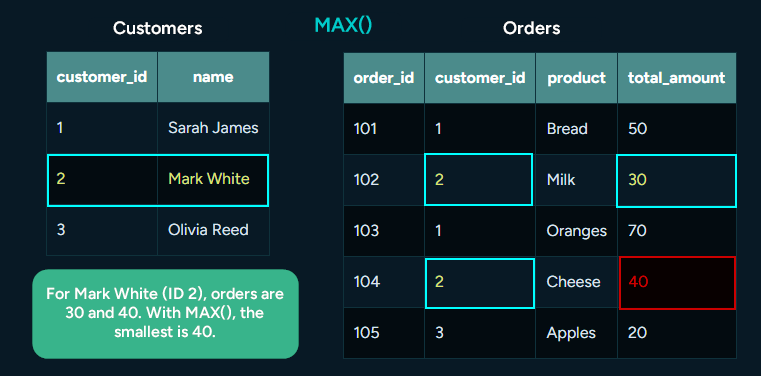
MAX returns the largest value of the column in each group.
SELECT c.name, MAX(o.total_amount) AS max_order
FROM Customers c
JOIN Orders o ON c.customer_id = o.customer_id
GROUP BY c.name;
| name | max_order |
|---|---|
| Sarah James | 70 |
| Mark White | 40 |
| Olivia Reed | 20 |
Olivia Reed's minimum and maximum are the same 20, because her group holds one row. Neither function tells you which order produced the number: MAX returns the amount, not the row it came from, and the product name beside it would need a different query.
Practice this: Lesson 7 of the SQL tutorial runs GROUP BY and HAVING on a shop database in your browser, with checked exercises.
How to build a GROUP BY query visually in DbSchema
The DbSchema Query Builder assembles the same statement from the diagram, and it writes the GROUP BY clause itself.
- Drag a table from the diagram into the builder.
- Click the small arrow icon next to a column to follow the foreign key and add the related table.
- Tick the checkbox next to each column you want in the SELECT list.
- Enable Group By mode with the toggle button in the Query Builder toolbar.
- Right-click a numeric column, choose Aggregate, and pick MIN, MAX, SUM, AVG or COUNT.
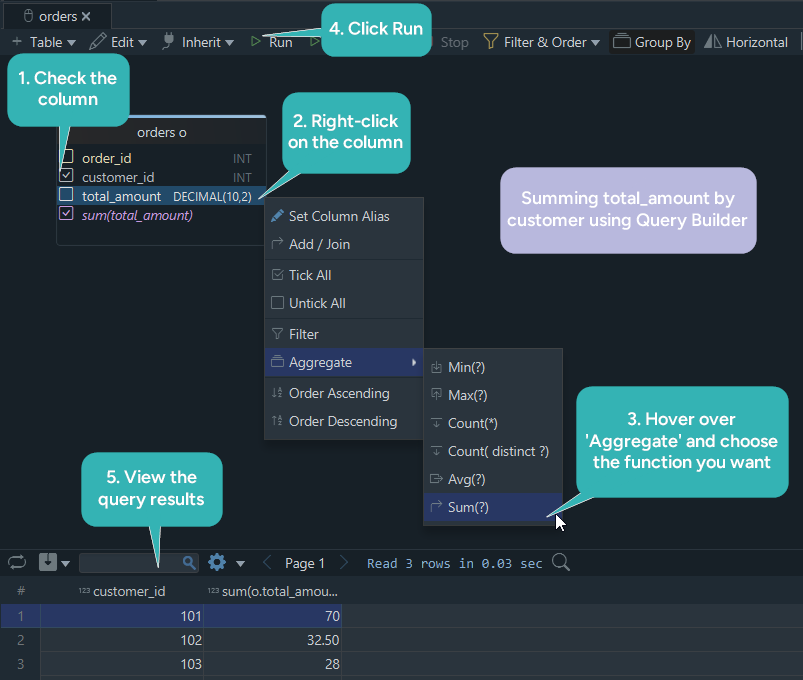
In Group By mode, the ticked columns that carry no aggregate function become the GROUP BY columns, which is where the clause comes from: tick the name, aggregate the amount, and DbSchema has everything it needs. The generated SQL is updated live at the bottom of the builder, so the statement and the diagram are on screen together. The builder itself is saved in the design model file, and running the query reads the database.
The rest of the series is at SQL tutorials. The Query Builder comes with the Pro edition, while the diagram and the SQL Editor that runs the statements above are in the free Community edition: download DbSchema at https://dbschema.com/download.html, reverse-engineer the schema that holds your orders, and build the per-customer total by ticking two columns and choosing SUM.









