DbSchema PostgreSQL starts when you begin the lesson

Lesson 7

Groups: GROUP BY and HAVING

For readers who finished lesson 6 and can count and add up with aggregate functions.

After this lesson you can work out an aggregate for each group of rows, keep only some groups with HAVING, and say in which order the clauses of a query run.
  • One row per group
  • Several aggregates per group
  • Columns beside an aggregate
  • HAVING filters groups
  • WHERE or HAVING
  • The order the clauses run
  • 5 exercises

Start the lesson

Every query runs on real PostgreSQL, in your browser. It downloads once, about 6 MB, then starts in a few seconds.

For a reference page on the same statements, read SQL HAVING Clause: GROUP BY Filters, Examples, and HAVING vs WHERE.

The idea

GROUP BY makes one row per group
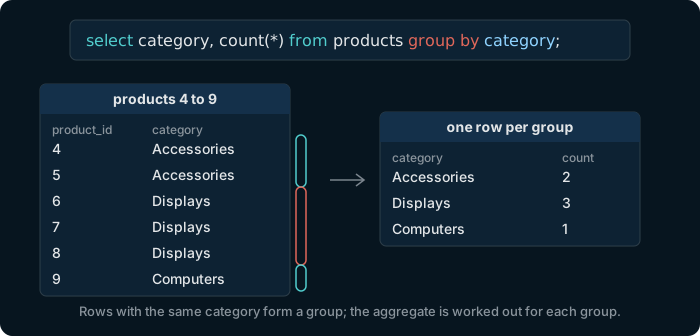
The query select category, count star from products group by category. Products 4 to 9 fall into three groups: Accessories with 2 rows, Displays with 3, Computers with 1; the answer has one row per group with its count.

GROUP BY gathers the rows that share a value into a group. An aggregate in the select list is then worked out for each group, and the answer has one row per group.

Try it

Count the products of each category

Table public.products ⎯⎯⎯⎯⎯⎯⎯⎯⎯⎯⎯⎯ What the shop sells.products 🔑 Pk products_pkey ( product_id ) ⧉ product_id * int4 ↙ order_items( product_id ) ⎯⎯⎯⎯⎯⎯⎯⎯⎯⎯⎯⎯ The number that identifies the product.product_id 🔗 Referred by order_items ( product_id ) 🔍 Unq products_name_key ( name ) ⧉ name * text ⎯⎯⎯⎯⎯⎯⎯⎯⎯⎯⎯⎯ The name of the product. No two products share a name.name ⧉ category * text ⎯⎯⎯⎯⎯⎯⎯⎯⎯⎯⎯⎯ The group the product belongs to, such as Accessories or Displays.category ⧉ price * numeric(10,2) ⎯⎯⎯⎯⎯⎯⎯⎯⎯⎯⎯⎯ The current price, with two decimals. Always more than 0.price ⧉ stock * int4 ⎯⎯⎯⎯⎯⎯⎯⎯⎯⎯⎯⎯ How many pieces are in the warehouse. Never below 0.stock
Hover a table or a column to read its comment.
select category, count(*)
from products
group by category;

6 rows, one per category. Accessories has the most products: 9.

Try it

Every aggregate works per group

Table public.orders ⎯⎯⎯⎯⎯⎯⎯⎯⎯⎯⎯⎯ One purchase by one customer. Its products are the rows of order_items.orders 🔑 Pk orders_pkey ( order_id ) ⧉ order_id * int4 ↙ order_items( order_id ) ⎯⎯⎯⎯⎯⎯⎯⎯⎯⎯⎯⎯ The number that identifies the order.order_id 🔗 Referred by order_items ( order_id ) ⧉ customer_id * int4 ↗ customers( customer_id ) ⎯⎯⎯⎯⎯⎯⎯⎯⎯⎯⎯⎯ The customer who placed the order: a customer_id of customers.customer_id 🔗 References customers ( customer_id ) ⧉ employee_id int4 ↗ employees( employee_id ) ⎯⎯⎯⎯⎯⎯⎯⎯⎯⎯⎯⎯ The employee who took the order: an employee_id of employees. NULL for an order placed online.employee_id 🔗 References employees ( employee_id ) ⧉ order_date * date ⎯⎯⎯⎯⎯⎯⎯⎯⎯⎯⎯⎯ The day the order was placed.order_date ⧉ status * text ⎯⎯⎯⎯⎯⎯⎯⎯⎯⎯⎯⎯ Where the order stands: pending, shipped, delivered or cancelled.status
Hover a table or a column to read its comment.
select status, count(*), min(order_date), max(order_date)
from orders
group by status;

One row per status. The 84 pending orders are the most recent ones: from 2026-09-04 on.

Watch out

Each column is grouped or inside an aggregate

Table public.products ⎯⎯⎯⎯⎯⎯⎯⎯⎯⎯⎯⎯ What the shop sells.products 🔑 Pk products_pkey ( product_id ) ⧉ product_id * int4 ↙ order_items( product_id ) ⎯⎯⎯⎯⎯⎯⎯⎯⎯⎯⎯⎯ The number that identifies the product.product_id 🔗 Referred by order_items ( product_id ) 🔍 Unq products_name_key ( name ) ⧉ name * text ⎯⎯⎯⎯⎯⎯⎯⎯⎯⎯⎯⎯ The name of the product. No two products share a name.name ⧉ category * text ⎯⎯⎯⎯⎯⎯⎯⎯⎯⎯⎯⎯ The group the product belongs to, such as Accessories or Displays.category ⧉ price * numeric(10,2) ⎯⎯⎯⎯⎯⎯⎯⎯⎯⎯⎯⎯ The current price, with two decimals. Always more than 0.price ⧉ stock * int4 ⎯⎯⎯⎯⎯⎯⎯⎯⎯⎯⎯⎯ How many pieces are in the warehouse. Never below 0.stock
Hover a table or a column to read its comment.
select category, name, count(*)
from products
group by category;

ERROR: column "products.name" must appear in the GROUP BY clause or be used in an aggregate function

A category has several products, so a group has several names and PostgreSQL will not pick one. Put name in GROUP BY, which makes a group per product, or inside an aggregate such as min(name).

Try it

HAVING keeps the groups that pass a test

HAVING is to groups what WHERE is to rows: its condition can use an aggregate, and the groups that fail it are left out.

Table public.orders ⎯⎯⎯⎯⎯⎯⎯⎯⎯⎯⎯⎯ One purchase by one customer. Its products are the rows of order_items.orders 🔑 Pk orders_pkey ( order_id ) ⧉ order_id * int4 ↙ order_items( order_id ) ⎯⎯⎯⎯⎯⎯⎯⎯⎯⎯⎯⎯ The number that identifies the order.order_id 🔗 Referred by order_items ( order_id ) ⧉ customer_id * int4 ↗ customers( customer_id ) ⎯⎯⎯⎯⎯⎯⎯⎯⎯⎯⎯⎯ The customer who placed the order: a customer_id of customers.customer_id 🔗 References customers ( customer_id ) ⧉ employee_id int4 ↗ employees( employee_id ) ⎯⎯⎯⎯⎯⎯⎯⎯⎯⎯⎯⎯ The employee who took the order: an employee_id of employees. NULL for an order placed online.employee_id 🔗 References employees ( employee_id ) ⧉ order_date * date ⎯⎯⎯⎯⎯⎯⎯⎯⎯⎯⎯⎯ The day the order was placed.order_date ⧉ status * text ⎯⎯⎯⎯⎯⎯⎯⎯⎯⎯⎯⎯ Where the order stands: pending, shipped, delivered or cancelled.status
Hover a table or a column to read its comment.
select customer_id, count(*)
from orders
group by customer_id
having count(*) >= 5;

80 customers have placed 5 orders or more.

Watch out

An aggregate cannot go in WHERE

Table public.orders ⎯⎯⎯⎯⎯⎯⎯⎯⎯⎯⎯⎯ One purchase by one customer. Its products are the rows of order_items.orders 🔑 Pk orders_pkey ( order_id ) ⧉ order_id * int4 ↙ order_items( order_id ) ⎯⎯⎯⎯⎯⎯⎯⎯⎯⎯⎯⎯ The number that identifies the order.order_id 🔗 Referred by order_items ( order_id ) ⧉ customer_id * int4 ↗ customers( customer_id ) ⎯⎯⎯⎯⎯⎯⎯⎯⎯⎯⎯⎯ The customer who placed the order: a customer_id of customers.customer_id 🔗 References customers ( customer_id ) ⧉ employee_id int4 ↗ employees( employee_id ) ⎯⎯⎯⎯⎯⎯⎯⎯⎯⎯⎯⎯ The employee who took the order: an employee_id of employees. NULL for an order placed online.employee_id 🔗 References employees ( employee_id ) ⧉ order_date * date ⎯⎯⎯⎯⎯⎯⎯⎯⎯⎯⎯⎯ The day the order was placed.order_date ⧉ status * text ⎯⎯⎯⎯⎯⎯⎯⎯⎯⎯⎯⎯ Where the order stands: pending, shipped, delivered or cancelled.status
Hover a table or a column to read its comment.
select customer_id, count(*)
from orders
where count(*) >= 5
group by customer_id;

ERROR: aggregate functions are not allowed in WHERE

WHERE tests one row at a time, before any group exists, so there is nothing to count yet. A condition on a single row goes in WHERE; a condition on a count, a sum or an average goes in HAVING.

The idea

The clauses run in a fixed order
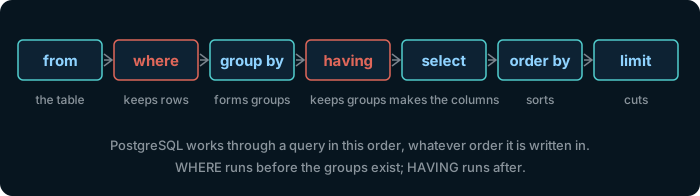
The clauses in the order PostgreSQL works through them: from, where, group by, having, select, order by, limit.

That order explains the last two slides. It also explains why a name given with AS works in ORDER BY, which runs after SELECT, while where gross > 100 fails with ERROR: column "gross" does not exist.

Try it

Sort the groups by their aggregate

Table public.products ⎯⎯⎯⎯⎯⎯⎯⎯⎯⎯⎯⎯ What the shop sells.products 🔑 Pk products_pkey ( product_id ) ⧉ product_id * int4 ↙ order_items( product_id ) ⎯⎯⎯⎯⎯⎯⎯⎯⎯⎯⎯⎯ The number that identifies the product.product_id 🔗 Referred by order_items ( product_id ) 🔍 Unq products_name_key ( name ) ⧉ name * text ⎯⎯⎯⎯⎯⎯⎯⎯⎯⎯⎯⎯ The name of the product. No two products share a name.name ⧉ category * text ⎯⎯⎯⎯⎯⎯⎯⎯⎯⎯⎯⎯ The group the product belongs to, such as Accessories or Displays.category ⧉ price * numeric(10,2) ⎯⎯⎯⎯⎯⎯⎯⎯⎯⎯⎯⎯ The current price, with two decimals. Always more than 0.price ⧉ stock * int4 ⎯⎯⎯⎯⎯⎯⎯⎯⎯⎯⎯⎯ How many pieces are in the warehouse. Never below 0.stock
Hover a table or a column to read its comment.
select category, round(avg(price), 2) as avg_price
from products
group by category
order by avg_price desc;

Computers average 1199.00, Accessories 90.31. ORDER BY uses the name avg_price, given in SELECT.

Exercise 1 of 5

Show each product category with its number of products.

Table public.products ⎯⎯⎯⎯⎯⎯⎯⎯⎯⎯⎯⎯ What the shop sells.products 🔑 Pk products_pkey ( product_id ) ⧉ product_id * int4 ↙ order_items( product_id ) ⎯⎯⎯⎯⎯⎯⎯⎯⎯⎯⎯⎯ The number that identifies the product.product_id 🔗 Referred by order_items ( product_id ) 🔍 Unq products_name_key ( name ) ⧉ name * text ⎯⎯⎯⎯⎯⎯⎯⎯⎯⎯⎯⎯ The name of the product. No two products share a name.name ⧉ category * text ⎯⎯⎯⎯⎯⎯⎯⎯⎯⎯⎯⎯ The group the product belongs to, such as Accessories or Displays.category ⧉ price * numeric(10,2) ⎯⎯⎯⎯⎯⎯⎯⎯⎯⎯⎯⎯ The current price, with two decimals. Always more than 0.price ⧉ stock * int4 ⎯⎯⎯⎯⎯⎯⎯⎯⎯⎯⎯⎯ How many pieces are in the warehouse. Never below 0.stock
Hover a table or a column to read its comment.
Expected result

It shows once PostgreSQL is ready.

Each check sends the exercise, your SQL and any PostgreSQL error to dbschema.com, without your IP address, so that the hints can improve.

Show answer
select category, count(*) from products group by category

Exercise 2 of 5

Show each order status with its number of orders.

Table public.orders ⎯⎯⎯⎯⎯⎯⎯⎯⎯⎯⎯⎯ One purchase by one customer. Its products are the rows of order_items.orders 🔑 Pk orders_pkey ( order_id ) ⧉ order_id * int4 ↙ order_items( order_id ) ⎯⎯⎯⎯⎯⎯⎯⎯⎯⎯⎯⎯ The number that identifies the order.order_id 🔗 Referred by order_items ( order_id ) ⧉ customer_id * int4 ↗ customers( customer_id ) ⎯⎯⎯⎯⎯⎯⎯⎯⎯⎯⎯⎯ The customer who placed the order: a customer_id of customers.customer_id 🔗 References customers ( customer_id ) ⧉ employee_id int4 ↗ employees( employee_id ) ⎯⎯⎯⎯⎯⎯⎯⎯⎯⎯⎯⎯ The employee who took the order: an employee_id of employees. NULL for an order placed online.employee_id 🔗 References employees ( employee_id ) ⧉ order_date * date ⎯⎯⎯⎯⎯⎯⎯⎯⎯⎯⎯⎯ The day the order was placed.order_date ⧉ status * text ⎯⎯⎯⎯⎯⎯⎯⎯⎯⎯⎯⎯ Where the order stands: pending, shipped, delivered or cancelled.status
Hover a table or a column to read its comment.
Expected result

It shows once PostgreSQL is ready.

Each check sends the exercise, your SQL and any PostgreSQL error to dbschema.com, without your IP address, so that the hints can improve.

Show answer
select status, count(*) from orders group by status

Exercise 3 of 5

Row order counts

Show each country with its number of customers, the most customers first. For the same number, sort by country name.

Table public.customers ⎯⎯⎯⎯⎯⎯⎯⎯⎯⎯⎯⎯ The people who buy from the shop.customers 🔑 Pk customers_pkey ( customer_id ) ⧉ customer_id * int4 ↙ orders( customer_id ) ⎯⎯⎯⎯⎯⎯⎯⎯⎯⎯⎯⎯ The number that identifies the customer.customer_id 🔗 Referred by orders ( customer_id ) ⧉ first_name * text ⎯⎯⎯⎯⎯⎯⎯⎯⎯⎯⎯⎯ The first name of the customer.first_name ⧉ last_name * text ⎯⎯⎯⎯⎯⎯⎯⎯⎯⎯⎯⎯ The last name of the customer.last_name 🔍 Unq customers_email_key ( email ) ⧉ email * text ⎯⎯⎯⎯⎯⎯⎯⎯⎯⎯⎯⎯ The email address of the customer. No two customers share one.email ⧉ phone text ⎯⎯⎯⎯⎯⎯⎯⎯⎯⎯⎯⎯ The phone number of the customer. NULL when the customer gave none.phone ⧉ country * text ⎯⎯⎯⎯⎯⎯⎯⎯⎯⎯⎯⎯ The country the customer lives in.country ⧉ signup_date * date ⎯⎯⎯⎯⎯⎯⎯⎯⎯⎯⎯⎯ The day the customer created an account.signup_date
Hover a table or a column to read its comment.
Expected result

It shows once PostgreSQL is ready.

Each check sends the exercise, your SQL and any PostgreSQL error to dbschema.com, without your IP address, so that the hints can improve.

Show answer
select country, count(*) from customers group by country order by count(*) desc, country

Exercise 4 of 5

Show the id and the order count of every customer with at least 5 orders.

Table public.orders ⎯⎯⎯⎯⎯⎯⎯⎯⎯⎯⎯⎯ One purchase by one customer. Its products are the rows of order_items.orders 🔑 Pk orders_pkey ( order_id ) ⧉ order_id * int4 ↙ order_items( order_id ) ⎯⎯⎯⎯⎯⎯⎯⎯⎯⎯⎯⎯ The number that identifies the order.order_id 🔗 Referred by order_items ( order_id ) ⧉ customer_id * int4 ↗ customers( customer_id ) ⎯⎯⎯⎯⎯⎯⎯⎯⎯⎯⎯⎯ The customer who placed the order: a customer_id of customers.customer_id 🔗 References customers ( customer_id ) ⧉ employee_id int4 ↗ employees( employee_id ) ⎯⎯⎯⎯⎯⎯⎯⎯⎯⎯⎯⎯ The employee who took the order: an employee_id of employees. NULL for an order placed online.employee_id 🔗 References employees ( employee_id ) ⧉ order_date * date ⎯⎯⎯⎯⎯⎯⎯⎯⎯⎯⎯⎯ The day the order was placed.order_date ⧉ status * text ⎯⎯⎯⎯⎯⎯⎯⎯⎯⎯⎯⎯ Where the order stands: pending, shipped, delivered or cancelled.status
Hover a table or a column to read its comment.
Expected result

It shows once PostgreSQL is ready.

Each check sends the exercise, your SQL and any PostgreSQL error to dbschema.com, without your IP address, so that the hints can improve.

Show answer
select customer_id, count(*) from orders group by customer_id having count(*) >= 5

Exercise 5 of 5

Show each category whose average price is over 200, with that average rounded to 2 decimals.

Table public.products ⎯⎯⎯⎯⎯⎯⎯⎯⎯⎯⎯⎯ What the shop sells.products 🔑 Pk products_pkey ( product_id ) ⧉ product_id * int4 ↙ order_items( product_id ) ⎯⎯⎯⎯⎯⎯⎯⎯⎯⎯⎯⎯ The number that identifies the product.product_id 🔗 Referred by order_items ( product_id ) 🔍 Unq products_name_key ( name ) ⧉ name * text ⎯⎯⎯⎯⎯⎯⎯⎯⎯⎯⎯⎯ The name of the product. No two products share a name.name ⧉ category * text ⎯⎯⎯⎯⎯⎯⎯⎯⎯⎯⎯⎯ The group the product belongs to, such as Accessories or Displays.category ⧉ price * numeric(10,2) ⎯⎯⎯⎯⎯⎯⎯⎯⎯⎯⎯⎯ The current price, with two decimals. Always more than 0.price ⧉ stock * int4 ⎯⎯⎯⎯⎯⎯⎯⎯⎯⎯⎯⎯ How many pieces are in the warehouse. Never below 0.stock
Hover a table or a column to read its comment.
Expected result

It shows once PostgreSQL is ready.

Each check sends the exercise, your SQL and any PostgreSQL error to dbschema.com, without your IP address, so that the hints can improve.

Show answer
select category, round(avg(price), 2) from products group by category having avg(price) > 200