DbSchema PostgreSQL starts when you begin the lesson

Lesson 14

Transactions: BEGIN, COMMIT and ROLLBACK

For readers who finished lesson 13 and can change rows with INSERT, UPDATE and DELETE.

After this lesson you can make several changes succeed or fail together, undo them before they are saved, and get out of a transaction that an error has stopped.
  • Changes that belong together
  • BEGIN
  • ROLLBACK
  • COMMIT
  • An error aborts the transaction
  • What other sessions see
  • 4 exercises

Start the lesson

Every query runs on real PostgreSQL, in your browser. It downloads once, about 6 MB, then starts in a few seconds.

For a reference page on the same statements, read PostgreSQL Transactions Guide with COMMIT and ROLLBACK.

The idea

Some changes must happen together or not at all

Table public.products ⎯⎯⎯⎯⎯⎯⎯⎯⎯⎯⎯⎯ What the shop sells.products 🔑 Pk products_pkey ( product_id ) ⧉ product_id * int4 ↙ order_items( product_id ) ⎯⎯⎯⎯⎯⎯⎯⎯⎯⎯⎯⎯ The number that identifies the product.product_id 🔗 Referred by order_items ( product_id ) 🔍 Unq products_name_key ( name ) ⧉ name * text ⎯⎯⎯⎯⎯⎯⎯⎯⎯⎯⎯⎯ The name of the product. No two products share a name.name ⧉ category * text ⎯⎯⎯⎯⎯⎯⎯⎯⎯⎯⎯⎯ The group the product belongs to, such as Accessories or Displays.category ⧉ price * numeric(10,2) ⎯⎯⎯⎯⎯⎯⎯⎯⎯⎯⎯⎯ The current price, with two decimals. Always more than 0.price ⧉ stock * int4 ⎯⎯⎯⎯⎯⎯⎯⎯⎯⎯⎯⎯ How many pieces are in the warehouse. Never below 0.stock
Hover a table or a column to read its comment.

Moving 5 units of stock from one product to another takes two updates:

update products set stock = stock - 5 where product_id = 1;
update products set stock = stock + 5 where product_id = 2;

If the first one runs and the second fails, 5 units vanish. A transaction groups statements: either all of their changes are saved, or none.

Try it

BEGIN starts a transaction

Table public.order_items ⎯⎯⎯⎯⎯⎯⎯⎯⎯⎯⎯⎯ The lines of an order: one row for each product in it.order_items 🔑 Pk order_items_pkey ( order_id, line_no ) ⧉ order_id * int4 ↗ orders( order_id ) ⎯⎯⎯⎯⎯⎯⎯⎯⎯⎯⎯⎯ The order this line belongs to: an order_id of orders.order_id 🔗 References orders ( order_id ) 🔑 Pk order_items_pkey ( order_id, line_no ) ⧉ line_no * int4 ⎯⎯⎯⎯⎯⎯⎯⎯⎯⎯⎯⎯ The number of the line within its order. With order_id, it identifies the line.line_no ⧉ product_id * int4 ↗ products( product_id ) ⎯⎯⎯⎯⎯⎯⎯⎯⎯⎯⎯⎯ The product on this line: a product_id of products.product_id 🔗 References products ( product_id ) ⧉ quantity * int4 ⎯⎯⎯⎯⎯⎯⎯⎯⎯⎯⎯⎯ How many pieces of the product were ordered.quantity ⧉ unit_price * numeric(10,2) ⎯⎯⎯⎯⎯⎯⎯⎯⎯⎯⎯⎯ The price of one piece on this line, kept with the order so that a later change of products.price leaves it as it was.unit_price
Hover a table or a column to read its comment.
begin;
delete from order_items;

5000 rows affected, and the bar above the slide says a transaction is open: the lines are deleted, for now, only inside it.

Try it

Inside the transaction, the change is real

Table public.order_items ⎯⎯⎯⎯⎯⎯⎯⎯⎯⎯⎯⎯ The lines of an order: one row for each product in it.order_items 🔑 Pk order_items_pkey ( order_id, line_no ) ⧉ order_id * int4 ↗ orders( order_id ) ⎯⎯⎯⎯⎯⎯⎯⎯⎯⎯⎯⎯ The order this line belongs to: an order_id of orders.order_id 🔗 References orders ( order_id ) 🔑 Pk order_items_pkey ( order_id, line_no ) ⧉ line_no * int4 ⎯⎯⎯⎯⎯⎯⎯⎯⎯⎯⎯⎯ The number of the line within its order. With order_id, it identifies the line.line_no ⧉ product_id * int4 ↗ products( product_id ) ⎯⎯⎯⎯⎯⎯⎯⎯⎯⎯⎯⎯ The product on this line: a product_id of products.product_id 🔗 References products ( product_id ) ⧉ quantity * int4 ⎯⎯⎯⎯⎯⎯⎯⎯⎯⎯⎯⎯ How many pieces of the product were ordered.quantity ⧉ unit_price * numeric(10,2) ⎯⎯⎯⎯⎯⎯⎯⎯⎯⎯⎯⎯ The price of one piece on this line, kept with the order so that a later change of products.price leaves it as it was.unit_price
Hover a table or a column to read its comment.
select count(*) from order_items;

0 order lines. Every statement you run now sees the delete.

Try it

ROLLBACK undoes everything since BEGIN

ROLLBACK ends the transaction and throws its changes away. The ROLLBACK button in the bar does the same.

Table public.order_items ⎯⎯⎯⎯⎯⎯⎯⎯⎯⎯⎯⎯ The lines of an order: one row for each product in it.order_items 🔑 Pk order_items_pkey ( order_id, line_no ) ⧉ order_id * int4 ↗ orders( order_id ) ⎯⎯⎯⎯⎯⎯⎯⎯⎯⎯⎯⎯ The order this line belongs to: an order_id of orders.order_id 🔗 References orders ( order_id ) 🔑 Pk order_items_pkey ( order_id, line_no ) ⧉ line_no * int4 ⎯⎯⎯⎯⎯⎯⎯⎯⎯⎯⎯⎯ The number of the line within its order. With order_id, it identifies the line.line_no ⧉ product_id * int4 ↗ products( product_id ) ⎯⎯⎯⎯⎯⎯⎯⎯⎯⎯⎯⎯ The product on this line: a product_id of products.product_id 🔗 References products ( product_id ) ⧉ quantity * int4 ⎯⎯⎯⎯⎯⎯⎯⎯⎯⎯⎯⎯ How many pieces of the product were ordered.quantity ⧉ unit_price * numeric(10,2) ⎯⎯⎯⎯⎯⎯⎯⎯⎯⎯⎯⎯ The price of one piece on this line, kept with the order so that a later change of products.price leaves it as it was.unit_price
Hover a table or a column to read its comment.
rollback;
select count(*) from order_items;

5000 lines again, and the bar is gone: no transaction is open.

Try it

COMMIT saves the changes for good

COMMIT ends the transaction and keeps every change in it.

Table public.products ⎯⎯⎯⎯⎯⎯⎯⎯⎯⎯⎯⎯ What the shop sells.products 🔑 Pk products_pkey ( product_id ) ⧉ product_id * int4 ↙ order_items( product_id ) ⎯⎯⎯⎯⎯⎯⎯⎯⎯⎯⎯⎯ The number that identifies the product.product_id 🔗 Referred by order_items ( product_id ) 🔍 Unq products_name_key ( name ) ⧉ name * text ⎯⎯⎯⎯⎯⎯⎯⎯⎯⎯⎯⎯ The name of the product. No two products share a name.name ⧉ category * text ⎯⎯⎯⎯⎯⎯⎯⎯⎯⎯⎯⎯ The group the product belongs to, such as Accessories or Displays.category ⧉ price * numeric(10,2) ⎯⎯⎯⎯⎯⎯⎯⎯⎯⎯⎯⎯ The current price, with two decimals. Always more than 0.price ⧉ stock * int4 ⎯⎯⎯⎯⎯⎯⎯⎯⎯⎯⎯⎯ How many pieces are in the warehouse. Never below 0.stock
Hover a table or a column to read its comment.
begin;
update products set stock = stock - 10 where product_id = 3;
update products set stock = stock + 10 where product_id = 4;
commit;

select product_id, stock from products where product_id in (3, 4);

Both updates are saved together: product 3 has 10 fewer in stock, product 4 has 10 more.

Watch out

An error aborts the transaction

Product 1 has 320 in stock, and the table refuses a negative stock.

Table public.products ⎯⎯⎯⎯⎯⎯⎯⎯⎯⎯⎯⎯ What the shop sells.products 🔑 Pk products_pkey ( product_id ) ⧉ product_id * int4 ↙ order_items( product_id ) ⎯⎯⎯⎯⎯⎯⎯⎯⎯⎯⎯⎯ The number that identifies the product.product_id 🔗 Referred by order_items ( product_id ) 🔍 Unq products_name_key ( name ) ⧉ name * text ⎯⎯⎯⎯⎯⎯⎯⎯⎯⎯⎯⎯ The name of the product. No two products share a name.name ⧉ category * text ⎯⎯⎯⎯⎯⎯⎯⎯⎯⎯⎯⎯ The group the product belongs to, such as Accessories or Displays.category ⧉ price * numeric(10,2) ⎯⎯⎯⎯⎯⎯⎯⎯⎯⎯⎯⎯ The current price, with two decimals. Always more than 0.price ⧉ stock * int4 ⎯⎯⎯⎯⎯⎯⎯⎯⎯⎯⎯⎯ How many pieces are in the warehouse. Never below 0.stock
Hover a table or a column to read its comment.
begin;
update products set stock = stock - 400 where product_id = 1;

Now every statement fails with current transaction is aborted, commands ignored until end of transaction block, until the transaction ends. Press ROLLBACK in the bar to continue.

The idea

Other sessions see a change only after COMMIT
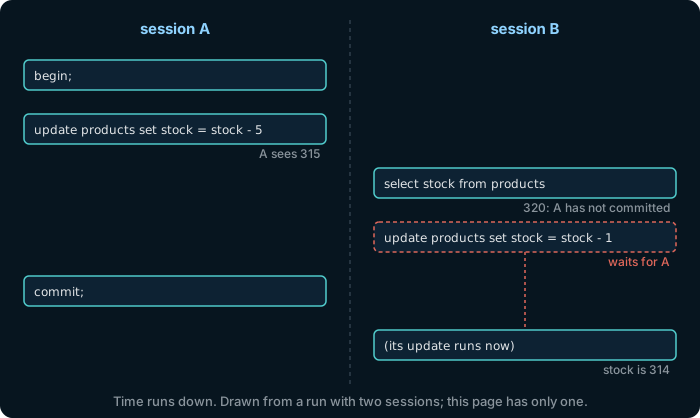
Two sessions on one PostgreSQL. Session A begins and lowers product 1's stock by 5. Session B still reads 320. B's own update waits until A commits; then it runs, and the stock is 314.

Until A commits, B reads the old stock, and B's update of the same row waits for A. This page has a single session, so it cannot show this; the timeline is a run of PostgreSQL 17.9 with two psql sessions, at its default isolation level, read committed.

In DbSchema

In DbSchema, a change waits for Commit
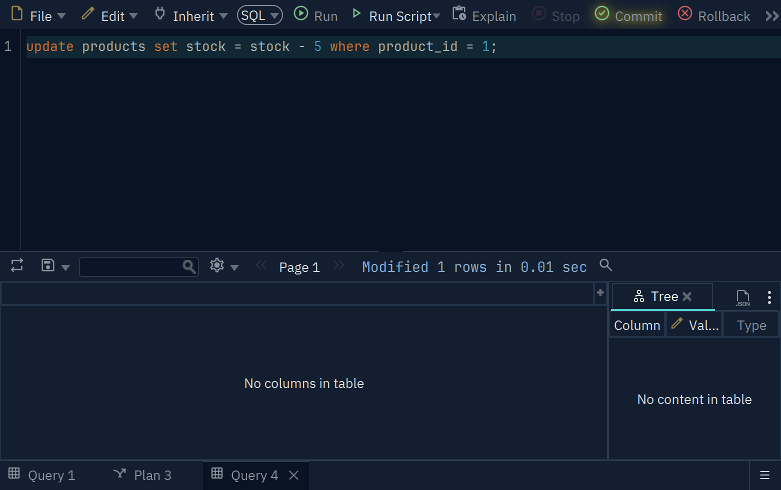
The DbSchema SQL Editor after update products set stock = stock - 5 where product_id = 1: the result reads Modified 1 rows, and the Commit button in the toolbar is lit, next to Rollback
The SQL Editor in DbSchema, with a change that is not committed yet.

Connected to PostgreSQL, a change that you run in the SQL Editor of DbSchema stays in an open transaction. The Commit button blinks, and other connections do not see the change until you press Commit; Rollback undoes it.

Download DbSchema

The Community Edition is free. Every download starts with a 15-day trial of all features.

Exercise 1 of 4

In one transaction, move 5 units of stock from product 1 to product 2, and commit it.

Table public.products ⎯⎯⎯⎯⎯⎯⎯⎯⎯⎯⎯⎯ What the shop sells.products 🔑 Pk products_pkey ( product_id ) ⧉ product_id * int4 ↙ order_items( product_id ) ⎯⎯⎯⎯⎯⎯⎯⎯⎯⎯⎯⎯ The number that identifies the product.product_id 🔗 Referred by order_items ( product_id ) 🔍 Unq products_name_key ( name ) ⧉ name * text ⎯⎯⎯⎯⎯⎯⎯⎯⎯⎯⎯⎯ The name of the product. No two products share a name.name ⧉ category * text ⎯⎯⎯⎯⎯⎯⎯⎯⎯⎯⎯⎯ The group the product belongs to, such as Accessories or Displays.category ⧉ price * numeric(10,2) ⎯⎯⎯⎯⎯⎯⎯⎯⎯⎯⎯⎯ The current price, with two decimals. Always more than 0.price ⧉ stock * int4 ⎯⎯⎯⎯⎯⎯⎯⎯⎯⎯⎯⎯ How many pieces are in the warehouse. Never below 0.stock
Hover a table or a column to read its comment.
Expected result

It shows once PostgreSQL is ready.

Each check sends the exercise, your SQL and any PostgreSQL error to dbschema.com, without your IP address, so that the hints can improve.

Show answer
update products set stock = stock - 5 where product_id = 1; update products set stock = stock + 5 where product_id = 2

Exercise 2 of 4

Inside a transaction, delete every order line and count the lines that are left. Then undo the delete.

Expected result

It shows once PostgreSQL is ready.

Each check sends the exercise, your SQL and any PostgreSQL error to dbschema.com, without your IP address, so that the hints can improve.

Show answer
select 1

Exercise 3 of 4

Start a transaction, and inside it take 400 units from the stock of product 1: the stock check refuses. Then end the transaction so that the database is usable again. Check after each step; the exercise is solved once no transaction is open and the stock is unchanged.

Expected result

It shows once PostgreSQL is ready.

Each check sends the exercise, your SQL and any PostgreSQL error to dbschema.com, without your IP address, so that the hints can improve.

Show answer
select 1

Exercise 4 of 4

In the two-session timeline, what does session B read before session A commits?

Each answer sends the exercise and whether the answer was right to dbschema.com, without your IP address.