PostgreSQL Transactions Guide with COMMIT and ROLLBACK
For SQL users who write INSERT and UPDATE against PostgreSQL and want control over when the work becomes permanent; savepoints and isolation levels are explained where they appear.
On this page
Two UPDATE statements move 100.00 from one account to another, and the second one fails. Without a transaction, the first update stays and the two balances no longer add up. Put both statements between BEGIN and COMMIT, and PostgreSQL keeps both changes or neither. ROLLBACK in place of COMMIT discards them.
Every example below ran on PostgreSQL 18.6, against one table whose check constraint refuses a negative balance:
CREATE TABLE accounts (
  acctnum int PRIMARY KEY,
  balance numeric(10,2) NOT NULL
    CONSTRAINT ck_accounts_balance CHECK (balance >= 0)
);
INSERT INTO accounts VALUES (7534, 500.00), (12345, 100.00);
The transfer as one transaction:
BEGIN;
UPDATE accounts SET balance = balance - 100.00 WHERE acctnum = 7534;
UPDATE accounts SET balance = balance + 100.00 WHERE acctnum = 12345;
COMMIT;
After COMMIT, both rows have changed:
| acctnum | balance |
|---|---|
| 7534 | 400.00 |
| 12345 | 200.00 |
Run the same block with ROLLBACK as its last line, and neither update happens: the balances stay at 400.00 and 200.00.
Transaction command reference for BEGIN, COMMIT, ROLLBACK and SAVEPOINT
Each command links to its page in the PostgreSQL 18 manual.
| Command | What it does |
|---|---|
| BEGIN | Opens a transaction block, as START TRANSACTION does |
| COMMIT | Makes the block's changes permanent and visible |
| ROLLBACK | Discards every change the block made |
| SAVEPOINT | Sets a named mark inside the open block |
| ROLLBACK TO SAVEPOINT | Undoes the work after the mark |
| RELEASE SAVEPOINT | Drops the mark, keeps the work |
| SET TRANSACTION | Sets the isolation level and access mode |
What a transaction is in PostgreSQL
A transaction is a group of statements that PostgreSQL applies as one unit: all of its changes or none. Without BEGIN, PostgreSQL works in autocommit mode, where each statement is executed in its own transaction and committed at its end if it succeeded. A single UPDATE is therefore already all or nothing. BEGIN matters when several statements have to succeed together.
The four ACID properties describe that unit. Atomicity is the all-or-nothing rule the transfer relies on. Consistency means the constraints hold when the block ends, so no committed state has a negative balance. Isolation decides how much of other sessions' work your statements see, and the isolation level sets it. Durability means a committed change survives a crash.
PostgreSQL has no nested transactions. A second BEGIN inside a block only prints a warning, and the block carries on:
WARNING: there is already a transaction in progress
To undo part of a block, use a savepoint (step 5 below).
A rollback also leaves one thing behind: sequence values. Changes made to a sequence are not rolled back when the transaction aborts, and a serial column takes its values from a sequence:
CREATE TABLE payments (id serial PRIMARY KEY, amount numeric(10,2));
BEGIN;
INSERT INTO payments (amount) VALUES (10.00);
ROLLBACK;
INSERT INTO payments (amount) VALUES (20.00);
SELECT * FROM payments;
The rolled-back insert used id 1, so the first row that stays gets id 2:
| id | amount |
|---|---|
| 2 | 20.00 |
The gap is expected, not a lost row.
Run a transaction in psql
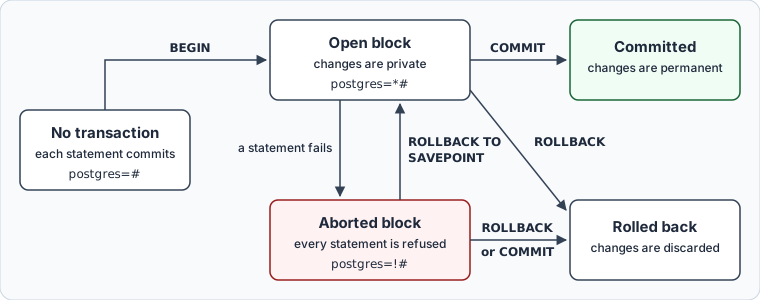
The five steps go from connecting to undoing part of a block. The psql prompt shows which state the block is in: its default prompt adds * inside a transaction block and ! inside a failed one.
Step 1: Connect to the database
psql -U <username> -d <database_name>
If the database doesn't exist yet, the CREATE DATABASE guide creates one in psql or in DbSchema.
Step 2: Start the transaction with BEGIN
BEGIN;
Every statement from here until COMMIT or ROLLBACK belongs to the block, and the prompt changes from postgres=# to postgres=*#. To choose an isolation level, put it on the same line:
BEGIN ISOLATION LEVEL REPEATABLE READ;
SET TRANSACTION sets the same thing, but only before the first query of the block; after one, PostgreSQL refuses it with an error.
Step 3: Run the statements inside the block
INSERT, UPDATE, DELETE, MERGE and SELECT all run inside the block. Your session sees its own uncommitted changes, and other sessions see none of them until COMMIT.
When one statement fails, PostgreSQL aborts the whole block. Here the credit succeeds, and then a debit of 900.00 would take account 7534 below zero:
BEGIN;
UPDATE accounts SET balance = balance + 100.00 WHERE acctnum = 12345;
UPDATE accounts SET balance = balance - 900.00 WHERE acctnum = 7534;
SELECT * FROM accounts;
ERROR:  new row for relation "accounts" violates check constraint "ck_accounts_balance"
DETAIL:  Failing row contains (7534, -500.00).
ERROR:  current transaction is aborted, commands ignored until end of transaction block
The second error comes from the SELECT. The block has not rolled back on its own: it waits in the aborted state, the prompt shows postgres=!#, and every statement fails the same way until the block ends. COMMIT can't save the credit either. On an aborted block, PostgreSQL answers COMMIT with ROLLBACK, and both balances stay at 400.00 and 200.00.
Step 4: End the block with COMMIT or ROLLBACK
COMMIT;
COMMIT makes every change in the block permanent, visible to other sessions and durable through a crash. After it there is no undo: a later ROLLBACK can only affect a new block.
ROLLBACK;
ROLLBACK discards every change the block made, and it is the usual way out of an aborted block. Outside a block, COMMIT and ROLLBACK both print a warning and do nothing else:
WARNING: there is no transaction in progress
Step 5: Roll back part of a transaction with SAVEPOINT
A savepoint is a named mark inside the block. ROLLBACK TO SAVEPOINT undoes only the commands that ran after the mark, and it brings an aborted block back to the open state. The failed debit then no longer costs you the credit before it:
BEGIN;
UPDATE accounts SET balance = balance + 100.00 WHERE acctnum = 12345;
SAVEPOINT before_debit;
UPDATE accounts SET balance = balance - 900.00 WHERE acctnum = 7534;
ROLLBACK TO SAVEPOINT before_debit;
UPDATE accounts SET balance = balance - 100.00 WHERE acctnum = 7534;
COMMIT;
SELECT * FROM accounts ORDER BY acctnum;
The debit of 900.00 fails with the same check-constraint error as in step 3. The credit before the mark and the smaller debit after it are both committed:
| acctnum | balance |
|---|---|
| 7534 | 300.00 |
| 12345 | 300.00 |
The savepoint stays valid after ROLLBACK TO, so you can return to it again, and any savepoint set after it is destroyed. RELEASE SAVEPOINT removes a mark and keeps the work done since. Outside a block, SAVEPOINT fails with ERROR: SAVEPOINT can only be used in transaction blocks.
Stored procedures can end transactions too: COMMIT and ROLLBACK work in a procedure invoked by CALL and in a DO block. A function called from a SELECT can't, and a COMMIT inside one fails with ERROR: invalid transaction termination.
Practice this: Lesson 14 of the SQL tutorial runs BEGIN, COMMIT and ROLLBACK on a shop database in your browser, an aborted transaction included, with exercises.
Transaction isolation levels in PostgreSQL
The isolation level decides what a block sees of other sessions' work. PostgreSQL accepts the four levels of the SQL standard but implements three: Read Uncommitted behaves like Read Committed, so no level shows you another session's uncommitted changes. Read Committed is the default.
The difference shows when another session commits in the middle of your block. Session A reads one balance twice and then updates it, while session B commits a debit of 50.00 between the two reads. Each run started with account 7534 at 300.00, and the Read Committed run named that level on BEGIN:
-- session A
BEGIN ISOLATION LEVEL REPEATABLE READ;
SELECT balance FROM accounts WHERE acctnum = 7534;
-- session B runs and commits:
--   UPDATE accounts SET balance = balance - 50.00 WHERE acctnum = 7534;
SELECT balance FROM accounts WHERE acctnum = 7534;
UPDATE accounts SET balance = balance - 100.00 WHERE acctnum = 7534;
What session A saw at each level:
| Level of session A | First SELECT | Second SELECT | UPDATE |
|---|---|---|---|
| Read committed | 300.00 | 250.00 | UPDATE 1 |
| Repeatable read | 300.00 | 300.00 | error |
Read Committed gives each statement a fresh view of committed data, so the second read sees session B's debit. Repeatable Read keeps the view from the first statement of the block. When session A then tries to change the row that session B changed, PostgreSQL refuses:
ERROR: could not serialize access due to concurrent update
At Repeatable Read and Serializable, the application has to catch this error and run the whole transaction again. Serializable adds one more guarantee: concurrent transactions that commit give the same result as if they had run one at a time. Set the level per block on BEGIN, or for the session with the default_transaction_isolation setting.
What you cannot run inside a transaction block
PostgreSQL rolls back DDL with the rest of the block: a DROP TABLE between BEGIN and ROLLBACK leaves the table in place. A few commands refuse to run in a block at all, and each fails at once with an error of this form:
ERROR: VACUUM cannot run inside a transaction block
The commands that fail this way, each linked to the manual page that states it:
- CREATE DATABASE and DROP DATABASE
- CREATE TABLESPACE
- VACUUM
- ALTER SYSTEM
- CREATE INDEX CONCURRENTLY, DROP INDEX CONCURRENTLY and REINDEX CONCURRENTLY; a plain CREATE INDEX runs in a block
- REINDEX SCHEMA, DATABASE and SYSTEM
- CLUSTER without a table name
- DISCARD ALL
- CREATE SUBSCRIPTION when it creates a replication slot, which it does by default
Two related commands do run in a block. TRUNCATE is rolled back with the block, so the rows come back. ALTER TYPE ... ADD VALUE runs too, but using the new enum value before COMMIT fails with ERROR: unsafe use of new value.
A migration script has to run the commands in the list outside BEGIN and COMMIT. The CREATE INDEX guide covers CONCURRENTLY, and the guide to dropping all tables rehearses DDL between BEGIN and ROLLBACK before committing it.
What transactions cost
A transaction holds its locks until it ends, so a block left open makes other writers wait on the same rows. While a session sits in an open block between statements, pg_stat_activity shows it as idle in transaction:
SELECT pid, state, query FROM pg_stat_activity WHERE state LIKE 'idle in%';
| pid | state | query |
|---|---|---|
| 251 | idle in transaction | UPDATE accounts SET balance = balance + 100.00 WHERE acctnum = 12345; |
Besides the locks, an open transaction stops VACUUM from removing dead rows that only it can still see, so the table grows. The idle_in_transaction_session_timeout setting ends such sessions. It is 0, which means off, by default.
Keep each block to the writes that belong together: in one large block, one bad row fails the whole batch.
Run a transaction in DbSchema
DbSchema connects to PostgreSQL, and its SQL Editor runs the statements you would type in psql. Open it with Editor → SQL Editor in the toolbar, or Ctrl+E, type the statement, and press Run, or Ctrl+Enter.
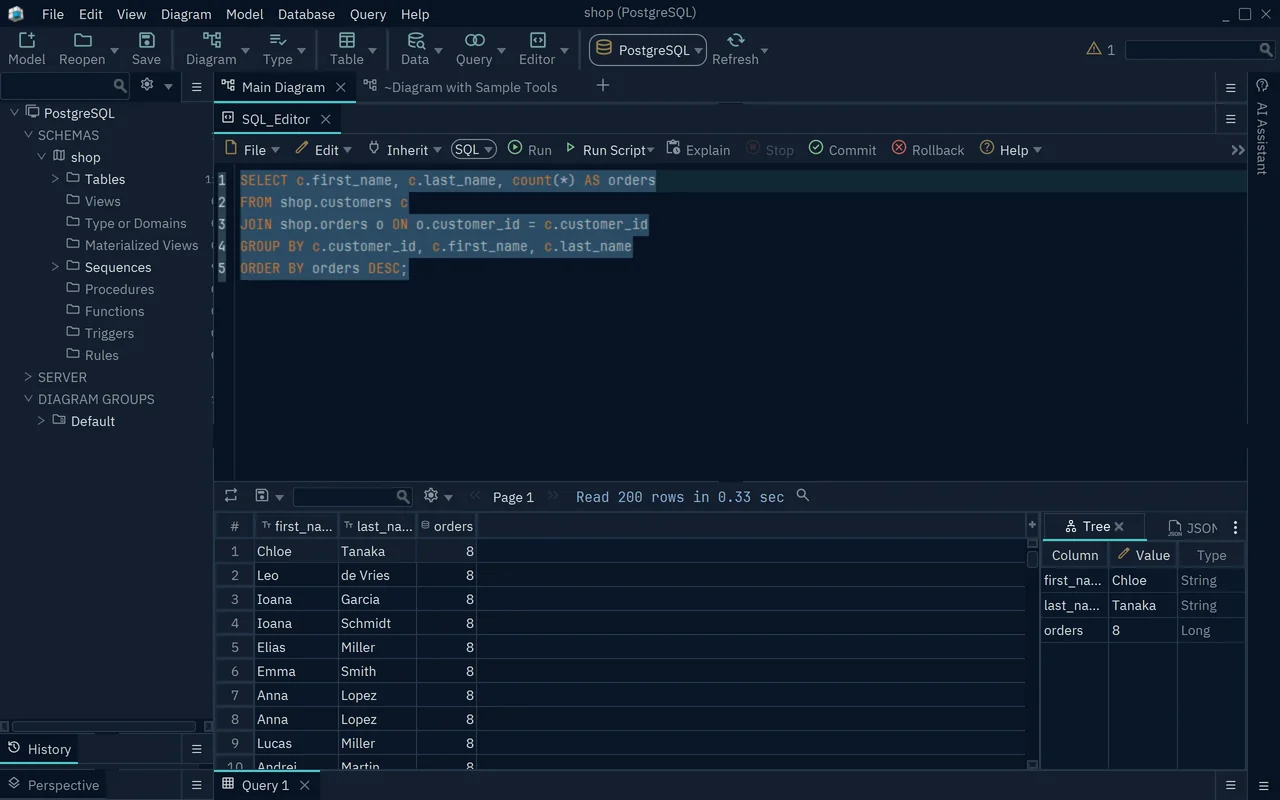
An INSERT, UPDATE or DELETE that you run with Run stays in an open transaction in the DbSchema SQL Editor. While it is open, the Commit button blinks, and other users of the database don't see your change. Press Commit, or Ctrl+Shift+C, to keep it, or Rollback, or Ctrl+Shift+R, to undo it. The two buttons take the place of the COMMIT and ROLLBACK lines of the block, and until you press one, the transaction stays open with the costs described above.
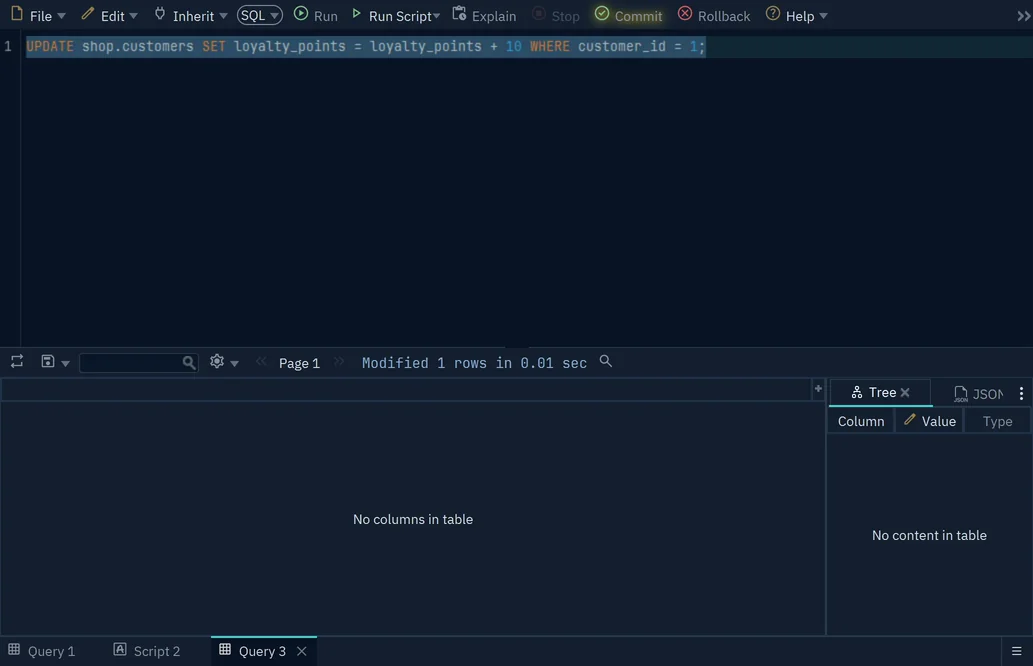
For a script, Run Script runs the statements one after the other, and its Auto Commit option commits each one that succeeds. All of this changes the PostgreSQL database, not the DbSchema model file.
To run these blocks against your own schema, download DbSchema, connect to your PostgreSQL database and open the SQL Editor. The SQL Editor with its Commit and Rollback buttons, the connection and the interactive diagrams of the tables you are changing are all in the free Community Edition.
Run your PostgreSQL transactions where you can see the schema
DbSchema connects to PostgreSQL, reverse-engineers the schema into interactive diagrams, and runs BEGIN, COMMIT and ROLLBACK from a SQL editor with explicit Commit and Rollback buttons. The free Community Edition covers all of that.









