DbSchema PostgreSQL starts when you begin the lesson

Lesson 2

Choosing columns: SELECT

For readers who finished lesson 1 and can run select * from a table.

After this lesson you can choose the columns of an answer, compute new ones, give them names, and remove repeated rows.
  • Choosing columns
  • Computing a column
  • Naming it with AS
  • The missing comma
  • Removing duplicates with DISTINCT
  • 4 exercises

Start the lesson

Every query runs on real PostgreSQL, in your browser. It downloads once, about 6 MB, then starts in a few seconds.

For a reference page on the same statements, read SQL SELECT Statement: Syntax, Examples, and Query Order.

The idea

The list after SELECT decides the columns
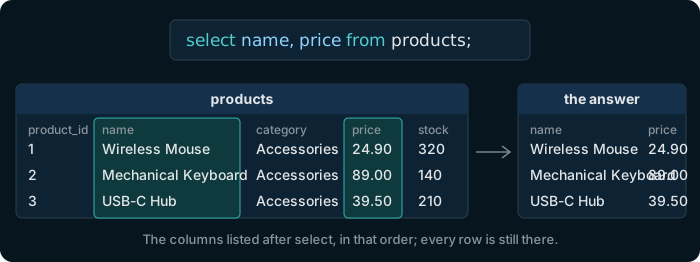
The query select name, price from products. In the products table the columns name and price are highlighted; the answer has only those two columns, for the same rows.

Instead of the star, write the columns you want, separated by commas. The answer has those columns, in the order you list them, and still one row for each row of the table.

Try it

Choose two columns of products

Table public.products ⎯⎯⎯⎯⎯⎯⎯⎯⎯⎯⎯⎯ What the shop sells.products 🔑 Pk products_pkey ( product_id ) ⧉ product_id * int4 ↙ order_items( product_id ) ⎯⎯⎯⎯⎯⎯⎯⎯⎯⎯⎯⎯ The number that identifies the product.product_id 🔗 Referred by order_items ( product_id ) 🔍 Unq products_name_key ( name ) ⧉ name * text ⎯⎯⎯⎯⎯⎯⎯⎯⎯⎯⎯⎯ The name of the product. No two products share a name.name ⧉ category * text ⎯⎯⎯⎯⎯⎯⎯⎯⎯⎯⎯⎯ The group the product belongs to, such as Accessories or Displays.category ⧉ price * numeric(10,2) ⎯⎯⎯⎯⎯⎯⎯⎯⎯⎯⎯⎯ The current price, with two decimals. Always more than 0.price ⧉ stock * int4 ⎯⎯⎯⎯⎯⎯⎯⎯⎯⎯⎯⎯ How many pieces are in the warehouse. Never below 0.stock
Hover a table or a column to read its comment.
select name, price from products;

Still 26 rows, but only the two columns you listed.

The idea

A column can be computed from others

An expression in the list, such as price * 1.2, is worked out for every row: here, the price with 20 % tax.

Table public.products ⎯⎯⎯⎯⎯⎯⎯⎯⎯⎯⎯⎯ What the shop sells.products 🔑 Pk products_pkey ( product_id ) ⧉ product_id * int4 ↙ order_items( product_id ) ⎯⎯⎯⎯⎯⎯⎯⎯⎯⎯⎯⎯ The number that identifies the product.product_id 🔗 Referred by order_items ( product_id ) 🔍 Unq products_name_key ( name ) ⧉ name * text ⎯⎯⎯⎯⎯⎯⎯⎯⎯⎯⎯⎯ The name of the product. No two products share a name.name ⧉ category * text ⎯⎯⎯⎯⎯⎯⎯⎯⎯⎯⎯⎯ The group the product belongs to, such as Accessories or Displays.category ⧉ price * numeric(10,2) ⎯⎯⎯⎯⎯⎯⎯⎯⎯⎯⎯⎯ The current price, with two decimals. Always more than 0.price ⧉ stock * int4 ⎯⎯⎯⎯⎯⎯⎯⎯⎯⎯⎯⎯ How many pieces are in the warehouse. Never below 0.stock
Hover a table or a column to read its comment.
select name, price, price * 1.2
from products;

PostgreSQL names the third column ?column?, since an expression has no name of its own.

Try it

AS gives a column its name

Write as and a name after the expression. The name is what the column is called in the answer; the table itself does not change.

Table public.products ⎯⎯⎯⎯⎯⎯⎯⎯⎯⎯⎯⎯ What the shop sells.products 🔑 Pk products_pkey ( product_id ) ⧉ product_id * int4 ↙ order_items( product_id ) ⎯⎯⎯⎯⎯⎯⎯⎯⎯⎯⎯⎯ The number that identifies the product.product_id 🔗 Referred by order_items ( product_id ) 🔍 Unq products_name_key ( name ) ⧉ name * text ⎯⎯⎯⎯⎯⎯⎯⎯⎯⎯⎯⎯ The name of the product. No two products share a name.name ⧉ category * text ⎯⎯⎯⎯⎯⎯⎯⎯⎯⎯⎯⎯ The group the product belongs to, such as Accessories or Displays.category ⧉ price * numeric(10,2) ⎯⎯⎯⎯⎯⎯⎯⎯⎯⎯⎯⎯ The current price, with two decimals. Always more than 0.price ⧉ stock * int4 ⎯⎯⎯⎯⎯⎯⎯⎯⎯⎯⎯⎯ How many pieces are in the warehouse. Never below 0.stock
Hover a table or a column to read its comment.
select name, price, price * 1.2 as price_with_tax
from products;

The third column is now called price_with_tax.

Watch out

A missing comma renames a column

Table public.products ⎯⎯⎯⎯⎯⎯⎯⎯⎯⎯⎯⎯ What the shop sells.products 🔑 Pk products_pkey ( product_id ) ⧉ product_id * int4 ↙ order_items( product_id ) ⎯⎯⎯⎯⎯⎯⎯⎯⎯⎯⎯⎯ The number that identifies the product.product_id 🔗 Referred by order_items ( product_id ) 🔍 Unq products_name_key ( name ) ⧉ name * text ⎯⎯⎯⎯⎯⎯⎯⎯⎯⎯⎯⎯ The name of the product. No two products share a name.name ⧉ category * text ⎯⎯⎯⎯⎯⎯⎯⎯⎯⎯⎯⎯ The group the product belongs to, such as Accessories or Displays.category ⧉ price * numeric(10,2) ⎯⎯⎯⎯⎯⎯⎯⎯⎯⎯⎯⎯ The current price, with two decimals. Always more than 0.price ⧉ stock * int4 ⎯⎯⎯⎯⎯⎯⎯⎯⎯⎯⎯⎯ How many pieces are in the warehouse. Never below 0.stock
Hover a table or a column to read its comment.

Without the comma between name and price, PostgreSQL reads price as a new name for name, the way it reads as:

select name price from products;
price
Wireless Mouse
Mechanical Keyboard
USB-C Hub

The query runs without an error: one column, headed price, full of product names. When an answer has fewer columns than you asked for, look for a missing comma.

The idea

DISTINCT keeps one copy of each row
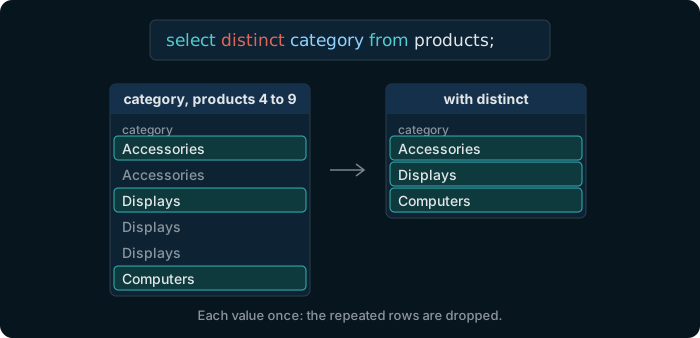
The query select distinct category from products. The categories of products 4 to 9 are Accessories, Accessories, Displays, Displays, Displays, Computers; with distinct, each appears once: Accessories, Displays, Computers.

Write DISTINCT right after select, and rows that repeat in the answer appear only once.

Try it

List the product categories

Table public.products ⎯⎯⎯⎯⎯⎯⎯⎯⎯⎯⎯⎯ What the shop sells.products 🔑 Pk products_pkey ( product_id ) ⧉ product_id * int4 ↙ order_items( product_id ) ⎯⎯⎯⎯⎯⎯⎯⎯⎯⎯⎯⎯ The number that identifies the product.product_id 🔗 Referred by order_items ( product_id ) 🔍 Unq products_name_key ( name ) ⧉ name * text ⎯⎯⎯⎯⎯⎯⎯⎯⎯⎯⎯⎯ The name of the product. No two products share a name.name ⧉ category * text ⎯⎯⎯⎯⎯⎯⎯⎯⎯⎯⎯⎯ The group the product belongs to, such as Accessories or Displays.category ⧉ price * numeric(10,2) ⎯⎯⎯⎯⎯⎯⎯⎯⎯⎯⎯⎯ The current price, with two decimals. Always more than 0.price ⧉ stock * int4 ⎯⎯⎯⎯⎯⎯⎯⎯⎯⎯⎯⎯ How many pieces are in the warehouse. Never below 0.stock
Hover a table or a column to read its comment.
select distinct category from products;

6 categories. Without distinct, the same query returns 26 rows, one per product.

In DbSchema

Run the same query on your own database
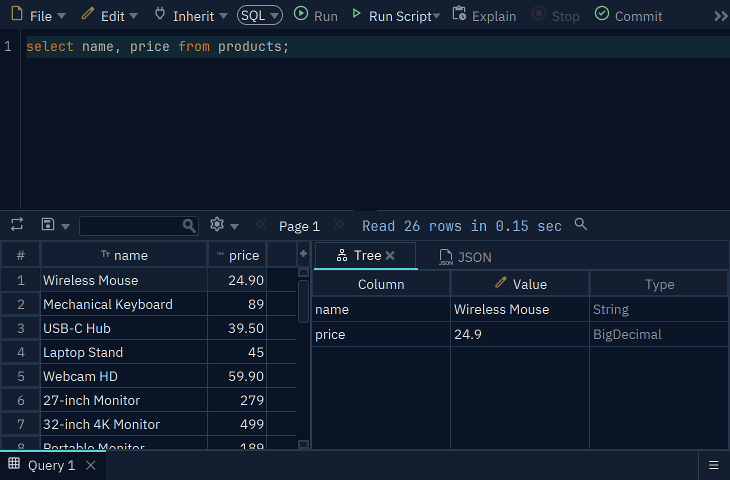
The DbSchema SQL Editor with the query select name, price from products, and below it the result grid with the product names and prices
The SQL Editor in DbSchema, connected to the practice database.

The SQL Editor in DbSchema runs the queries of this lesson on any database you connect to, and shows the rows in a grid under the query.

Download DbSchema

The Community Edition is free. Every download starts with a 15-day trial of all features.

Exercise 1 of 4

Show the name and the price of every product.

Table public.products ⎯⎯⎯⎯⎯⎯⎯⎯⎯⎯⎯⎯ What the shop sells.products 🔑 Pk products_pkey ( product_id ) ⧉ product_id * int4 ↙ order_items( product_id ) ⎯⎯⎯⎯⎯⎯⎯⎯⎯⎯⎯⎯ The number that identifies the product.product_id 🔗 Referred by order_items ( product_id ) 🔍 Unq products_name_key ( name ) ⧉ name * text ⎯⎯⎯⎯⎯⎯⎯⎯⎯⎯⎯⎯ The name of the product. No two products share a name.name ⧉ category * text ⎯⎯⎯⎯⎯⎯⎯⎯⎯⎯⎯⎯ The group the product belongs to, such as Accessories or Displays.category ⧉ price * numeric(10,2) ⎯⎯⎯⎯⎯⎯⎯⎯⎯⎯⎯⎯ The current price, with two decimals. Always more than 0.price ⧉ stock * int4 ⎯⎯⎯⎯⎯⎯⎯⎯⎯⎯⎯⎯ How many pieces are in the warehouse. Never below 0.stock
Hover a table or a column to read its comment.
Expected result

It shows once PostgreSQL is ready.

Each check sends the exercise, your SQL and any PostgreSQL error to dbschema.com, without your IP address, so that the hints can improve.

Show answer
select name, price from products

Exercise 2 of 4

Show the first name, the last name and the email of every customer.

Table public.customers ⎯⎯⎯⎯⎯⎯⎯⎯⎯⎯⎯⎯ The people who buy from the shop.customers 🔑 Pk customers_pkey ( customer_id ) ⧉ customer_id * int4 ↙ orders( customer_id ) ⎯⎯⎯⎯⎯⎯⎯⎯⎯⎯⎯⎯ The number that identifies the customer.customer_id 🔗 Referred by orders ( customer_id ) ⧉ first_name * text ⎯⎯⎯⎯⎯⎯⎯⎯⎯⎯⎯⎯ The first name of the customer.first_name ⧉ last_name * text ⎯⎯⎯⎯⎯⎯⎯⎯⎯⎯⎯⎯ The last name of the customer.last_name 🔍 Unq customers_email_key ( email ) ⧉ email * text ⎯⎯⎯⎯⎯⎯⎯⎯⎯⎯⎯⎯ The email address of the customer. No two customers share one.email ⧉ phone text ⎯⎯⎯⎯⎯⎯⎯⎯⎯⎯⎯⎯ The phone number of the customer. NULL when the customer gave none.phone ⧉ country * text ⎯⎯⎯⎯⎯⎯⎯⎯⎯⎯⎯⎯ The country the customer lives in.country ⧉ signup_date * date ⎯⎯⎯⎯⎯⎯⎯⎯⎯⎯⎯⎯ The day the customer created an account.signup_date
Hover a table or a column to read its comment.
Expected result

It shows once PostgreSQL is ready.

Each check sends the exercise, your SQL and any PostgreSQL error to dbschema.com, without your IP address, so that the hints can improve.

Show answer
select first_name, last_name, email from customers

Exercise 3 of 4

Show every product's name, its price, and its price with 20 % tax, in a column named price_with_tax.

Table public.products ⎯⎯⎯⎯⎯⎯⎯⎯⎯⎯⎯⎯ What the shop sells.products 🔑 Pk products_pkey ( product_id ) ⧉ product_id * int4 ↙ order_items( product_id ) ⎯⎯⎯⎯⎯⎯⎯⎯⎯⎯⎯⎯ The number that identifies the product.product_id 🔗 Referred by order_items ( product_id ) 🔍 Unq products_name_key ( name ) ⧉ name * text ⎯⎯⎯⎯⎯⎯⎯⎯⎯⎯⎯⎯ The name of the product. No two products share a name.name ⧉ category * text ⎯⎯⎯⎯⎯⎯⎯⎯⎯⎯⎯⎯ The group the product belongs to, such as Accessories or Displays.category ⧉ price * numeric(10,2) ⎯⎯⎯⎯⎯⎯⎯⎯⎯⎯⎯⎯ The current price, with two decimals. Always more than 0.price ⧉ stock * int4 ⎯⎯⎯⎯⎯⎯⎯⎯⎯⎯⎯⎯ How many pieces are in the warehouse. Never below 0.stock
Hover a table or a column to read its comment.
Expected result

It shows once PostgreSQL is ready.

Each check sends the exercise, your SQL and any PostgreSQL error to dbschema.com, without your IP address, so that the hints can improve.

Show answer
select name, price, price * 1.2 as price_with_tax from products

Exercise 4 of 4

Show each product category once.

Table public.products ⎯⎯⎯⎯⎯⎯⎯⎯⎯⎯⎯⎯ What the shop sells.products 🔑 Pk products_pkey ( product_id ) ⧉ product_id * int4 ↙ order_items( product_id ) ⎯⎯⎯⎯⎯⎯⎯⎯⎯⎯⎯⎯ The number that identifies the product.product_id 🔗 Referred by order_items ( product_id ) 🔍 Unq products_name_key ( name ) ⧉ name * text ⎯⎯⎯⎯⎯⎯⎯⎯⎯⎯⎯⎯ The name of the product. No two products share a name.name ⧉ category * text ⎯⎯⎯⎯⎯⎯⎯⎯⎯⎯⎯⎯ The group the product belongs to, such as Accessories or Displays.category ⧉ price * numeric(10,2) ⎯⎯⎯⎯⎯⎯⎯⎯⎯⎯⎯⎯ The current price, with two decimals. Always more than 0.price ⧉ stock * int4 ⎯⎯⎯⎯⎯⎯⎯⎯⎯⎯⎯⎯ How many pieces are in the warehouse. Never below 0.stock
Hover a table or a column to read its comment.
Expected result

It shows once PostgreSQL is ready.

Each check sends the exercise, your SQL and any PostgreSQL error to dbschema.com, without your IP address, so that the hints can improve.

Show answer
select distinct category from products