Lesson 10
Keeping rows without a match: LEFT JOIN
For readers who finished lesson 9 and can write a SELECT with a JOIN.
- Why orders have their own table
- What a join does
- What JOIN leaves out
- LEFT JOIN
- Finding what is missing
- A table joined to itself
- 4 exercises
Every query runs on real PostgreSQL, in your browser. It downloads once, about 6 MB, then starts in a few seconds.
For a reference page on the same statements, read SQL Joins Explained.
Why a join is needed
Why the shop keeps orders in their own table
A customer places many orders. If every order were stored inside customers, the customer's name and email would be copied onto each one, and a changed email would have to be fixed in every copy.
So each order is a row in orders, and its customer_id holds the number of the customer who placed it. The line in the diagram is that link, the foreign key you met in lesson 8.
Why a join is needed
A join puts the two tables back together
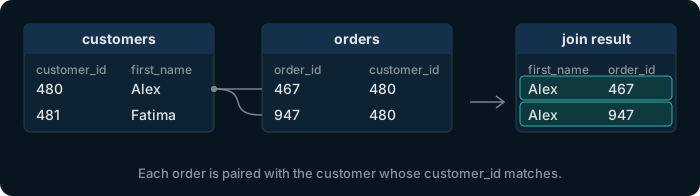
To show a customer's name next to an order, PostgreSQL pairs each order with the customer whose customer_id matches. That pairing is the join from lesson 9:
select c.first_name, o.order_id
from customers c
join orders o on o.customer_id = c.customer_id;
Try it
Run the join for four customers
select c.customer_id, c.first_name, o.order_id
from customers c
join orders o on o.customer_id = c.customer_id
where c.customer_id between 479 and 482
order by c.customer_id, o.order_id;
You asked for customers 479 to 482, but only 479 and 480 came back.
The problem
A plain JOIN drops the customers who never ordered
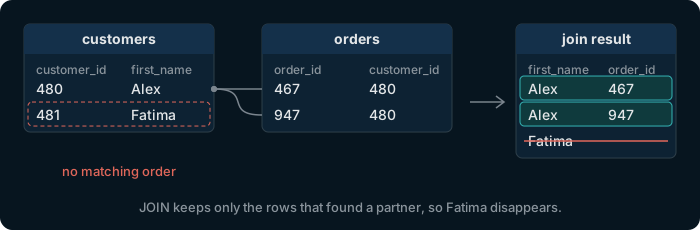
Fatima, customer 481, has no row in orders. The join finds nobody to pair her with, so she isn't in the result. Customer 482 has no orders either.
For a list of orders that's right. For a list of customers it's wrong: Fatima is a customer, she just hasn't bought anything yet.
The fix
LEFT JOIN keeps every row of the first table
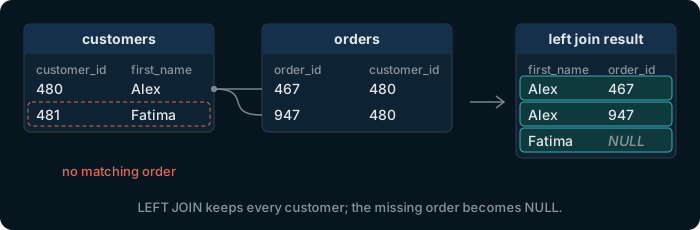
Write LEFT JOIN instead of JOIN. Every row of the table written first, here customers, stays in the result. Where a customer has no order, the columns from orders are NULL.
select c.first_name, o.order_id
from customers c
left join orders o on o.customer_id = c.customer_id;
Try it
Run the same four customers with LEFT JOIN
select c.customer_id, c.first_name, o.order_id
from customers c
left join orders o on o.customer_id = c.customer_id
where c.customer_id between 479 and 482
order by c.customer_id, o.order_id;
Customers 481 and 482 are back, with NULL where an order would be.
Using it
Find the customers who never ordered
Only a customer without orders has NULL in o.order_id, so filtering on it keeps exactly those customers.
select c.customer_id, c.first_name, c.last_name
from customers c
left join orders o on o.customer_id = c.customer_id
where o.order_id is null;
20 customers, numbers 481 to 500, have never ordered.
Watch out
Count orders with count(o.order_id), not count(*)
LEFT JOIN made one row for Fatima, with NULL in every order column. count(*) counts that row, so it says she has 1 order. count(o.order_id) skips NULL, as every aggregate does (lesson 6), and says 0.
select c.customer_id, count(*), count(o.order_id)
from customers c
left join orders o on o.customer_id = c.customer_id
where c.customer_id in (480, 481)
group by c.customer_id;
| customer_id | count | count |
|---|---|---|
| 480 | 4 | 4 |
| 481 | 1 | 0 |
One more use
A table can be joined to itself
An employee's manager_id holds the employee_id of their manager. To print both names on one row, join employees to itself under two names, e for the employee and m for the manager.
The six department heads have no manager, so use LEFT JOIN to keep them.
select e.first_name, e.last_name, m.first_name as manager
from employees e
left join employees m on m.employee_id = e.manager_id;
All 60 employees are there. The six department heads come first, with NULL as manager.
In DbSchema
The lines in a diagram are the joins you can write
A DbSchema diagram draws each foreign key as a line between two tables, so you can read off which columns to join on. Connect DbSchema to your own PostgreSQL and it draws this diagram for your tables.
The Community Edition is free. Every download starts with a 15-day trial of all features.
Exercise 1 of 4
List the id, first name and last name of every customer who has no orders.
Expected result
It shows once PostgreSQL is ready.
Hint
Start from customers and keep every one with left join orders. A customer without orders gets NULL in every column of orders.
Each check sends the exercise, your SQL and any PostgreSQL error to dbschema.com, without your IP address, so that the hints can improve.
Show answer
select c.customer_id, c.first_name, c.last_name
from customers c
left join orders o on o.customer_id = c.customer_id
where o.order_id is null
Exercise 2 of 4
List every customer's id and their number of orders. Customers without orders must appear with 0.
Expected result
It shows once PostgreSQL is ready.
Hint
Keep every customer with a left join, group by customer, and count a column of orders, which is NULL where no order matched.
Each check sends the exercise, your SQL and any PostgreSQL error to dbschema.com, without your IP address, so that the hints can improve.
Show answer
select c.customer_id, count(o.order_id)
from customers c
left join orders o on o.customer_id = c.customer_id
group by c.customer_id
Exercise 3 of 4
List every employee's first and last name, with their manager's first and last name. The department heads must appear too.
Expected result
It shows once PostgreSQL is ready.
Hint
Join employees to itself, once as the employee and once as the manager, through manager_id. The heads have no manager, so the join must keep rows without a match.
Each check sends the exercise, your SQL and any PostgreSQL error to dbschema.com, without your IP address, so that the hints can improve.
Show answer
select e.first_name, e.last_name, m.first_name, m.last_name
from employees e
left join employees m on m.employee_id = e.manager_id
Exercise 4 of 4
List the name of every product that nobody has ordered. An order's products are in order_items.
Expected result
It shows once PostgreSQL is ready.
Hint
Start from products, left join order_items, and keep the products for which no order line matched.
Each check sends the exercise, your SQL and any PostgreSQL error to dbschema.com, without your IP address, so that the hints can improve.
Show answer
select p.name
from products p
left join order_items oi on oi.product_id = p.product_id
where oi.order_id is null