DbSchema PostgreSQL starts when you begin the lesson

Lesson 16

How a join runs: nested loop, hash join, merge join

For readers who finished lesson 15 and can read an EXPLAIN plan.

After this lesson you can name the three ways PostgreSQL runs a join, find which one a plan uses, and say when each one wins.
  • Nested loop
  • Hash join
  • Merge join
  • Making the planner choose another
  • 4 exercises

Start the lesson

Every query runs on real PostgreSQL, in your browser. It downloads once, about 6 MB, then starts in a few seconds.

For a reference page on the same statements, read PostgreSQL JOINs Explained with Examples.

The idea

A nested loop looks up the matches of each row

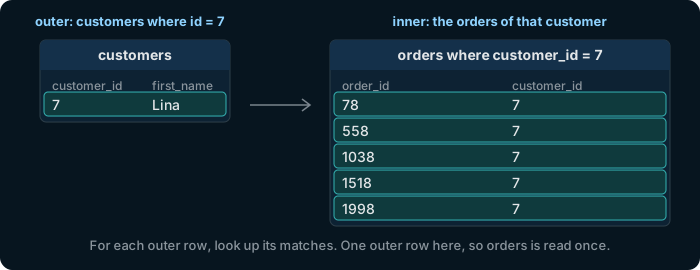
Nested loop: the outer side is customer 7, Lina; for that one row, the inner side finds her 5 orders, 78, 558, 1038, 1518 and 1998.

A nested loop takes the rows of one side one by one and, for each, finds its matches on the other side. It wins when one side has few rows, ideally found through an index.

Try it

One customer and their orders: a nested loop

🔗 Foreign Key orders_customer_id_fkey orders ➔ customers ( customer_id ) 🔗 Foreign Key orders_customer_id_fkey orders ➔ customers ( customer_id ) customer_id Table public.customers ⎯⎯⎯⎯⎯⎯⎯⎯⎯⎯⎯⎯ The people who buy from the shop.customers 🔑 Pk customers_pkey ( customer_id ) ⧉ customer_id * int4 ↙ orders( customer_id ) ⎯⎯⎯⎯⎯⎯⎯⎯⎯⎯⎯⎯ The number that identifies the customer.customer_id 🔗 Referred by orders ( customer_id ) ⧉ first_name * text ⎯⎯⎯⎯⎯⎯⎯⎯⎯⎯⎯⎯ The first name of the customer.first_name ⧉ last_name * text ⎯⎯⎯⎯⎯⎯⎯⎯⎯⎯⎯⎯ The last name of the customer.last_name 🔍 Unq customers_email_key ( email ) ⧉ email * text ⎯⎯⎯⎯⎯⎯⎯⎯⎯⎯⎯⎯ The email address of the customer. No two customers share one.email ⧉ phone text ⎯⎯⎯⎯⎯⎯⎯⎯⎯⎯⎯⎯ The phone number of the customer. NULL when the customer gave none.phone ⧉ country * text ⎯⎯⎯⎯⎯⎯⎯⎯⎯⎯⎯⎯ The country the customer lives in.country ⧉ signup_date * date ⎯⎯⎯⎯⎯⎯⎯⎯⎯⎯⎯⎯ The day the customer created an account.signup_date Table public.orders ⎯⎯⎯⎯⎯⎯⎯⎯⎯⎯⎯⎯ One purchase by one customer. Its products are the rows of order_items.orders 🔑 Pk orders_pkey ( order_id ) ⧉ order_id * int4 ↙ order_items( order_id ) ⎯⎯⎯⎯⎯⎯⎯⎯⎯⎯⎯⎯ The number that identifies the order.order_id 🔗 Referred by order_items ( order_id ) ⧉ customer_id * int4 ↗ customers( customer_id ) ⎯⎯⎯⎯⎯⎯⎯⎯⎯⎯⎯⎯ The customer who placed the order: a customer_id of customers.customer_id 🔗 References customers ( customer_id ) ⧉ employee_id int4 ↗ employees( employee_id ) ⎯⎯⎯⎯⎯⎯⎯⎯⎯⎯⎯⎯ The employee who took the order: an employee_id of employees. NULL for an order placed online.employee_id 🔗 References employees ( employee_id ) ⧉ order_date * date ⎯⎯⎯⎯⎯⎯⎯⎯⎯⎯⎯⎯ The day the order was placed.order_date ⧉ status * text ⎯⎯⎯⎯⎯⎯⎯⎯⎯⎯⎯⎯ Where the order stands: pending, shipped, delivered or cancelled.status
Hover a table or a column to read its comment.
explain
select *
from customers c
join orders o on o.customer_id = c.customer_id
where c.customer_id = 7;

Nested Loop. The primary key's index finds customer 7, one row, so orders is read only once for her matches.

The idea

A hash join builds a lookup table from one side

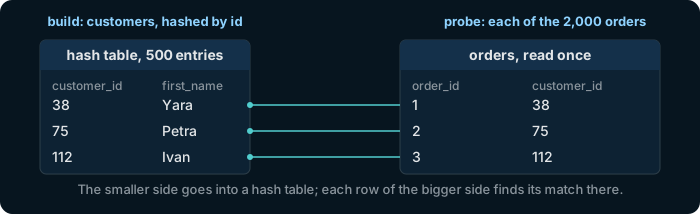
Hash join: the 500 customers go into a hash table keyed by customer_id; each of the 2,000 orders then finds its customer there, order 1 customer 38 Yara, order 2 customer 75 Petra, order 3 customer 112 Ivan.

A hash join reads the smaller side once into a hash table, keyed by the join column, and then reads the bigger side once, looking each row up. It wins when both sides are whole tables without a useful order.

Try it

Every customer with every order: a hash join

🔗 Foreign Key orders_customer_id_fkey orders ➔ customers ( customer_id ) 🔗 Foreign Key orders_customer_id_fkey orders ➔ customers ( customer_id ) customer_id Table public.customers ⎯⎯⎯⎯⎯⎯⎯⎯⎯⎯⎯⎯ The people who buy from the shop.customers 🔑 Pk customers_pkey ( customer_id ) ⧉ customer_id * int4 ↙ orders( customer_id ) ⎯⎯⎯⎯⎯⎯⎯⎯⎯⎯⎯⎯ The number that identifies the customer.customer_id 🔗 Referred by orders ( customer_id ) ⧉ first_name * text ⎯⎯⎯⎯⎯⎯⎯⎯⎯⎯⎯⎯ The first name of the customer.first_name ⧉ last_name * text ⎯⎯⎯⎯⎯⎯⎯⎯⎯⎯⎯⎯ The last name of the customer.last_name 🔍 Unq customers_email_key ( email ) ⧉ email * text ⎯⎯⎯⎯⎯⎯⎯⎯⎯⎯⎯⎯ The email address of the customer. No two customers share one.email ⧉ phone text ⎯⎯⎯⎯⎯⎯⎯⎯⎯⎯⎯⎯ The phone number of the customer. NULL when the customer gave none.phone ⧉ country * text ⎯⎯⎯⎯⎯⎯⎯⎯⎯⎯⎯⎯ The country the customer lives in.country ⧉ signup_date * date ⎯⎯⎯⎯⎯⎯⎯⎯⎯⎯⎯⎯ The day the customer created an account.signup_date Table public.orders ⎯⎯⎯⎯⎯⎯⎯⎯⎯⎯⎯⎯ One purchase by one customer. Its products are the rows of order_items.orders 🔑 Pk orders_pkey ( order_id ) ⧉ order_id * int4 ↙ order_items( order_id ) ⎯⎯⎯⎯⎯⎯⎯⎯⎯⎯⎯⎯ The number that identifies the order.order_id 🔗 Referred by order_items ( order_id ) ⧉ customer_id * int4 ↗ customers( customer_id ) ⎯⎯⎯⎯⎯⎯⎯⎯⎯⎯⎯⎯ The customer who placed the order: a customer_id of customers.customer_id 🔗 References customers ( customer_id ) ⧉ employee_id int4 ↗ employees( employee_id ) ⎯⎯⎯⎯⎯⎯⎯⎯⎯⎯⎯⎯ The employee who took the order: an employee_id of employees. NULL for an order placed online.employee_id 🔗 References employees ( employee_id ) ⧉ order_date * date ⎯⎯⎯⎯⎯⎯⎯⎯⎯⎯⎯⎯ The day the order was placed.order_date ⧉ status * text ⎯⎯⎯⎯⎯⎯⎯⎯⎯⎯⎯⎯ Where the order stands: pending, shipped, delivered or cancelled.status
Hover a table or a column to read its comment.
explain
select *
from customers c
join orders o on o.customer_id = c.customer_id;

Hash Join. The Hash step under it builds the table from customers, the smaller side; orders is scanned once against it.

The idea

A merge join walks two sorted lists side by side

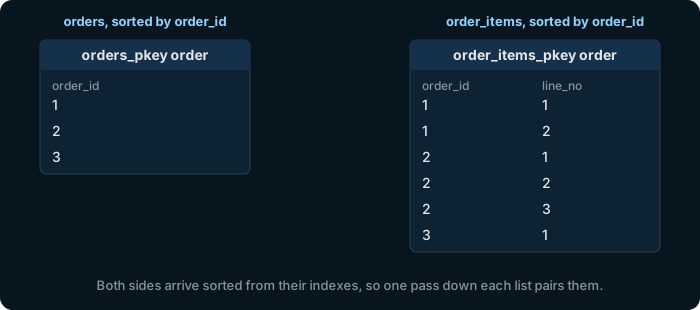
Merge join: orders 1, 2 and 3 in order_id order, and the lines of order_items in the same order; one pass down both lists pairs order 1 with its 2 lines, order 2 with its 3, and order 3 with the next.

A merge join reads both sides in the order of the join column and pairs them in one pass. It wins when both sides come sorted already, as indexes deliver them, and when the answer has to be sorted anyway.

Try it

Orders and their lines, sorted: a merge join

🔗 Foreign Key order_items_order_id_fkey order_items ➔ orders ( order_id ) 🔗 Foreign Key order_items_order_id_fkey order_items ➔ orders ( order_id ) order_id Table public.orders ⎯⎯⎯⎯⎯⎯⎯⎯⎯⎯⎯⎯ One purchase by one customer. Its products are the rows of order_items.orders 🔑 Pk orders_pkey ( order_id ) ⧉ order_id * int4 ↙ order_items( order_id ) ⎯⎯⎯⎯⎯⎯⎯⎯⎯⎯⎯⎯ The number that identifies the order.order_id 🔗 Referred by order_items ( order_id ) ⧉ customer_id * int4 ↗ customers( customer_id ) ⎯⎯⎯⎯⎯⎯⎯⎯⎯⎯⎯⎯ The customer who placed the order: a customer_id of customers.customer_id 🔗 References customers ( customer_id ) ⧉ employee_id int4 ↗ employees( employee_id ) ⎯⎯⎯⎯⎯⎯⎯⎯⎯⎯⎯⎯ The employee who took the order: an employee_id of employees. NULL for an order placed online.employee_id 🔗 References employees ( employee_id ) ⧉ order_date * date ⎯⎯⎯⎯⎯⎯⎯⎯⎯⎯⎯⎯ The day the order was placed.order_date ⧉ status * text ⎯⎯⎯⎯⎯⎯⎯⎯⎯⎯⎯⎯ Where the order stands: pending, shipped, delivered or cancelled.status Table public.order_items ⎯⎯⎯⎯⎯⎯⎯⎯⎯⎯⎯⎯ The lines of an order: one row for each product in it.order_items 🔑 Pk order_items_pkey ( order_id, line_no ) ⧉ order_id * int4 ↗ orders( order_id ) ⎯⎯⎯⎯⎯⎯⎯⎯⎯⎯⎯⎯ The order this line belongs to: an order_id of orders.order_id 🔗 References orders ( order_id ) 🔑 Pk order_items_pkey ( order_id, line_no ) ⧉ line_no * int4 ⎯⎯⎯⎯⎯⎯⎯⎯⎯⎯⎯⎯ The number of the line within its order. With order_id, it identifies the line.line_no ⧉ product_id * int4 ↗ products( product_id ) ⎯⎯⎯⎯⎯⎯⎯⎯⎯⎯⎯⎯ The product on this line: a product_id of products.product_id 🔗 References products ( product_id ) ⧉ quantity * int4 ⎯⎯⎯⎯⎯⎯⎯⎯⎯⎯⎯⎯ How many pieces of the product were ordered.quantity ⧉ unit_price * numeric(10,2) ⎯⎯⎯⎯⎯⎯⎯⎯⎯⎯⎯⎯ The price of one piece on this line, kept with the order so that a later change of products.price leaves it as it was.unit_price
Hover a table or a column to read its comment.
explain
select *
from orders o
join order_items oi on oi.order_id = o.order_id
order by o.order_id;

Merge Join over two index scans: orders_pkey and order_items_pkey both deliver the rows sorted by order_id.

Try it

Switch a method off, and the planner picks another

set enable_hashjoin = off tells PostgreSQL to avoid hash joins, for the session. It is a way to compare plans, not a setting for real work. Each example below sets it back with reset all.

🔗 Foreign Key orders_customer_id_fkey orders ➔ customers ( customer_id ) 🔗 Foreign Key orders_customer_id_fkey orders ➔ customers ( customer_id ) customer_id Table public.customers ⎯⎯⎯⎯⎯⎯⎯⎯⎯⎯⎯⎯ The people who buy from the shop.customers 🔑 Pk customers_pkey ( customer_id ) ⧉ customer_id * int4 ↙ orders( customer_id ) ⎯⎯⎯⎯⎯⎯⎯⎯⎯⎯⎯⎯ The number that identifies the customer.customer_id 🔗 Referred by orders ( customer_id ) ⧉ first_name * text ⎯⎯⎯⎯⎯⎯⎯⎯⎯⎯⎯⎯ The first name of the customer.first_name ⧉ last_name * text ⎯⎯⎯⎯⎯⎯⎯⎯⎯⎯⎯⎯ The last name of the customer.last_name 🔍 Unq customers_email_key ( email ) ⧉ email * text ⎯⎯⎯⎯⎯⎯⎯⎯⎯⎯⎯⎯ The email address of the customer. No two customers share one.email ⧉ phone text ⎯⎯⎯⎯⎯⎯⎯⎯⎯⎯⎯⎯ The phone number of the customer. NULL when the customer gave none.phone ⧉ country * text ⎯⎯⎯⎯⎯⎯⎯⎯⎯⎯⎯⎯ The country the customer lives in.country ⧉ signup_date * date ⎯⎯⎯⎯⎯⎯⎯⎯⎯⎯⎯⎯ The day the customer created an account.signup_date Table public.orders ⎯⎯⎯⎯⎯⎯⎯⎯⎯⎯⎯⎯ One purchase by one customer. Its products are the rows of order_items.orders 🔑 Pk orders_pkey ( order_id ) ⧉ order_id * int4 ↙ order_items( order_id ) ⎯⎯⎯⎯⎯⎯⎯⎯⎯⎯⎯⎯ The number that identifies the order.order_id 🔗 Referred by order_items ( order_id ) ⧉ customer_id * int4 ↗ customers( customer_id ) ⎯⎯⎯⎯⎯⎯⎯⎯⎯⎯⎯⎯ The customer who placed the order: a customer_id of customers.customer_id 🔗 References customers ( customer_id ) ⧉ employee_id int4 ↗ employees( employee_id ) ⎯⎯⎯⎯⎯⎯⎯⎯⎯⎯⎯⎯ The employee who took the order: an employee_id of employees. NULL for an order placed online.employee_id 🔗 References employees ( employee_id ) ⧉ order_date * date ⎯⎯⎯⎯⎯⎯⎯⎯⎯⎯⎯⎯ The day the order was placed.order_date ⧉ status * text ⎯⎯⎯⎯⎯⎯⎯⎯⎯⎯⎯⎯ Where the order stands: pending, shipped, delivered or cancelled.status
Hover a table or a column to read its comment.
set enable_hashjoin = off;
explain
select *
from customers c
join orders o on o.customer_id = c.customer_id;
reset all;

The same join as on slide 5, now a Merge Join: customers comes sorted from its index, and orders is sorted first.

Try it

Switch off the merge join too

🔗 Foreign Key orders_customer_id_fkey orders ➔ customers ( customer_id ) 🔗 Foreign Key orders_customer_id_fkey orders ➔ customers ( customer_id ) customer_id Table public.customers ⎯⎯⎯⎯⎯⎯⎯⎯⎯⎯⎯⎯ The people who buy from the shop.customers 🔑 Pk customers_pkey ( customer_id ) ⧉ customer_id * int4 ↙ orders( customer_id ) ⎯⎯⎯⎯⎯⎯⎯⎯⎯⎯⎯⎯ The number that identifies the customer.customer_id 🔗 Referred by orders ( customer_id ) ⧉ first_name * text ⎯⎯⎯⎯⎯⎯⎯⎯⎯⎯⎯⎯ The first name of the customer.first_name ⧉ last_name * text ⎯⎯⎯⎯⎯⎯⎯⎯⎯⎯⎯⎯ The last name of the customer.last_name 🔍 Unq customers_email_key ( email ) ⧉ email * text ⎯⎯⎯⎯⎯⎯⎯⎯⎯⎯⎯⎯ The email address of the customer. No two customers share one.email ⧉ phone text ⎯⎯⎯⎯⎯⎯⎯⎯⎯⎯⎯⎯ The phone number of the customer. NULL when the customer gave none.phone ⧉ country * text ⎯⎯⎯⎯⎯⎯⎯⎯⎯⎯⎯⎯ The country the customer lives in.country ⧉ signup_date * date ⎯⎯⎯⎯⎯⎯⎯⎯⎯⎯⎯⎯ The day the customer created an account.signup_date Table public.orders ⎯⎯⎯⎯⎯⎯⎯⎯⎯⎯⎯⎯ One purchase by one customer. Its products are the rows of order_items.orders 🔑 Pk orders_pkey ( order_id ) ⧉ order_id * int4 ↙ order_items( order_id ) ⎯⎯⎯⎯⎯⎯⎯⎯⎯⎯⎯⎯ The number that identifies the order.order_id 🔗 Referred by order_items ( order_id ) ⧉ customer_id * int4 ↗ customers( customer_id ) ⎯⎯⎯⎯⎯⎯⎯⎯⎯⎯⎯⎯ The customer who placed the order: a customer_id of customers.customer_id 🔗 References customers ( customer_id ) ⧉ employee_id int4 ↗ employees( employee_id ) ⎯⎯⎯⎯⎯⎯⎯⎯⎯⎯⎯⎯ The employee who took the order: an employee_id of employees. NULL for an order placed online.employee_id 🔗 References employees ( employee_id ) ⧉ order_date * date ⎯⎯⎯⎯⎯⎯⎯⎯⎯⎯⎯⎯ The day the order was placed.order_date ⧉ status * text ⎯⎯⎯⎯⎯⎯⎯⎯⎯⎯⎯⎯ Where the order stands: pending, shipped, delivered or cancelled.status
Hover a table or a column to read its comment.
set enable_hashjoin = off;
set enable_mergejoin = off;
explain
select *
from customers c
join orders o on o.customer_id = c.customer_id;
reset all;

A Nested Loop: each order looks its customer up in customers_pkey. The Memoize step remembers the customers it has already looked up.

In DbSchema

See the plan of a query as a tree

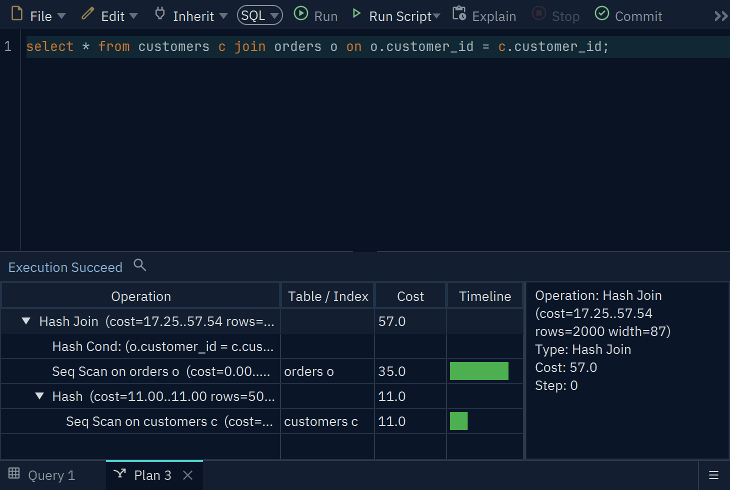
The DbSchema SQL Editor with the customers and orders join, and its plan as a tree: Hash Join, with a Seq Scan on orders and a Hash over a Seq Scan on customers, each with its cost
The plan of the hash join, in the SQL Editor of DbSchema.

The SQL Editor of DbSchema can show the plan of a query as a tree, each step with its table and its cost, for a database you connect to.
Download DbSchema

The Community Edition is free. Every download starts with a 15-day trial of all features.

Exercise 1 of 4

Which join method does EXPLAIN show for all customers with all their orders?

🔗 Foreign Key orders_customer_id_fkey orders ➔ customers ( customer_id ) 🔗 Foreign Key orders_customer_id_fkey orders ➔ customers ( customer_id ) customer_id Table public.customers ⎯⎯⎯⎯⎯⎯⎯⎯⎯⎯⎯⎯ The people who buy from the shop.customers 🔑 Pk customers_pkey ( customer_id ) ⧉ customer_id * int4 ↙ orders( customer_id ) ⎯⎯⎯⎯⎯⎯⎯⎯⎯⎯⎯⎯ The number that identifies the customer.customer_id 🔗 Referred by orders ( customer_id ) ⧉ first_name * text ⎯⎯⎯⎯⎯⎯⎯⎯⎯⎯⎯⎯ The first name of the customer.first_name ⧉ last_name * text ⎯⎯⎯⎯⎯⎯⎯⎯⎯⎯⎯⎯ The last name of the customer.last_name 🔍 Unq customers_email_key ( email ) ⧉ email * text ⎯⎯⎯⎯⎯⎯⎯⎯⎯⎯⎯⎯ The email address of the customer. No two customers share one.email ⧉ phone text ⎯⎯⎯⎯⎯⎯⎯⎯⎯⎯⎯⎯ The phone number of the customer. NULL when the customer gave none.phone ⧉ country * text ⎯⎯⎯⎯⎯⎯⎯⎯⎯⎯⎯⎯ The country the customer lives in.country ⧉ signup_date * date ⎯⎯⎯⎯⎯⎯⎯⎯⎯⎯⎯⎯ The day the customer created an account.signup_date Table public.orders ⎯⎯⎯⎯⎯⎯⎯⎯⎯⎯⎯⎯ One purchase by one customer. Its products are the rows of order_items.orders 🔑 Pk orders_pkey ( order_id ) ⧉ order_id * int4 ↙ order_items( order_id ) ⎯⎯⎯⎯⎯⎯⎯⎯⎯⎯⎯⎯ The number that identifies the order.order_id 🔗 Referred by order_items ( order_id ) ⧉ customer_id * int4 ↗ customers( customer_id ) ⎯⎯⎯⎯⎯⎯⎯⎯⎯⎯⎯⎯ The customer who placed the order: a customer_id of customers.customer_id 🔗 References customers ( customer_id ) ⧉ employee_id int4 ↗ employees( employee_id ) ⎯⎯⎯⎯⎯⎯⎯⎯⎯⎯⎯⎯ The employee who took the order: an employee_id of employees. NULL for an order placed online.employee_id 🔗 References employees ( employee_id ) ⧉ order_date * date ⎯⎯⎯⎯⎯⎯⎯⎯⎯⎯⎯⎯ The day the order was placed.order_date ⧉ status * text ⎯⎯⎯⎯⎯⎯⎯⎯⎯⎯⎯⎯ Where the order stands: pending, shipped, delivered or cancelled.status
Hover a table or a column to read its comment.
explain select * from customers c join orders o on o.customer_id = c.customer_id;

Each answer sends the exercise and whether the answer was right to dbschema.com, without your IP address.

Exercise 2 of 4

And for the orders of one customer, customer 7?

🔗 Foreign Key orders_customer_id_fkey orders ➔ customers ( customer_id ) 🔗 Foreign Key orders_customer_id_fkey orders ➔ customers ( customer_id ) customer_id Table public.customers ⎯⎯⎯⎯⎯⎯⎯⎯⎯⎯⎯⎯ The people who buy from the shop.customers 🔑 Pk customers_pkey ( customer_id ) ⧉ customer_id * int4 ↙ orders( customer_id ) ⎯⎯⎯⎯⎯⎯⎯⎯⎯⎯⎯⎯ The number that identifies the customer.customer_id 🔗 Referred by orders ( customer_id ) ⧉ first_name * text ⎯⎯⎯⎯⎯⎯⎯⎯⎯⎯⎯⎯ The first name of the customer.first_name ⧉ last_name * text ⎯⎯⎯⎯⎯⎯⎯⎯⎯⎯⎯⎯ The last name of the customer.last_name 🔍 Unq customers_email_key ( email ) ⧉ email * text ⎯⎯⎯⎯⎯⎯⎯⎯⎯⎯⎯⎯ The email address of the customer. No two customers share one.email ⧉ phone text ⎯⎯⎯⎯⎯⎯⎯⎯⎯⎯⎯⎯ The phone number of the customer. NULL when the customer gave none.phone ⧉ country * text ⎯⎯⎯⎯⎯⎯⎯⎯⎯⎯⎯⎯ The country the customer lives in.country ⧉ signup_date * date ⎯⎯⎯⎯⎯⎯⎯⎯⎯⎯⎯⎯ The day the customer created an account.signup_date Table public.orders ⎯⎯⎯⎯⎯⎯⎯⎯⎯⎯⎯⎯ One purchase by one customer. Its products are the rows of order_items.orders 🔑 Pk orders_pkey ( order_id ) ⧉ order_id * int4 ↙ order_items( order_id ) ⎯⎯⎯⎯⎯⎯⎯⎯⎯⎯⎯⎯ The number that identifies the order.order_id 🔗 Referred by order_items ( order_id ) ⧉ customer_id * int4 ↗ customers( customer_id ) ⎯⎯⎯⎯⎯⎯⎯⎯⎯⎯⎯⎯ The customer who placed the order: a customer_id of customers.customer_id 🔗 References customers ( customer_id ) ⧉ employee_id int4 ↗ employees( employee_id ) ⎯⎯⎯⎯⎯⎯⎯⎯⎯⎯⎯⎯ The employee who took the order: an employee_id of employees. NULL for an order placed online.employee_id 🔗 References employees ( employee_id ) ⧉ order_date * date ⎯⎯⎯⎯⎯⎯⎯⎯⎯⎯⎯⎯ The day the order was placed.order_date ⧉ status * text ⎯⎯⎯⎯⎯⎯⎯⎯⎯⎯⎯⎯ Where the order stands: pending, shipped, delivered or cancelled.status
Hover a table or a column to read its comment.
explain select * from customers c join orders o on o.customer_id = c.customer_id where c.customer_id = 7;

Each answer sends the exercise and whether the answer was right to dbschema.com, without your IP address.

Exercise 3 of 4

And for orders joined to order_items, sorted by order_id?

🔗 Foreign Key order_items_order_id_fkey order_items ➔ orders ( order_id ) 🔗 Foreign Key order_items_order_id_fkey order_items ➔ orders ( order_id ) order_id Table public.orders ⎯⎯⎯⎯⎯⎯⎯⎯⎯⎯⎯⎯ One purchase by one customer. Its products are the rows of order_items.orders 🔑 Pk orders_pkey ( order_id ) ⧉ order_id * int4 ↙ order_items( order_id ) ⎯⎯⎯⎯⎯⎯⎯⎯⎯⎯⎯⎯ The number that identifies the order.order_id 🔗 Referred by order_items ( order_id ) ⧉ customer_id * int4 ↗ customers( customer_id ) ⎯⎯⎯⎯⎯⎯⎯⎯⎯⎯⎯⎯ The customer who placed the order: a customer_id of customers.customer_id 🔗 References customers ( customer_id ) ⧉ employee_id int4 ↗ employees( employee_id ) ⎯⎯⎯⎯⎯⎯⎯⎯⎯⎯⎯⎯ The employee who took the order: an employee_id of employees. NULL for an order placed online.employee_id 🔗 References employees ( employee_id ) ⧉ order_date * date ⎯⎯⎯⎯⎯⎯⎯⎯⎯⎯⎯⎯ The day the order was placed.order_date ⧉ status * text ⎯⎯⎯⎯⎯⎯⎯⎯⎯⎯⎯⎯ Where the order stands: pending, shipped, delivered or cancelled.status Table public.order_items ⎯⎯⎯⎯⎯⎯⎯⎯⎯⎯⎯⎯ The lines of an order: one row for each product in it.order_items 🔑 Pk order_items_pkey ( order_id, line_no ) ⧉ order_id * int4 ↗ orders( order_id ) ⎯⎯⎯⎯⎯⎯⎯⎯⎯⎯⎯⎯ The order this line belongs to: an order_id of orders.order_id 🔗 References orders ( order_id ) 🔑 Pk order_items_pkey ( order_id, line_no ) ⧉ line_no * int4 ⎯⎯⎯⎯⎯⎯⎯⎯⎯⎯⎯⎯ The number of the line within its order. With order_id, it identifies the line.line_no ⧉ product_id * int4 ↗ products( product_id ) ⎯⎯⎯⎯⎯⎯⎯⎯⎯⎯⎯⎯ The product on this line: a product_id of products.product_id 🔗 References products ( product_id ) ⧉ quantity * int4 ⎯⎯⎯⎯⎯⎯⎯⎯⎯⎯⎯⎯ How many pieces of the product were ordered.quantity ⧉ unit_price * numeric(10,2) ⎯⎯⎯⎯⎯⎯⎯⎯⎯⎯⎯⎯ The price of one piece on this line, kept with the order so that a later change of products.price leaves it as it was.unit_price
Hover a table or a column to read its comment.
explain select * from orders o join order_items oi on oi.order_id = o.order_id order by o.order_id;

Each answer sends the exercise and whether the answer was right to dbschema.com, without your IP address.

Exercise 4 of 4

Why does the join for one customer use a nested loop?

Each answer sends the exercise and whether the answer was right to dbschema.com, without your IP address.