Lesson 12
Stacking results: UNION
For readers who finished lesson 11 and can write a SELECT on any table.
- Stacking two answers
- Matching columns
- UNION drops duplicates
- UNION ALL keeps them
- Sorting the whole result
- 4 exercises
Every query runs on real PostgreSQL, in your browser. It downloads once, about 6 MB, then starts in a few seconds.
For a reference page on the same statements, read SQL UNION Operator: UNION vs UNION ALL with Examples.
The idea
UNION stacks the rows of two queries
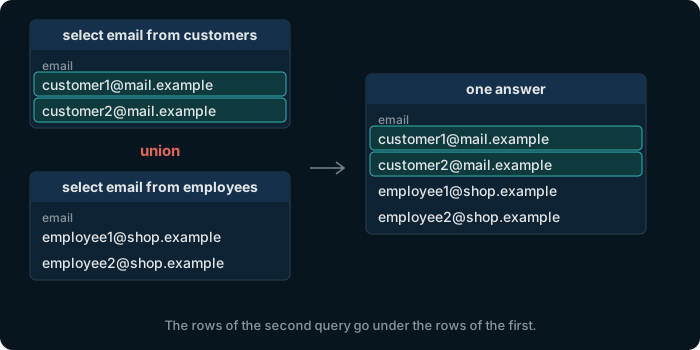
Write UNION between two queries, and their rows come back as one answer. The columns are named after the first query.
Try it
Every email address in the shop
select email from customers
union
select email from employees;
560 addresses: 500 customers and 60 employees, all different.
Watch out
Both queries need the same columns, of matching types
select first_name, last_name from customers
union
select first_name from employees;
ERROR: each UNION query must have the same number of columns
The columns are matched by position, not by name, and each pair must hold the same kind of value: select customer_id … union select email … fails with ERROR: UNION types integer and text cannot be matched.
Try it
UNION drops the rows that repeat
Many customers and employees share a last name. UNION keeps each distinct row once, as DISTINCT does.
select last_name from customers
union
select last_name from employees;
40 different last names among 560 people.
Try it
UNION ALL keeps every row
UNION ALL stacks the rows as they are. It is also quicker, since PostgreSQL skips the search for duplicates, so use it whenever repeats are wanted or cannot happen.
select last_name from customers
union all
select last_name from employees;
560 rows, one per person, with every repeated name.
Try it
ORDER BY at the end sorts the whole result
A WHERE belongs to its own query. One ORDER BY, after the last query, sorts all the rows together. A text value such as 'customer' makes a column that says where each row came from.
select first_name, last_name, 'customer' as kind
from customers where country = 'Romania' and customer_id <= 60
union all
select first_name, last_name, 'employee'
from employees where department_id = 1 and employee_id <= 13
order by last_name;
Customers and employees mixed, sorted by last name. The third column is named kind, after the first query.
Exercise 1 of 4
Show every email address of a customer or an employee.
Expected result
It shows once PostgreSQL is ready.
Hint
Two queries of one column each, joined by union: the emails of customers, then those of employees.
Each check sends the exercise, your SQL and any PostgreSQL error to dbschema.com, without your IP address, so that the hints can improve.
Show answer
select email from customers union select email from employees
Exercise 2 of 4
Show one list of everyone: first name, last name, and the text customer or employee. Keep everyone, even people with the same name.
Expected result
It shows once PostgreSQL is ready.
Hint
Each query selects the two names and a text value in single quotes. People who share a name must all stay, which union alone does not do.
Each check sends the exercise, your SQL and any PostgreSQL error to dbschema.com, without your IP address, so that the hints can improve.
Show answer
select first_name, last_name, 'customer' from customers union all select first_name, last_name, 'employee' from employees
Exercise 3 of 4
How many different first names do the customers and the employees have together? Run a query here to find out.
Each answer sends the exercise and whether the answer was right to dbschema.com, without your IP address.
Exercise 4 of 4
Row order countsMake one timeline of orders 1 to 3 and the sign-ups of customers 1 to 3: the date, and the text order or signup, the oldest first.
Expected result
It shows once PostgreSQL is ready.
Hint
Each query selects a date and a text value. One order by at the very end sorts the whole result.
Each check sends the exercise, your SQL and any PostgreSQL error to dbschema.com, without your IP address, so that the hints can improve.
Show answer
select order_date, 'order' from orders where order_id <= 3 union all select signup_date, 'signup' from customers where customer_id <= 3 order by 1