Lesson 4
Missing values: NULL
For readers who finished lesson 3 and can filter rows with WHERE.
- What NULL means
- Why = NULL finds nothing
- IS NULL and IS NOT NULL
- NULL and <>
- COALESCE
- 4 exercises
Every query runs on real PostgreSQL, in your browser. It downloads once, about 6 MB, then starts in a few seconds.
For a reference page on the same statements, read SQL NULL Values: IS NULL, COALESCE, NULLIF, and Common Pitfalls.
The idea
NULL marks a value that is missing
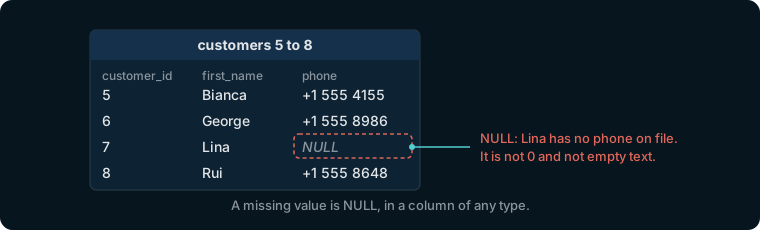
Not every customer gave a phone number. Where a value is unknown, the column holds NULL. It is not zero and not empty text: it says that there is no value at all, in a column of any type.
Try it
Look at a customer without a phone
select customer_id, first_name, phone
from customers
where customer_id between 5 and 8;
Customer 7, Lina, has NULL as phone. The page writes NULL in italics, apart from any text.
The idea
A comparison with NULL is neither true nor false
Comparing a value with NULL asks whether it equals a value nobody knows. PostgreSQL answers NULL, unknown:
select 5 = 5, 5 = 6, 5 = null, null = null;
| ?column? | ?column? | ?column? | ?column? |
|---|---|---|---|
| t | f | NULL | NULL |
t is true and f is false. Even two NULLs are not known to be equal.
Watch out
WHERE phone = NULL finds nobody
WHERE keeps a row only when its condition is true, and phone = null is never true. count(*) counts the rows of the answer; lesson 6 has more on it.
select count(*)
from customers
where phone = null;
0, although 71 customers have no phone.
Try it
IS NULL is the test for a missing value
Write IS NULL instead of = null. Its opposite is is not null, which keeps the rows that have a value.
select count(*)
from customers
where phone is null;
71 customers have no phone. Change is null to is not null and the count becomes 429.
Watch out
A row with NULL fails every comparison, <> included
Customer 1's phone is +1 555 4831. These are meant to be all the other customers:
select count(*) from customers where phone <> '+1 555 4831';
| count |
|---|
| 428 |
Not 499: the 71 customers without a phone are left out too, since NULL <> '+1 555 4831' is unknown as well. Add or phone is null to keep them.
Try it
COALESCE puts a value where one is missing
COALESCE returns its first argument that is not NULL. coalesce(phone, 'no phone') is the phone where there is one, and the text no phone where there is none.
select first_name, coalesce(phone, 'no phone')
from customers
where customer_id between 5 and 8;
Lina's phone reads no phone; the other three are unchanged.
Exercise 1 of 4
Show the first name, last name and email of every customer without a phone number.
Expected result
It shows once PostgreSQL is ready.
Hint
A missing phone is NULL, and = null is never true. NULL has a test of its own.
Each check sends the exercise, your SQL and any PostgreSQL error to dbschema.com, without your IP address, so that the hints can improve.
Show answer
select first_name, last_name, email from customers where phone is null
Exercise 2 of 4
How many orders were placed online, that is, with no employee? Answer with one number.
Expected result
It shows once PostgreSQL is ready.
Hint
Count the rows of orders whose employee_id is missing. count(*) counts rows.
Each check sends the exercise, your SQL and any PostgreSQL error to dbschema.com, without your IP address, so that the hints can improve.
Show answer
select count(*) from orders where employee_id is null
Exercise 3 of 4
Show the first and last name of every employee who has no manager.
Expected result
It shows once PostgreSQL is ready.
Hint
The manager is in manager_id, and a head of department has none there.
Each check sends the exercise, your SQL and any PostgreSQL error to dbschema.com, without your IP address, so that the hints can improve.
Show answer
select first_name, last_name from employees where manager_id is null
Exercise 4 of 4
For customers 1 to 14, show the first name, the last name, and the phone, or the text no phone where it is missing.
Expected result
It shows once PostgreSQL is ready.
Hint
coalesce returns the first of its arguments that is not NULL: give it the phone, then the text to show instead. Keep the rows with customer_id <= 14.
Each check sends the exercise, your SQL and any PostgreSQL error to dbschema.com, without your IP address, so that the hints can improve.
Show answer
select first_name, last_name, coalesce(phone, 'no phone') from customers where customer_id <= 14