DbSchema PostgreSQL starts when you begin the lesson

Lesson 6

Counting and adding up: aggregates

For readers who finished part 1 and can choose, filter and sort the rows of one table.

After this lesson you can count rows, and add up, average and find the smallest and largest values of a column, knowing how each treats NULL.
  • Many rows into one
  • COUNT
  • SUM and AVG
  • MIN and MAX
  • Aggregates skip NULL
  • Mixing in a plain column
  • 5 exercises

Start the lesson

Every query runs on real PostgreSQL, in your browser. It downloads once, about 6 MB, then starts in a few seconds.

For a reference page on the same statements, read SQL Aggregate Functions: COUNT, SUM, AVG, MIN, MAX, and GROUP BY.

The idea

An aggregate turns many rows into one value
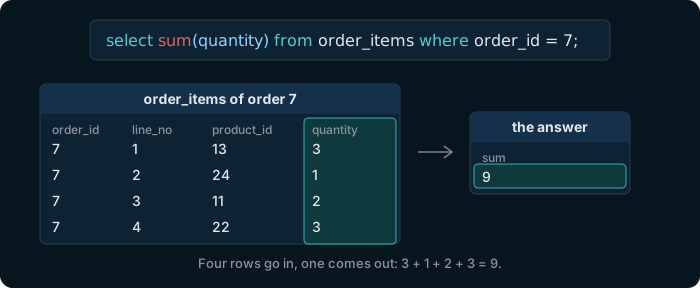
The query select sum of quantity from order_items where order_id is 7. The four lines of order 7 have quantities 3, 1, 2 and 3; the answer is one row with the sum 9.

An aggregate function reads a column over all the rows that WHERE keeps, and returns one value. The answer has a single row.

Try it

Several aggregates in one query

count(*) counts the rows, min and max find the smallest and largest value, and avg the average.

Table public.products ⎯⎯⎯⎯⎯⎯⎯⎯⎯⎯⎯⎯ What the shop sells.products 🔑 Pk products_pkey ( product_id ) ⧉ product_id * int4 ↙ order_items( product_id ) ⎯⎯⎯⎯⎯⎯⎯⎯⎯⎯⎯⎯ The number that identifies the product.product_id 🔗 Referred by order_items ( product_id ) 🔍 Unq products_name_key ( name ) ⧉ name * text ⎯⎯⎯⎯⎯⎯⎯⎯⎯⎯⎯⎯ The name of the product. No two products share a name.name ⧉ category * text ⎯⎯⎯⎯⎯⎯⎯⎯⎯⎯⎯⎯ The group the product belongs to, such as Accessories or Displays.category ⧉ price * numeric(10,2) ⎯⎯⎯⎯⎯⎯⎯⎯⎯⎯⎯⎯ The current price, with two decimals. Always more than 0.price ⧉ stock * int4 ⎯⎯⎯⎯⎯⎯⎯⎯⎯⎯⎯⎯ How many pieces are in the warehouse. Never below 0.stock
Hover a table or a column to read its comment.
select count(*), min(price), max(price), avg(price)
from products;

One row: 26 products, priced from 12.50 to 1899.00.

Try it

SUM adds up a column

Table public.order_items ⎯⎯⎯⎯⎯⎯⎯⎯⎯⎯⎯⎯ The lines of an order: one row for each product in it.order_items 🔑 Pk order_items_pkey ( order_id, line_no ) ⧉ order_id * int4 ↗ orders( order_id ) ⎯⎯⎯⎯⎯⎯⎯⎯⎯⎯⎯⎯ The order this line belongs to: an order_id of orders.order_id 🔗 References orders ( order_id ) 🔑 Pk order_items_pkey ( order_id, line_no ) ⧉ line_no * int4 ⎯⎯⎯⎯⎯⎯⎯⎯⎯⎯⎯⎯ The number of the line within its order. With order_id, it identifies the line.line_no ⧉ product_id * int4 ↗ products( product_id ) ⎯⎯⎯⎯⎯⎯⎯⎯⎯⎯⎯⎯ The product on this line: a product_id of products.product_id 🔗 References products ( product_id ) ⧉ quantity * int4 ⎯⎯⎯⎯⎯⎯⎯⎯⎯⎯⎯⎯ How many pieces of the product were ordered.quantity ⧉ unit_price * numeric(10,2) ⎯⎯⎯⎯⎯⎯⎯⎯⎯⎯⎯⎯ The price of one piece on this line, kept with the order so that a later change of products.price leaves it as it was.unit_price
Hover a table or a column to read its comment.
select sum(quantity)
from order_items
where order_id = 7;

9 units in all, the 3 + 1 + 2 + 3 of the diagram.

Try it

ROUND keeps an average readable

An average rarely comes out even. round(value, 2) keeps two decimals.

Table public.products ⎯⎯⎯⎯⎯⎯⎯⎯⎯⎯⎯⎯ What the shop sells.products 🔑 Pk products_pkey ( product_id ) ⧉ product_id * int4 ↙ order_items( product_id ) ⎯⎯⎯⎯⎯⎯⎯⎯⎯⎯⎯⎯ The number that identifies the product.product_id 🔗 Referred by order_items ( product_id ) 🔍 Unq products_name_key ( name ) ⧉ name * text ⎯⎯⎯⎯⎯⎯⎯⎯⎯⎯⎯⎯ The name of the product. No two products share a name.name ⧉ category * text ⎯⎯⎯⎯⎯⎯⎯⎯⎯⎯⎯⎯ The group the product belongs to, such as Accessories or Displays.category ⧉ price * numeric(10,2) ⎯⎯⎯⎯⎯⎯⎯⎯⎯⎯⎯⎯ The current price, with two decimals. Always more than 0.price ⧉ stock * int4 ⎯⎯⎯⎯⎯⎯⎯⎯⎯⎯⎯⎯ How many pieces are in the warehouse. Never below 0.stock
Hover a table or a column to read its comment.
select avg(price), round(avg(price), 2)
from products;

287.6807692307692308 becomes 287.68.

Try it

MIN and MAX work on dates and text too

They work on any column that can be sorted: the earliest and latest date, or the first and last name in alphabetical order.

Table public.orders ⎯⎯⎯⎯⎯⎯⎯⎯⎯⎯⎯⎯ One purchase by one customer. Its products are the rows of order_items.orders 🔑 Pk orders_pkey ( order_id ) ⧉ order_id * int4 ↙ order_items( order_id ) ⎯⎯⎯⎯⎯⎯⎯⎯⎯⎯⎯⎯ The number that identifies the order.order_id 🔗 Referred by order_items ( order_id ) ⧉ customer_id * int4 ↗ customers( customer_id ) ⎯⎯⎯⎯⎯⎯⎯⎯⎯⎯⎯⎯ The customer who placed the order: a customer_id of customers.customer_id 🔗 References customers ( customer_id ) ⧉ employee_id int4 ↗ employees( employee_id ) ⎯⎯⎯⎯⎯⎯⎯⎯⎯⎯⎯⎯ The employee who took the order: an employee_id of employees. NULL for an order placed online.employee_id 🔗 References employees ( employee_id ) ⧉ order_date * date ⎯⎯⎯⎯⎯⎯⎯⎯⎯⎯⎯⎯ The day the order was placed.order_date ⧉ status * text ⎯⎯⎯⎯⎯⎯⎯⎯⎯⎯⎯⎯ Where the order stands: pending, shipped, delivered or cancelled.status
Hover a table or a column to read its comment.
select min(order_date), max(order_date)
from orders;

The orders run from 2025-01-01 to 2026-10-02.

Watch out

Every aggregate skips NULL, except count(*)

Table public.customers ⎯⎯⎯⎯⎯⎯⎯⎯⎯⎯⎯⎯ The people who buy from the shop.customers 🔑 Pk customers_pkey ( customer_id ) ⧉ customer_id * int4 ↙ orders( customer_id ) ⎯⎯⎯⎯⎯⎯⎯⎯⎯⎯⎯⎯ The number that identifies the customer.customer_id 🔗 Referred by orders ( customer_id ) ⧉ first_name * text ⎯⎯⎯⎯⎯⎯⎯⎯⎯⎯⎯⎯ The first name of the customer.first_name ⧉ last_name * text ⎯⎯⎯⎯⎯⎯⎯⎯⎯⎯⎯⎯ The last name of the customer.last_name 🔍 Unq customers_email_key ( email ) ⧉ email * text ⎯⎯⎯⎯⎯⎯⎯⎯⎯⎯⎯⎯ The email address of the customer. No two customers share one.email ⧉ phone text ⎯⎯⎯⎯⎯⎯⎯⎯⎯⎯⎯⎯ The phone number of the customer. NULL when the customer gave none.phone ⧉ country * text ⎯⎯⎯⎯⎯⎯⎯⎯⎯⎯⎯⎯ The country the customer lives in.country ⧉ signup_date * date ⎯⎯⎯⎯⎯⎯⎯⎯⎯⎯⎯⎯ The day the customer created an account.signup_date
Hover a table or a column to read its comment.

count(*) counts rows. count(phone) counts the values in phone, and a NULL is no value:

select count(*), count(phone)
from customers;
countcount
500429

sum, avg, min and max ignore NULL too: an average, for one, is taken over the rows that have a value.

Watch out

A plain column cannot sit beside an aggregate

Table public.products ⎯⎯⎯⎯⎯⎯⎯⎯⎯⎯⎯⎯ What the shop sells.products 🔑 Pk products_pkey ( product_id ) ⧉ product_id * int4 ↙ order_items( product_id ) ⎯⎯⎯⎯⎯⎯⎯⎯⎯⎯⎯⎯ The number that identifies the product.product_id 🔗 Referred by order_items ( product_id ) 🔍 Unq products_name_key ( name ) ⧉ name * text ⎯⎯⎯⎯⎯⎯⎯⎯⎯⎯⎯⎯ The name of the product. No two products share a name.name ⧉ category * text ⎯⎯⎯⎯⎯⎯⎯⎯⎯⎯⎯⎯ The group the product belongs to, such as Accessories or Displays.category ⧉ price * numeric(10,2) ⎯⎯⎯⎯⎯⎯⎯⎯⎯⎯⎯⎯ The current price, with two decimals. Always more than 0.price ⧉ stock * int4 ⎯⎯⎯⎯⎯⎯⎯⎯⎯⎯⎯⎯ How many pieces are in the warehouse. Never below 0.stock
Hover a table or a column to read its comment.

This asks for the name of the most expensive product:

select name, max(price)
from products;

ERROR: column "products.name" must appear in the GROUP BY clause or be used in an aggregate function

The aggregate makes one row out of 26, but there are 26 names, and PostgreSQL will not pick one. GROUP BY, in the message, is lesson 7. For the most expensive product, sort as in lesson 5: order by price desc limit 1.

Exercise 1 of 5

How many products are there? Answer with one number.

Table public.products ⎯⎯⎯⎯⎯⎯⎯⎯⎯⎯⎯⎯ What the shop sells.products 🔑 Pk products_pkey ( product_id ) ⧉ product_id * int4 ↙ order_items( product_id ) ⎯⎯⎯⎯⎯⎯⎯⎯⎯⎯⎯⎯ The number that identifies the product.product_id 🔗 Referred by order_items ( product_id ) 🔍 Unq products_name_key ( name ) ⧉ name * text ⎯⎯⎯⎯⎯⎯⎯⎯⎯⎯⎯⎯ The name of the product. No two products share a name.name ⧉ category * text ⎯⎯⎯⎯⎯⎯⎯⎯⎯⎯⎯⎯ The group the product belongs to, such as Accessories or Displays.category ⧉ price * numeric(10,2) ⎯⎯⎯⎯⎯⎯⎯⎯⎯⎯⎯⎯ The current price, with two decimals. Always more than 0.price ⧉ stock * int4 ⎯⎯⎯⎯⎯⎯⎯⎯⎯⎯⎯⎯ How many pieces are in the warehouse. Never below 0.stock
Hover a table or a column to read its comment.
Expected result

It shows once PostgreSQL is ready.

Each check sends the exercise, your SQL and any PostgreSQL error to dbschema.com, without your IP address, so that the hints can improve.

Show answer
select count(*) from products

Exercise 2 of 5

Show the average product price, rounded to 2 decimals.

Table public.products ⎯⎯⎯⎯⎯⎯⎯⎯⎯⎯⎯⎯ What the shop sells.products 🔑 Pk products_pkey ( product_id ) ⧉ product_id * int4 ↙ order_items( product_id ) ⎯⎯⎯⎯⎯⎯⎯⎯⎯⎯⎯⎯ The number that identifies the product.product_id 🔗 Referred by order_items ( product_id ) 🔍 Unq products_name_key ( name ) ⧉ name * text ⎯⎯⎯⎯⎯⎯⎯⎯⎯⎯⎯⎯ The name of the product. No two products share a name.name ⧉ category * text ⎯⎯⎯⎯⎯⎯⎯⎯⎯⎯⎯⎯ The group the product belongs to, such as Accessories or Displays.category ⧉ price * numeric(10,2) ⎯⎯⎯⎯⎯⎯⎯⎯⎯⎯⎯⎯ The current price, with two decimals. Always more than 0.price ⧉ stock * int4 ⎯⎯⎯⎯⎯⎯⎯⎯⎯⎯⎯⎯ How many pieces are in the warehouse. Never below 0.stock
Hover a table or a column to read its comment.
Expected result

It shows once PostgreSQL is ready.

Each check sends the exercise, your SQL and any PostgreSQL error to dbschema.com, without your IP address, so that the hints can improve.

Show answer
select round(avg(price), 2) from products

Exercise 3 of 5

Show the first and the last order date, in one row.

Table public.orders ⎯⎯⎯⎯⎯⎯⎯⎯⎯⎯⎯⎯ One purchase by one customer. Its products are the rows of order_items.orders 🔑 Pk orders_pkey ( order_id ) ⧉ order_id * int4 ↙ order_items( order_id ) ⎯⎯⎯⎯⎯⎯⎯⎯⎯⎯⎯⎯ The number that identifies the order.order_id 🔗 Referred by order_items ( order_id ) ⧉ customer_id * int4 ↗ customers( customer_id ) ⎯⎯⎯⎯⎯⎯⎯⎯⎯⎯⎯⎯ The customer who placed the order: a customer_id of customers.customer_id 🔗 References customers ( customer_id ) ⧉ employee_id int4 ↗ employees( employee_id ) ⎯⎯⎯⎯⎯⎯⎯⎯⎯⎯⎯⎯ The employee who took the order: an employee_id of employees. NULL for an order placed online.employee_id 🔗 References employees ( employee_id ) ⧉ order_date * date ⎯⎯⎯⎯⎯⎯⎯⎯⎯⎯⎯⎯ The day the order was placed.order_date ⧉ status * text ⎯⎯⎯⎯⎯⎯⎯⎯⎯⎯⎯⎯ Where the order stands: pending, shipped, delivered or cancelled.status
Hover a table or a column to read its comment.
Expected result

It shows once PostgreSQL is ready.

Each check sends the exercise, your SQL and any PostgreSQL error to dbschema.com, without your IP address, so that the hints can improve.

Show answer
select min(order_date), max(order_date) from orders

Exercise 4 of 5

How many units were sold in all, over every order line?

Table public.order_items ⎯⎯⎯⎯⎯⎯⎯⎯⎯⎯⎯⎯ The lines of an order: one row for each product in it.order_items 🔑 Pk order_items_pkey ( order_id, line_no ) ⧉ order_id * int4 ↗ orders( order_id ) ⎯⎯⎯⎯⎯⎯⎯⎯⎯⎯⎯⎯ The order this line belongs to: an order_id of orders.order_id 🔗 References orders ( order_id ) 🔑 Pk order_items_pkey ( order_id, line_no ) ⧉ line_no * int4 ⎯⎯⎯⎯⎯⎯⎯⎯⎯⎯⎯⎯ The number of the line within its order. With order_id, it identifies the line.line_no ⧉ product_id * int4 ↗ products( product_id ) ⎯⎯⎯⎯⎯⎯⎯⎯⎯⎯⎯⎯ The product on this line: a product_id of products.product_id 🔗 References products ( product_id ) ⧉ quantity * int4 ⎯⎯⎯⎯⎯⎯⎯⎯⎯⎯⎯⎯ How many pieces of the product were ordered.quantity ⧉ unit_price * numeric(10,2) ⎯⎯⎯⎯⎯⎯⎯⎯⎯⎯⎯⎯ The price of one piece on this line, kept with the order so that a later change of products.price leaves it as it was.unit_price
Hover a table or a column to read its comment.
Expected result

It shows once PostgreSQL is ready.

Each check sends the exercise, your SQL and any PostgreSQL error to dbschema.com, without your IP address, so that the hints can improve.

Show answer
select sum(quantity) from order_items

Exercise 5 of 5

In one query, show the number of customers and the number of customers who have a phone.

Table public.customers ⎯⎯⎯⎯⎯⎯⎯⎯⎯⎯⎯⎯ The people who buy from the shop.customers 🔑 Pk customers_pkey ( customer_id ) ⧉ customer_id * int4 ↙ orders( customer_id ) ⎯⎯⎯⎯⎯⎯⎯⎯⎯⎯⎯⎯ The number that identifies the customer.customer_id 🔗 Referred by orders ( customer_id ) ⧉ first_name * text ⎯⎯⎯⎯⎯⎯⎯⎯⎯⎯⎯⎯ The first name of the customer.first_name ⧉ last_name * text ⎯⎯⎯⎯⎯⎯⎯⎯⎯⎯⎯⎯ The last name of the customer.last_name 🔍 Unq customers_email_key ( email ) ⧉ email * text ⎯⎯⎯⎯⎯⎯⎯⎯⎯⎯⎯⎯ The email address of the customer. No two customers share one.email ⧉ phone text ⎯⎯⎯⎯⎯⎯⎯⎯⎯⎯⎯⎯ The phone number of the customer. NULL when the customer gave none.phone ⧉ country * text ⎯⎯⎯⎯⎯⎯⎯⎯⎯⎯⎯⎯ The country the customer lives in.country ⧉ signup_date * date ⎯⎯⎯⎯⎯⎯⎯⎯⎯⎯⎯⎯ The day the customer created an account.signup_date
Hover a table or a column to read its comment.
Expected result

It shows once PostgreSQL is ready.

Each check sends the exercise, your SQL and any PostgreSQL error to dbschema.com, without your IP address, so that the hints can improve.

Show answer
select count(*), count(phone) from customers