Lesson 13
Changing data: INSERT, UPDATE and DELETE
For readers who finished part 3 and can query several tables.
- INSERT adds a row
- The table's rules still apply
- UPDATE changes rows
- Without WHERE, every row
- DELETE removes rows
- Deleting in key order
- 3 exercises
Every query runs on real PostgreSQL, in your browser. It downloads once, about 6 MB, then starts in a few seconds.
For a reference page on the same statements, read SQL UPDATE Statement: Syntax, Examples, and Safe Patterns.
Try it
INSERT adds a row
INSERT names the table and its columns, then the values in the same order. A second statement after the semicolon shows the new row.
insert into departments (department_id, name)
values (8, 'Research');

select * from departments where department_id = 8;
1 row affected, and department 8, Research, is there. Changes stay on this page until you reset the database.
Watch out
The table's rules still apply
A new row has to pass every rule the table was created with: here, a price above 0.
insert into products (product_id, name, category, price, stock)
values (27, 'Webcam 4K', 'Accessories', 0, 40);
ERROR: new row for relation "products" violates check constraint "products_price_check"
Leave the price out instead, and the refusal names price as a column that needs a value. Nothing is added either way.
The idea
UPDATE changes the rows that WHERE picks
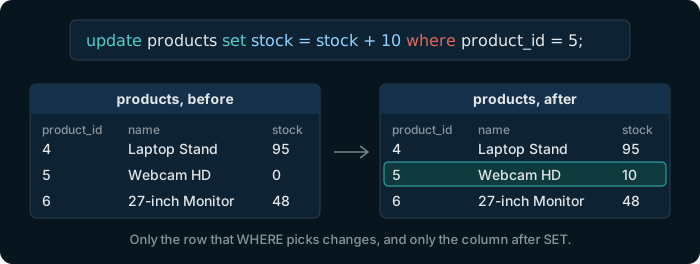
UPDATE names the table, then after set the column and its new value, which can be computed from the old one. WHERE picks the rows, exactly as in a query.
Try it
Restock the webcam
update products
set stock = stock + 10
where product_id = 5;

select product_id, name, stock from products where product_id = 5;
1 row affected: the Webcam HD now has 10 in stock.
Watch out
Without WHERE, every row changes
update products set price = price * 2;
26 rows affected.
Every price doubled. PostgreSQL does not ask whether you meant it. Before an UPDATE or a DELETE, run its WHERE as a SELECT and look at the rows it picks. Here, Reset database undoes it; on a real database, lesson 14's transactions are the way back.
Try it
Check the rows first with SELECT
Before raising the Furniture prices, see which products that is.
select product_id, name, price
from products
where category = 'Furniture';
4 products. An UPDATE with the same WHERE changes exactly these.
Try it
DELETE removes the rows that WHERE picks
DELETE takes a table and a WHERE, and removes the rows it picks.
delete from order_items
where order_id = 7 and line_no = 4;

select count(*) from order_items where order_id = 7;
1 row affected: order 7 now has 3 lines instead of 4.
Watch out
Delete the rows that point before the row they point at
delete from orders where order_id = 7;
ERROR: update or delete on table "orders" violates foreign key constraint "order_items_order_id_fkey" on table "order_items"
The lines of order 7 point at it, as lesson 8 showed. Delete them first, then the order:
delete from order_items where order_id = 8;
delete from orders where order_id = 8;
Order 8 had one line. Both statements ran, and the order is gone.
Exercise 1 of 3
Add product 27: Webcam 4K, in the category Accessories, priced 129.00, with 40 in stock.
Expected result
It shows once PostgreSQL is ready.
Hint
insert into products values (…) takes the values in the order of the columns, which the diagram shows.
Each check sends the exercise, your SQL and any PostgreSQL error to dbschema.com, without your IP address, so that the hints can improve.
Show answer
insert into products values (27, 'Webcam 4K', 'Accessories', 129.00, 40)
Exercise 2 of 3
Raise the price of every Furniture product by 10 %, rounded to cents.
Expected result
It shows once PostgreSQL is ready.
Hint
update products set price = …, with a where for the category. A rise of 10 % multiplies by 1.10, and round(…, 2) keeps the cents.
Each check sends the exercise, your SQL and any PostgreSQL error to dbschema.com, without your IP address, so that the hints can improve.
Show answer
update products set price = round(price * 1.10, 2) where category = 'Furniture'
Exercise 3 of 3
Delete every cancelled order, with its lines.
Expected result
It shows once PostgreSQL is ready.
Hint
The lines of an order point at it, so delete the lines of the cancelled orders first, then the orders: two statements, each ending in ;.
Each check sends the exercise, your SQL and any PostgreSQL error to dbschema.com, without your IP address, so that the hints can improve.
Show answer
delete from order_items where order_id in (select order_id from orders where status = 'cancelled'); delete from orders where status = 'cancelled'