Lesson 15
Indexes, full table scans and EXPLAIN
For readers who finished part 4 and can query and change the tables of the shop.
- How PostgreSQL finds rows
- EXPLAIN
- No index on a foreign key
- Creating an index
- A table large enough to feel it
- When an index is not used
- 4 exercises
Every query runs on real PostgreSQL, in your browser. It downloads once, about 6 MB, then starts in a few seconds.
For a reference page on the same statements, read PostgreSQL CREATE INDEX Guide with psql and DbSchema.
The idea
Without an index, PostgreSQL reads every row
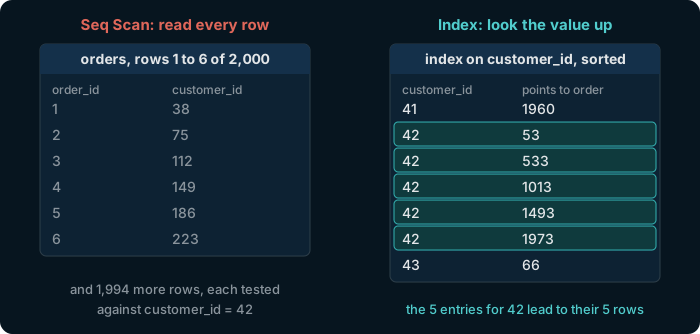
To find customer 42's orders, PostgreSQL can read the whole table and test each row: a full table scan. An index is a sorted copy of one column with a pointer to each row, so the matching rows are found directly.
Try it
EXPLAIN shows how a query will run
EXPLAIN in front of a query returns its plan instead of its rows. Primary keys always have an index.
explain select * from orders where order_id = 42;
Index Scan using orders_pkey: PostgreSQL looks order 42 up in the primary key's index.
Try it
A foreign key gets no index of its own
explain select * from orders where customer_id = 42;
Seq Scan on orders, with a Filter: every order is read and tested. PostgreSQL builds an index for a primary key, but never for a foreign key.
Try it
Create the index, and the plan changes
create index on orders (customer_id);
explain select * from orders where customer_id = 42;
A Bitmap Index Scan on the new index finds the 5 orders, and a Bitmap Heap Scan reads only those rows.
The index stays until you reset the database. PostgreSQL names it for you, here orders_customer_id_idx.
Setup
Make a table large enough to feel the difference
The shop is small: every query on it takes under a millisecond. Each button below runs this SQL with its number of rows, dropping the table first:
drop table if exists page_views;
select setseed(0.42);
create table page_views as
select g as view_id,
       1 + floor(random() * 500)::int as customer_id,
       timestamp '2025-01-01' + random() * interval '600 days' as viewed_at
from generate_series(1, 200000) g;
analyze page_views;
setseed makes random() return the same numbers for every reader. The million rows take a few seconds and add about 50 MB to this page's database.
Try it
EXPLAIN ANALYZE runs the query and measures it
explain analyze runs the query and reports what happened: the rows each step read, and the time it took.
explain analyze
select * from page_views where customer_id = 42;
Seq Scan, with Rows Removed by Filter: 199,626 at 200,000 rows. Fill another size and run it again: the scan grows with the table.
Try it
Index the lookup and measure again
create index on page_views (customer_id);
explain analyze
select * from page_views where customer_id = 42;
A Bitmap Heap Scan now reads only customer 42's rows, and the Execution Time drops. A new fill drops the table, and its index with it.
Watch out
On a small table, PostgreSQL ignores the index
create index on products (category);
explain select * from products where category = 'Audio';
| QUERY PLAN |
|---|
| Seq Scan on products (cost=0.00..1.32 rows=3 width=37) |
| Filter: (category = 'Audio'::text) |
The index exists, and PostgreSQL does not use it. All 26 products fit in one page of the table, so reading that page is cheaper than reading the index first. It decides the same way for a value that most rows have.
In DbSchema
Create an index from the table dialog
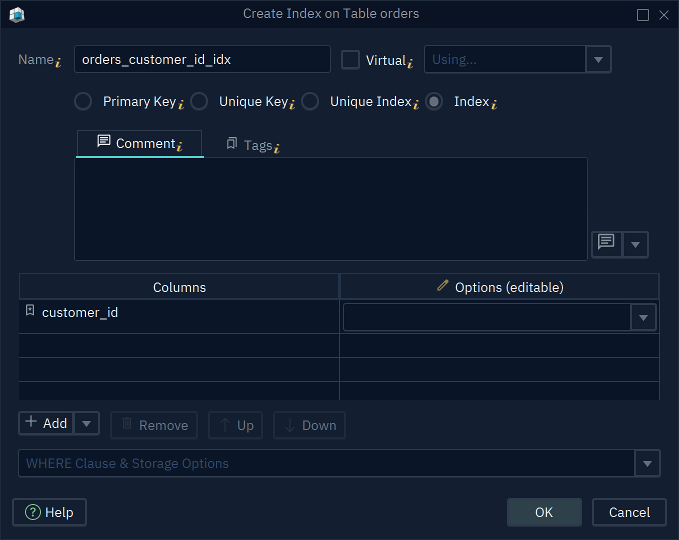
In DbSchema, double-click a table's header, open the Primary Key / Unique / Indexes tab and press Add: the dialog asks for the type, here Index, and the columns. The steps are in the documentation.
The Community Edition is free. Every download starts with a 15-day trial of all features.
Exercise 1 of 4
Without an index on customer_id, how does PostgreSQL read orders for select * from orders where customer_id = 42? If you created the index on slide 5, reset the database first, from the Tables button.
explain select * from orders where customer_id = 42;
Each answer sends the exercise and whether the answer was right to dbschema.com, without your IP address.
Exercise 2 of 4
Create an index that lets PostgreSQL find a customer's orders without reading the whole table.
Expected result
It shows once PostgreSQL is ready.
Hint
The form is create index on table (column). Which column does the lookup of a customer's orders test?
Each check sends the exercise, your SQL and any PostgreSQL error to dbschema.com, without your IP address, so that the hints can improve.
Show answer
create index on orders (customer_id)
Exercise 3 of 4
With an index on products (category), EXPLAIN still shows a Seq Scan for category = 'Audio'. Why?
Each answer sends the exercise and whether the answer was right to dbschema.com, without your IP address.
Exercise 4 of 4
Fill page_views with 200,000 rows, with the button on slide 6, and run explain analyze on the lookup of customer 42 without an index. How many rows did PostgreSQL read and throw away?
explain analyze
select * from page_views where customer_id = 42;
Each answer sends the exercise and whether the answer was right to dbschema.com, without your IP address.