PostgreSQL JOINs Explained with Examples
For someone who writes PostgreSQL queries against one table and now needs two; ON, USING and NATURAL are explained where they appear.
On this page
One table stops being enough as soon as the answer needs a name from here and an amount from there. A join is how PostgreSQL puts the two rows side by side: you name the second table, you say which column has to equal which, and PostgreSQL returns one wider row for every pair that matches. The join type you write decides what happens to the rows that match nothing, and that is the only real decision among the seven.
The examples run on PostgreSQL 18 against two small tables:
CREATE TABLE basket_a (a int PRIMARY KEY, fruit_a varchar(100) NOT NULL);
CREATE TABLE basket_b (b int PRIMARY KEY, fruit_b varchar(100) NOT NULL);

INSERT INTO basket_a VALUES (1, 'Apple'), (2, 'Orange'), (3, 'Banana'), (4, 'Cucumber');
INSERT INTO basket_b VALUES (1, 'Orange'), (2, 'Apple'), (3, 'Watermelon'), (4, 'Pear');
Apple and Orange are in both baskets, Banana and Cucumber only in the first, Watermelon and Pear only in the second. Every result below is that overlap seen from a different angle.
What a join does in PostgreSQL
The manual states the inner join in one line: for each row R1 of the first table, the joined table has a row for each row in the second table that satisfies the join condition with R1. Everything else is a rule about the leftovers. A left join adds one row for each row of the first table that matches no row of the second, with nulls in the columns of the second table.
Three ways of writing the condition matter, because they change the columns you get back. JOIN ON produces all columns from the first table followed by all columns from the second. JOIN USING takes a list of column names present in both tables and produces one output column for each listed pair, followed by the remaining columns of the first table and then those of the second. NATURAL is a shorthand form of USING that builds the list from every column name that appears in both tables.
A row-by-row walk through each type, with diagrams, is in the SQL joins tutorial. This page stays with what PostgreSQL prints.
Practice this: Lesson 16 of the SQL tutorial shows in EXPLAIN plans, in your browser, how PostgreSQL runs a join: nested loop, hash join or merge join.
The seven join types at a glance
| Join type | What it returns |
|---|---|
| Inner join | Only the rows that match in both tables |
| Left join | Every row of the left table, with nulls where the right has no match |
| Right join | Every row of the right table, with nulls where the left has no match |
| Full outer join | Every row of both tables, with nulls on the side that has no match |
| Cross join | Every combination of a left row with a right row |
| Natural join | An inner join on every column name the two tables share |
| Self join | A join of a table with itself, through two aliases |
Inner, left, right and full outer joins in psql
Connect with psql and run the queries below against the tables declared above. If you have no database to connect to yet, the CREATE DATABASE guide covers creating one and connecting to it.
psql -U <username> -d <database_name>
Each query carries an ORDER BY, because a join makes no promise about the order of its rows.
Inner join
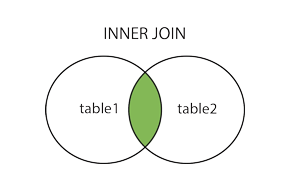
The inner join keeps a row only when the condition holds on both sides, so the two fruits that sit in both baskets come back and the four that do not are gone:
SELECT a, fruit_a, b, fruit_b
FROM basket_a
INNER JOIN basket_b ON fruit_a = fruit_b
ORDER BY a;
| a | fruit_a | b | fruit_b |
|---|---|---|---|
| 1 | Apple | 2 | Apple |
| 2 | Orange | 1 | Orange |
The a and b values differ in every row, which is the point of joining on the fruit name rather than on the key: nothing says the two baskets number their contents the same way.
Left join
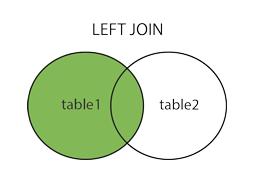
The left join returns the same two matched rows and then adds every unmatched row of basket_a, with nulls in the columns that would have come from basket_b:
SELECT a, fruit_a, b, fruit_b
FROM basket_a
LEFT JOIN basket_b ON fruit_a = fruit_b
ORDER BY a;
| a | fruit_a | b | fruit_b |
|---|---|---|---|
| 1 | Apple | 2 | Apple |
| 2 | Orange | 1 | Orange |
| 3 | Banana | ||
| 4 | Cucumber |
Two null columns in a row are how you find what is missing: add WHERE b IS NULL and the query answers "which fruit is in the first basket only".
Right join
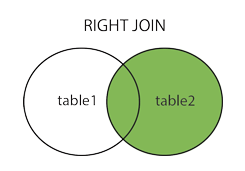
The right join is the same operation with the tables the other way round: every row of basket_b survives, and the columns of basket_a go null where nothing matched.
SELECT a, fruit_a, b, fruit_b
FROM basket_a
RIGHT JOIN basket_b ON fruit_a = fruit_b
ORDER BY b;
| a | fruit_a | b | fruit_b |
|---|---|---|---|
| 2 | Orange | 1 | Orange |
| 1 | Apple | 2 | Apple |
| 3 | Watermelon | ||
| 4 | Pear |
Swapping the two table names and writing LEFT JOIN gives the same rows. Pick whichever keeps the table you care about on the left, and a reader of the query will follow it more easily.
Full outer join
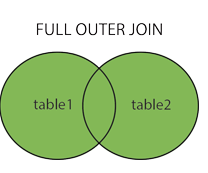
The full outer join keeps everything: the matched pairs, the unmatched rows of the left table with nulls on the right, and the unmatched rows of the right table with nulls on the left.
SELECT a, fruit_a, b, fruit_b
FROM basket_a
FULL OUTER JOIN basket_b ON fruit_a = fruit_b
ORDER BY a, b;
| a | fruit_a | b | fruit_b |
|---|---|---|---|
| 1 | Apple | 2 | Apple |
| 2 | Orange | 1 | Orange |
| 3 | Banana | ||
| 4 | Cucumber | ||
| 3 | Watermelon | ||
| 4 | Pear |
The two null rows sort last because the default in an ascending sort is NULLS LAST, which acts as though nulls were larger than non-nulls.
Cross, natural and self joins in psql
The last three types each need a second pair of tables, because a basket of fruit has nothing to cross-join, no shared column name and no row that points at another row of the same table.
Cross join
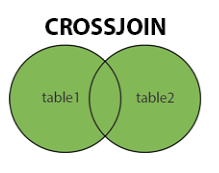
The cross join has no condition at all. For every possible combination of a row from the first table and a row from the second, the joined table contains a row of all columns of the first followed by all columns of the second, so two tables of N and M rows produce N times M. Two smaller tables show it without filling the page:
CREATE TABLE customer (customer_id int PRIMARY KEY, customer_name varchar(60) NOT NULL);
CREATE TABLE invoice (
  invoice_id     int PRIMARY KEY,
  invoice_number varchar(20) NOT NULL,
  customer_id    int NOT NULL,
  total_amount   numeric(10,2) NOT NULL
);

INSERT INTO customer VALUES (1, 'John Smith'), (2, 'Jane Doe');
INSERT INTO invoice VALUES (1, 'INV-001', 1, 100.00), (2, 'INV-002', 2, 150.00);
SELECT c.customer_id, c.customer_name, i.invoice_number, i.total_amount
FROM customer c
CROSS JOIN invoice i
ORDER BY c.customer_id, i.invoice_id;
| customer_id | customer_name | invoice_number | total_amount |
|---|---|---|---|
| 1 | John Smith | INV-001 | 100.00 |
| 1 | John Smith | INV-002 | 150.00 |
| 2 | Jane Doe | INV-001 | 100.00 |
| 2 | Jane Doe | INV-002 | 150.00 |
Both invoices belong to a customer through invoice.customer_id, and the cross join ignores that column completely. Two of these four rows pair a customer with someone else's invoice, which is what a forgotten join condition produces on a table of any size.
Natural join
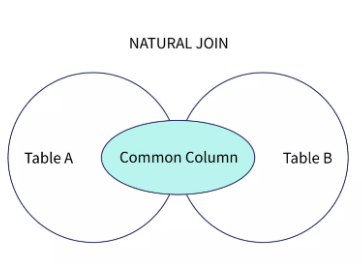
The natural join writes the condition for you out of the column names the two tables share:
CREATE TABLE categories (category_id int PRIMARY KEY, category_name varchar(60) NOT NULL);
CREATE TABLE products (
  product_id   int PRIMARY KEY,
  product_name varchar(60) NOT NULL,
  category_id  int NOT NULL REFERENCES categories,
  price        int NOT NULL
);

INSERT INTO categories VALUES (1, 'Phones'), (2, 'TVs'), (3, 'Laptops');
INSERT INTO products VALUES
  (1, 'iPhone', 1, 999), (2, 'Samsung S21', 1, 899),
  (3, 'Sony TV', 2, 1499), (4, 'MacBook Pro', 3, 1999);
SELECT * FROM products NATURAL JOIN categories ORDER BY product_id;
| category_id | product_id | product_name | price | category_name |
|---|---|---|---|---|
| 1 | 1 | iPhone | 999 | Phones |
| 1 | 2 | Samsung S21 | 899 | Phones |
| 2 | 3 | Sony TV | 1499 | TVs |
| 3 | 4 | MacBook Pro | 1999 | Laptops |
category_id comes first and appears once, because the merged join columns lead the output of a USING join and a natural join is a USING join with an implicit list. The manual is blunt about the risk in that implicit list. USING is reasonably safe from column changes in the joined relations, since only the listed columns are combined. NATURAL is considerably more risky, because any schema change that puts a new matching column name in both tables makes the join combine that column as well. Adding a created_at column to both tables would silently turn the query above into a join on category and timestamp. Write the list yourself and the same query is immune:
SELECT * FROM products JOIN categories USING (category_id) ORDER BY product_id;
Self join
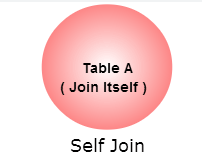
A self join is an ordinary join in which both sides are the same table under different aliases, which is how a row reaches the row it points at:
CREATE TABLE employee (
  employee_id int PRIMARY KEY,
  first_name  varchar(60) NOT NULL,
  last_name   varchar(60) NOT NULL,
  manager_id  int REFERENCES employee
);

INSERT INTO employee VALUES
  (1, 'John', 'Smith', NULL), (2, 'Jane', 'Doe', 1),
  (3, 'Alice', 'Brown', 1), (4, 'Bob', 'Johnson', 2);
SELECT e.first_name || ' ' || e.last_name AS employee,
       m.first_name || ' ' || m.last_name AS manager
FROM employee e
LEFT JOIN employee m ON m.employee_id = e.manager_id
ORDER BY manager, employee;
| employee | manager |
|---|---|
| Bob Johnson | Jane Doe |
| Alice Brown | John Smith |
| Jane Doe | John Smith |
| John Smith |
The alias is what makes this legal: e is the employee row and m is the manager row, and without the two names PostgreSQL could not tell which employee_id you meant. LEFT JOIN is doing work here too, because the one employee with no manager_id would drop out of an inner join.
Build a join visually in DbSchema

DbSchema connects to PostgreSQL, reverse-engineers the schema into a diagram, and builds joins from the foreign keys it found there. Click a table header in the diagram and DbSchema opens the Query Builder with that table loaded. Click the small arrow next to a column to follow a foreign key, and DbSchema adds the related table and the join between them. Click the join type label on the connecting line to switch it between INNER JOIN, LEFT JOIN and EXISTS, tick the columns you want in the result, and read the SQL DbSchema writes at the bottom of the builder as you click.
Tables that should be joined but have no foreign key between them are the common case in an old schema, and DbSchema covers it with virtual foreign keys: drag a column onto the related column in another table and DbSchema records the relationship in the .dbs model file without creating a constraint in PostgreSQL. The Query Builder then treats it exactly like a real foreign key when it builds the join.
Queries you would rather type go into the DbSchema SQL Editor, which opens from the Editors menu and sends the statement to the connected database when you press Execute Query. The SQL Editor is in the free Community Edition; the Query Builder is a Pro feature.
Seven join types, one decision: what should happen to a row that matches nothing on the other side. Inner drops it, left and right keep the side you name, full outer keeps both, cross join never asks the question, and a self join answers it about a table's own rows. Write USING rather than NATURAL when the shared column list matters, and put an ORDER BY on anything whose output you are going to read. To see the foreign keys your joins follow, download DbSchema at https://dbschema.com/download.html and reverse-engineer your PostgreSQL database into a diagram: reverse engineering, the diagrams and the SQL Editor are in the free Community Edition, and the visual Query Builder is in Pro.









