SQL HAVING Clause: GROUP BY Filters, Examples, and HAVING vs WHERE
For someone who has just learned GROUP BY and needs to filter the groups; every query below is shown with the rows it returns.
On this page
A grouped query gives you one row per group, and the report needs only some of them: the products
that sold more than a threshold, or the customers with enough orders to count. A condition in
WHERE can't do it, because WHERE runs before the groups exist. HAVING runs after them, so it
can test each group's COUNT, SUM or AVG and keep the groups that pass:
SELECT grouped_column, aggregate_function(column)
FROM table_name
WHERE row_condition
GROUP BY grouped_column
HAVING aggregate_condition
ORDER BY grouped_column;
Leave out the clauses you don't need; keep the rest in this order.
What the SQL HAVING clause does
Every query in this article runs on six orders of three products:
CREATE TABLE Orders (
    order_id    INT PRIMARY KEY,
    customer_id INT,
    product     VARCHAR(20),
    quantity    INT
);

INSERT INTO Orders VALUES
    (1, 1, 'Apples',   50),
    (2, 2, 'Bananas',  30),
    (3, 2, 'Apples',   20),
    (4, 3, 'Cherries', 70),
    (5, 2, 'Bananas',  10),
    (6, 1, 'Apples',   20);
Grouped by product, the six rows give the numbers that every HAVING condition below is tested
against:
SELECT product,
       COUNT(*)      AS order_count,
       SUM(quantity) AS total_quantity,
       MIN(quantity) AS smallest,
       MAX(quantity) AS largest,
       AVG(quantity) AS average
FROM Orders
GROUP BY product;
| product | order_count | total_quantity | smallest | largest | average |
|---|---|---|---|---|---|
| Apples | 3 | 90 | 20 | 50 | 30.0000 |
| Bananas | 2 | 40 | 10 | 30 | 20.0000 |
| Cherries | 1 | 70 | 70 | 70 | 70.0000 |
The tables show what MySQL prints. PostgreSQL and SQLite return the same rows, with other decimal
places in the averages, and without ORDER BY any of them may list the groups in another order
(PostgreSQL 17 SELECT).
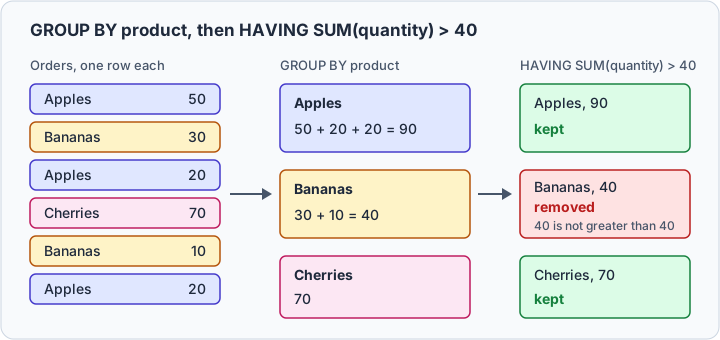
The products that sold more than 40 units in total:
SELECT product, SUM(quantity) AS total_quantity
FROM Orders
GROUP BY product
HAVING SUM(quantity) > 40
ORDER BY total_quantity DESC;
| product | total_quantity |
|---|---|
| Apples | 90 |
| Cherries | 70 |
Bananas totals exactly 40, which is not greater than 40, so HAVING drops its group; >= 40 would
keep it. No row was removed on the way in:
Where HAVING goes in the query, and why
The clauses follow the logical order in which the database processes a query, which PostgreSQL's SELECT page describes and Microsoft Learn lists in SELECT (Transact-SQL). The physical execution can differ, but this order decides what each clause can see:
FROMreads the tables and runs the joins.WHEREremoves rows.GROUP BYforms the groups, and the aggregates are computed.HAVINGremoves groups.SELECTcomputes the output columns and their aliases.ORDER BYsorts what is left.
WHERE runs before the totals exist, so it has nothing to compare them with, and HAVING is the
first clause after them. Aliases appear only at step 5, which is why ORDER BY total_quantity works
everywhere while an alias in HAVING depends on the engine.



HAVING vs WHERE
| clause | filters | runs | can test SUM() or COUNT() |
|---|---|---|---|
WHERE | rows | before GROUP BY | no |
HAVING | groups | after GROUP BY | yes |
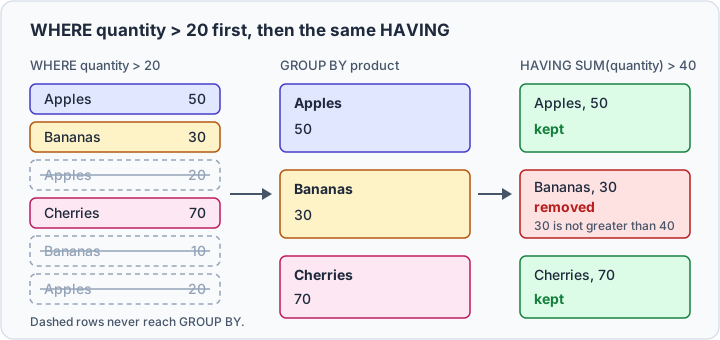
Both clauses in one query: keep the orders of more than 20 units, then the products whose remaining total is over 40.
SELECT product, SUM(quantity) AS total_quantity
FROM Orders
WHERE quantity > 20
GROUP BY product
HAVING SUM(quantity) > 40;
| product | total_quantity |
|---|---|
| Apples | 50 |
| Cherries | 70 |
Apples totals 50 here, not 90, because WHERE removed its two orders of 20 before the grouping.
Bananas lost its order of 10 the same way and fails HAVING with 30. Moving a condition from one
clause to the other changes the answer.
A condition on a grouped column, such as HAVING product = 'Apples', also runs without an aggregate
and returns Apples with 90. It belongs in WHERE: the
MySQL 8.4 SELECT manual asks you not to use
HAVING for items that should be in WHERE, and says MySQL applies HAVING nearly last, with no
optimization. More on row filters in SQL WHERE Clause.
Practice this: Lesson 7 of the SQL tutorial runs GROUP BY and HAVING on a shop database in your browser, with checked exercises.
SQL HAVING examples with COUNT, AVG, MIN, and MAX
Only the HAVING line changes from one question to the next. The products ordered more than once:
SELECT product, COUNT(*) AS order_count
FROM Orders
GROUP BY product
HAVING COUNT(*) > 1;
| product | order_count |
|---|---|
| Apples | 3 |
| Bananas | 2 |
The other aggregates, read against the group table above:
HAVING line | groups it keeps |
|---|---|
HAVING AVG(quantity) < 30 | Bananas |
HAVING MIN(quantity) < 25 | Apples, Bananas |
HAVING MAX(quantity) > 60 | Cherries |
Apples averages exactly 30, and < leaves it out, as > left out the Bananas total of 40.
MIN(quantity) < 25 keeps a group with any
order under 25, and MAX(quantity) > 60 a group with any order over 60. The functions themselves are
in SQL MIN() and MAX() and
SQL COUNT(), AVG(), and SUM().
HAVING with multiple conditions
AND, OR and BETWEEN combine conditions as they do in WHERE, and an aggregate can filter
without being selected, as COUNT(*) does here:
SELECT product, SUM(quantity) AS total_quantity
FROM Orders
GROUP BY product
HAVING COUNT(*) >= 2
   AND SUM(quantity) > 50;
| product | total_quantity |
|---|---|
| Apples | 90 |
Bananas has its two orders but only 40 units. With OR, one condition is enough:
HAVING AVG(quantity) > 50 OR COUNT(*) > 2 keeps Cherries for its average and Apples for its three
orders. BETWEEN includes both ends, so a total of exactly 70 passes:
SELECT product, SUM(quantity) AS total_quantity
FROM Orders
GROUP BY product
HAVING SUM(quantity) BETWEEN 30 AND 70;
| product | total_quantity |
|---|---|
| Bananas | 40 |
| Cherries | 70 |
HAVING with COUNT DISTINCT
COUNT(DISTINCT column) counts the different values in a group rather than its rows. The products
bought by at least two different customers:
SELECT product, COUNT(DISTINCT customer_id) AS customers
FROM Orders
GROUP BY product
HAVING COUNT(DISTINCT customer_id) >= 2;
| product | customers |
|---|---|
| Apples | 2 |
Bananas has two orders, so HAVING COUNT(*) >= 2 would keep it, but both came from customer 2.
HAVING with JOINs
A second table holds the customers' names:
CREATE TABLE Customers (
    customer_id   INT PRIMARY KEY,
    customer_name VARCHAR(20)
);

INSERT INTO Customers VALUES
    (1, 'Ada'),
    (2, 'Grace'),
    (3, 'Linus');
The join runs first, then the grouping, then HAVING, so the condition counts joined rows. The
customers with at least two orders, by name:
SELECT c.customer_name, COUNT(*) AS order_count
FROM Customers c
JOIN Orders o ON o.customer_id = c.customer_id
GROUP BY c.customer_id, c.customer_name
HAVING COUNT(*) >= 2
ORDER BY order_count DESC;
| customer_name | order_count |
|---|---|
| Grace | 3 |
| Ada | 2 |
Linus has one order and drops out. Grouping by the id as well as the name keeps apart two customers who share a name. For the join itself, see SQL Joins Explained.
HAVING without GROUP BY
With no GROUP BY, all the selected rows form one group, as Microsoft Learn's
HAVING (Transact-SQL)
and the PostgreSQL SELECT page both say. PostgreSQL's page adds that the query returns one row when
the condition is true, none when it is false:
SELECT SUM(quantity) AS total_quantity
FROM Orders
HAVING SUM(quantity) > 100;
| total_quantity |
|---|
| 200 |
With > 1000, it returns no rows at all, not a row holding 200. SQLite accepts this form from
version 3.39.0.
A plain column is another matter:
SELECT product, quantity
FROM Orders
HAVING quantity > 40;
| engine | result |
|---|---|
| MySQL | Apples 50 and Cherries 70, as if HAVING were WHERE |
| PostgreSQL 17 | ERROR: column "orders.product" must appear in the GROUP BY clause or be used in an aggregate function |
| SQLite 3.50 | HAVING clause on a non-aggregate query |
Put that filter in WHERE, where every engine agrees.
Column aliases in HAVING
An alias from the select list is where engines differ, and the usual reason a HAVING doesn't
recognize a column the select list shows:
SELECT product, SUM(quantity) AS total_quantity
FROM Orders
GROUP BY product
HAVING total_quantity > 40;
| engine | result |
|---|---|
| MySQL | Apples 90 and Cherries 70 |
| SQLite 3.50 | Apples 90 and Cherries 70 |
| PostgreSQL 17 | ERROR: column "total_quantity" does not exist |
| SQL Server | rejected, by its documented logical order |
MySQL's GROUP BY handling page
calls the alias in HAVING an extension to standard SQL. PostgreSQL's SELECT page allows an output
column's name in ORDER BY and GROUP BY only, and Microsoft Learn rules the aliases out of every
clause before SELECT, HAVING included. Repeating the aggregate, HAVING SUM(quantity) > 40,
runs everywhere.
Common mistakes and the errors they raise
An aggregate in WHERE is the first, and all three engines refuse it:
SELECT product, SUM(quantity)
FROM Orders
WHERE SUM(quantity) > 40
GROUP BY product;
| engine | error |
|---|---|
| MySQL | ERROR 1111 (HY000): Invalid use of group function |
| PostgreSQL | ERROR: aggregate functions are not allowed in WHERE |
| SQLite | misuse of aggregate: SUM() |
Move the condition to HAVING. A column that is neither grouped nor aggregated is the second: the
three Apples orders become one row, with three quantities and one place to put them.
SELECT product, SUM(quantity)
FROM Orders
GROUP BY product
HAVING quantity > 20;
| engine | error |
|---|---|
| MySQL | ERROR 1054 (42S22): Unknown column 'quantity' in 'having clause' |
| PostgreSQL | ERROR: column "orders.quantity" must appear in the GROUP BY clause or be used in an aggregate function |
| SQLite | none |
Selecting the column fails the same way, in MySQL with error 1055 under ONLY_FULL_GROUP_BY, which
is on by default. SQLite accepts both, and its
SELECT documentation evaluates such a HAVING condition
against an arbitrarily selected row of the group. Group by the column, wrap it in an aggregate such
as MIN(quantity) > 20, or move a condition on single rows to WHERE.
Run and build HAVING queries in DbSchema
Connect DbSchema through its MySQL or
PostgreSQL JDBC driver and open the DbSchema
SQL Editor, which the free Community Edition includes. In
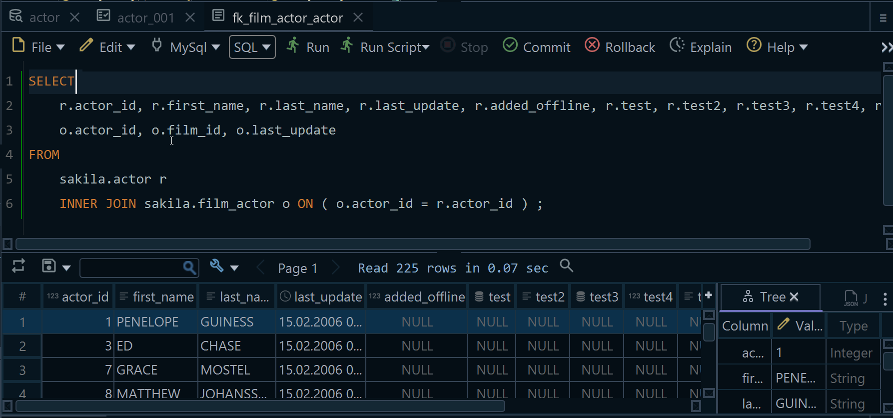
DbSchema, run a grouped query without its HAVING line, then with it: the groups missing from the
second result are the ones the condition removed.
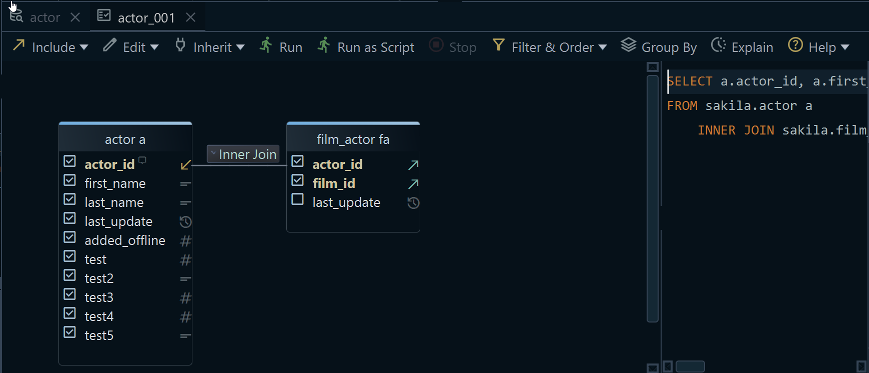
To build the query with the mouse, turn on Group By mode in the toolbar of the DbSchema
Query Builder, which is in the Pro edition. DbSchema then
makes ticked columns without an aggregate function the GROUP BY columns, applies MIN, MAX,
SUM, AVG or COUNT when you choose Aggregate from a column's right-click menu, and updates the
generated SQL with each change.
A SELECT like these reads the connected database and changes nothing in it. To practice, answer
these on the Orders table with one grouped query each:
- The customers whose largest single order is at least 50 units.
- Each product's smallest order, for the products whose smallest order is over 20 units.
- The customers who placed more than two orders.
Download DbSchema, connect it to your own database, and run your grouped
query with and without its HAVING line. The connection, the diagram and the SQL Editor are in the
free Community Edition, and the Query Builder is in Pro:
https://dbschema.com/download.html. For the grouping itself,
read SQL GROUP BY Explained.









