SQL WHERE Clause Explained with Operators and Examples
For someone writing their first SQL filters; every operator below is shown with the rows it actually returns.
On this page
You need a handful of rows out of a table that holds thousands, and a SELECT without a filter hands you all of them. WHERE is the clause that cuts the result down. You write a condition, the database tests every row against it, and only the rows for which the condition comes out TRUE are returned:
SELECT column1, column2
FROM table_name
WHERE condition;
What is the WHERE clause?
WHERE goes after FROM and before anything that groups or sorts the result.
The same clause works in UPDATE and DELETE, where it decides which rows are changed or removed rather than which are returned. Its position in the statement never moves, so the SQL syntax of a filtered query is the unfiltered one with a line added.
The demo table
Every query below runs against one table of eight customers. Each was run on PostgreSQL 17.9, MySQL 9.1 and SQLite 3.50, and the rows were the same on all three except where a section says otherwise.
CREATE TABLE Customers (
    CustomerID INT PRIMARY KEY,
    Name       VARCHAR(50),
    Age        INT,
    City       VARCHAR(50)
);

INSERT INTO Customers VALUES
    (1, 'John',  28, 'New York'),
    (2, 'Alice', 30, 'London'),
    (3, 'James', 32, 'New York'),
    (4, 'Clara', 27, 'Paris'),
    (5, 'Bob',   35, 'London'),
    (6, 'Jules', 22, 'Berlin'),
    (7, 'Jimmy', 45, 'Los Angeles'),
    (8, 'Nora',  29, NULL);
Nora has no city on file. That gap comes back in several sections below.
Comparison operators
A condition is built from these operators:
| Operator | The row is kept when |
|---|---|
= | the two values are equal |
<> or != | the two values differ |
>, < | the column is greater, or smaller |
>=, <= | the column is greater or equal, or smaller or equal |
BETWEEN a AND b | the value lies from a to b, both included |
IN (a, b, ...) | the value equals one entry of the list |
LIKE 'pattern' | the text matches the pattern |
IS NULL | the value is missing |
PostgreSQL, MySQL and SQLite accept both spellings of "not equal"; PostgreSQL's documentation calls != an alias of <>. A comparison puts a column on one side and a value on the other:
SELECT * FROM Customers
WHERE Age > 30;
| CustomerID | Name | Age | City |
|---|---|---|---|
| 3 | James | 32 | New York |
| 5 | Bob | 35 | London |
| 7 | Jimmy | 45 | Los Angeles |
Text is compared the same way, with the value in single quotes, as in WHERE City = 'London'. Whether 'london' would match as well depends on the engine, as the section on upper and lower case shows.
BETWEEN, IN and LIKE
Three operators cover the conditions that a single comparison handles badly: a range, a list of accepted values, and a partial string.
BETWEEN takes two bounds and includes both of them, so the query below keeps the 35-year-old as well:
SELECT * FROM Customers
WHERE Age BETWEEN 25 AND 35;
| CustomerID | Name | Age | City |
|---|---|---|---|
| 1 | John | 28 | New York |
| 2 | Alice | 30 | London |
| 3 | James | 32 | New York |
| 4 | Clara | 27 | Paris |
| 5 | Bob | 35 | London |
| 8 | Nora | 29 | NULL |
The smaller bound goes first. BETWEEN 35 AND 25 means Age >= 35 AND Age <= 25, so it returns no rows on any of the three engines.
IN takes a list and matches a row when the column equals any entry in it, which is shorter than chaining OR:
SELECT * FROM Customers
WHERE City IN ('London', 'Paris');
| CustomerID | Name | Age | City |
|---|---|---|---|
| 2 | Alice | 30 | London |
| 4 | Clara | 27 | Paris |
| 5 | Bob | 35 | London |
LIKE matches a pattern, in which % stands for any number of characters and _ stands for exactly one:
SELECT * FROM Customers
WHERE City LIKE 'L%';
| CustomerID | Name | Age | City |
|---|---|---|---|
| 2 | Alice | 30 | London |
| 5 | Bob | 35 | London |
| 7 | Jimmy | 45 | Los Angeles |
Los Angeles is in that result because L% asks for a city starting with L, not for a city called London.
Upper and lower case in text conditions
Whether a lowercase value finds London is decided by the engine, not by the SQL you write. These two conditions were run against the demo table:
SELECT * FROM Customers WHERE City = 'london';
SELECT * FROM Customers WHERE City LIKE 'l%';
Each engine returned a different combination:
| Condition | PostgreSQL 17 | MySQL 9.1 | SQLite 3.50 |
|---|---|---|---|
City = 'london' | 0 rows | 2 rows | 0 rows |
City LIKE 'l%' | 0 rows | 3 rows | 3 rows |
MySQL compares text by the collation of the column, and its default collation, utf8mb4_0900_ai_ci, ignores case (MySQL manual). PostgreSQL compares the characters exactly and offers ILIKE for a pattern that ignores case (PostgreSQL 17). SQLite's = compares exactly too, while its LIKE ignores case for the ASCII letters A to Z (SQLite).
If a condition has to ignore case on every engine, lower both sides yourself. WHERE LOWER(City) = 'london' returned Alice and Bob on all three.
Filtering on NULL values
A NULL value means the value is unknown, and an unknown compares equal to nothing, not even to another unknown. WHERE City = NULL therefore returns no rows at all, whatever the table holds. The operator that finds the gaps is IS NULL:
SELECT * FROM Customers
WHERE City IS NULL;
| CustomerID | Name | Age | City |
|---|---|---|---|
| 8 | Nora | 29 | NULL |
IS NOT NULL returns the other seven rows. The same rule kept Nora out of the IN and LIKE results above: her city is unknown, so it matched neither list nor pattern.
A NULL inside a NOT IN list does more damage:
SELECT * FROM Customers
WHERE City NOT IN ('London', NULL);
This returns no rows on all three engines, John and Jules included. For John the test asks whether New York differs from London and from an unknown value, and the second half can never be TRUE (PostgreSQL 17). A NULL usually reaches such a list through a subquery whose column has a missing value.
AND, OR and NOT in the same condition
AND keeps a row only when both of its conditions are TRUE:
SELECT * FROM Customers
WHERE Age > 25 AND City = 'New York';
| CustomerID | Name | Age | City |
|---|---|---|---|
| 1 | John | 28 | New York |
| 3 | James | 32 | New York |
OR keeps a row when either condition is TRUE, and NOT inverts the condition that follows it. Inverting has one catch:
SELECT * FROM Customers
WHERE NOT City = 'London';
| CustomerID | Name | Age | City |
|---|---|---|---|
| 1 | John | 28 | New York |
| 3 | James | 32 | New York |
| 4 | Clara | 27 | Paris |
| 6 | Jules | 22 | Berlin |
| 7 | Jimmy | 45 | Los Angeles |
Nora is not in London, yet she is missing from the result. A condition has three possible outcomes, and only TRUE keeps the row:
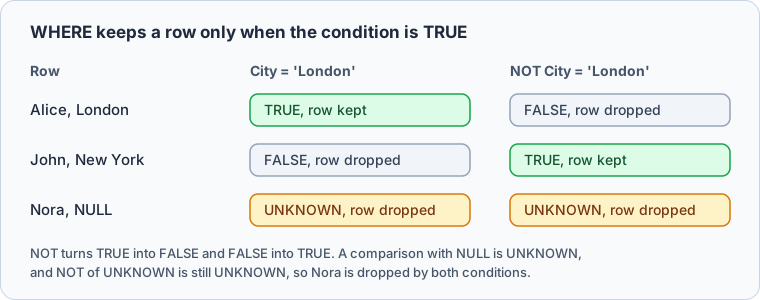
To keep Nora, say so: WHERE City <> 'London' OR City IS NULL.



WHERE in UPDATE and DELETE
In an UPDATE or a DELETE, the condition picks the rows that change, so a wrong condition changes data rather than a result. Run the condition as a SELECT first and check that it returns exactly the rows you mean, then reuse it:
SELECT * FROM Customers
WHERE CustomerID = 2;

UPDATE Customers
SET Age = 31
WHERE CustomerID = 2;
The SELECT returns Alice alone, and the UPDATE changes that one row: PostgreSQL reports UPDATE 1, MySQL Query OK, 1 row affected. DELETE works the same way, so DELETE FROM Customers WHERE CustomerID = 2 removes Alice and nobody else. Without the WHERE line, an UPDATE or a DELETE hits every row in the table.
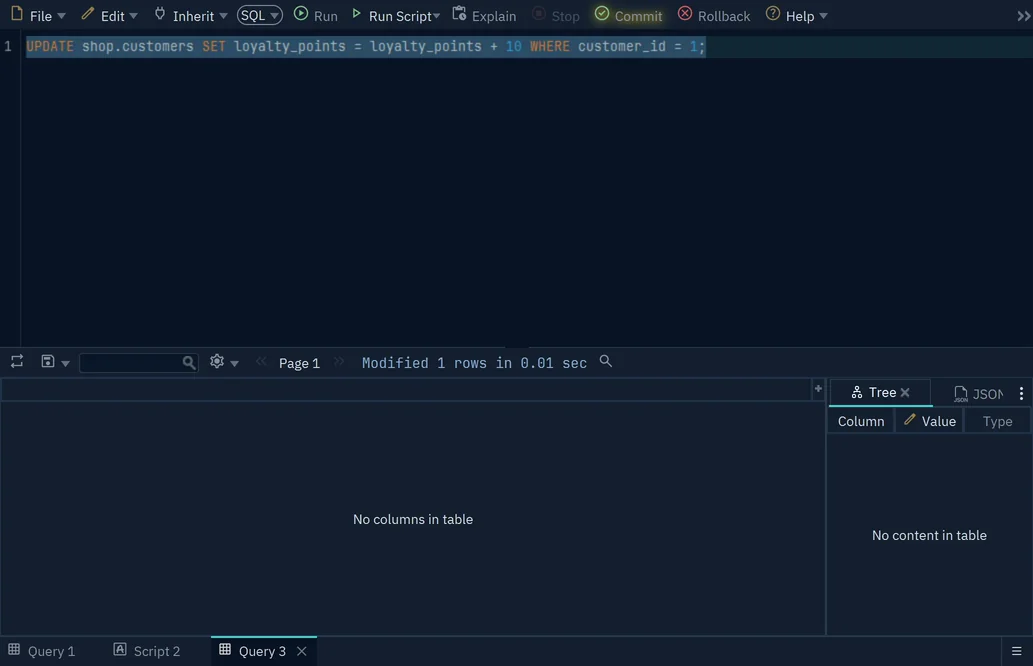
In the DbSchema SQL Editor, an UPDATE or DELETE that you run with Run stays in an open transaction until you press Commit, and Rollback undoes it. If DbSchema reports more modified rows than the SELECT returned, roll back.
Common mistakes
AND binds tighter than OR, the way multiplication binds tighter than addition (PostgreSQL 17, MySQL). Mixing the two without parentheses gives a result that reads right and is wrong:
SELECT * FROM Customers
WHERE City = 'London' OR City = 'Paris' AND Age > 30;
| CustomerID | Name | Age | City |
|---|---|---|---|
| 2 | Alice | 30 | London |
| 5 | Bob | 35 | London |
The database read that as London, or else Paris with an age over 30. Clara is in Paris but 27, so no Paris row survives, while both Londoners come back regardless of age. Parentheses say what you meant:
SELECT * FROM Customers
WHERE (City = 'London' OR City = 'Paris') AND Age > 30;
| CustomerID | Name | Age | City |
|---|---|---|---|
| 5 | Bob | 35 | London |
Writing = NULL instead of IS NULL is the second classic, and it returns an empty result rather than an error, as the NULL section above shows.
The third is a condition on an aggregate. WHERE tests single rows before any grouping happens, so WHERE COUNT(*) > 1 fails. PostgreSQL answers aggregate functions are not allowed in WHERE, and MySQL Invalid use of group function. That test belongs in the HAVING clause.
Practice this: Lesson 3 of the SQL tutorial runs WHERE, AND, OR, IN, BETWEEN and LIKE on a shop database in your browser, with checked exercises.
Practice questions
Four conditions to write against the Customers table above:
- The customers whose name starts with J.
- The customers in New York who are older than 25.
- The customers whose age is not between 25 and 35.
- The customers whose city is neither London nor Paris, Nora included.
The fourth one is the interesting one, because Nora's city is unknown and the NOT result above shows what an unknown does to a condition that excludes values.
If the rest of the statement is still new, the SQL tutorial for beginners walks through SELECT itself.
Download DbSchema at https://dbschema.com/download.html, connect to a database of your own, and rewrite these conditions against a real table in the SQL Editor. The connection, the diagram DbSchema draws from it, and the SQL Editor with its Commit and Rollback are all in the free Community Edition.
Frequently asked questions
What is the difference between the WHERE and HAVING clause in SQL?
WHERE is written before GROUP BY and tests one row at a time, using only the values in that row. HAVING is written after GROUP BY and tests the groups it produced, which is why an aggregate such as COUNT(*) or SUM(Age) can appear there and not in WHERE.
Try these WHERE clauses on your own schema
DbSchema reverse-engineers your database into an interactive diagram and includes an SQL editor, so you can write a query and see which rows come back. All three are in the free Community Edition.









