SQL IN Operator Explained with Practical Examples
For someone new to SQL who can write a SELECT with one condition; every query below is shown with the rows it returns.
On this page
You need the rows whose grade is A or B, and next month the list grows to four grades. Written with OR, the filter repeats the column name once for every value. IN writes the column once and puts the accepted values after it, in parentheses: a row comes back when the column equals any value in the list. NOT IN returns the rows that equal none of them, and a subquery can supply the list so that you don't type it at all.
SELECT columns FROM table_name WHERE column_name IN (value1, value2, value3);

SELECT columns FROM table_name WHERE column_name NOT IN (value1, value2, value3);

SELECT columns FROM table_name WHERE column_name IN (SELECT column_name FROM other_table);
Every statement on this page was run on PostgreSQL 17.9, MySQL 9.1.0 and SQLite 3.50.4, and the result tables are copied from those runs. Where the three engines disagree, the section says so.
What the SQL IN operator does
IN belongs in the WHERE clause, right after the column it tests. The examples use two tables, four students and the scholarships awarded to them:
CREATE TABLE Students (
    ID    INT PRIMARY KEY,
    Name  VARCHAR(50),
    Age   INT,
    Grade CHAR(1)
);

INSERT INTO Students VALUES
    (1, 'Alice',   23, 'A'),
    (2, 'Bob',     25, 'B'),
    (3, 'Charlie', 23, 'A'),
    (4, 'David',   24, 'C');

CREATE TABLE Scholarships (
    ScholarshipID INT PRIMARY KEY,
    StudentID     INT,
    AwardedOn     DATE
);

INSERT INTO Scholarships VALUES
    (1, 1,    '2023-01-10'),
    (2, 3,    '2023-02-15'),
    (3, 1,    '2023-02-15'),
    (4, NULL, '2023-01-10');
Alice holds two scholarships, and scholarship 4 has no student yet, so its StudentID is NULL. Both details matter later.
The students whose grade is A or B:
SELECT Name
FROM Students
WHERE Grade IN ('A', 'B');
| Name |
|---|
| Alice |
| Bob |
| Charlie |
David's grade is C, which is not in the list, so his row is left out.
Practice this: Lesson 3 of the SQL tutorial runs WHERE, AND, OR, IN, BETWEEN and LIKE on a shop database in your browser, with checked exercises.
IN compared with OR and the = operator
The same filter written without IN is a chain of = conditions joined by OR:
SELECT Name
FROM Students
WHERE Grade = 'A' OR Grade = 'B';
It returns the same three rows. The PostgreSQL 17 documentation defines IN as shorthand for exactly this chain, so the choice is about the person who reads the query next. Use = when there is one value, because it says exactly that, and IN from the second value on. Keep OR when each condition tests a different column, such as Grade = 'A' OR Age = 25, since IN compares one column against a list.
The values an IN list can hold
The values are written the way their type is written anywhere else in SQL. Strings take single quotes:
SELECT Name
FROM Students
WHERE Name IN ('Alice', 'David');
| Name |
|---|
| Alice |
| David |
Numbers take none: WHERE ID IN (1, 4) returns the same two students. A date is a quoted literal compared against a date column:
SELECT ScholarshipID, StudentID
FROM Scholarships
WHERE AwardedOn IN ('2023-01-10');
| ScholarshipID | StudentID |
|---|---|
| 1 | 1 |
| 4 | NULL |
A list with one value is legal, and a repeated value is harmless: Grade IN ('A', 'A', 'B') returns the same three rows as Grade IN ('A', 'B').
IN with a subquery
A subquery that returns one column can stand in for the typed list. The students who hold a scholarship:
SELECT Name
FROM Students
WHERE ID IN (SELECT StudentID FROM Scholarships);
| Name |
|---|
| Alice |
| Charlie |
The subquery returns 1, 3, 1 and NULL. Alice appears once even though her ID is in that list twice, because IN only asks whether a match exists.
A subquery with two columns is rejected, because IN has one value on its left to compare. Adding AwardedOn to the subquery's select list gives these errors:
| Engine | Error |
|---|---|
| PostgreSQL 17.9 | ERROR: subquery has too many columns |
| MySQL 9.1.0 | ERROR 1241 (21000): Operand should contain 1 column(s) |
| SQLite 3.50.4 | sub-select returns 2 columns - expected 1 |
NOT IN, and what a NULL does to it
NOT IN keeps the rows that match none of the values:
SELECT Name
FROM Students
WHERE Name NOT IN ('Alice', 'David');
| Name |
|---|
| Bob |
| Charlie |
Now the students without a scholarship. Bob and David hold none, so the obvious query should return them:
SELECT Name
FROM Students
WHERE ID NOT IN (SELECT StudentID FROM Scholarships);
It returns no rows, on all three engines. The NULL in scholarship 4 causes it. A comparison with NULL is neither true nor false but UNKNOWN, and NOT IN joins its comparisons with AND, which is true only when every part is:
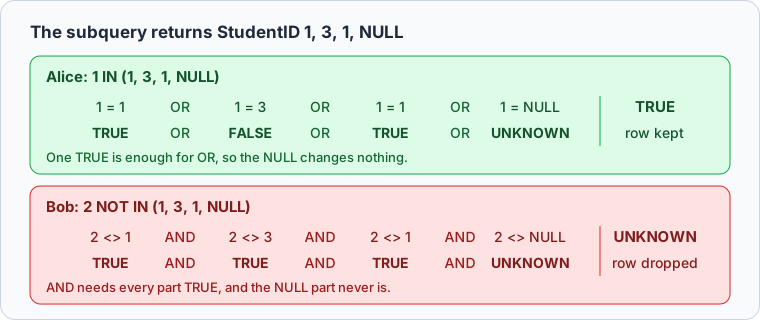
WHERE keeps only the rows whose condition is true, so every student is dropped. PostgreSQL's documentation states the rule: with no equal value and at least one NULL on the right, NOT IN yields null, not true. Microsoft's documentation for SQL Server and Oracle's describe the same result. IN is safe from it: Grade IN ('A', NULL) still returns Alice and Charlie, because one true comparison is enough for OR.
The fix is to keep the NULL out of the list:
SELECT Name
FROM Students
WHERE ID NOT IN (SELECT StudentID FROM Scholarships WHERE StudentID IS NOT NULL);
| Name |
|---|
| Bob |
| David |
NOT EXISTS returns the same two rows without the extra condition. It tests for a matching row rather than comparing against a list, and a NULL never matches anything:
SELECT Name
FROM Students s
WHERE NOT EXISTS (SELECT 1 FROM Scholarships sc WHERE sc.StudentID = s.ID);
Whenever a NOT IN subquery reads a column that allows NULL, use one of these two forms.
IN in an UPDATE statement
IN is a condition, so it picks the rows an UPDATE changes or a DELETE removes in the same way it picks the rows a SELECT returns:
UPDATE Students
SET Grade = 'D'
WHERE Name IN ('Alice', 'David');
Reading the table back shows the two rows that changed:
SELECT Name, Grade
FROM Students;
| Name | Grade |
|---|---|
| Alice | D |
| Bob | B |
| Charlie | A |
| David | D |
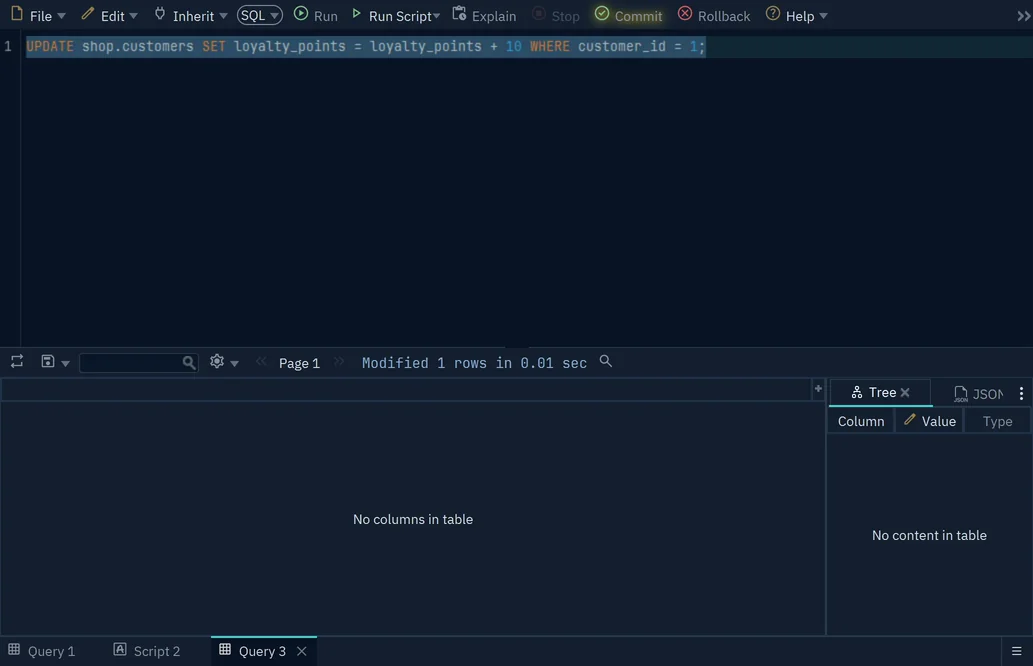
The UPDATE itself reports only a count (UPDATE 2 on PostgreSQL, 2 rows affected on MySQL), not which rows it changed. So run the same WHERE clause as a SELECT first, and read the rows it returns before you change them.



Practice IN and NOT IN in DbSchema
DbSchema connects to your database and opens a SQL Editor on that connection: choose Editor → SQL Editor in the toolbar, or press Ctrl+E. Type the SELECT with its IN list and press Run, or Ctrl+Enter, and DbSchema shows the rows in the result grid under the editor.
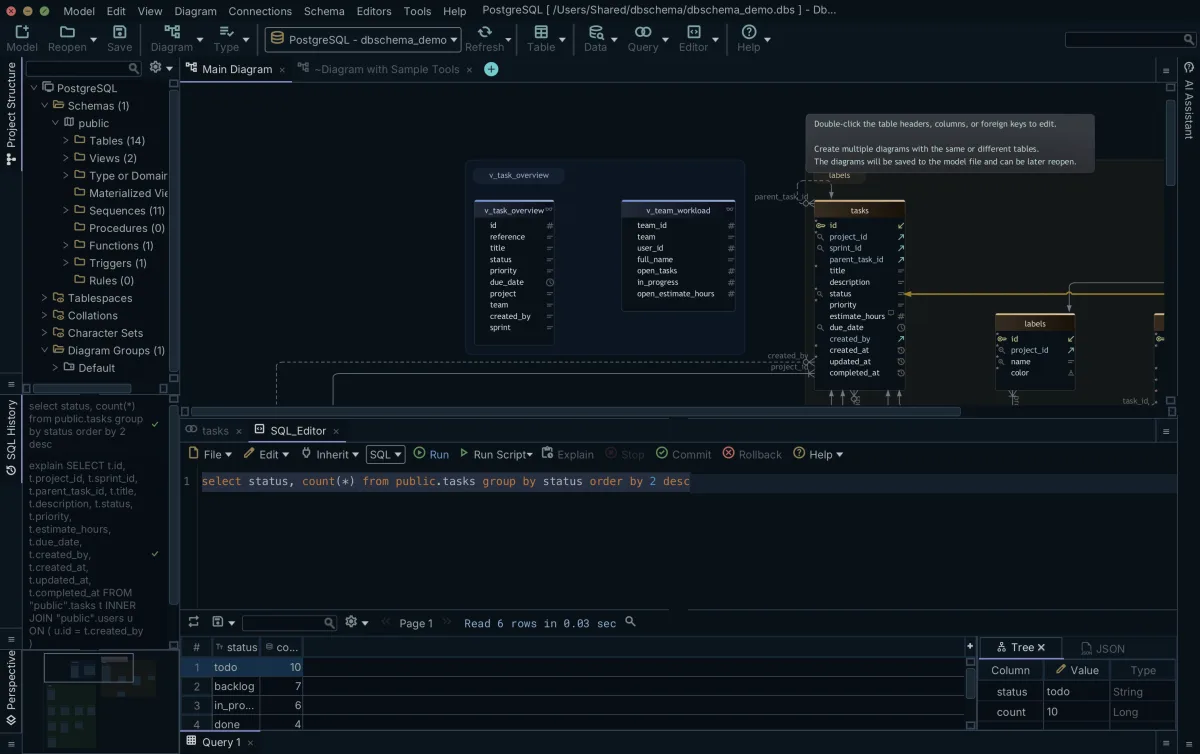
When those rows are the ones you meant, change the SELECT into the UPDATE and press Run again. DbSchema runs it against the live database, not against the diagram, and keeps the change in an open transaction: the Commit button blinks, and other users of the database don't see the change yet. Press Commit to keep it, or Rollback to undo it if the list was wrong.
The SQL Editor is in every edition of DbSchema, the free Community Edition included.
Common mistakes with IN
Leaving out the parentheses is the mistake every engine catches. WHERE Grade IN 'A', 'B' fails on PostgreSQL with syntax error at or near "'A'" and on MySQL with ERROR 1064 (42000).
Mixing types is the one an engine may not catch. Here a number is tested against a text column:
SELECT Name
FROM Students
WHERE Grade IN (0);
PostgreSQL rejects it with operator does not exist: character = integer, and SQLite returns no rows. MySQL returns all four students, with the warning Truncated incorrect DOUBLE value: 'A': it converts both sides to numbers, every grade letter becomes 0, and 0 equals 0. The MySQL 8.4 manual warns never to mix quoted and unquoted values in an IN list for this reason.
An empty list is the third. Code that builds the list from user input can produce WHERE Grade IN (), which is a syntax error on PostgreSQL and MySQL. SQLite accepts it and returns no rows, but most engines and the SQL-92 standard require at least one value, so check for an empty list before you build the query.
Practice questions
- List the scholarships awarded on 2023-01-10 or 2023-02-15.
- Find the students aged 23 or 25.
- Find the students whose grade is neither A nor B.
- Find the students with no scholarship, and check that Bob and David come back.
- Set the grade of every student who holds a scholarship to A.
Download DbSchema, connect it to a database with these two tables, and run your answers in the SQL Editor, which the free Community Edition includes along with connecting to the database.
Frequently asked questions
Is IN case-sensitive?
The column's collation decides, not IN. WHERE Name IN ('alice', 'BOB') returns Alice and Bob on MySQL 9.1.0, whose default collation utf8mb4_0900_ai_ci is case-insensitive, and no rows on PostgreSQL 17.9 or SQLite 3.50.4.
Can IN compare more than one column?
On some engines, with a list of rows in parentheses that tests several columns at once:
SELECT Name
FROM Students
WHERE (Grade, Age) IN (('A', 23), ('B', 25));
| Name |
|---|
| Alice |
| Bob |
| Charlie |
PostgreSQL 17.9, MySQL 9.1.0 and SQLite 3.50.4 all ran it, and Oracle documents it on its Expression Lists page. SQL Server's IN takes a single expression on its left, so on SQL Server write the test as EXISTS, with one condition per column.
Should I use IN or a JOIN?
Use IN when you only want the rows of one table that have a match in another. A JOIN returns one row per match, so Alice, with two scholarships, comes back twice:
SELECT s.Name
FROM Students s
JOIN Scholarships sc ON sc.StudentID = s.ID;
| Name |
|---|
| Alice |
| Charlie |
| Alice |
The IN query in the subquery section returns her once.
Is there a limit to how many values IN accepts?
Each engine sets its own: Oracle AI Database 26ai accepts up to 65,535 expressions in the list, and MySQL 8.4 limits it only by the max_allowed_packet setting. SQL Server's documentation warns that many thousands of values can return error 8623 or 8632, and recommends storing the values in a table and using a subquery in the IN clause instead.
Try your IN lists against a real schema
DbSchema connects to your database and runs your SELECT in its SQL Editor, with the matching rows in the result grid. The free Community Edition includes the SQL Editor.









