SQL LIKE Operator: Wildcards, ESCAPE, ILIKE, and Examples
For a SQL beginner writing a search query; every pattern below runs against the same five rows, with the rows it returns.
On this page
You search for part of a name with =, and nothing comes back, although the row is there. = only matches the whole value. LIKE matches a pattern instead: you write the part you know and put a wildcard where the rest goes.
SELECT column1, column2
FROM table_name
WHERE column_name LIKE 'pattern';
| Wildcard | Matches | Works in |
|---|---|---|
% | any number of characters, including none | every engine in this article |
_ | exactly one character | every engine in this article |
[abc] and [^abc] | one character from the set, or one not in it | SQL Server only |
NOT LIKE returns the rows that do not match.
Pattern examples on one table
Every example runs against this table. The last row has no email, which matters for NOT LIKE:
CREATE TABLE employees (
    employee_id INT PRIMARY KEY,
    name        VARCHAR(50),
    email       VARCHAR(100)
);

INSERT INTO employees VALUES
    (1, 'John Doe',     '[email protected]'),
    (2, 'Jane Doe',     '[email protected]'),
    (3, 'Sam Smith',    '[email protected]'),
    (4, 'Mike Johnson', '[email protected]'),
    (5, 'Emily Davis',  NULL);
Each pattern goes into WHERE name LIKE ...:
| Pattern | Reads as | Returns |
|---|---|---|
'J%' | starts with J | John Doe, Jane Doe |
'%son' | ends with son | Mike Johnson |
'%Davis%' | contains Davis | Emily Davis |
'_a%' | second letter is a | Jane Doe, Sam Smith |
'J_n%' | J, any one letter, then n | Jane Doe |
The first row as a complete query:
SELECT employee_id, name
FROM employees
WHERE name LIKE 'J%'
ORDER BY employee_id;
| employee_id | name |
|---|---|
| 1 | John Doe |
| 2 | Jane Doe |
John Doe is missing from the last row of the pattern table. The third letter of John is h, and _ stands for exactly one character, so the n in 'J_n%' has to be the third letter.
For more patterns built from the same wildcards, see SQL Wildcard Characters. For the clause that LIKE sits in, see SQL WHERE Clause.
Practice this: Lesson 3 of the SQL tutorial runs WHERE, AND, OR, IN, BETWEEN and LIKE on a shop database in your browser, with checked exercises.
NOT LIKE skips rows that are NULL
NOT LIKE lists the values that break a convention, such as the addresses outside your company domain:
SELECT employee_id, email
FROM employees
WHERE email NOT LIKE '%@example.com'
ORDER BY employee_id;
| employee_id | |
|---|---|
| 3 | [email protected] |
Emily Davis is in neither the LIKE result nor the NOT LIKE one. Her email is NULL, and comparing NULL with any pattern gives unknown, which WHERE treats as no match. When the missing values belong in the list, ask for them:
SELECT employee_id, email
FROM employees
WHERE email NOT LIKE '%@example.com'
   OR email IS NULL
ORDER BY employee_id;
| employee_id | |
|---|---|
| 3 | [email protected] |
| 5 | NULL |
Case-insensitive search with ILIKE or LOWER
Whether LIKE 'john%' finds John Doe depends on the engine, not on the pattern:
| Engine | LIKE 'john%' finds John Doe | Case-insensitive search |
|---|---|---|
| PostgreSQL 17 | no | ILIKE |
| MySQL 8.4 | yes, with the default collation | the default |
| SQL Server | depends on the collation | a case-insensitive collation |
| Oracle | no | a case-insensitive collation |
| SQLite | yes, for ASCII letters | the default for ASCII |
PostgreSQL has ILIKE, which matches case-insensitively according to the active locale (PostgreSQL 17 documentation):
SELECT employee_id, name
FROM employees
WHERE name ILIKE 'john%';
| employee_id | name |
|---|---|
| 1 | John Doe |
ILIKE exists only in PostgreSQL. The version that runs everywhere lowers the column and writes the pattern in lower case, and it returns the same row:
SELECT employee_id, name
FROM employees
WHERE LOWER(name) LIKE 'john%';
MySQL compares strings case-insensitively unless one side uses a case-sensitive collation or is a binary string (MySQL 8.4 manual). SQLite ignores case only for ASCII letters, so 'a' LIKE 'A' is true and 'æ' LIKE 'Æ' is false (SQLite documentation).
Matching a literal % or _ with ESCAPE
An underscore in an email address is a problem for LIKE '%_%': the _ is a wildcard, so the pattern matches every email that has at least one character. To search for the underscore itself, name an escape character and put it in front of the _:
SELECT employee_id, email
FROM employees
WHERE email LIKE '%!_%' ESCAPE '!'
ORDER BY employee_id;
| employee_id | |
|---|---|
| 2 | [email protected] |
!_ is a literal underscore, and the % on each side is still a wildcard. Any character that does not occur in the data can be the escape character. A literal percent sign works the same way: LIKE '%50!%%' ESCAPE '!' finds values containing 50%.
Avoid the backslash if the query has to run on several engines. MySQL reads a backslash in a string literal as an escape of its own, so an ESCAPE clause naming the backslash fails there with error 1064. MySQL and PostgreSQL already use the backslash as the escape character when there is no ESCAPE clause (MySQL 8.4 manual, PostgreSQL 17 documentation). SQL Server, Oracle and SQLite use one only when ESCAPE names it. SQL Server also accepts the wildcard in brackets, LIKE '%[_]%' (SQL Server documentation).
LIKE, = or a regular expression
| You know | Use | Example |
|---|---|---|
| the whole value | = | WHERE name = 'John Doe' |
| part of the value | LIKE | WHERE email LIKE '%@example.com' |
| a rule about which characters, or how many | a regular expression | WHERE name ~ '^J[a-z]+ Doe$' (PostgreSQL) |
Use = when you have the whole value: it says exactly what you mean. Use LIKE when you have a fragment. Move to a regular expression when the rule is about the kind of character rather than its position, such as three letters followed by two digits. In MySQL the regular expression above is REGEXP_LIKE(name, '^J[a-z]+ Doe$'). Both return John Doe and Jane Doe.
Why '%text%' is slow and 'text%' can be fast
An index on name is sorted from the first character, so it can find the values that start with abc and has no way to find the ones that contain abc in the middle. The plans below come from a table built for the purpose:
CREATE TABLE people AS
SELECT g AS id, md5(g::text) AS name
FROM generate_series(1, 200000) AS g;

CREATE INDEX people_name_idx ON people (name);
ANALYZE people;

EXPLAIN (COSTS OFF) SELECT id FROM people WHERE name LIKE 'abc%';
PostgreSQL 17 ignores the index even for the prefix search:
Seq Scan on people
  Filter: (name ~~ 'abc%'::text)
The database uses the en_US.utf8 locale. PostgreSQL uses a B-tree index for a LIKE pattern anchored at the start only when the database uses the C locale, or when the index has a pattern operator class (PostgreSQL 17 documentation). With that operator class, the same query reads the index:
CREATE INDEX people_name_pattern_idx ON people (name text_pattern_ops);
Index Scan using people_name_pattern_idx on people
  Index Cond: ((name ~>=~ 'abc'::text) AND (name ~<~ 'abd'::text))
MySQL uses a plain index for the prefix search. On the same kind of table in MySQL, LIKE 'abc%' reads a range of 4 rows, and LIKE '%abc%' reads all 20,000 entries of the index.
For '%abc%' in PostgreSQL, the pg_trgm extension provides GIN and GiST indexes that support LIKE and ILIKE with the wildcard anywhere (PostgreSQL 17 documentation):
CREATE EXTENSION pg_trgm;
CREATE INDEX people_name_trgm_idx ON people USING gin (name gin_trgm_ops);
After that, the '%abc%' query runs as a Bitmap Index Scan on people_name_trgm_idx. A condition on LOWER(name) is a different matter: no index on name applies to it, because the condition is on the expression and not on the column.



Testing a pattern in DbSchema
A pattern usually takes a few attempts before it returns the right rows, and real data has cases that the five rows above do not. Connect DbSchema to the database through its PostgreSQL, MySQL or SQL Server JDBC driver, open the DbSchema SQL Editor with Ctrl+E, write the query and press Run, or Ctrl+Enter. The rows appear in the grid under the editor. Change one wildcard and run it again: the row count tells you whether the pattern got wider or narrower.
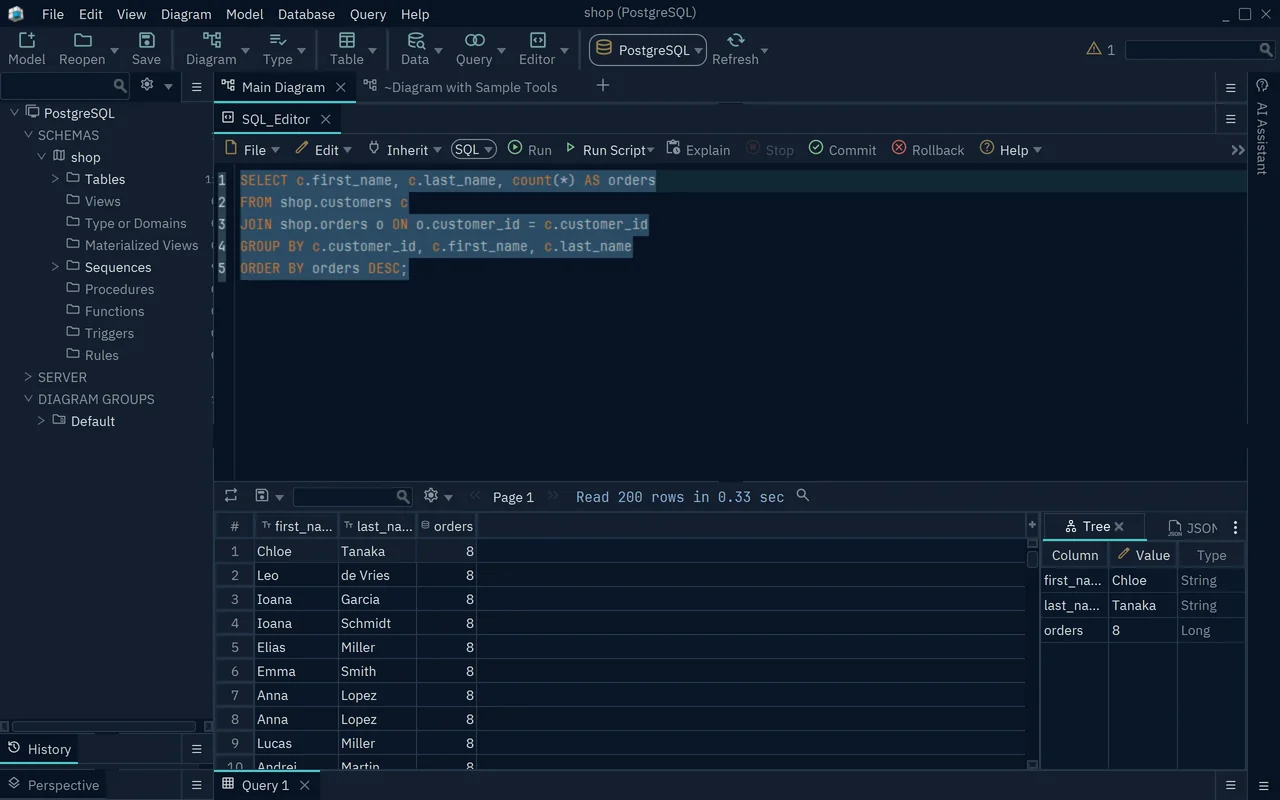
A SELECT changes nothing, neither in the database nor in the DbSchema model file.
Download DbSchema from https://dbschema.com/download.html, connect it to the table your search will query, and try the patterns above in the SQL Editor of the free Community Edition.
FAQ
Can LIKE search a number or a date column?
MySQL and SQL Server convert the value to text first (SQL Server documentation). PostgreSQL refuses: employee_id LIKE '1%' fails with "operator does not exist: integer ~~ unknown" until you write employee_id::text. A numeric comparison or a date range is the better choice either way, because it does not depend on how the value is formatted as text.
Can I match several patterns at once?
There is no LIKE IN (...). Join the conditions with OR, as in WHERE name LIKE 'J%' OR name LIKE 'S%'. PostgreSQL also accepts WHERE name LIKE ANY (ARRAY['J%', 'S%']), which returns the same three rows.









