SQL Wildcard Characters: LIKE Patterns, ESCAPE Rules, and Examples
For someone learning SQL who wants a partial match rather than an exact one; every wildcard is worked through on one small table.
On this page
You know the first few letters of a value, or a piece from its middle, and = finds nothing, because it compares the whole value. A wildcard turns the letters you know into a pattern: % stands for any run of characters, _ stands for exactly one, and LIKE checks a column against the pattern. SQL Server adds bracket sets to those two.
| Wildcard | Stands for | Example | Engines |
|---|---|---|---|
% | any run of characters, or none | 'Ali%' | all |
_ | exactly one character | '_ob' | all |
[ ] | one character from a set or a range | '[A-B]%' | SQL Server |
[^ ] | one character outside a set or a range | '[^A-B]%' | SQL Server |
A % or _ that belongs to the data is matched with an escape character, as in LIKE '%!_%' ESCAPE '!', which finds a literal underscore.
How LIKE reads a pattern
Every example below runs on this table of four students:
CREATE TABLE Students (
    Name     VARCHAR(50) PRIMARY KEY,
    Username VARCHAR(50)
);

INSERT INTO Students VALUES
    ('Alice',   'alice_k'),
    ('Alina',   'alina'),
    ('Bob',     'bob_99'),
    ('Charlie', 'charlie');
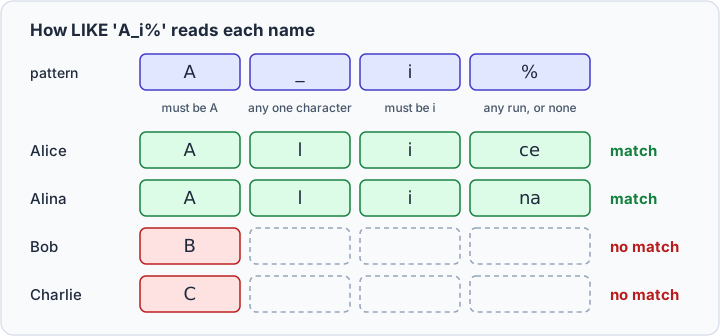
LIKE compares the pattern with the whole value, from its first character to its last (PostgreSQL 17 documentation); the SQL LIKE operator tutorial covers the rest of its syntax. A character that is not a wildcard has to match exactly where it stands, _ fills one position, and % fills whatever is left, including nothing. Here is 'A_i%' read against each name:
The % wildcard, any run of characters
Put % at the end to find the values that start with the letters you know:
SELECT Name FROM Students
WHERE Name LIKE 'Ali%'
ORDER BY Name;
| Name |
|---|
| Alice |
| Alina |
Put it at the front to find an ending:
SELECT Name FROM Students
WHERE Name LIKE '%na'
ORDER BY Name;
| Name |
|---|
| Alina |
Put it at both ends to find the letters anywhere in the value:
SELECT Name FROM Students
WHERE Name LIKE '%li%'
ORDER BY Name;
| Name |
|---|
| Alice |
| Alina |
| Charlie |
% also matches nothing, so 'Bob%' still finds Bob. The * in SELECT * is not a wildcard of this kind: it asks for every column and matches no values.
Practice this: Lesson 3 of the SQL tutorial runs WHERE, AND, OR, IN, BETWEEN and LIKE on a shop database in your browser, with checked exercises.
The _ wildcard, exactly one character
_ holds one position, and a character has to be there:
SELECT Name FROM Students
WHERE Name LIKE '_ob'
ORDER BY Name;
| Name |
|---|
| Bob |
One underscore is one character, never zero and never two, so '_ob' would miss a name like Bobby. Three underscores find the names that are exactly three characters long:
SELECT Name FROM Students
WHERE Name LIKE '___'
ORDER BY Name;
| Name |
|---|
| Bob |
Combine the two wildcards when some positions are fixed and the rest is free, as in the pattern from the diagram:
SELECT Name FROM Students
WHERE Name LIKE 'A_i%'
ORDER BY Name;
| Name |
|---|
| Alice |
| Alina |
Bracket sets in SQL Server, and what the other engines use
SQL Server has two more wildcards. [ ] matches any single character within a range or a set, and [^ ] matches any single character outside it (SQL Server documentation). A hyphen between two characters makes a range:
SELECT Name FROM Students
WHERE Name LIKE '[A-B]%'
ORDER BY Name;
| Name |
|---|
| Alice |
| Alina |
| Bob |
A caret straight after the opening bracket turns the set around:
SELECT Name FROM Students
WHERE Name LIKE '[^A-B]%'
ORDER BY Name;
| Name |
|---|
| Charlie |
Without a hyphen, the brackets list single characters: '[BC]%' finds Bob and Charlie. Which characters a range covers can vary with the sorting rules of the collation, so try a range on the database it will run on. Some tutorials negate a set with !, as in [!A-B]. That is Microsoft Access syntax, where the wildcards are *, ?, [ ], !, - and # (Microsoft Support). SQL Server negates with ^.
MySQL, PostgreSQL and Oracle give LIKE only % and _. A bracket in the pattern is an ordinary character there, so LIKE '[A-B]%' returns no rows on MySQL and PostgreSQL. For a set of characters, each engine has a regular expression operator instead:
| Engine | Names that start with A or B |
|---|---|
| SQL Server | Name LIKE '[A-B]%' |
| MySQL 8.4 | Name REGEXP '^[A-B]' |
| PostgreSQL 17 | Name SIMILAR TO '[A-B]%' or Name ~ '^[A-B]' |
| Oracle 26ai | REGEXP_LIKE(Name, '^[A-B]') |
A regular expression matches anywhere in the value, so the ^ in front anchors it to the start (MySQL 8.4 manual); inside the brackets, ^ still means "not". SIMILAR TO keeps % and _ and covers the whole value, like LIKE (PostgreSQL 17 documentation).
NOT LIKE, and wildcards outside LIKE
NOT LIKE returns every row that the pattern does not match:
SELECT Name FROM Students
WHERE Name NOT LIKE 'A%'
ORDER BY Name;
| Name |
|---|
| Bob |
| Charlie |
= knows no wildcards. A percent sign is just a percent sign there, so WHERE Name = 'Ali%' looks for a student named Ali% and returns no rows. The reverse holds in PostgreSQL: a pattern with no wildcard in it stands for the string itself, and LIKE then acts like =. Spaces in the pattern count like any other character, so LIKE 'Bob ', with a space at the end, does not find Bob on MySQL, PostgreSQL or SQL Server (SQL Server documentation).
Searching for a literal % or _
The pattern reads an underscore in the data as a wildcard too. Looking for the usernames that contain one:
SELECT Username FROM Students
WHERE Username LIKE '%_%'
ORDER BY Username;
| Username |
|---|
| alice_k |
| alina |
| bob_99 |
| charlie |
Every row comes back, because '%_%' only asks for at least one character. To make the underscore literal, put an escape character in front of it and name that character with ESCAPE:
SELECT Username FROM Students
WHERE Username LIKE '%!_%' ESCAPE '!'
ORDER BY Username;
| Username |
|---|
| alice_k |
| bob_99 |
!_ is a literal underscore, and the % on either side is still a wildcard. A literal percent sign takes the same shape, '%!%%' ESCAPE '!'.
Many examples use the backslash instead, and it does not travel. PostgreSQL 17 and MySQL 8.4 treat it as the default escape character, MySQL unless the NO_BACKSLASH_ESCAPES SQL mode is on (MySQL 8.4 manual). SQL Server and Oracle have no default escape character. MySQL also reads a backslash as an escape inside every string, so ESCAPE '\' never closes its string there. The same search, written three ways:
| Pattern | MySQL 8.4 | PostgreSQL 17 | SQL Server | Oracle 26ai |
|---|---|---|---|---|
'%!_%' ESCAPE '!' | 2 rows | 2 rows | 2 rows | 2 rows |
'%\_%', no ESCAPE | 2 rows | 2 rows | no rows | no rows |
'%\_%' ESCAPE '\' | error 1064 | 2 rows | 2 rows | 2 rows |
MySQL takes the backslash only doubled, as ESCAPE '\\', which leaves ESCAPE '!' as the one form that means the same on all four. In SQL Server, LIKE '%[_]%' works too, because a wildcard inside brackets is a literal.
Escape every %, _ and escape character that a user types into a search box, since someone who searches for 50% means a literal percent sign. Then add your own wildcards, and pass the result as a query parameter rather than pasting it into the SQL text.
Upper and lower case
The wildcards say nothing about case; the engine and the collation decide it. The same query gives two answers:
SELECT Name FROM Students
WHERE Name LIKE 'ali%'
ORDER BY Name;
On MySQL:
| Name |
|---|
| Alice |
| Alina |
PostgreSQL returns no rows. MySQL's string comparisons are not case-sensitive unless an operand uses a case-sensitive collation or is a binary string (MySQL 8.4 manual). PostgreSQL compares case for case and adds ILIKE, which matches case-insensitively according to the active locale (PostgreSQL 17 documentation):
SELECT Name FROM Students
WHERE Name ILIKE 'ali%'
ORDER BY Name;
| Name |
|---|
| Alice |
| Alina |
SQL Server's LIKE follows the collation, and Oracle treats case as significant unless the collation in force is case-insensitive. For one query that behaves the same everywhere, lower both sides: WHERE LOWER(Name) LIKE 'ali%' returns Alice and Alina on all four.
| MySQL 8.4 | PostgreSQL 17 | SQL Server | Oracle 26ai | |
|---|---|---|---|---|
ILIKE | no | yes | no | no |
| default escape character | backslash | backslash | none | none |
| case-sensitive by default | no | yes | by collation | yes |
Why a leading wildcard is slow
Name is the primary key, so MySQL keeps the names in an index, in sorted order. EXPLAIN shows how MySQL plans to read the table for three patterns:
EXPLAIN SELECT * FROM Students WHERE Name LIKE 'Ali%';
EXPLAIN SELECT * FROM Students WHERE Name LIKE '%na';
EXPLAIN SELECT * FROM Students WHERE Name LIKE '_li%';
| pattern | type | key | rows |
|---|---|---|---|
'Ali%' | range | PRIMARY | 2 |
'%na' | ALL | NULL | 4 |
'_li%' | ALL | NULL | 4 |
The letters in front of the first wildcard give MySQL a place to start: for 'Ali%' it reads only the names from Ali up to Alj, which the index keeps side by side (MySQL 8.4 manual). A pattern that starts with a wildcard gives it no such place, so it reads every row and tests each one:
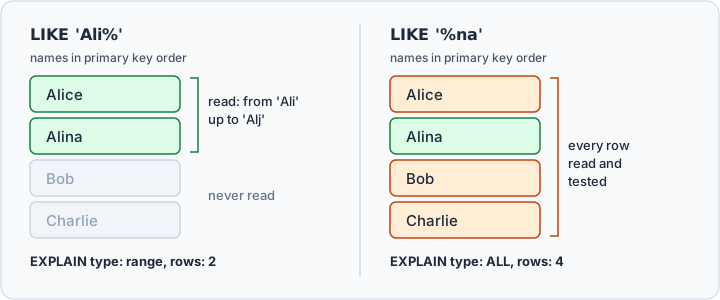
So _ is no faster than %: the position matters, not the wildcard, and Oracle's documentation says the same of its indexes when the pattern starts with % or _.
PostgreSQL follows the same rule, with one extra step. In a database that does not use the C locale, an index supports pattern matching only when it is created with a special operator class (PostgreSQL 17 documentation):
CREATE INDEX students_name_pattern
    ON Students (Name varchar_pattern_ops);
With that index, PostgreSQL can read 'Ali%' as the range from Ali up to Alj. On a four-row table it still reads every row, because that costs less there.



Test wildcard patterns in DbSchema
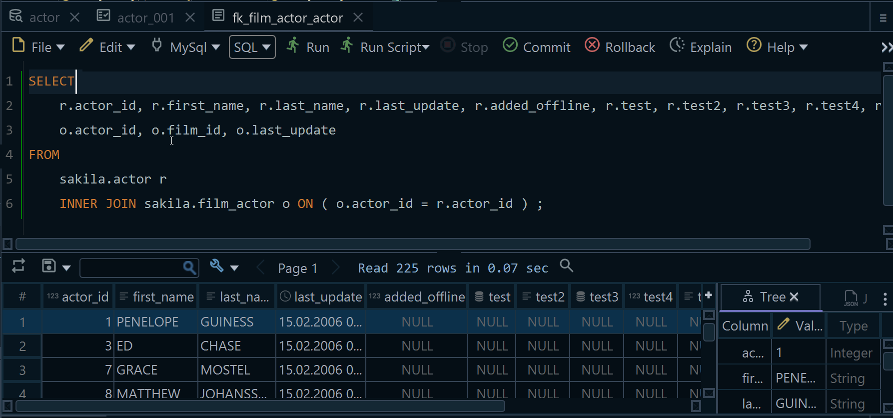
Connect DbSchema to the database through its PostgreSQL, MySQL or SQL Server JDBC driver, and open the DbSchema SQL Editor. It runs the statement at the cursor and shows the result as a table.
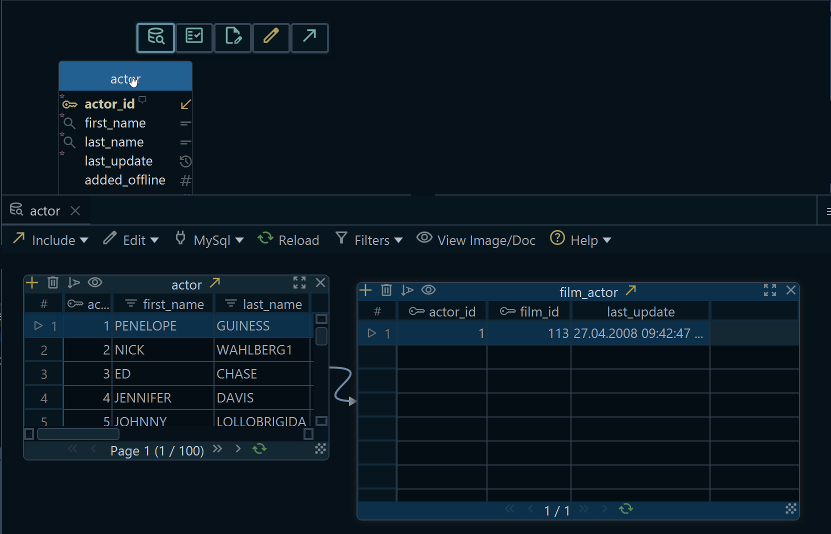
To see the values before you write a pattern, open the table in the DbSchema Relational Data Editor. Click a column header to open the filter dialog for that column, set the condition and the value, and the pane narrows to the matching rows. Neither step changes the live database: a SELECT and a column filter only read it.
Four patterns to try on the Students table:
- The names that end with
ie. - The names with
oas the second character. - The names that do not start with a vowel, once with
NOT LIKEand once with brackets in SQL Server. - The usernames with no underscore in them.
Download DbSchema at https://dbschema.com/download.html, connect it to your database, and run the patterns above in the SQL Editor of the free Community Edition. Browsing and filtering the table's values in the Relational Data Editor is part of the Pro edition.









