SQL BETWEEN Operator Explained with Range Examples
For SQL beginners who are filtering on a range of numbers, dates or times and want the rows at both ends to come back.
On this page
A filter for the first quarter of the year comes back without the last day's rows, and the condition that produced it reads perfectly. BETWEEN puts both ends of a range into one condition and counts both of them as inside it, so an upper bound written as a date means midnight at the start of that day. Everything else the operator does follows from that inclusive rule.
What the SQL BETWEEN operator does
The operator goes in the WHERE clause and takes the two ends of the range, low one first:
SELECT column_name(s)
FROM table_name
WHERE column_name BETWEEN value1 AND value2;
Both ends belong to the range, and MySQL's manual gives the definition that says so: BETWEEN is equivalent to "(min <= expr AND expr <= max)" when the three values have the same type. Every question about BETWEEN comes back to that line. Each end is compared with an operator that allows equality, so a value sitting exactly on a bound is a match. The order of the two bounds is not a preference. Written high first, the condition asks for values that are at once above the larger and below the smaller, and no value is both.
BETWEEN with numeric values
Five students, each with an age, carry every example below except the two that need a date or a time:
CREATE TABLE students (
    ID   INT PRIMARY KEY,
    Name VARCHAR(20),
    Age  INT
);

INSERT INTO students VALUES
    (1, 'Alice', 20),
    (2, 'Bob',   22),
    (3, 'Carol', 25),
    (4, 'Dave',  19),
    (5, 'Eve',   27);
SELECT Name, Age
FROM students
WHERE Age BETWEEN 20 AND 25;
| Name | Age |
|---|---|
| Alice | 20 |
| Bob | 22 |
| Carol | 25 |
Alice is exactly 20 and Carol is exactly 25, and both are in the result, which is the inclusive rule at work. Dave at 19 and Eve at 27 are the two rows outside it. Turn the bounds around and the same query answers nothing at all:
SELECT Name, Age
FROM students
WHERE Age BETWEEN 25 AND 20;
No rows come back, and no error either, because the condition is a legal question with an empty answer. A range built from two variables in application code is where that bites, so check which of the two is the smaller before the query runs.
Practice this: Lesson 3 of the SQL tutorial runs WHERE, AND, OR, IN, BETWEEN and LIKE on a shop database in your browser, with checked exercises.
Negating ranges with NOT BETWEEN
NOT in front of the operator asks for everything outside the range, bounds excluded:
SELECT Name, Age
FROM students
WHERE Age NOT BETWEEN 20 AND 25;
| Name | Age |
|---|---|
| Dave | 19 |
| Eve | 27 |
Dave and Eve are exactly the two rows the previous query left behind, so the two conditions divide the table between them with no row counted twice and none missed. That holds only while the column has a value in every row. A NULL age would satisfy neither condition, since a comparison against NULL is neither true nor false, and SQL NULL values covers what to do about it.
BETWEEN vs LIKE and comparison operators
LIKE and BETWEEN both narrow a result, and they answer different questions.
| LIKE | BETWEEN | |
|---|---|---|
| What it matches | a pattern, with % and _ as wildcards | a range with a low and a high end |
| Column types | text | numbers, dates, times, text |
| Example condition | Name LIKE 'A%' | Age BETWEEN 20 AND 25 |
LIKE looks at the shape of a string and has no idea which of two values is larger. BETWEEN asks about order, and it works on anything the database can sort, which is why the same operator handles ages, dates and names. The plain comparison operators do the same work as BETWEEN in two clauses instead of one, and they are what you fall back on when only one of the two ends should be inclusive.
BETWEEN with dates
A second table records what was sold and when, down to the second:
CREATE TABLE sales (
    SaleID  INT PRIMARY KEY,
    Product VARCHAR(20),
    SoldAt  DATETIME
);

INSERT INTO sales VALUES
    (101, 'Laptop', '2023-01-15 09:00:00'),
    (102, 'Phone',  '2023-03-20 14:30:00'),
    (103, 'Tablet', '2023-03-31 16:45:00');
The obvious way to ask for the first quarter of 2023 loses a sale:
SELECT *
FROM sales
WHERE SoldAt BETWEEN '2023-01-01' AND '2023-03-31';
| SaleID | Product | SoldAt |
|---|---|---|
| 101 | Laptop | 2023-01-15 09:00:00 |
| 102 | Phone | 2023-03-20 14:30:00 |
The tablet sold on 31 March, inside the quarter by any reading, and it is not in the result. The upper bound is a date with no time on it, which the database reads as midnight at the start of that day, and 16:45 that afternoon is later than midnight that morning. MySQL's manual asks for the conversion to be explicit: "For best results when using BETWEEN with date or time values, use CAST() to explicitly convert the values to the desired data type", and it names this exact case, a DATETIME compared against two DATE values. The version that needs no cast is two comparisons with the upper end left open:
SELECT *
FROM sales
WHERE SoldAt >= '2023-01-01' AND SoldAt < '2023-04-01';
| SaleID | Product | SoldAt |
|---|---|---|
| 101 | Laptop | 2023-01-15 09:00:00 |
| 102 | Phone | 2023-03-20 14:30:00 |
| 103 | Tablet | 2023-03-31 16:45:00 |
Write BETWEEN for a column that stores a date and nothing else, where midnight is the only time there is. Write the pair of comparisons above for a timestamp column, and put the first instant of the next period on the right of the strict operator, so nothing on the boundary day can slip out. Extracting a part of the timestamp with date functions is the other way round the problem.
BETWEEN with text
Text has an order too, so the operator takes names as readily as numbers:
SELECT Name
FROM students
WHERE Name BETWEEN 'Alice' AND 'Dave';
| Name |
|---|
| Alice |
| Bob |
| Carol |
| Dave |
Eve is the only name after Dave, and she is the only one left out. The comparison runs character by character in the order the column is sorted by, and it is stricter than it looks. An upper bound of 'Dave' takes in 'Dave' itself but not 'David', because the two agree for three letters and then i comes after e. A text range that has to catch every name starting with a prefix is a job for LIKE.
BETWEEN with times
A third table timestamps events with a time of day:
CREATE TABLE logs (
    LogID     INT PRIMARY KEY,
    Event     VARCHAR(20),
    EventTime TIME
);

INSERT INTO logs VALUES
    (1, 'Login',       '08:30:00'),
    (2, 'File Access', '09:45:00'),
    (3, 'Logout',      '10:00:00'),
    (4, 'Backup',      '10:30:00');
SELECT *
FROM logs
WHERE EventTime BETWEEN '08:00:00' AND '10:00:00';
| LogID | Event | EventTime |
|---|---|---|
| 1 | Login | 08:30:00 |
| 2 | File Access | 09:45:00 |
| 3 | Logout | 10:00:00 |
The logout at exactly 10:00:00 is inside the range and the backup half an hour later is outside it. A TIME column holds no date, so the range is read as a position in the day and the same condition matches that window on every day the table covers.
A night shift is the one window BETWEEN cannot express. The hours from ten at night to two in the morning are two ranges, not one, and asking for them as a single pair puts the larger bound first:
SELECT *
FROM logs
WHERE EventTime BETWEEN '22:00:00' AND '02:00:00';
No row comes back, whatever the table holds, because no time of day is both later than 22:00 and earlier than 02:00. The night shift takes two conditions joined by OR, one reaching to the end of the day and one starting at the beginning of the next.
Combining BETWEEN with other SQL operators
BETWEEN is one condition, so it joins others in the WHERE clause with AND and OR, and sits beside an IN operator or a LIKE without any parentheses of its own:
SELECT Name, Age
FROM students
WHERE Age BETWEEN 20 AND 25 OR Name = 'Eve';
| Name | Age |
|---|---|
| Alice | 20 |
| Bob | 22 |
| Carol | 25 |
| Eve | 27 |
Eve joins the three students in the range. The AND in the middle of a BETWEEN belongs to the operator rather than to the WHERE clause. The query above therefore has two conditions in it, not three, and the OR is what separates them.
BETWEEN in UPDATE and DELETE statements
The WHERE clause of an UPDATE or a DELETE takes BETWEEN in the same words as a SELECT, which also means a reversed pair of bounds changes nothing and an inclusive bound takes one row more than you may have counted on. Adding a year to the students in their early twenties moves two rows:
UPDATE students
SET Age = Age + 1
WHERE Age BETWEEN 20 AND 22;
The five rows afterwards:
| ID | Name | Age |
|---|---|---|
| 1 | Alice | 21 |
| 2 | Bob | 23 |
| 3 | Carol | 25 |
| 4 | Dave | 19 |
| 5 | Eve | 27 |
Alice and Bob are a year older and the other three rows are untouched. A DELETE over the table in that state removes the two students the new range covers:
DELETE FROM students
WHERE Age BETWEEN 23 AND 25;
The three rows left:
| ID | Name | Age |
|---|---|---|
| 1 | Alice | 21 |
| 4 | Dave | 19 |
| 5 | Eve | 27 |
Bob at 23 and Carol at 25 are gone, both of them on a boundary of the range. Run the same WHERE clause as a SELECT first and the rows it lists are the rows the DELETE will take.



Verify range filters in DbSchema
A range predicate is easiest to check at its edges, and that means running it twice. Open the SQL Editor in DbSchema and click Execute Query on the BETWEEN version, which displays the rows it returned as a table. Then edit the bounds by one, run it again, and the rows that appear or disappear between the two results are the boundary rows.
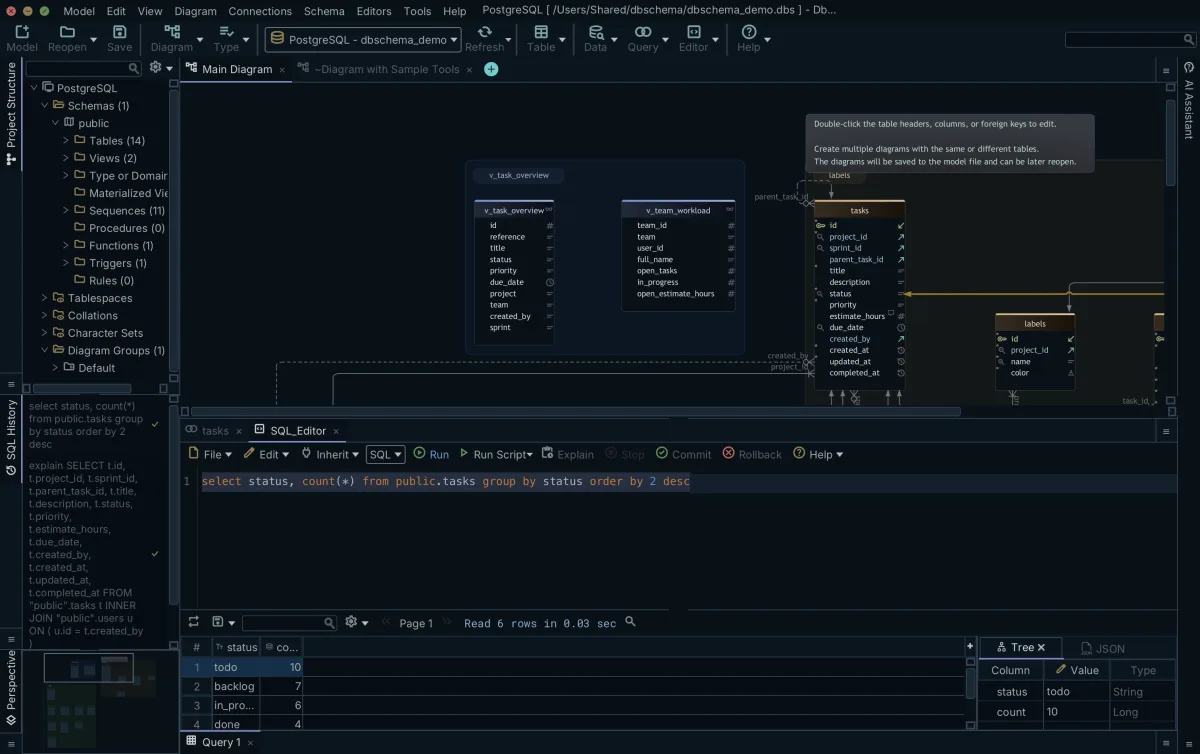
DbSchema keeps every statement of the session in its SQL History pane, so the earlier version is one click away when you want to compare the two counts. The SQL Editor runs against the connected database, which is why the SELECT form of a DELETE is worth running first, and DbSchema stores the editor itself in the model file rather than in the database.
Common mistakes and how to avoid them
Boundaries account for most of what goes wrong. Both ends are inside the range, so a report of ages 20 to 25 and a report of ages 26 to 30 written next to each other are correct, while 20 to 25 and 25 to 30 count the 25-year-olds twice. On a column that stores a time, the upper bound reaches only to midnight, which is the sale the dates section lost.
Types are the second source. The three values in a BETWEEN condition are compared as one type, so a range given as text against a numeric column, or as a date against a timestamp, is converted before the comparison and the conversion is what decides the answer. The third mistake is the reversed pair of bounds, which returns nothing and reports nothing, and it is worth a glance whenever a range filter comes back empty.
Practice corner
- List the students aged 19 to 22, and say which of the five rows sits on a bound.
- List the sales from March 2023, with no sale of that month left out.
- List the log events from 09:00 to 10:30.
- List the students whose name falls between Bob and Eve, and check whether Eve is in your result.
Boundaries are worth two runs rather than one guess. Download DbSchema at https://dbschema.com/download.html, connect to your database, and run your range filter twice in the SQL Editor with the bounds one step apart, so you can see which rows the edges decide. Connecting, the diagram DbSchema draws from your schema and the SQL Editor are all in the free Community Edition.
FAQs
Can BETWEEN be used with strings?
Strings are ordered, so BETWEEN takes them: MySQL's manual demonstrates the operator with 'b' BETWEEN 'a' AND 'c', which returns 1. The comparison follows the order the column is sorted by, so a text range answers the question ORDER BY would answer, not the one the alphabet in your head would.
Run your range queries against a live schema
DbSchema connects to your database and runs your BETWEEN filter in the SQL Editor. Every statement of the session stays in the SQL History pane, so the run with the other bounds is one click away. Free Community Edition included.









