Antijoins, semijoins, and some generalized quantifiers in SQL
For SQL users who write joins and subqueries daily; the set-theory names for these queries are given where they help.
On this page
You want the rows of one table that have no counterpart in another. Standard SQL gives you no keyword for it, though the pattern has a name, the antijoin, and three formulations: a correlated NOT EXISTS, the set operator EXCEPT, and an outer join filtered on the side that came back null. A few dialects do name the operation, Spark SQL among them, where LEFT ANTI JOIN is one of the join types the parser accepts.
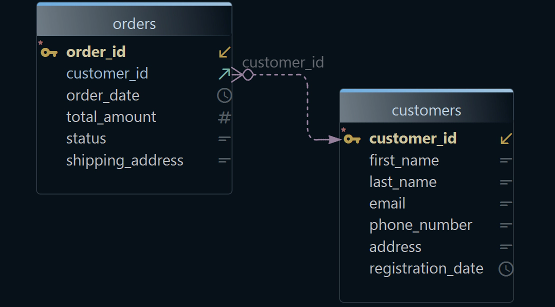

The examples run against two tables, the second carrying a foreign key to the first:
CREATE TABLE Customers (
    customer_id INTEGER PRIMARY KEY,
    name        TEXT,
    email       TEXT,
    country     TEXT
);

CREATE TABLE Orders (
    order_id    INTEGER PRIMARY KEY,
    order_date  DATE,
    customer_id INTEGER REFERENCES Customers
);

INSERT INTO Customers VALUES
    (1, 'Mira',  '[email protected]',  'IE'),
    (2, 'Tomas', '[email protected]', 'PT'),
    (3, 'Ines',  '[email protected]',  'ES'),
    (4, 'Yuki',  '[email protected]',  'JP');

INSERT INTO Orders VALUES
    (101, '2026-03-02', 1),
    (102, '2026-03-05', 1),
    (103, '2026-03-06', 2);
Which customers have never placed an order is the question every query below answers, and Ines and Yuki are the answer. If you want to review the foreign key first, including how you draw one in DbSchema, our prior tutorial on foreign keys covers it.

NOT EXISTS in the DbSchema SQL Editor
The DbSchema Query Builder draws the two tables and the line that joins them, and the join type sits on that line as a label you click: INNER JOIN, LEFT JOIN or EXISTS. The antijoin is the complement of that last one, and you write it in the SQL Editor:
SELECT c.customer_id, c.name, c.email, c.country
FROM Customers c
WHERE  NOT EXISTS (
	SELECT 1
	FROM Orders o
	WHERE o.customer_id = c.customer_id  )
| customer_id | name | country | |
|---|---|---|---|
| 3 | Ines | [email protected] | ES |
| 4 | Yuki | [email protected] | JP |
The inner SELECT 1 refers to the alias c of the outer query, which makes it a correlated subquery: it is evaluated for each candidate row of Customers rather than once. SELECT 1 returns the constant 1 for every matching order, and NOT EXISTS cares only whether any row came back at all, so the projection inside the subquery is arbitrary. A Query Builder and an SQL Editor are both saved in the design model file. The queries themselves run against the live database and only read it.
EXCEPT and the other set operators
A correlated subquery is not the only approach. If you are comfortable with set theory, EXCEPT reads as the shorter answer, and it is, as long as the customer id is all you want:
SELECT customer_id FROM Customers
EXCEPT
SELECT customer_id FROM Orders;
| customer_id |
|---|
| 3 |
| 4 |
The result carries no duplicates: the PostgreSQL 18 manual states that "The result of EXCEPT does not contain any duplicate rows unless the ALL option is specified". Oracle spells the operator MINUS, and only from Oracle Database 21c is EXCEPT accepted as well, a synonym for MINUS with the exact same semantics; the Oracle 19c manual lists only UNION, UNION ALL, INTERSECT and MINUS.
The cost arrives as soon as you want a second column. Set operators compare whole rows, so both sides need the same number of columns and compatible types, and Customers and Orders have only customer_id in common. Getting the name and the country of a customer with no orders means wrapping the set operation in another query:
SELECT * FROM Customers WHERE customer_id IN (
    SELECT customer_id FROM Customers
    EXCEPT
    SELECT customer_id FROM Orders
);
Two rows again, Ines and Yuki, with all four columns. Two statements to say what NOT EXISTS said in one is the trade: EXCEPT is the shortest form when the key is the whole answer, and the correlated form is shorter as soon as it is not.
Antijoins using outer joins
The third formulation joins the two tables and then keeps only the rows where the join found nothing. A left outer join emits a row for every customer, filling the Orders columns with nulls where no order matched, and order_id IS NULL is true on exactly those rows:
SELECT c.customer_id, c.name, c.email, c.country
FROM Customers c
	LEFT OUTER JOIN Orders o ON ( o.customer_id = c.customer_id  )
WHERE o.order_id IS NULL
| customer_id | name | country | |
|---|---|---|---|
| 3 | Ines | [email protected] | ES |
| 4 | Yuki | [email protected] | JP |
The null test has to name a column that is never null in Orders, which is why order_id is the one to pick: a nullable column would confuse a genuine null with an unmatched row. This query is also one the DbSchema Query Builder assembles from the diagram, and the SQL it produces is shorter than the correlated version while asking more of the reader, who has to recall what an outer join does with unmatched rows before the IS NULL makes sense.

Semijoins and how the joins map onto set operators
The counterpart query, the one that keeps the customers who did order, is a semijoin. Setting the join type to EXISTS in the DbSchema Query Builder asks for exactly that, and in SQL you write EXISTS where the antijoin wrote NOT EXISTS:
SELECT c.customer_id, c.name, c.email, c.country
FROM Customers c
WHERE  EXISTS (
	SELECT 1
	FROM Orders o
	WHERE o.customer_id = c.customer_id  )
| customer_id | name | country | |
|---|---|---|---|
| 1 | Mira | [email protected] | IE |
| 2 | Tomas | [email protected] | PT |
Both names in use for the antijoin, antijoin and anti-semijoin, refer to this same operation; the longer one exists to stress that the antijoin is the complement of the semijoin rather than of some other kind of join.
The semi in both names points at the projection: only the columns of one table survive into the result. That is a second dimension next to the usual one. A join decides which rows come out, and it also decides which attributes.
Take two tables R and S. A holds the rows of R with no match in S, B the rows that match, and C the rows of S with no match in R.
| Output | SQL set operators (match on all attributes ) | SQL join operators (match on some attributes) |
|---|---|---|
| A | R EXCEPT S | R left anti-semijoin S |
| B (roughly) | R INTERSECT S | R INNER JOIN S or semijoins(depends on attributes projected) |
| C | S EXCEPT R | R right anti-semijoin S |
| A, B | R | R LEFT OUTER JOIN S |
| B, C | S | R RIGHT OUTER JOIN S |
| A, B, C | R UNION S | R FULL OUTER JOIN S |
Inner joins and semijoins share a cell in that table because the rows they return are the same, B, and only the projection separates them. For an antijoin the projection settles itself: the rows come from the table you are subtracting from, and the other table contributed nothing but nulls. For B there are three sensible choices, separated by which table's attributes come out:
| Output rows | Output attributes | SQL join operators |
|---|---|---|
| B | R | R left semijoin S |
| B | S | R right semijoin S |
| B | R and S | R INNER JOIN S |
Threshold counts (generalized quantifiers)
Existence and non-existence are the two extremes of a count. The interesting questions often sit between them: the customers with fewer than two orders, say, which the Query Builder reaches from the outer-join query by adding a grouping and a threshold.
SELECT c.customer_id, c.name, c.email, c.country, count(DISTINCT o.order_id)
FROM Customers c
	LEFT OUTER JOIN Orders o ON ( o.customer_id = c.customer_id  )
GROUP BY c.customer_id, c.name, c.email, c.country
HAVING count(DISTINCT order_id) < 2;
| customer_id | name | country | count(DISTINCT o.order_id) | |
|---|---|---|---|---|
| 2 | Tomas | [email protected] | PT | 1 |
| 3 | Ines | [email protected] | ES | 0 |
| 4 | Yuki | [email protected] | JP | 0 |
The outer join is what keeps Ines and Yuki in the result: their group holds one row with a null order_id, and count of a null column counts nothing, so the threshold sees 0 rather than 1. An inner join here would answer a different question, the one about customers who ordered exactly once.
In logic, "there exists" is a quantifier, and a constraint of the form "there exist fewer than three" is a generalized quantifier. The name is worth knowing because it groups this query with the antijoin rather than with reporting: the count is a filter on the parent row, not a figure anybody wants to read.

The correlated form of the same question puts the count in a column position:
SELECT  c.customer_id, c.name, c.email, c.country,
        (SELECT COUNT(DISTINCT  o.order_id) FROM Orders o
         WHERE  o.customer_id = c.customer_id) AS order_count
FROM Customers c
WHERE order_count < 2;
That runs on SQLite and is rejected by Oracle, PostgreSQL and SQL Server, which apply the standard scoping rule to order_count. PostgreSQL 18 puts it plainly: an output column's name can be used in ORDER BY and GROUP BY clauses, "but not in the WHERE or HAVING clauses; there you must write out the expression instead". What comes back is a complaint about the name, not about the count:
ERROR: column "order_count" does not exist
Wrapping the query, minus its WHERE clause, in an outer query that applies the filter is the fix, at the price of a shape nobody enjoys reading:
SELECT * FROM (
  SELECT c.customer_id, c.name, c.email, c.country,
         (SELECT COUNT(DISTINCT o.order_id) FROM Orders o
          WHERE o.customer_id = c.customer_id) AS order_count
  FROM Customers c
) counted
WHERE order_count < 2;
The same three customers come back, with the count as a fifth column. The alias counted on the derived table is there because the SQL standard requires a sub-SELECT in the FROM list to carry one, a rule PostgreSQL relaxes and SQL Server does not. A correlated subquery in a column position is the one shape here the Query Builder does not draw, which costs little: the grouped form above is the one it generates, and this variant runs in DbSchema's SQL Editor beside it.
Of the three antijoin formulations, write NOT EXISTS unless you have a reason not to: it states the condition in the words of the question, and it is the one that survives a second condition, since narrowing the subquery to the orders of the last quarter is a line added inside it rather than a restructured query. The DbSchema Query Builder is a Pro edition feature; the SQL Editor and the interactive diagrams it sits on come with the free Community edition. Download DbSchema at https://dbschema.com/download.html, reverse-engineer a schema you already have, and write the NOT EXISTS query in the SQL Editor with your own two tables in place of Customers and Orders.