What Is a Foreign Key in SQL? Syntax, Rules, and Examples (2026)
For someone meeting foreign keys for the first time; each rule is shown with the statement that declares it and the error the database raises when it is broken.
On this page
A row in one table points at a row in another by holding its id, and nothing stops that id from pointing at a row that was deleted last month or never existed. A foreign key is the constraint that does stop it. You declare which column points where, and from then on the database refuses any insert, update or delete that would leave the pointer dangling.
What a foreign key is
A foreign key is a rule on a column, or on a group of columns, saying that every value in it must already exist in a column of another table. Two tables are involved:
- The parent table holds the referenced values, normally its primary key.
- The child table holds the foreign key column that points at the parent.
A parent row can have many children, or none, and a child row points at one parent. The database checks that rule itself, on every statement, which is what separates it from the same check written in application code. One application can forget it, a second can disagree with the first, and a fix typed into a console skips it altogether.
An order whose customer was deleted cannot exist once the constraint is in place, so no report has to decide what to do with a row like that. Joins become predictable too: the relationship is declared in the schema rather than assumed by whoever writes the next query.
DbSchema draws each foreign key as a line between two tables on the diagram, which is often how a missing constraint gets noticed: the table nobody connected sits there without a line. If you are reviewing query logic at the same time, see SQL Joins Explained and What Is a Primary Key?.
Foreign key syntax
Two tables, and the constraint that ties them together:
CREATE TABLE Customers (
    customer_id INT PRIMARY KEY,
    name        VARCHAR(100),
    email       VARCHAR(100),
    country     VARCHAR(50)
);

CREATE TABLE Orders (
    order_id    INT PRIMARY KEY,
    order_date  DATE,
    customer_id INT,
    CONSTRAINT fk_orders_customers
        FOREIGN KEY (customer_id)
        REFERENCES Customers(customer_id)
);

INSERT INTO Customers VALUES
    (1, 'Tiffany Ritter', '[email protected]', 'England'),
    (2, 'Marco Levi',     '[email protected]',     'Italy');

INSERT INTO Orders VALUES
    (100, '2026-03-01', 1),
    (101, '2026-03-04', 1),
    (102, '2026-03-06', 2);
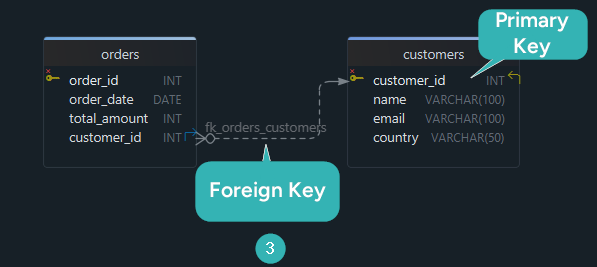
Orders.customer_id is now a foreign key, and the three orders are accepted because customers 1 and
2 exist. The referenced side has to be unique for the rule to mean anything: PostgreSQL 17 requires
the referenced columns to be a primary key, a unique constraint, or the columns of a non-partial
unique index (Constraints).
Inline syntax (single column)
For a single column, the constraint fits on the column itself:
CREATE TABLE Orders (
    order_id    INT PRIMARY KEY,
    order_date  DATE,
    customer_id INT REFERENCES Customers(customer_id)
);
The inline form is shorter, and the database generates the constraint name. Write the named form
instead: fk_orders_customers is a name you can drop, recreate and read in an error message, while a
generated orders_ibfk_1 is one you look up first. On MySQL 8.4 the named form is the only one that
does anything, because MySQL parses a REFERENCES clause written on the column and ignores it,
accepting it only inside a separate FOREIGN KEY specification
(FOREIGN KEY Constraint Differences).

What referential integrity enforces
Referential integrity is the guarantee that every foreign key value points at a row that exists, and the database checks it wherever a statement could break it:
- An insert into the child table fails when the value has no parent row.
- An update of the child's foreign key fails for the same reason.
- A delete of a parent row that still has children fails, unless
ON DELETEasked for something else.
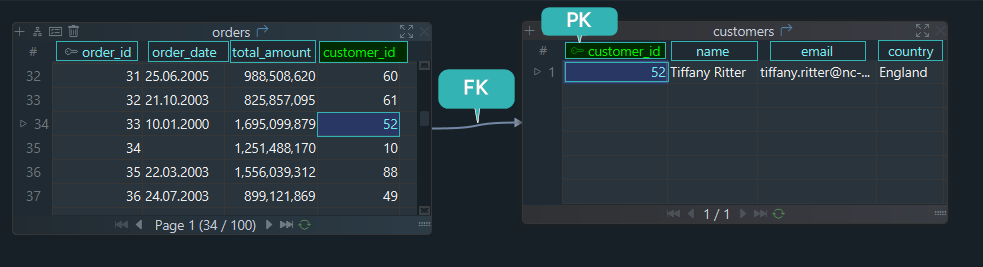
Customer 99 is in neither table, so an order for that customer is rejected:
INSERT INTO Orders VALUES (103, '2026-03-08', 99);
Cannot add or update a child row: a foreign key constraint fails (`organization`.`orders`, CONSTRAINT `fk_orders_customers` FOREIGN KEY (`customer_id`) REFERENCES `customers` (`customer_id`))
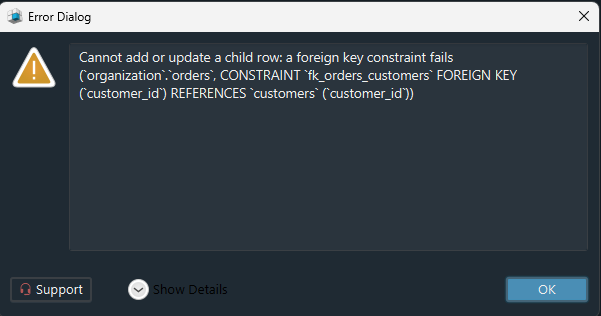
The message qualifies the child table with the database it lives in, organization here, then names
the constraint and the parent table it references.
Practice this: Lesson 8 of the SQL tutorial shows on a shop database in your browser which rows a primary key and a foreign key refuse, with exercises.
ON DELETE and ON UPDATE actions
The ON DELETE and ON UPDATE clauses decide what happens to the child rows when the parent row is
deleted or updated:
| Action | What happens to child rows | Typical use |
|---|---|---|
NO ACTION | error if referencing rows still exist, the default | keep the delete deliberate |
RESTRICT | error, and the check cannot be deferred | block the delete outright |
CASCADE | deleted or updated along with the parent | child has no meaning alone |
SET NULL | the foreign key column becomes NULL | relationship is optional |
SET DEFAULT | the foreign key column takes its default | a fallback parent row exists |
The referential actions in that table are not equally portable, so check the one you plan around against the engine you are on.
NO ACTION is what you get when you write nothing. PostgreSQL 17 raises an error if any referencing
rows still exist when the constraint is checked, and puts the difference from RESTRICT plainly:
NO ACTION allows the check to be deferred until later in the transaction, whereas RESTRICT does
not (Constraints). MySQL 8.4 draws no such
distinction, because for InnoDB NO ACTION is equivalent to RESTRICT and the parent change is
rejected immediately.
SET DEFAULT is rejected outright on MySQL 8.4, whose manual states that InnoDB and NDB reject table
definitions containing ON DELETE SET DEFAULT or ON UPDATE SET DEFAULT
(FOREIGN KEY Constraints).
In SQLite, none of the clauses does anything until enforcement is switched on. Foreign key
constraints are disabled there by default and have to be enabled for each database connection with
PRAGMA foreign_keys = ON (SQLite Foreign Key Support).
CASCADE example
CREATE TABLE Orders (
    order_id    INT PRIMARY KEY,
    order_date  DATE,
    customer_id INT,
    CONSTRAINT fk_orders_customers
        FOREIGN KEY (customer_id)
        REFERENCES Customers(customer_id)
        ON DELETE CASCADE
        ON UPDATE CASCADE
);
With that constraint in place, deleting customer 1 takes orders 100 and 101 with it:
DELETE FROM Customers WHERE customer_id = 1;
SELECT * FROM Orders;
| order_id | order_date | customer_id |
|---|---|---|
| 102 | 2026-03-06 | 2 |
One statement removed three rows across two tables. That is both the argument for CASCADE and the
reason to think twice: rows disappear without being named in the statement. Pick the action from
what the child row means once its parent is gone, which is what the "Typical use" column records.
Composite and self-referencing foreign keys
When the parent is identified by two columns together, the foreign key names both, and the pair is matched as a pair:
CREATE TABLE Registrations (
    country_code CHAR(2),
    plate_number VARCHAR(10),
    PRIMARY KEY (country_code, plate_number)
);

CREATE TABLE Violations (
    violation_id INT PRIMARY KEY,
    country_code CHAR(2),
    plate_number VARCHAR(10),
    CONSTRAINT fk_violations_registrations
        FOREIGN KEY (country_code, plate_number)
        REFERENCES Registrations(country_code, plate_number)
);
A plate number alone repeats across countries, so the parent's key is composite and the child's has to match it column for column.
A foreign key can also point back into its own table. That is a self-referencing foreign key, and it is how a hierarchy lives in one table:
CREATE TABLE Employees (
    employee_id INT PRIMARY KEY,
    employee_name VARCHAR(100) NOT NULL,
    manager_id INT,
    CONSTRAINT fk_employees_manager
        FOREIGN KEY (manager_id)
        REFERENCES Employees(employee_id)
);
manager_id holds an employee_id from the same table, so a manager who is not an employee cannot
be recorded. The same shape covers category trees, comment threads and bill-of-material structures,
and the top of the hierarchy is the row whose manager_id is NULL.
Add a foreign key to an existing table
ALTER TABLE Orders
ADD CONSTRAINT fk_orders_customers
    FOREIGN KEY (customer_id)
    REFERENCES Customers(customer_id);
The statement fails if any row already breaks the rule, so check these before you run it:
- Every
customer_idinOrdersexists inCustomers, or isNULL. - The child and parent columns have the same data type, and the same collation for text keys.
- The relationship allows
NULL, or the column is declaredNOT NULLbecause it does not. - The child column is indexed, if the table is large or joined often.
The first check is a query. Every row it returns is a row that will block the constraint:
SELECT o.order_id, o.customer_id
FROM Orders o
LEFT JOIN Customers c
  ON c.customer_id = o.customer_id
WHERE o.customer_id IS NOT NULL
  AND c.customer_id IS NULL;
Against the three orders above it returns nothing, because each points at a customer that exists. On a database that has run without the constraint, its output is the cleanup list.
Drop a foreign key
MySQL drops a foreign key by its own keyword and the constraint name (ALTER TABLE):
ALTER TABLE Orders
DROP FOREIGN KEY fk_orders_customers;
PostgreSQL and SQL Server drop it as a constraint like any other:
ALTER TABLE Orders
DROP CONSTRAINT fk_orders_customers;
Both statements need the constraint name, which is the second reason to name it yourself.
Foreign keys vs primary keys vs unique keys
| Constraint | Purpose | Allows NULL? | References another table? |
|---|---|---|---|
| Primary key | unique row identity | no | usually referenced by FKs |
| Unique key | prevents duplicate values | usually yes | can be referenced by FKs |
| Foreign key | links child rows to parent rows | usually yes | yes |
A nullable foreign key is the right choice when the relationship is optional: the NULL says the row
has no parent, rather than pointing at a placeholder row that means nothing. For the rest of what
NULL does to comparisons, read SQL NULL Values.
Common mistakes and performance tips
The index on the child column is the mistake worth knowing about, because the engines differ. PostgreSQL 17 does not create it: the documentation says the declaration of a foreign key constraint does not automatically create an index on the referencing columns (Constraints), so every delete of a parent row scans the child table until you add one. MySQL 8.4 does create it, stating that an index on the referencing table is created automatically if it does not already exist (FOREIGN KEY Constraints).
The rest come with their fix attached:
CASCADEchosen without following the delete path to its end removes rows in tables nobody was thinking about, so trace the path one table at a time.- Mismatched types or collations stop the constraint from being created, and changing the column type is the whole answer.
- A relationship that exists only in someone's head fails nothing until a new colleague writes the join the wrong way, which is why it survives longest.
Read Indexes and Foreign Keys for the indexing side in detail.
Create foreign keys visually in DbSchema
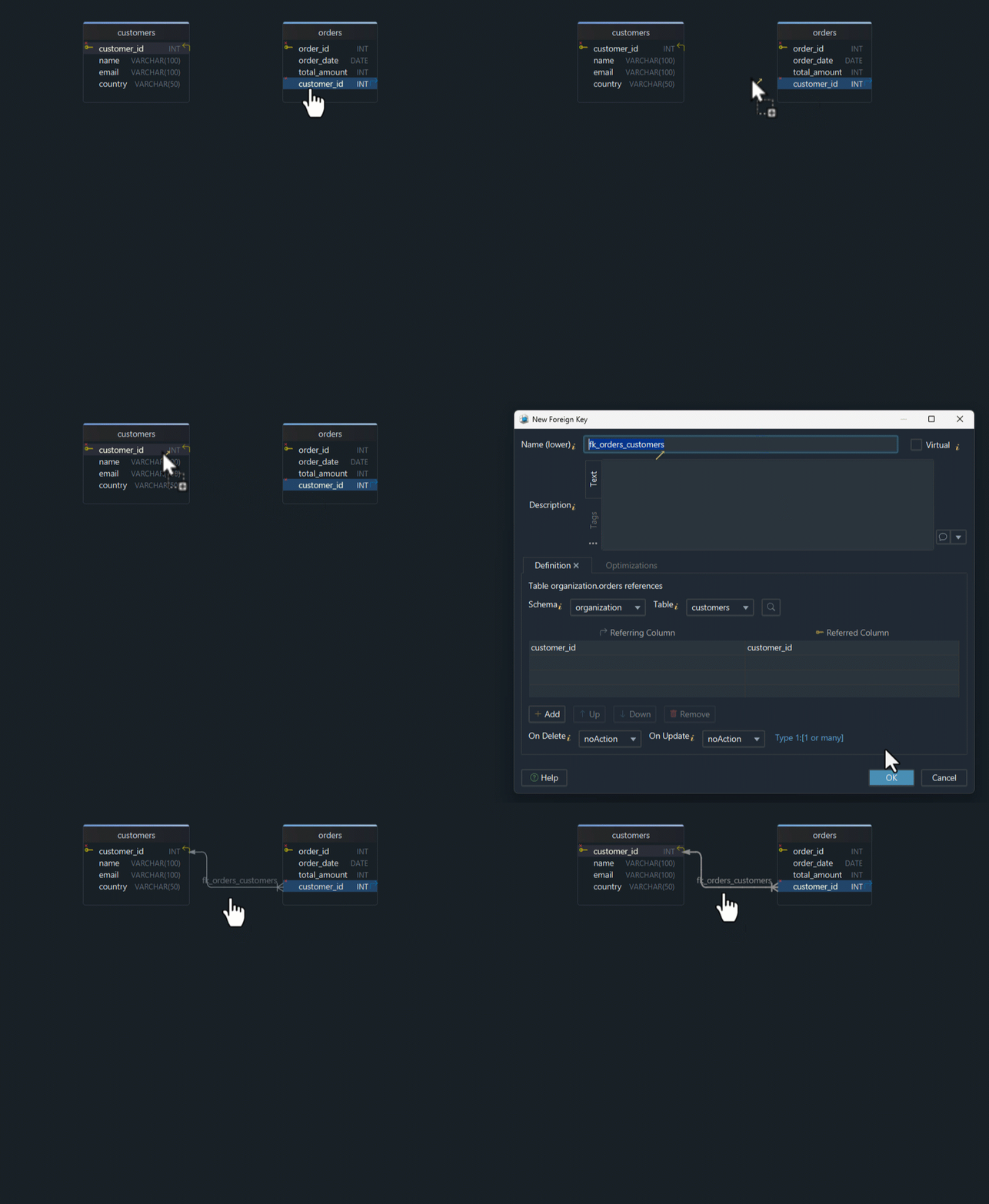
In DbSchema, a foreign key is a line you draw between two columns, and the foreign keys documentation covers both ways of drawing it.
- Connect using the PostgreSQL JDBC driver, MySQL JDBC driver, or SQL Server JDBC driver, and let DbSchema reverse-engineer the schema into a diagram.
- Hover over the referencing column until the connector handle appears on its right edge, then drag from that handle to the column it should point at. DbSchema draws the relationship line immediately.
- Double-click the line to open the Foreign Key Editor, where the
ON DELETEandON UPDATEactions are set. - Switch the diagram's notation from Diagram → FK Notation to crow's foot, Barker or UML.
Which of those steps reaches the database depends on the mode DbSchema is in. The
schema synchronization documentation states it plainly:
connected, every schema change is applied to the database as you make it; disconnected, changes are
saved only to the design model file. Designing offline and reviewing each difference in the
Synchronization Dialog afterwards is the Pro workflow, as is saving the model to a .dbs file.
Virtual foreign keys for NoSQL and legacy databases
Some databases do not enforce foreign key constraints at all. MongoDB is one, and a MySQL 8.4 table
on the MyISAM engine is another: for storage engines that do not support foreign keys, MySQL Server
parses and ignores foreign key specifications
(FOREIGN KEY Constraint Differences),
so the CREATE TABLE succeeds and nothing is checked afterwards. Other schemas carry relationships
that nobody has declared yet. DbSchema covers both with a
virtual foreign key: you drag from one column to the other exactly as above, and DbSchema asks
whether the key should be real or virtual. A virtual one is written to the .dbs model file and
never to the database, so no constraint is created and no existing row is validated.
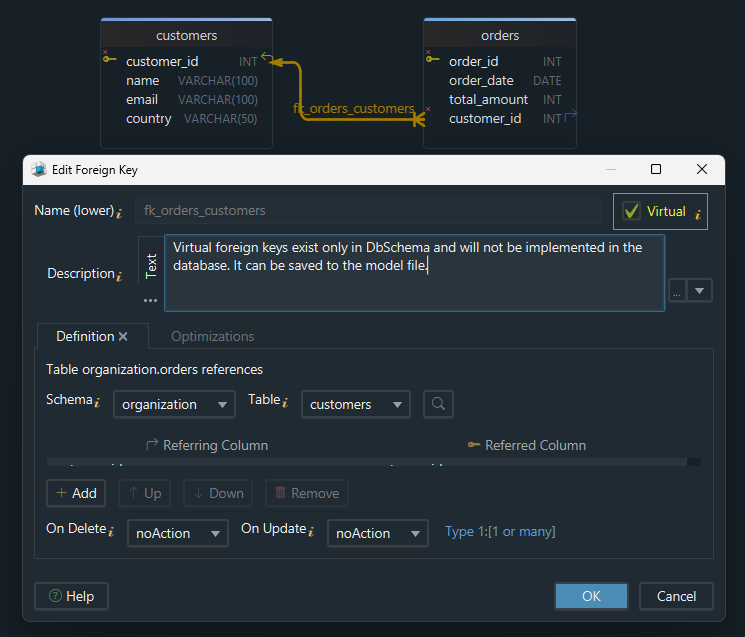
What you get in return is the relationship everywhere DbSchema uses relationships: the line on the diagram and in the documentation exported from it, the Query Builder following it when you add a related table, and the Relational Data Editor walking from a parent row to its children, which is how you check a relationship before enforcing it. Those two editors and the model file that stores the virtual keys are Pro features.
Your own schema answers this faster than any example can. Get DbSchema from https://dbschema.com/download.html, connect, and read the diagram it draws: a table with no line into it is a relationship nothing enforces yet, and drawing that line writes the foreign key while you are connected. The free Community Edition covers the connection, the reverse-engineering and the diagram; Pro adds the model file, the Query Builder and the Relational Data Editor.
FAQ
Can a table have multiple foreign keys?
A table can reference as many parents as it has relationships, and the same parent more than once. A message with a sender and a recipient carries two foreign keys into the same table.
Do foreign keys improve query performance?
The constraint itself does not make a join faster; it makes the join correct. The index on the child column is what does the speed work.
Should every relationship be implemented as a real foreign key?
In a transactional database, declare it, so the engine does the checking rather than each application. Where the engine enforces nothing, or the data is not clean yet, draw it as a virtual foreign key in DbSchema first, and the relationship is usable while the constraint waits.









