What Is a Primary Key in SQL? Definition and Examples (2026)
For someone writing their first CREATE TABLE statements who has to decide which column identifies a row.
On this page
Two rows in a table describe the same real thing, and nothing stored in either row says which of them is the record everyone should use. A primary key is the constraint that prevents the situation. You nominate one column, or a group of columns, and the database then rejects any row whose value there is empty or already taken. Every table gets at most one primary key, and the columns it covers become the address other tables use to point at a row.
What a primary key is
The examples on this page run against two tables, a list of countries and a list of cities:
CREATE TABLE Countries (
  country_code CHAR(2) PRIMARY KEY,
  name         VARCHAR(100),
  continent    VARCHAR(50)
);

CREATE TABLE Cities (
  city_id      INT PRIMARY KEY,
  name         VARCHAR(100),
  population   INT,
  country_code CHAR(2)
);

INSERT INTO Countries VALUES
  ('CH', 'Switzerland',   'Europe'),
  ('DE', 'Germany',       'Europe'),
  ('US', 'United States', 'North America');
Countries now holds three rows, and country_code is what tells them apart. Ask for 'DE' and exactly one row can come back, today and after ten thousand more inserts.
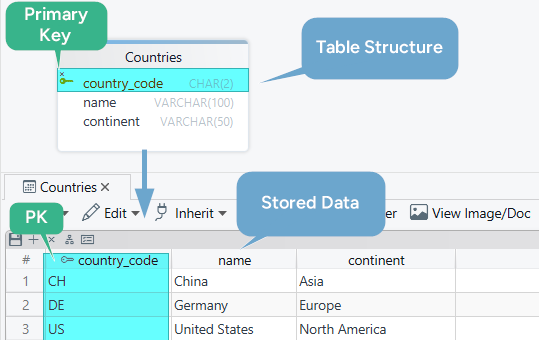
Three rules come with the constraint, and the database applies all of them for you:
- The key values are unique, so no second row may repeat one.
- The key columns are never empty. PostgreSQL 17 says that adding a primary key "will force the column(s) to be marked NOT NULL", and MySQL 8.4 declares them NOT NULL "implicitly (and silently)".
- A table carries one primary key constraint, never two.
The third rule is the one people misread. One constraint does not mean one column: a primary key can list several columns and treat the combination as the identifier, which the composite section below builds.
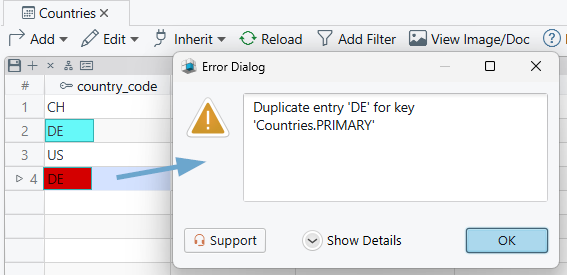
Break the uniqueness rule and the insert fails rather than quietly creating a second Germany:
INSERT INTO Countries VALUES ('DE', 'Deutschland', 'Europe');
MySQL 8.4 answers:
Duplicate entry 'DE' for key 'Countries.PRIMARY'
Why primary keys matter
A primary key is worth more than the duplicate it blocks: it is the value other tables store when they refer to a row. Cities keeps a country_code column for exactly that, and a foreign key ties each city to one country:
ALTER TABLE Cities
ADD CONSTRAINT fk_cities_countries
FOREIGN KEY (country_code) REFERENCES Countries (country_code);
From here on the database refuses a city whose country_code matches no row in Countries, and refuses to delete a country that still has cities. Neither check means anything unless the parent column is guaranteed unique, which is what the primary key supplies.
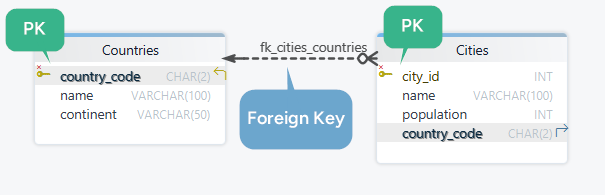
The same guarantee makes a join on that column return one country per city rather than several. What Is a Foreign Key? covers the child side of the relationship.
Composite primary key example
Some rows have no single column that identifies them. A car registration is one: the plate number repeats across countries, and the country code repeats across cars, so only the pair is unique. A composite primary key lists both columns in one constraint and treats the combination as the identifier.
CREATE TABLE CarRegistrations (
  country_code      CHAR(2),
  plate_number      VARCHAR(10),
  registration_date DATE,
  PRIMARY KEY (country_code, plate_number)
);

INSERT INTO CarRegistrations VALUES
  ('DE', 'B-AB 1234', '2024-05-02'),
  ('CH', 'B-AB 1234', '2024-06-11');
Both rows go in. The plate is the same, the country differs, so the pair differs. A third row repeating ('DE', 'B-AB 1234') is rejected the same way the duplicate country code was.
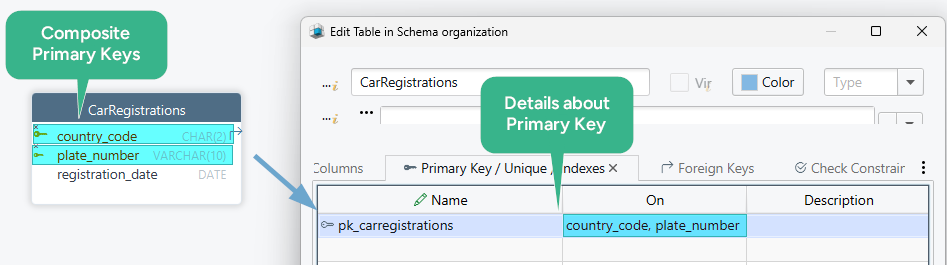
MySQL 8.4 requires the separate PRIMARY KEY (col, col) clause shown above: writing PRIMARY KEY beside a column "only marks that single column as primary", so two column-level keywords produce an error rather than a two-column key.
Practice this: Lesson 8 of the SQL tutorial shows on a shop database in your browser which rows a primary key and a foreign key refuse, with exercises.
Primary key vs unique key vs foreign key
Three constraints in SQL keep values under control, and only one of them identifies the row:
| Constraint | What it does | Allows NULL | Per table |
|---|---|---|---|
| Primary key | Identifies the row | No | One |
| Unique | Blocks a duplicate value | Yes | Any number |
| Foreign key | Points at a row in another table | Yes | Any number |
Give the table one primary key for its identity, and add a unique constraint on every other value that must not repeat: an email address, a username, an invoice number. The two are close relatives, and PostgreSQL 17 says so directly, describing unique and not-null constraints as "functionally almost the same thing, but only one can be identified as the primary key". The foreign key is the odd one out, because it says nothing about its own row's identity.
Natural vs surrogate keys
A natural key is a value the business already uses as an identifier: the country_code above, an ISBN, a VAT number. It is in the data before you design the table.
A surrogate key is a number the database invents, such as the city_id column above. It means nothing to anyone outside the database, and identifying the row is the only job it has.
Pick the surrogate key by default, because nothing outside the database can decide that a city's id is now different. Natural keys do change: countries have been renamed and recoded, product codes get restructured, and an email address used as a key follows the person who changes it. The natural key wins where the value is short, issued and frozen by someone outside your system, and queried constantly, which is why Countries above uses a two-letter country code and Cities does not.
Whichever you choose, put a unique constraint on the business identifier as well, because a surrogate key alone lets two rows describe the same country with two different ids. Prefer a small key too, since it is copied into every child table and, on InnoDB, into every secondary index. Avoid one that encodes meaning, such as a product code whose first two characters name the warehouse, because the day a product moves warehouse you either change the key or accept that it lies.
Changing a key later reaches the foreign keys that reference it, and the exports, reports, and integrations that carry the old value. What Is an ER Diagram? and How to Design a Relational Database Schema put those relationships in front of you before you commit to a key.
How to create or add a primary key
Create the key with the table
CREATE TABLE Orders (
  order_id    INT,
  customer_id INT,
  CONSTRAINT pk_orders PRIMARY KEY (order_id)
);
Writing PRIMARY KEY beside the column, the way Countries does above, is shorter. The named form buys you the constraint name, which you have to quote later to drop or replace the key, instead of the one the database generates.
Add a primary key to an existing table
ALTER TABLE Countries
ADD CONSTRAINT pk_countries PRIMARY KEY (country_code);
The statement fails if the column already holds a duplicate or an empty value. Run two checks first. This one lists every code that appears more than once:
SELECT country_code, COUNT(*)
FROM Countries
GROUP BY country_code
HAVING COUNT(*) > 1;
This one lists the rows that have no code at all:
SELECT * FROM Countries WHERE country_code IS NULL;
Clean up whatever either query returns before the ALTER TABLE.
Remove or change a primary key
Drop the existing constraint, then add the new one. Where the engine runs DDL inside a transaction, put both statements in the same transaction, so no query ever sees the table without a key. Any foreign key pointing at the old key has to be dropped first, because the database will not leave a reference hanging while the key it points to disappears.
Primary key syntax in MySQL, PostgreSQL, and SQL Server
PRIMARY KEY itself is written the same way everywhere. What differs is the clause that makes the database fill the column in for you, which is how most surrogate keys get their values.
CREATE TABLE customers (
    customer_id INT AUTO_INCREMENT PRIMARY KEY,
    full_name   VARCHAR(200) NOT NULL
);
That is the MySQL 8.4 form. The other two engines change the one column line:
| Engine | The customer_id line |
|---|---|
| PostgreSQL 17 | customer_id INT GENERATED ALWAYS AS IDENTITY PRIMARY KEY |
| SQL Server | customer_id INT IDENTITY(1,1) PRIMARY KEY |
The two arguments to IDENTITY are the first value and the step. Three engines, three keywords, one constraint, which is why a schema written for one database needs a pass over its key columns before it runs on another.
What the engine builds behind the constraint
Every engine enforces the same rule and builds something different underneath it. PostgreSQL 17 says the constraint "will automatically create a unique B-tree index" on the key columns, and MySQL 8.4 defines a primary key as "a unique index where all key columns must be defined as NOT NULL". What that index does to the rows themselves differs:
- SQL Server makes the primary key the clustered index, so the table itself is held in key order: "if clustered or nonclustered isn't specified for a primary key constraint, clustered is used if there's no clustered index on the table".
- MySQL 8.4 does the same on InnoDB, and each record in a secondary index "contains the primary key columns for the row" as well as its own columns, so a wide primary key widens every other index on the table.
- PostgreSQL 17 keeps the index separate and stores rows in no particular order.
CLUSTERreorders a table once, and "when the table is subsequently updated, the changes are not clustered". - SQLite turns a single
INTEGER PRIMARY KEYcolumn into an alias for the rowid. Any other declared type,INTandBIGINTincluded, gets an ordinary column with a unique index instead.
SQLite also breaks the NOT NULL rule. It allows NULL in a primary key column, a bug in early versions that the documentation keeps because fixing it "might break legacy applications". An INTEGER PRIMARY KEY column, a WITHOUT ROWID table, a STRICT table, or a column you declared NOT NULL yourself behaves the way the standard says.
Work with primary keys in DbSchema
Reading a schema you did not write, the question is usually which column identifies a row in each table, and DDL files answer it slowly. DbSchema connects to the database, reverse-engineers the schema, and draws it as an interactive diagram in which the primary key columns carry a key icon, so a table missing a key is visible without reading a line of SQL.
To set or change one, double-click the table header to open the Table Dialog, go to the Indexes tab, and flag the columns as the primary key. The foreign keys that reference it are drawn as lines to the other tables, so you can see what a change would reach before you make it.
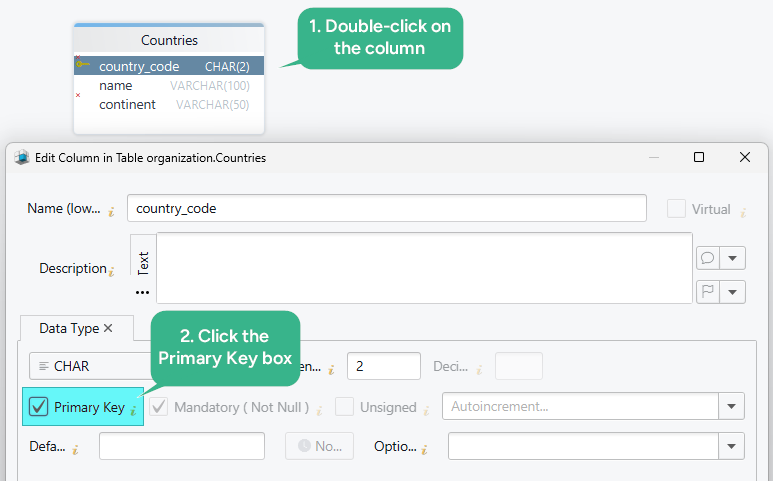
Where the change lands depends on the mode. Connected, a schema change goes to the database as you make it. Disconnected, it stays in the design model file until you review each difference in the Synchronization Dialog. Saving that model file and schema synchronization are both in the Pro edition.

Pick the column that identifies your row, check it for duplicates and empty values, and add the constraint. Then download DbSchema at https://dbschema.com/download.html, connect to your database, and look at the diagram for a table with no key icon on any column. Connecting, reverse-engineering, and the diagram are all in the free Community Edition.









