Indexes and Foreign Keys Design Tips
For the person who decides which columns get an index and whether the foreign keys go into the schema at all.
On this page
Two indexes sit on the same table, a query filters on both of their columns, and only one of the two gets used. Which one depends on how many distinct values each index holds. Foreign keys sit on the other side of the same trade: they cost a check on every insert, update and delete, and they buy a child table that can never hold a row whose parent is gone.
The examples run on MySQL 9.7 against these two tables:
CREATE TABLE departments (
  department_id INT PRIMARY KEY,
  name          VARCHAR(50) NOT NULL
);

CREATE TABLE employees (
  employee_id   INT PRIMARY KEY,
  firstname     VARCHAR(50) NOT NULL,
  lastname      VARCHAR(50) NOT NULL,
  department_id INT
);

INSERT INTO departments VALUES (1, 'Support'), (2, 'Sales');
INSERT INTO employees VALUES
  (10, 'Ada',   'Novak', 1),
  (11, 'Grace', 'Weber', 1),
  (12, 'Linus', 'Novak', 2);
Foreign keys
Leaving the reference between employees and departments undeclared is a common way to keep writes cheap, and the saving is real. InnoDB looks up the parent row on every insert into employees, and it looks up the children on every delete from departments. What the check buys is that the second statement below can never return a row.
With nothing enforcing the reference, a department can be deleted while its employees stay behind:
DELETE FROM departments WHERE department_id = 1;

SELECT employee_id, firstname, lastname, department_id
FROM employees
WHERE department_id NOT IN (SELECT department_id FROM departments);
| employee_id | firstname | lastname | department_id |
|---|---|---|---|
| 10 | Ada | Novak | 1 |
| 11 | Grace | Weber | 1 |
Two employees now point at a department that no longer exists, and every report that joins the two tables has to decide what to do with them. An inner join drops the two rows without saying so. A left join shows them with an empty department name. The headcount is wrong either way, and nothing in the schema says which answer was intended.
Put department 1 back, then declare the reference:
INSERT INTO departments VALUES (1, 'Support');

ALTER TABLE employees
  ADD CONSTRAINT fk_employees_department
  FOREIGN KEY (department_id) REFERENCES departments (department_id);
Run the delete that succeeded a moment ago and MySQL rejects it:
DELETE FROM departments WHERE department_id = 1;
With no ON DELETE clause the constraint behaves as RESTRICT, and the MySQL manual says the delete is rejected immediately while a child row still references the parent. Both departments survive:
SELECT department_id, name FROM departments;
| department_id | name |
|---|---|
| 1 | Support |
| 2 | Sales |
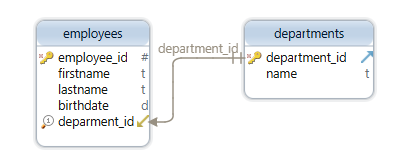
The ALTER TABLE above also gave you an index. MySQL "requires indexes on foreign keys and referenced keys so that foreign key checks can be fast and not require a table scan", and creates the index on the referencing table if it is not already there. So the column you join on ends up indexed as a side effect of declaring the constraint, which is the part usually left out of the argument that foreign keys are expensive.
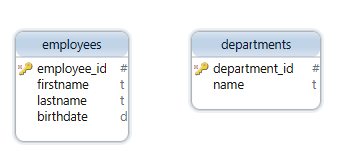
Two tables with no line between them:
The same two tables after the constraint is declared, with DbSchema drawing the relationship:
Indexes
An index is to a table what a table of contents is to a book: a sorted list of key values, each with a pointer to the row it came from, so the database jumps to the matching rows instead of reading every one.
CREATE INDEX idx_firstname ON employees (firstname);

SELECT employee_id, firstname, lastname
FROM employees
WHERE firstname = 'Ada';
| employee_id | firstname | lastname |
|---|---|---|
| 10 | Ada | Novak |
Three rows are not enough for the index to earn anything, and MySQL reads all three either way. The shape is what carries over to a million rows: a filter on an indexed column becomes a lookup, and a filter on an unindexed one becomes a scan.
The cost sits on the other side of the ledger. Every insert into employees writes an entry into idx_firstname as well as into the table, and every update of firstname moves that entry. An index no query filters on is paid for on every write and returns nothing, so the list of indexes on a table is worth reading against the list of queries that actually run against it.
Which of two indexes the database picks

Add a second index and a query that filters on both columns still runs on one of them:
CREATE INDEX idx_lastname ON employees (lastname);

SELECT * FROM employees
WHERE firstname = 'Ada' AND lastname = 'Novak';
The optimizer picks between idx_firstname and idx_lastname, reads the rows that index gives it, and checks the other condition against those rows. The documented exception is the Index Merge access method, which "retrieves rows with multiple range scans and merges their results into one" on a single table; EXPLAIN reports it as index_merge in the type column. Run EXPLAIN on your own query rather than assuming which of the two paths you got.
Which index wins the comparison comes down to how many distinct values it holds. SHOW INDEX FROM employees prints a Cardinality column, defined in the MySQL manual as "an estimate of the number of unique values in the index", and the manual adds that the higher the cardinality, the greater the chance MySQL uses that index. A staff table with 2,000 distinct first names and 5,000 distinct last names therefore leans on the last name index, because a lookup there returns fewer rows to filter afterwards.
Composite indexes and the leftmost column
An index built on two or more columns is a composite index, and only a leftmost run of its columns can be used for a lookup. Replace the two single-column indexes with one:
DROP INDEX idx_firstname ON employees;
DROP INDEX idx_lastname ON employees;
CREATE INDEX idx_name ON employees (firstname, lastname);
The rule in the MySQL manual is that any leftmost prefix of the index can be used by the optimizer to look up rows. A filter on both columns matches the prefix (firstname, lastname):
SELECT * FROM employees
WHERE firstname = 'Ada' AND lastname = 'Novak';
| employee_id | firstname | lastname | department_id |
|---|---|---|---|
| 10 | Ada | Novak | 1 |
A filter on the second column alone matches no prefix, so idx_name is of no use to it:
SELECT * FROM employees WHERE lastname = 'Novak';
| employee_id | firstname | lastname | department_id |
|---|---|---|---|
| 10 | Ada | Novak | 1 |
| 12 | Linus | Novak | 2 |
The rows still come back. MySQL reads the whole table to find them, which is exactly what the index was meant to avoid. Column order inside a composite index is a design decision, and the column you always filter on goes first.
One composite index can replace two narrower ones, because (firstname) is itself a leftmost prefix of (firstname, lastname): the query from the section above that filters on the first name alone still gets its lookup. What it cannot replace is an index on the second column, which is why a table filtered on either column separately needs a second index rather than a wider first one.
Clustered indexes
A clustered index is not beside the table, it is the table. SQL Server's documentation puts it as "Clustered indexes sort and store the data rows in the table or view based on their key values", and "There can be only one clustered index per table, because the data rows themselves can be stored in only one order". A table without one keeps its rows in an unordered heap. InnoDB works the same way from the other end: define a PRIMARY KEY and InnoDB uses it as the clustered index.
That is why the clustered key belongs on a column you do not update. In SQL Server the row locator inside every nonclustered index is the clustered index key, so changing that key moves the row and rewrites the corresponding entry in each nonclustered index. InnoDB stores the primary key columns inside every secondary index for the same reason, which is also why a short primary key keeps the secondary indexes small. A surrogate key that is written once fits; a status column that changes all day does not.
Reading a table's indexes on a DbSchema diagram
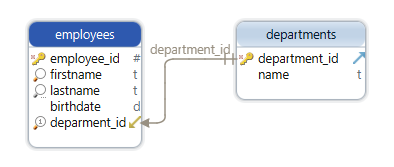
Double-click a table header on the diagram to open the Table Dialog, then open its Indexes tab: DbSchema lists the primary key, the unique indexes and the normal indexes of that table in one place, which is quicker than reading them back out of SHOW CREATE TABLE one table at a time. Primary key columns are marked with a key icon on the canvas itself. To add the foreign key from the previous section, drag from the referencing column to the referenced one and DbSchema draws the relationship line between the two tables.
While DbSchema is connected, both edits run against the database as you make them; in disconnected mode they stay in the design model until you deploy them. Download DbSchema at https://dbschema.com/download.html, connect to your database and open the Indexes tab of the table your slowest report reads. Connecting, reverse-engineering, the interactive diagram and the Table Dialog are all in the free Community Edition; saving the model to a file, designing disconnected and schema synchronization are Pro.









