MongoDB Schema Design Best Practices for 2026
For the developer or architect laying out MongoDB collections before an application ships; embedding, referencing, indexes and validation rules are explained where they appear.
On this page
Two releases in, the collection that started with five fields has fourteen, three of them on some documents and not others, and one array that nobody has measured. MongoDB accepted every one of those writes, because a collection puts no field list on the documents inside it. The design work is deciding what belongs in a document and what belongs in a collection of its own, then writing that decision down as a validation rule so the database starts refusing what breaks it.
Design around your queries
A relational schema is laid out from the entities and tuned for queries afterwards. In MongoDB the order reverses, because the document boundary you choose decides how many round trips a read costs. Start from the queries the application runs most: which fields they filter on, which fields they join on with $lookup, and which pieces of data are always fetched in the same request. Data that is read together is a candidate for one document. Data that is read on its own belongs in its own collection.
That leaves four things to weigh, and they usually agree with each other:
| Criterion | Embed | Reference |
|---|---|---|
| Subdocument size | small and bounded | large or unbounded |
| Update frequency | rarely written | written often |
| Access pattern | fetched with the parent | fetched separately |
| Cardinality | one-to-one, one-to-few | one-to-many, many-to-many |
Where they disagree, size wins. A read that costs a second query is an inconvenience; a document that grows past the limit is a write that fails.
The document boundary you settle on is also the atomicity boundary: a write is atomic within one document, and a change that has to span two of them needs an explicit multi-document transaction. Two fields that must always change together are therefore an argument for keeping them in the same document, and it is worth writing that reason down next to the collection, because it is the one a later reader will not guess.
When to use embedded documents
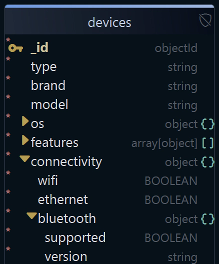
Embedding puts the related data inside the parent document, as a nested object or an array, so one read returns the whole thing. A device document that carries its connectivity as an object, with a further object nested inside it, looks like this:
{
"connectivity": {
"wifi": true,
"ethernet": false,
"bluetooth": {
"supported": true,
"version": "5.3"
}
}
}
Nesting a field does not hide it from a query. A dotted path reaches any depth, and the document above is returned by a filter written against the innermost field:
db.devices.find({ "connectivity.bluetooth.supported": true })
The same dotted path can carry an index, so an embedded field stays as searchable as a top-level one:
db.devices.createIndex({ "connectivity.bluetooth.supported": 1 })
Embed when the nested part stays small, when parent and child are always fetched together, and when a write touches only a few of the subdocuments. The atomicity boundary described above is the second thing embedding buys, after the saved read.
When to use references
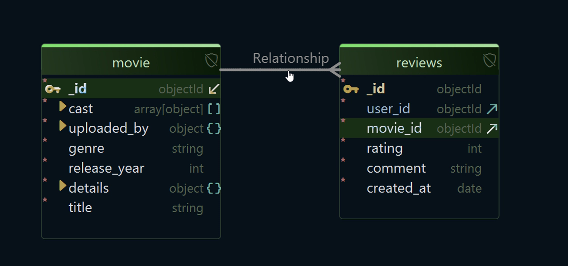
A reference keeps the related entity in its own collection and links it by identifier. Each review below carries the _id of the movie it belongs to and the _id of its author:
// reviews collection
{
"_id": ObjectId("67102d8e1f23b45c9a003001"),
"user_id": ObjectId("67102d8e1f23b45c9a002001"),
"movie_id": ObjectId("67102d8e1f23b45c9a001001"),
"rating": 5,
"comment": "Brilliant concept and visuals!",
"created_at": ISODate("2025-10-16T09:00:00Z")
}
movie_id points at _id in the movie collection, which is a one-to-many relation: one movie, many reviews. Reading them together is a $lookup stage or a second query, and that is the price of the split. What it buys is a movie document that stays the same size however many reviews arrive, and reviews that another part of the application can query without loading a movie at all.
A BSON document is capped at 16 mebibytes, so an unbounded array is not a performance question but a correctness one: the write that appends the entry over the limit fails. Anything that grows for as long as the account exists goes in its own collection for that reason alone.
MongoDB neither declares that link nor enforces it. Nothing rejects a review whose movie_id matches no movie, and nothing cascades a delete along it. DbSchema records the link anyway as a virtual foreign key: drag reviews.movie_id onto movie._id on the diagram and the connector line appears between the two collections, saved in the design model file rather than in the database.
Both rules applied to a user collection
A user profile is where the two rules meet in one document. The profile details, the preferences and a short list of addresses are small, bounded and read on every session, so they are embedded:
{
"_id": ObjectId("67102d8e1f23b45c9a002001"),
"username": "jdoe2026",
"email": "[email protected]",
"preferences": {
"theme": "dark",
"notifications": true
},
"addresses": [
{ "type": "billing", "city": "New York" },
{ "type": "shipping", "city": "Boston" }
]
}
The login history is not in there, because it grows for as long as the account does. Each login event is a document in a collection of its own carrying the user's _id. The full version of that design, with the second-factor devices, the working set and the validator that goes with it, is worked through in designing a MongoDB user collection.
Avoid deeply nested structures
MongoDB allows 100 levels of nesting in a BSON document, with every object and every array counting as a level. The useful limit is far lower than that, and it is set by the updates rather than by the reads. Reading a.b.c.d is one dotted path, but changing one element of an array that sits inside another array needs the positional operators and an arrayFilters clause, and every developer who touches that collection has to get them right.
Indexes run into the same wall from the other side. A compound multikey index may hold at most one field whose value is an array, so a document with an array inside an array cannot have both levels covered by one index.
Two or three levels is where most documents stop being comfortable. Past that, the nested part is usually an entity in its own right, and moving it into its own collection costs one $lookup and saves every update after it.
Index strategically
Every index is paid for twice: in memory, and in the writes that have to maintain it. That is the argument against indexing everything, and it is not an argument for indexing nothing, because a filter with no index behind it reads the whole collection.
Compound indexes are where the order of the fields decides whether the index is used at all. The MongoDB manual's ESR guideline puts the equality fields first, the sort fields second and the range fields last, and it names the one case that reverses the last two: where the range predicate is very selective, putting it before the sort fields wins instead. Start with ESR, and change it only when you have measured the query both ways.
The fields worth covering are the ones that appear in $match, in $sort and on the foreignField of a $lookup. A case-sensitive regular expression is matched against the values held in the index where the field has one. Anchoring the pattern at the start of the string, with ^ or \A, is what makes that fast: MongoDB builds a range from the prefix and reads only the part of the index inside that range. Where the data is temporary or where only part of a collection is ever queried, a partial index or a TTL index keeps the index itself small.
Which indexes are actually being used is a question the server answers:
db.reviews.getIndexes()
db.reviews.aggregate([ { $indexStats: {} } ])
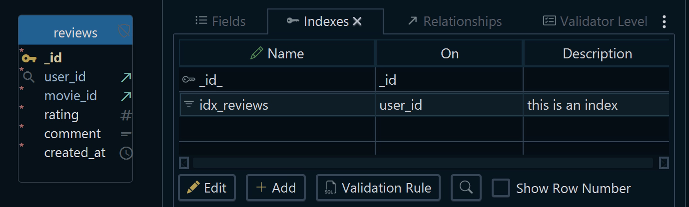
The first lists the indexes on the collection. The second reports, for each one, how many user operations have used it since the server last started, in an accesses.ops field, which is the number to look at before dropping one. DbSchema draws each index under its collection on the diagram, and new ones are added from the Indexes tab of the collection's dialog.
Design for schema evolution
MongoDB requires no fixed schema, which is why the field that was renamed in one release and left alone in another breaks an export six months later. A validation rule is how you stop that at the database rather than in a code review. It is a JSON description of the expected document, applied to every insert and update:
db.createCollection("reviews", {
  validator: {
    $jsonSchema: {
      bsonType: "object",
      required: [ "movie_id", "user_id", "rating" ],
      properties: {
        movie_id: { bsonType: "objectId" },
        user_id:  { bsonType: "objectId" },
        rating:   { bsonType: "int", minimum: 1, maximum: 5 }
      }
    }
  }
})
A review that arrives without a rating, or with the rating as the string "5", is now rejected. Two settings on the rule decide how hard it bites. The validation level says whether existing documents are checked when they are updated. The validation action says what happens to a write that breaks the rule: error, the default, rejects it, while warn lets it through and records the violation in the MongoDB log.
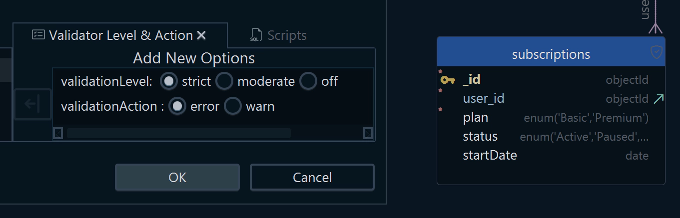
Where a collection carries a rule like that one, DbSchema reverse-engineers it and treats it as the collection's structure, rather than guessing from a sample of documents. Double-click the collection header to edit the rule, or create a collection in DbSchema, and the rule is written to the live MongoDB database and to the design model file together. Schema → Compare Model with Database then puts that model beside a second instance and lists what differs, which is how a rule agreed in staging reaches production without anybody retyping it.
Document the schema
A field named status with values 0, 1 and 4 means nothing to the person who joins next year, and a collection is a worse place to guess than a table, because there is no column comment in the catalog to read. Write down what each field holds, which fields are embedded objects and which are references, and what type each one is meant to carry. In DbSchema those descriptions go on the collection and the field, and Diagram → Export HTML5 or PDF Documentation turns them into documentation that opens in any browser with no server behind it: the diagram as a vector image, a searchable list of collections, and the field descriptions readable as mouse-over tooltips. The same dialog writes PDF for anyone who wants to print it and Markdown for a repository, where the schema description sits in the same pull request as the code that changed it.
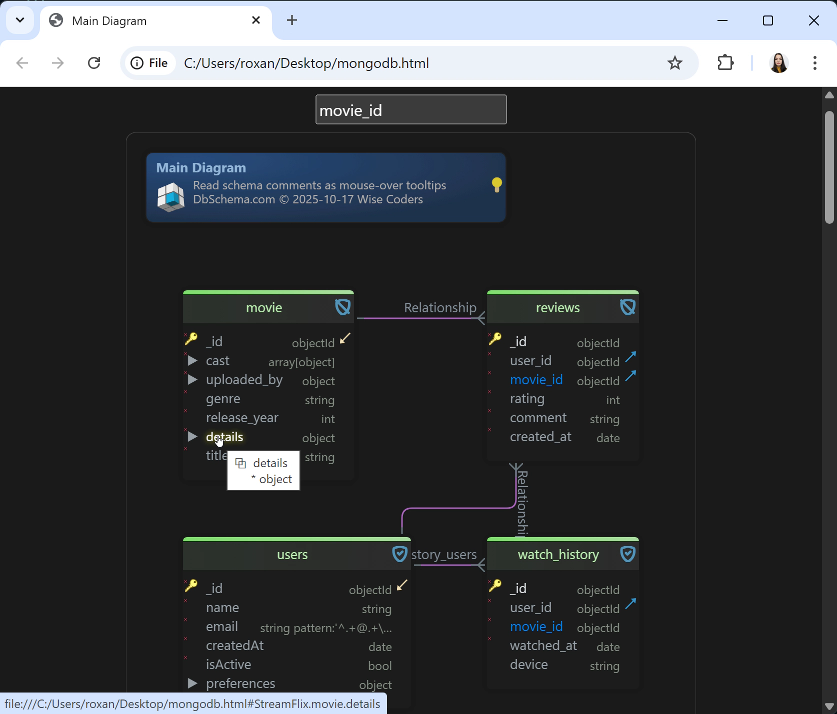
and comments
Common mistakes to avoid
The unbounded array is the first and the most expensive, because it looks fine for months and then fails a write at 16 mebibytes. Next to it sits the field whose type changes between releases, a string in the documents written last year and an object in the ones written this year, which no query can filter on without knowing both shapes.
The other three are habits rather than structures. Indexes get postponed until something is slow, by which time the slow query is in a report somebody runs daily. A collection gets modelled as if it were a table, one entity per collection with a reference for every relation, which throws away the read that embedding would have saved. And the schema is left with no validation rule and no documentation at all, so the only description of it is the application code that happens to write it.
What DbSchema adds to a MongoDB model

DbSchema connects to MongoDB and introspects a configurable sample of documents per collection, inferring the field names, the BSON types, the nested objects and the arrays from what the sample holds, so the diagram approximates what the sampled documents contain and is never a structure MongoDB enforces. Where a collection carries a validation rule, DbSchema reverse-engineers that rule instead and treats it as the authoritative structure.
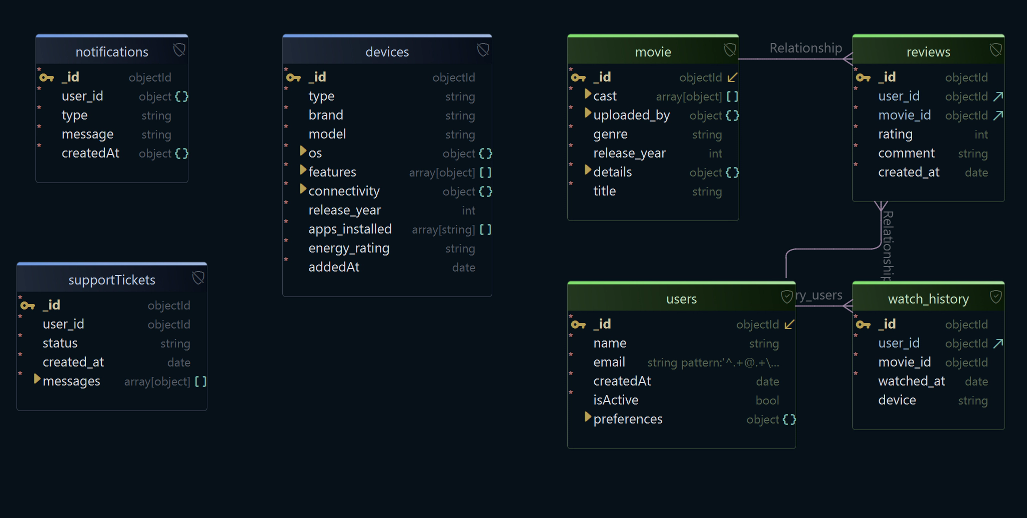
The virtual relations drawn on that diagram are what the Relational Data Editor reads: it opens the parent and its children as panes of one editor, and selecting a movie refilters the reviews pane to that movie's reviews and the users pane to their authors, as many levels deep as the relations go. The model file itself is XML with a .dbs extension, so it belongs in Git beside the application code, and a schema change arrives as a diff rather than as a surprise.
Five things make one chain: a schema inferred from the documents, the validation rule where one exists, the virtual relations, the browsing across them, and the interactive HTML5 documentation. Other tools cover parts of it, and the combination is what turns a MongoDB database into something you can hand to a colleague.
Download DbSchema at https://dbschema.com/download.html, connect to your MongoDB instance, and let it read the collections before you decide anything: the diagram shows you which arrays are already growing and which collections have no validation rule. Connecting, reverse-engineering, the interactive diagram and the Query Editor are in the free Community Edition. Saving the model to a .dbs file, the Relational Data Editor, the HTML5 documentation and the schema comparison are Pro.
Design MongoDB collections visually
DbSchema samples your documents, draws the collections as an interactive diagram, and records the virtual relations MongoDB never declares. Reverse-engineering and interactive diagrams are in the free Community Edition.









