MySQL ER Diagram and Design Tool for MySQL Workbench Users
How DbSchema draws an existing MySQL database as an ER diagram, keeps the design offline and turns it into a model for any database.
On this page
Words in this article
Words in this article
- ER diagram
- A picture of a database: each table is a box, and each link between two tables is a line.
- Reverse-engineering
- Reading the tables and keys of a live database and drawing them.
- Foreign key
- A column that points to a row in another table.
- Model
- A tool's own copy of the schema, saved as a file.
- Virtual foreign key
- A link that lives only in the DbSchema model and never changes the database.
- Forward engineering
- Writing SQL from a model.
- Logical design
- A description of the data that names no database: entities, attributes and relations.
- Version control
- A system such as Git that keeps every version of a file and who changed what.
The short answer
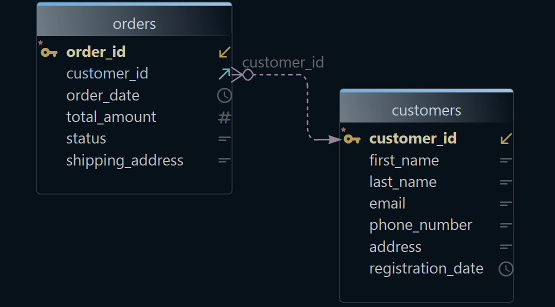
You want a MySQL ERD, an ER diagram of your MySQL database, or a MySQL Workbench alternative to keep designing the model you drew there. An ER diagram shows each table as a box and each link between two tables as a line. DbSchema draws it from the live database, lets you change the design offline, and carries it to MySQL or another database:
Diagram an existing MySQL database
DbSchema connects and draws every table and foreign key.
Keep designing without a connection
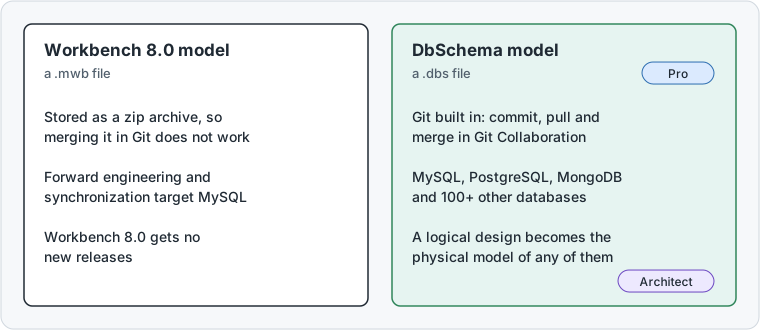
DbSchema Pro saves the design as a file, with Git built in, and writes the SQL for each change.
Carry the design to another database
DbSchema Architect turns it into a logical design for MySQL or PostgreSQL.
What DbSchema adds to a MySQL ER diagram
Why DbSchema
DbSchema is a desktop design tool for Windows, macOS and Linux. It connects to MySQL and more than 100 other databases.
The diagram from your live database
DbSchema reads the tables and their links from MySQL and draws them (Connect to Database).
The design in Git, with merges
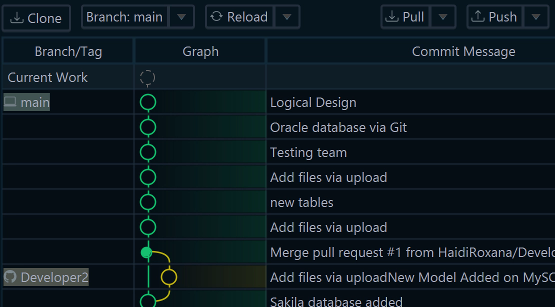
DbSchema Pro saves the design in one
.dbsfile. File → Git Collaboration commits and pulls it (Git Collaboration).Changes as reviewed SQL
Pro compares the saved design with the database and writes the SQL for the differences you pick (Schema Synchronization).
One design for MySQL and PostgreSQL
DbSchema Architect keeps a logical design and generates the model for the database you choose (Logical Design).
Then, in DbSchema:Reverse-engineerDesign offlineCompareRedesign
Key takeaways
- Reverse-engineering only reads from MySQL, so the diagram shows what really runs.
- Virtual foreign keys add the links your application uses but the database never declared.
- When two people change the same design, DbSchema shows both versions side by side to merge.
- A Workbench 8.0 model moves into DbSchema as an SQL script.
What users say
DbSchema data modelling capability is more than enough for most companies. … DbSchema is a very useful tool.
I mainly use the ER diagram, schema visualization, and database synchronization tools because they make database management faster and easier.
Reverse-engineer a MySQL database into an ERD
Reverse-engineering means reading the tables and keys of a live database and drawing them. DbSchema connects to the database, so the MySQL schema diagram shows what really runs. The badges show the edition each step needs.
-
Connect to MySQL Community
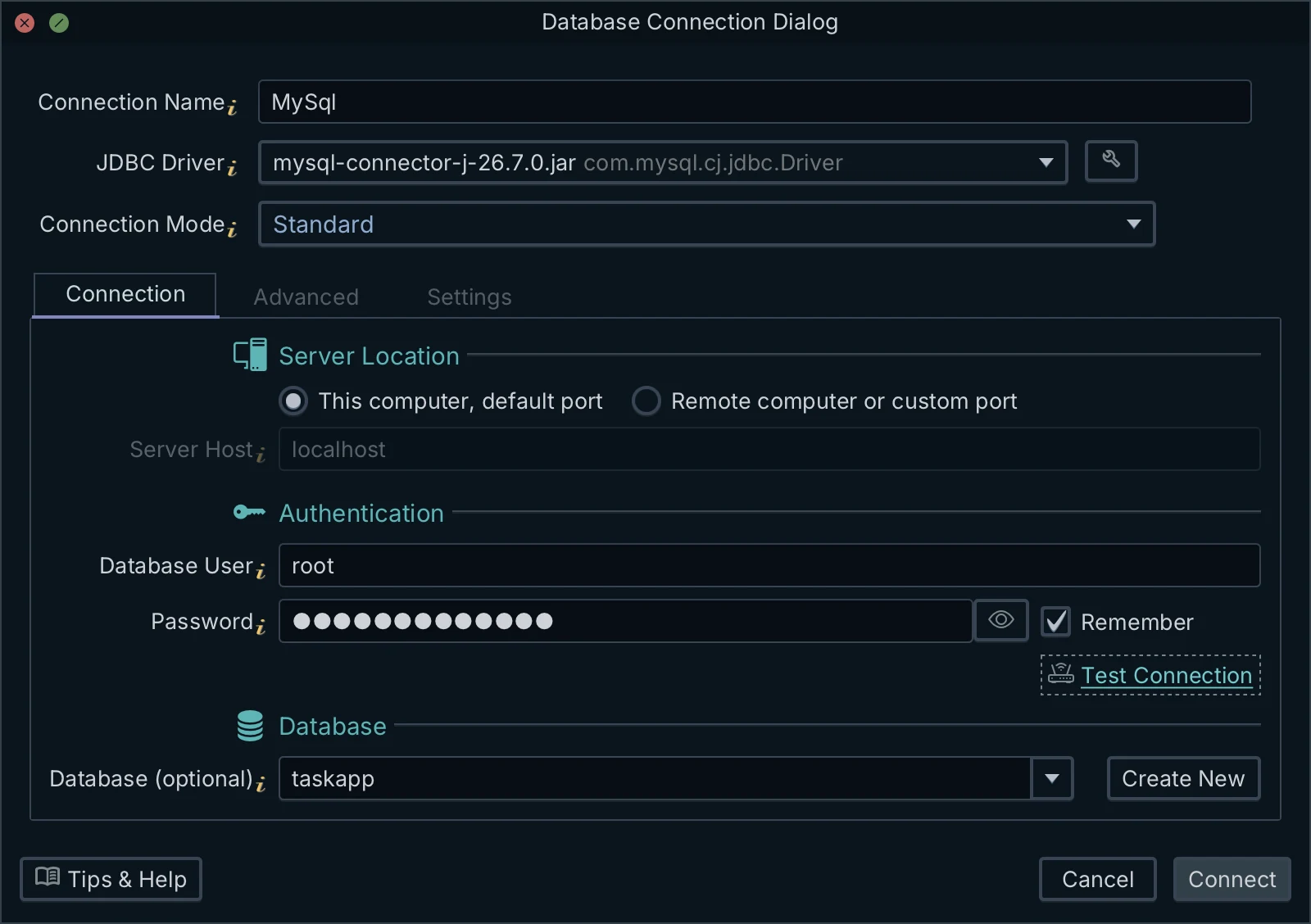
Choose File → New Model and keep Connect to Database selected. Click MySQL, choose New Connection, and press Connect to MySQL. Fill in the host, port, user and password, then press Connect. DbSchema downloads the JDBC driver itself. A JDBC driver is the small program a Java application uses to talk to a database.
01 JDBC driverDbSchema downloads the MySQL JDBC driver itself. You don't install anything.
02 Where MySQL runsThis computer uses localhost and the default port. Pick the other option for a server or a custom port.
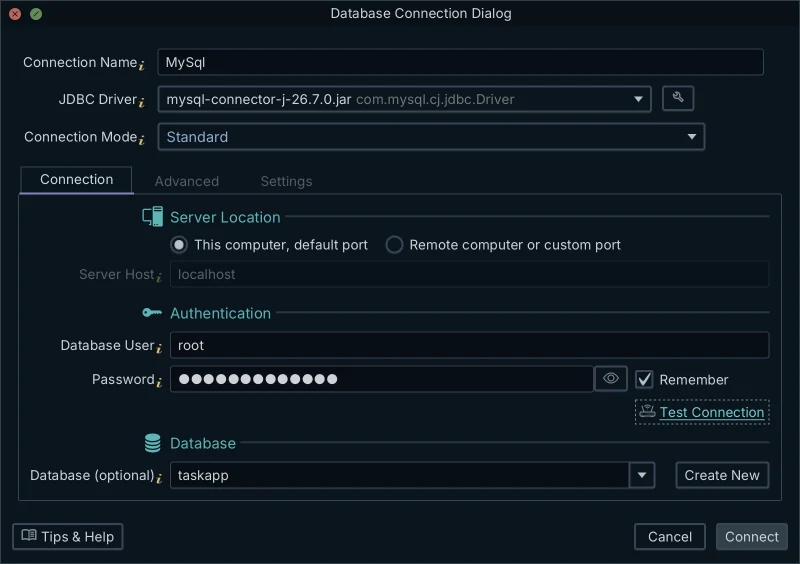
03 User and passwordA MySQL user and its password. Remember keeps the password for the next connection.
04 Test ConnectionChecks host, user and password before you connect.
Figure 1. The MySQL connection dialog. DbSchema picked the MySQL JDBC driver itself; you fill in host, user, password and, optionally, the database. Click the screenshot to enlarge it. -
Reverse-engineer the schema Community
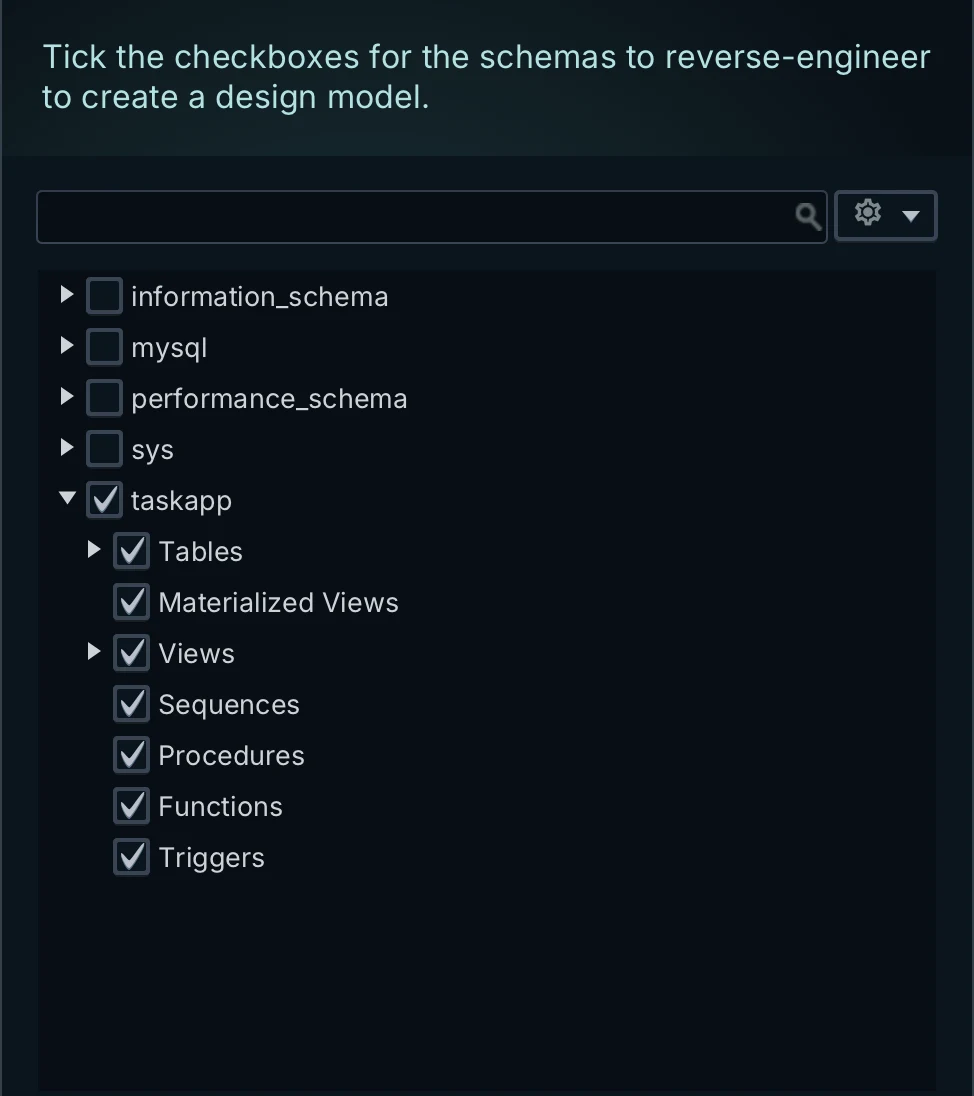
In Reverse Engineer the Database, tick the schemas and press Import. A schema is one database on the MySQL server, with its tables. DbSchema draws the tables and their foreign keys. A foreign key is a column that points to a row in another table, such as
orders.customer_id. Connecting and importing only read from the database.01 System schemasinformation_schema, mysql, performance_schema and sys belong to MySQL itself. Leave them unticked.
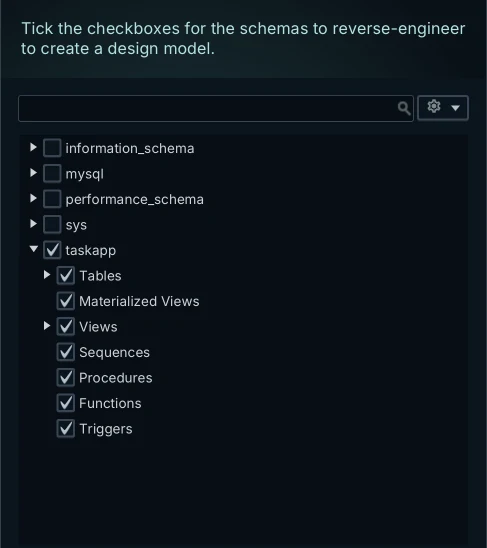
02 Your schemaTick it to import its tables, views, procedures, functions and triggers.
Figure 2. Choosing what to reverse-engineer from MySQL 8. Tick your own schema, here taskapp, and leave the system schemas out. Click the screenshot to enlarge it. -
Add the links the database doesn't declare Community
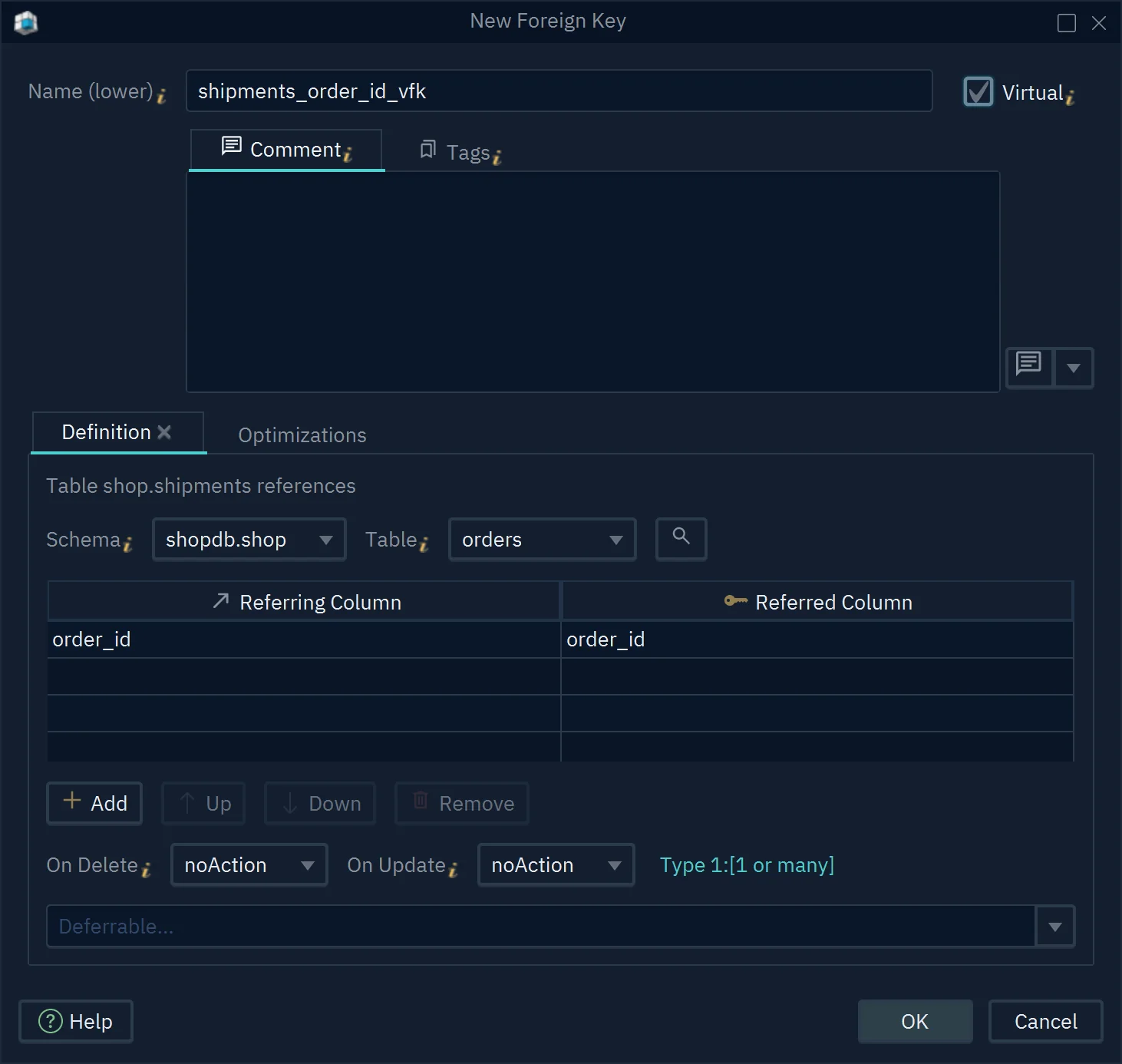
Some tables are joined in the application but have no foreign key. Drag the child column, the one that points, onto the parent column, the one it points to. Then tick Virtual. A virtual foreign key lives only in the DbSchema model and never changes the database (Foreign Keys).
01 Referenced tableThe parent table, here orders in the shop schema.
02 VirtualTicked, the key lives only in the DbSchema model. The database doesn't change.
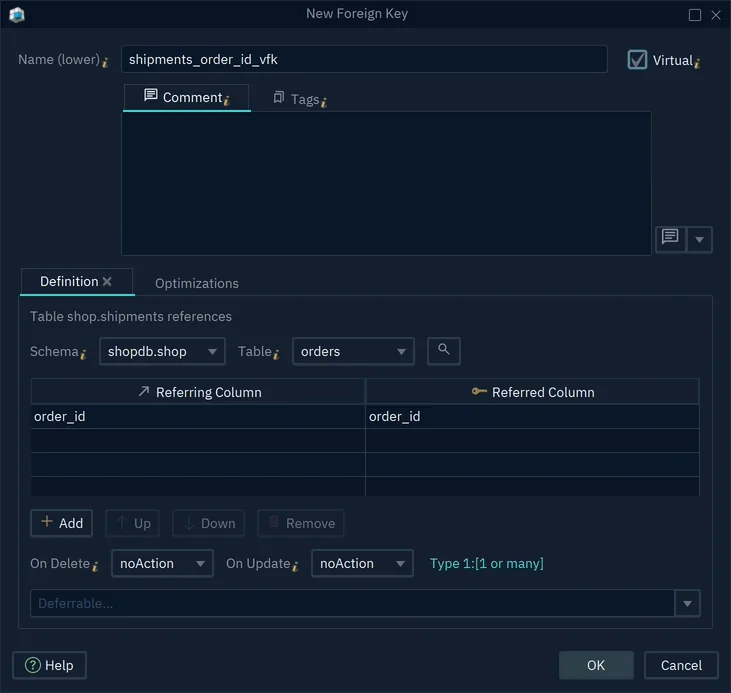
03 ColumnsReferring Column is the child column, shipments.order_id. Referred Column is the one it points to, orders.order_id.
Figure 3. A virtual foreign key from shipments.order_id to orders.order_id. The Virtual tick keeps it in the model only. Click the screenshot to enlarge it.
A large schema reads best as several small diagrams. Diagram → New Diagram adds one to the same model, and Auto Arrange Tables lays out the tables by their foreign keys (Diagrams). The MySQL ER diagram guide explains the line ends.
Design offline, without a live database connection
While you're connected, every change you confirm runs in the database at once. DbSchema Pro lets you work on the design instead, and decide later what reaches the database.
-
Save the design as a file Pro
Choose File → Save Model to File. The design is now a
.dbsfile, DbSchema's own copy of the schema, called the model. -
Go offline and change the design Pro
Choose Database → Offline (connect later). Add columns, tables and foreign keys on the diagram. Your changes stay in the model, and the database doesn't change.
-
Share it in Git Pro
Choose File → Git Collaboration, tick the
.dbsfile and commit it. Git is a version control system: it keeps every version of a file and who changed what. When two people change the same part, DbSchema shows both versions side by side to merge them.01 The model fileTick the .dbs model file to include it in the commit.
02 DiffShows what changed in the model file.

03 Commit messageSay what changed, such as Add the shop model.
04 CommitSaves the version on this computer. Push sends it to the shared repository.
Figure 4. Git Collaboration inside DbSchema: tick the .dbs file, write a message, commit. Push sends it to the shared repository. Click the screenshot to enlarge it. -
Compare and apply Pro
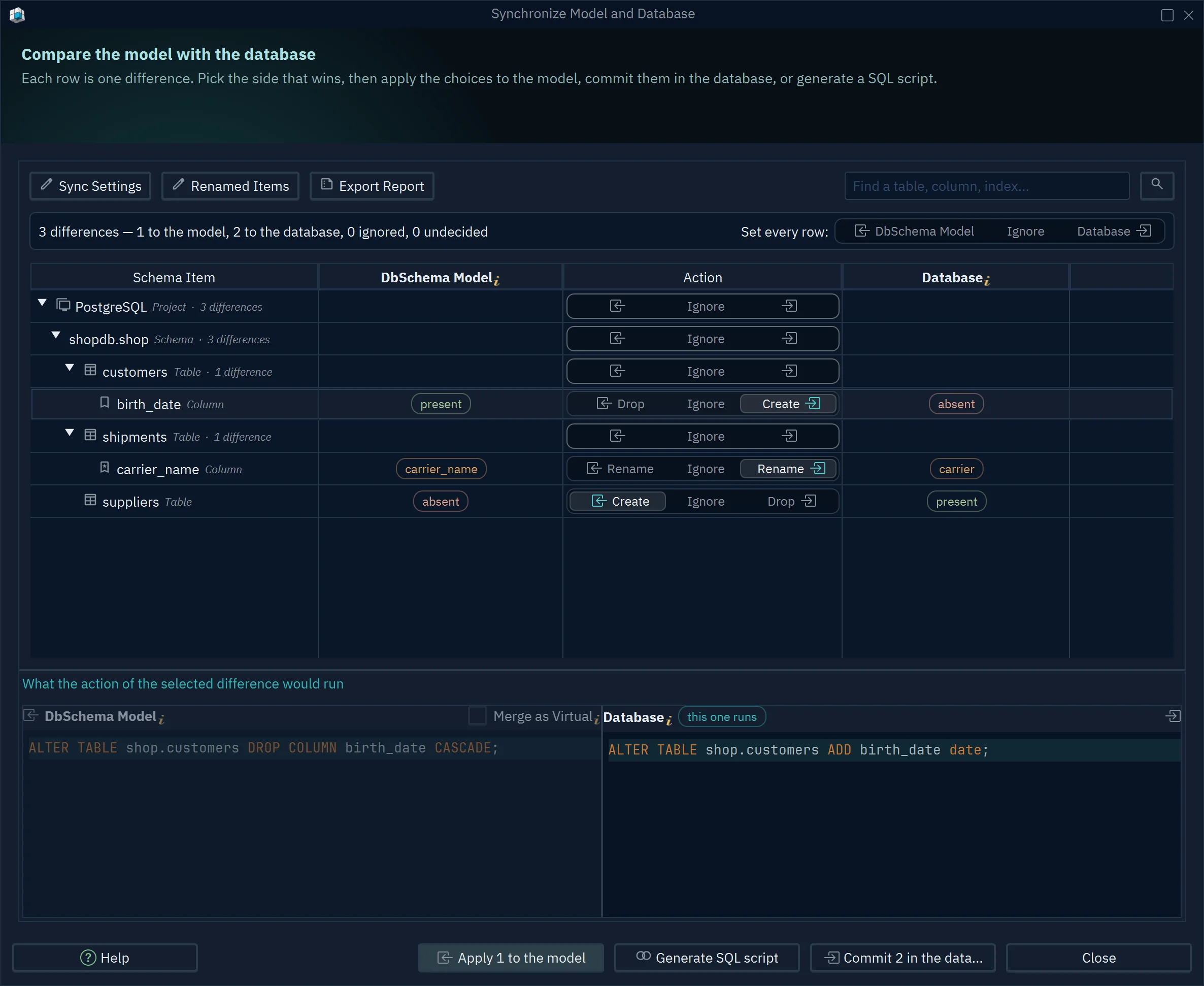
Connect again and choose Compare. DbSchema lists each difference between the model and the database, with its SQL, and runs only the changes you pick (Schema Synchronization).
01 One row per differenceThree differences: one goes to the model, two to the database.
02 Pick the side that winsCreate adds birth_date to the database. Drop removes it from the model. Ignore skips it.
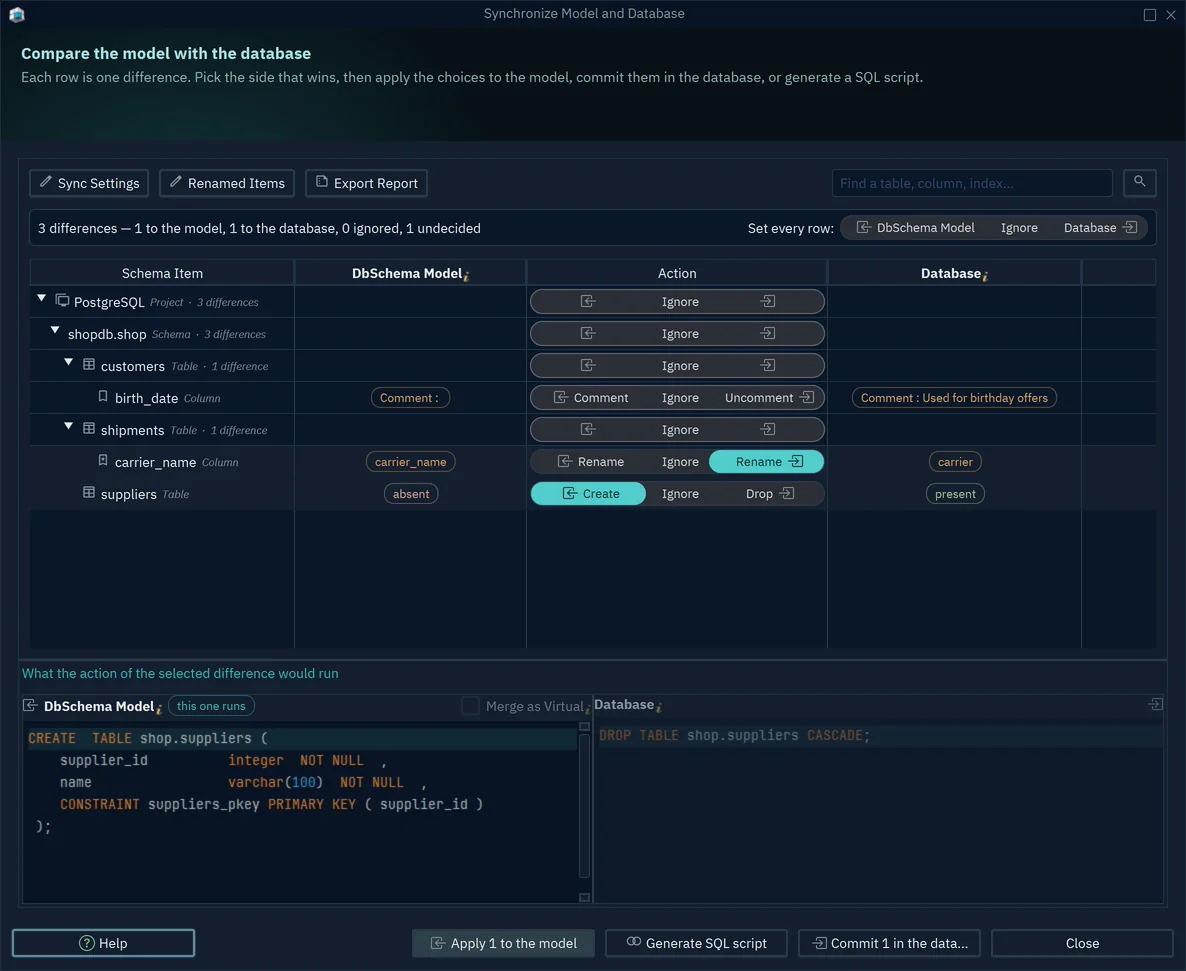
03 Generate SQL scriptWrites the changes as a script you review first, instead of running them.
04 The SQL that runsThe ALTER TABLE statement this choice runs in the database.
Figure 5. Compare lists each difference and the SQL it would run. Shown on a PostgreSQL demo model; with MySQL the dialog is the same. Click the screenshot to enlarge it.

01 SaveSaves the design as a .dbs model file, the same as File → Save Model to File.
02 OfflineNo MySQL connection is open. Your changes stay in the model until you compare and apply them.
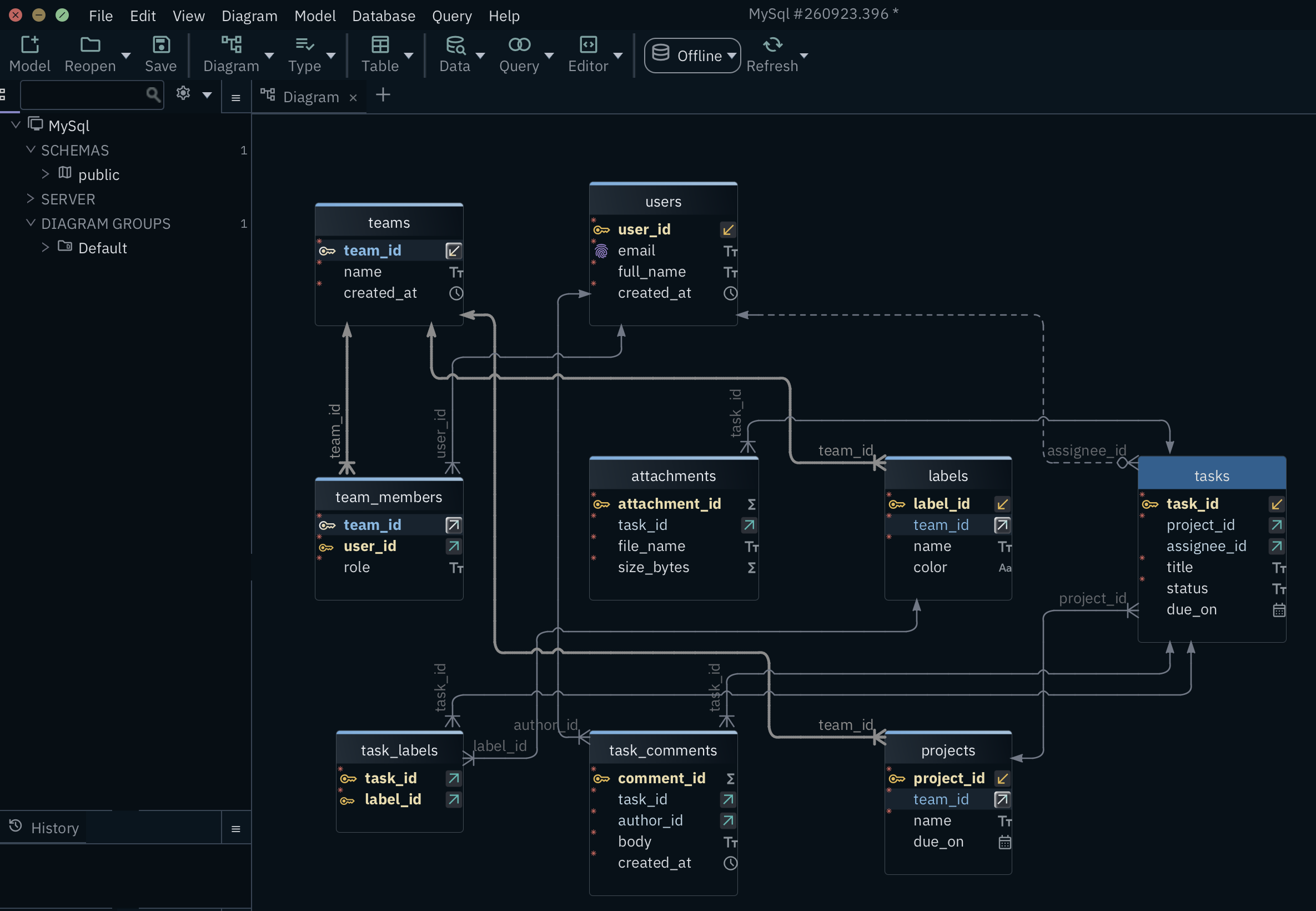
03 task_commentsAdd columns, tables and foreign keys right on the diagram. Each line is a foreign key.
04 tasksEach table is a box with its columns. The key icon marks the primary key, the arrow icons the foreign keys.
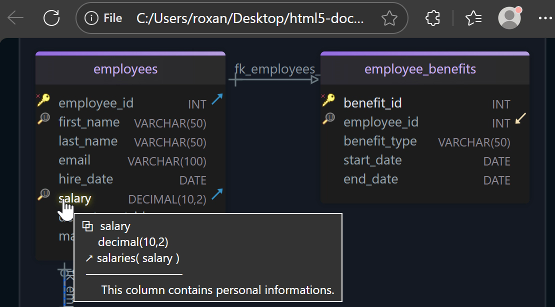
File → Export As... → HTML5/PDF Documentation, also in Pro, turns the same model into documentation for readers without a database login.
Move your MySQL Workbench model to DbSchema
Oracle now lists MySQL Workbench 8.0 as no longer maintained. Its successor, Workbench 26, names no data modeling on its product page, checked on 19 November 2026. A .mwb model from Workbench 8.0 still moves into DbSchema in two steps.
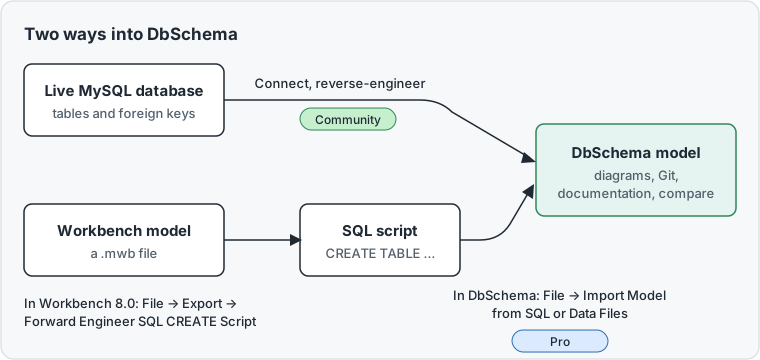
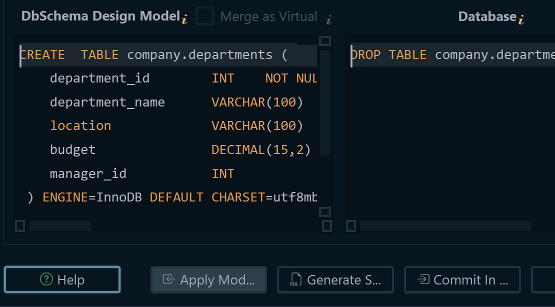
In Workbench 8.0, open the model and choose File → Export → Forward Engineer SQL CREATE Script. Forward engineering means writing SQL from a model. The result is a text file of CREATE TABLE statements.
In DbSchema, choose File → Import Model from SQL or Data Files. Pick the file, set DBMS, the database type, to MySQL, and press Load Model. DbSchema reads the statements into a new model without running them. This import needs DbSchema Pro (Import and Export the Model). If the tables already exist in a database, reverse-engineer that database instead.
01 FilesPick this for the SQL script you exported from Workbench.
02 ChooseOpens the file picker. Select the .sql file.
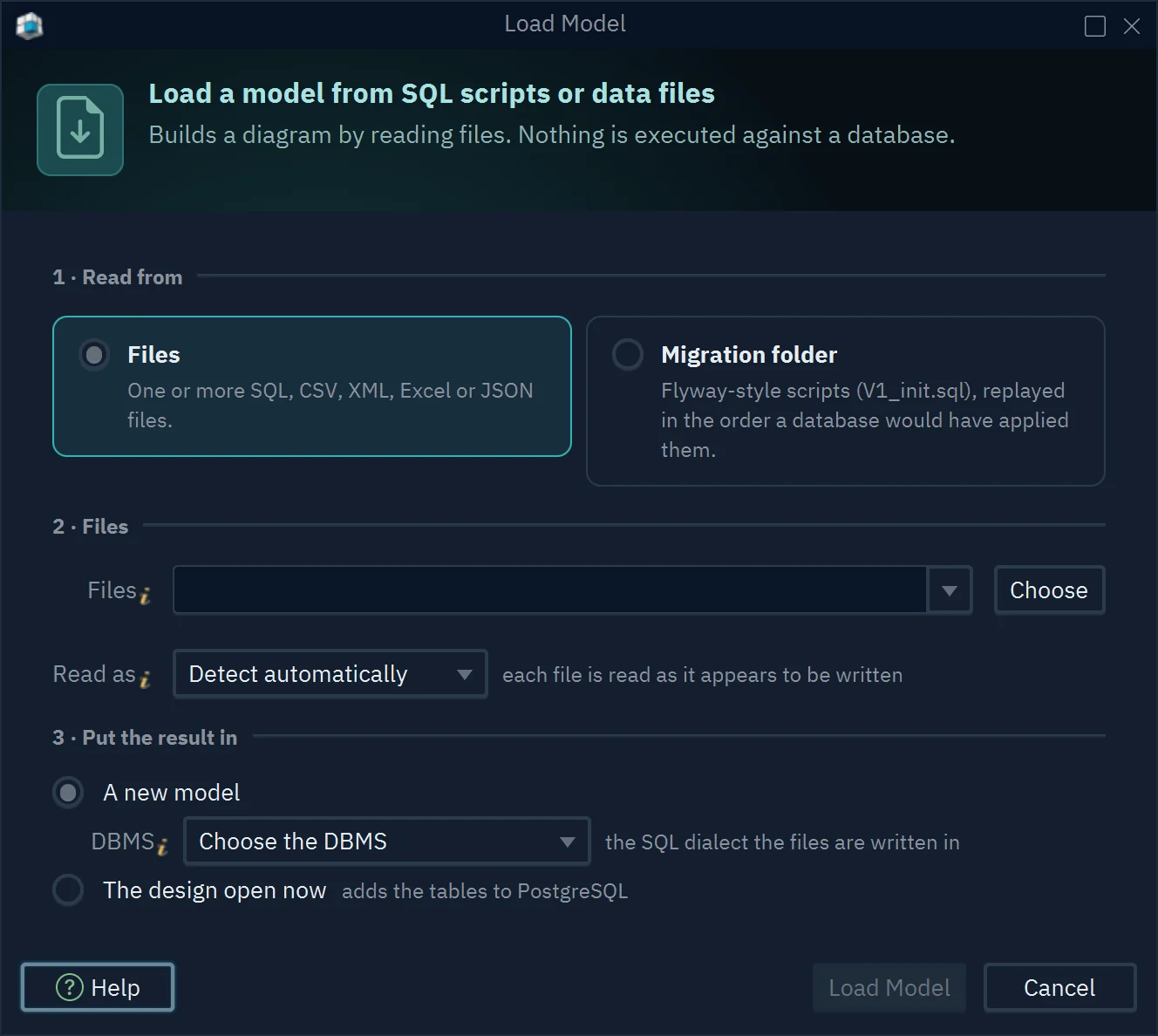
03 DBMSSet it to MySQL, the dialect Workbench wrote the script in.
04 Load ModelReads the script into a new model. Nothing runs against a database.
Logical design with DbSchema Architect
Many teams now run PostgreSQL next to MySQL. DbSchema Architect adds logical design, so one design serves both.
A physical model holds the tables of one database, with its data types. A logical design describes the same data without choosing a database. It uses entities, attributes and relations instead of tables, columns and foreign keys.
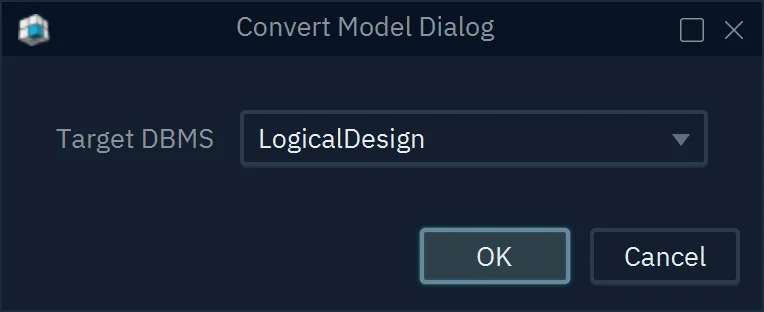
DbSchema Architect works in both directions. Model → Convert Model with Target DBMS set to LogicalDesign turns your reverse-engineered MySQL model into a logical design. Model → Generate Physical Model then creates the model for the database you choose, such as PostgreSQL. The logical design stays as it is, so you can generate MySQL again later.
01 Target DBMSLogicalDesign turns the MySQL model into a logical design.
01 Target DBMSThe database to generate the model for, here PostgreSQL. Pick MySQL to get the MySQL model back.
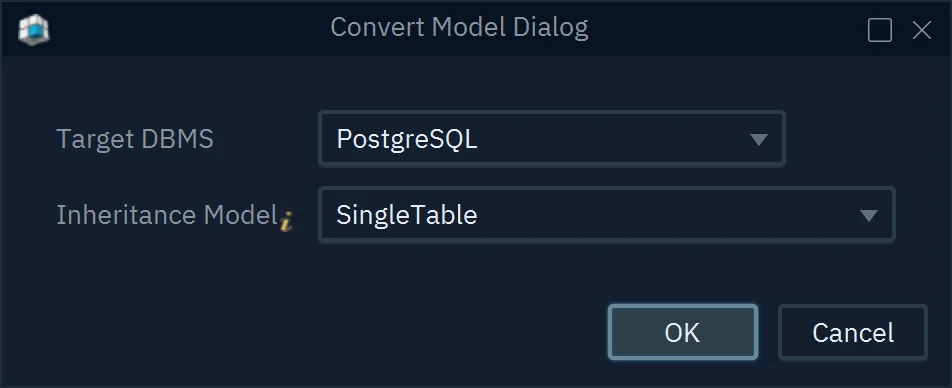
02 Inheritance ModelHow subtypes become tables. SingleTable keeps them in one table.
02 EntitiesA logical design lists entities instead of tables.
01 ConvertTurns the design into a physical model for the database you choose.
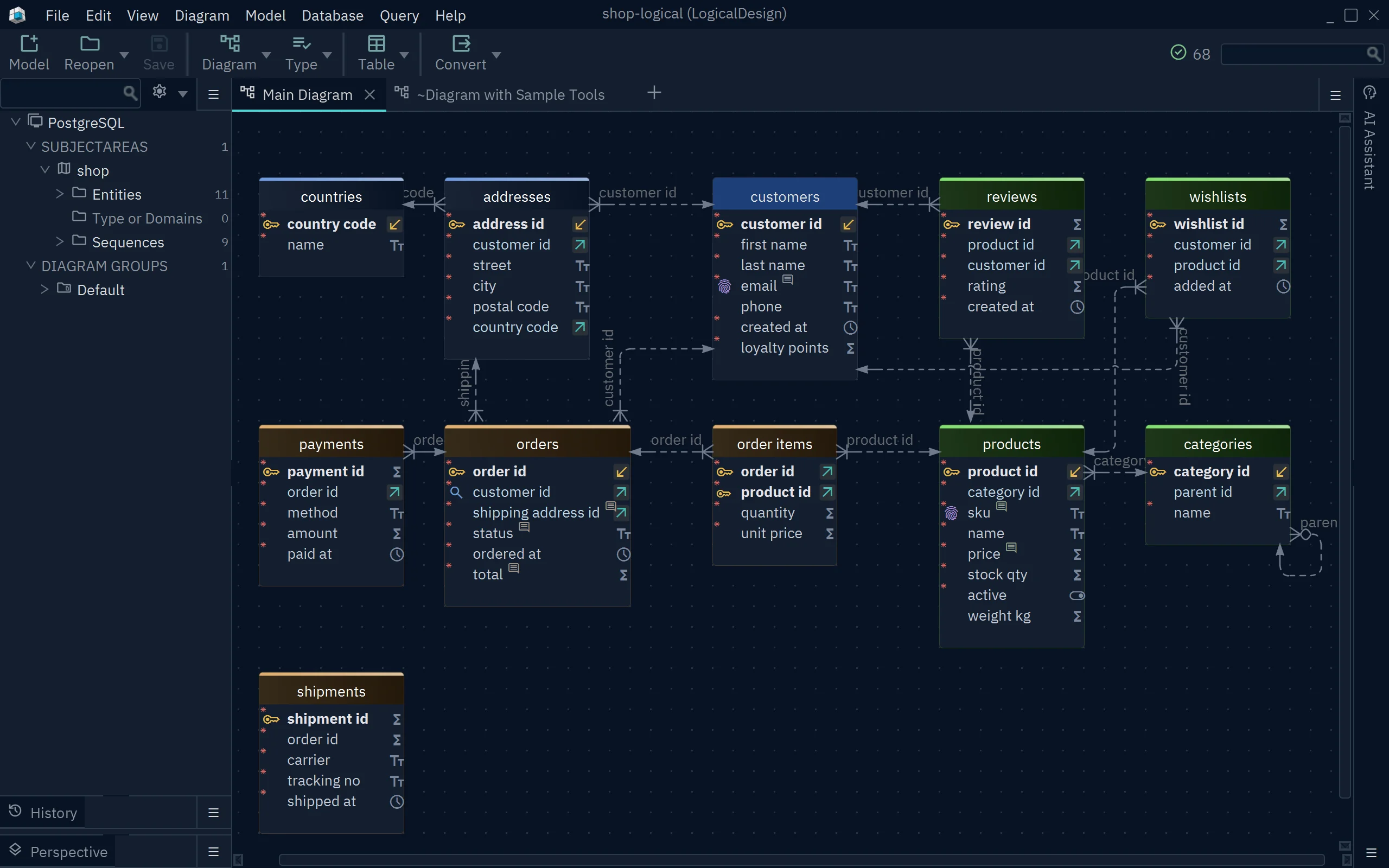
03 customersAn entity with its attributes. Names use plain words, such as first name.
A new design can also start here. File → New Model → Design without Database → Logical Design opens an empty logical model, before any table exists. Check triggers and procedures after you generate a physical model. They are code stored in the database, written in the language of one database.
The MySQL Workbench alternatives article covers teams that run several databases. For Oracle, see the Oracle ER diagram and data modeling guide.
DbSchema Architect is the right edition if you design before the database exists or plan one model for MySQL and PostgreSQL. It also shows which procedures read and write a table. It includes everything in Pro. DbSchema Pro fits developers who keep the MySQL design in a file, work on it offline and send changes as scripts they review. Viewing the diagram stays free in the Community Edition. The pricing page lists every edition.
Download DbSchema and try all features free for 15 days, without registration. To design across databases, choose DbSchema Architect.
Sources
- MySQL, Workbench 26.7.0 and 26.10.0 release notes (dev.mysql.com/doc/relnotes/workbench), read 19 November 2026.
- MySQL, Workbench product page (mysql.com/products/workbench), read 19 November 2026.
- MySQL Workbench 8.0 Reference Manual, Forward Engineering Using an SQL Script (dev.mysql.com/doc/workbench), read 19 November 2026.
- DbSchema, Connect to Database, Diagrams, Foreign Keys, Git Collaboration and Schema Synchronization documentation.
- DbSchema, Import and Export the Model, Logical Design and Licensing documentation.
- DbSchema, purchase page, read 19 November 2026.
Draw your MySQL schema as a diagram
DbSchema reverse-engineers the MySQL database you open in Workbench into an interactive ER diagram. DbSchema Architect turns the design into a model for MySQL, PostgreSQL or another database.