Database Design Errors to Avoid & How To Fix Them
For the person who designs a schema and reviews the changes before they reach a live database.
On this page
Two reports that count the same rows differently, a delete that runs for minutes, a column nobody can explain: schema mistakes show themselves only once the tables hold rows, and by then every fix is a migration. These six come up again and again in relational schemas, and each has a fix that takes a few lines of SQL:
| Mistake | What it costs later | The fix |
|---|---|---|
| Foreign keys never declared | rows that point at nothing | ALTER TABLE ... ADD FOREIGN KEY |
| Missing or badly chosen indexes | full table scans, slow deletes | an index on each filter, join and foreign key column |
| Structured data in a JSON column | values of the wrong type, filters that miss rows | real columns, or a CHECK on the document |
| Normalization skipped or overdone | the same fact stored twice, or too many joins | third normal form, then stop |
| No naming convention | guessing at every column name | one written rule, checked automatically |
| No schema documentation | nobody knows why a column exists | COMMENT ON, exported as documentation |
The SQL below was run on PostgreSQL 18, and the design decisions apply to any relational database schema.
Foreign keys that were never declared
Here the relationship between users and reviews exists in everyone's head but not in the DDL:
CREATE TABLE users (
  user_id  int PRIMARY KEY,
  username text NOT NULL
);

CREATE TABLE reviews (
  review_id   int PRIMARY KEY,
  user_id     int NOT NULL,
  review_text text NOT NULL
);

INSERT INTO users VALUES (1, 'ada');
INSERT INTO reviews VALUES (10, 1, 'Fits the socket'), (11, 42, 'Never arrived');
Review 11 belongs to user 42, who was never created. PostgreSQL accepts it, because nothing in reviews says that user_id has to match a row in users:
SELECT r.review_id, r.user_id, u.username
FROM reviews r
LEFT JOIN users u ON u.user_id = r.user_id
ORDER BY r.review_id;
| review_id | user_id | username |
|---|---|---|
| 10 | 1 | ada |
| 11 | 42 |
The cost arrives later than the mistake. A count of reviews with an inner join to users returns 1, the same count with a left join returns 2, and two reports built on the same tables disagree. Nothing failed at insert time, so the search starts from the report rather than from the row.
Add the missing foreign keys
An ALTER TABLE statement adds the constraint to a table that already holds data:
ALTER TABLE reviews
  ADD CONSTRAINT fk_reviews_users
  FOREIGN KEY (user_id) REFERENCES users (user_id)
  ON DELETE CASCADE
  ON UPDATE CASCADE;
PostgreSQL scans the table to check every existing row first[2], so on this table the statement fails:
ERROR:  insert or update on table "reviews" violates foreign key constraint "fk_reviews_users"
DETAIL:  Key (user_id)=(42) is not present in table "users".
Delete review 11 or point it at a real user, then run the statement again. On a table large enough that the scan is a problem, add NOT VALID to the statement: the scan is skipped, new inserts and updates are checked at once, and ALTER TABLE reviews VALIDATE CONSTRAINT fk_reviews_users checks the old rows later, once you have cleaned them up[2].
The two actions decide what happens to the child rows. ON DELETE CASCADE deletes a user's reviews with the user, and ON UPDATE CASCADE copies a changed user_id into them[1]. Without an action clause you get the default, NO ACTION, and deleting a user who still has reviews fails:
ERROR:  update or delete on table "users" violates foreign key constraint "fk_reviews_users" on table "reviews"
DETAIL:  Key (user_id)=(1) is still referenced from table "reviews".
Choose CASCADE where the child rows mean nothing without the parent, as reviews without a user do. Keep NO ACTION where deleting the parent should stop and make someone look, as with invoices that point at a customer.
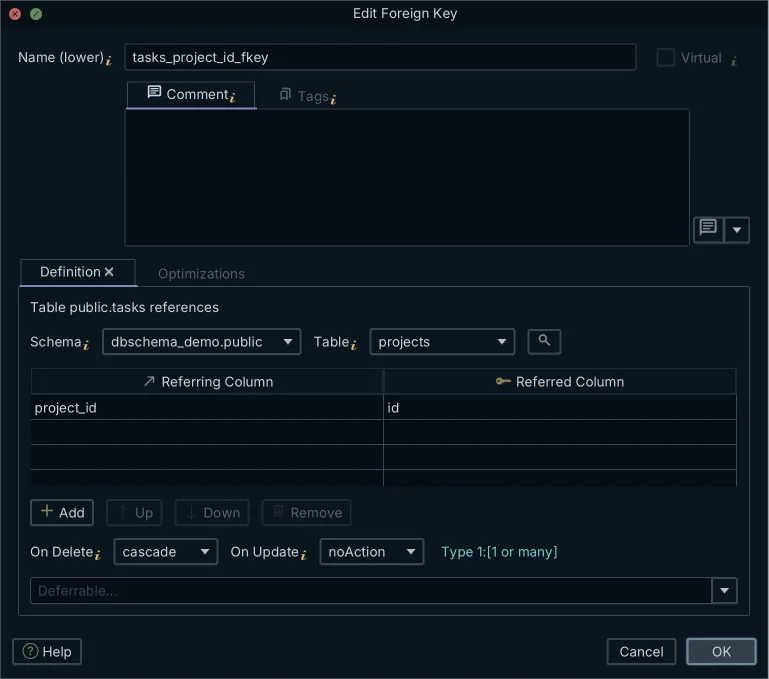
In DbSchema you draw the relationship instead of typing it. Drag the user_id column of reviews onto user_id in users, and the New Foreign Key dialog opens already filled in. Double-click the line later to open the Edit Foreign Key dialog, where On Delete and On Update sit next to the column pairs. If DbSchema is connected, the foreign key is created in the database as soon as you press OK. If you work offline, it stays in the model until you synchronize the model with the database, which is in DbSchema Pro.
Missing or badly chosen indexes
The foreign key above did not create an index on reviews.user_id. The referenced columns always have one, because they must be a primary key or unique, but PostgreSQL creates nothing on the referencing side[1]. To see what that costs, give the tables some volume:
INSERT INTO users
SELECT g, 'user ' || g FROM generate_series(1000, 10999) g;

INSERT INTO reviews
SELECT g, 1000 + g % 10000, 'review ' || g FROM generate_series(100, 200099) g;

ANALYZE reviews;

EXPLAIN (COSTS OFF) SELECT * FROM reviews WHERE user_id = 1042;
 Seq Scan on reviews
   Filter: (user_id = 1042)
To find the 20 reviews of one user, PostgreSQL reads all 200,001 rows of the table. Deleting a user does the same lookup: the cascade has to find the reviews that point at the deleted row, and without an index it scans the referencing table for every deleted user[1]. The symptoms show up before you open a query plan. Response time follows the size of the table rather than the size of the result, and a delete on a small parent table is slow for no visible reason.
Add and verify the right indexes
Index the columns that appear in WHERE, JOIN and ORDER BY clauses, and the referencing side of every foreign key. The CREATE INDEX statement is the same idea on every engine:
CREATE INDEX idx_reviews_user_id ON reviews (user_id);

EXPLAIN (COSTS OFF) SELECT * FROM reviews WHERE user_id = 1042;
 Bitmap Heap Scan on reviews
   Recheck Cond: (user_id = 1042)
   ->  Bitmap Index Scan on idx_reviews_user_id
         Index Cond: (user_id = 1042)
Run EXPLAIN before and after, on the query you are trying to speed up, because an index has a price too. PostgreSQL keeps every index in step with its table, which adds work to each insert, update and delete, and its documentation advises removing indexes that queries seldom or never use[5]. The article on indexes and foreign keys goes further into which foreign keys need one.
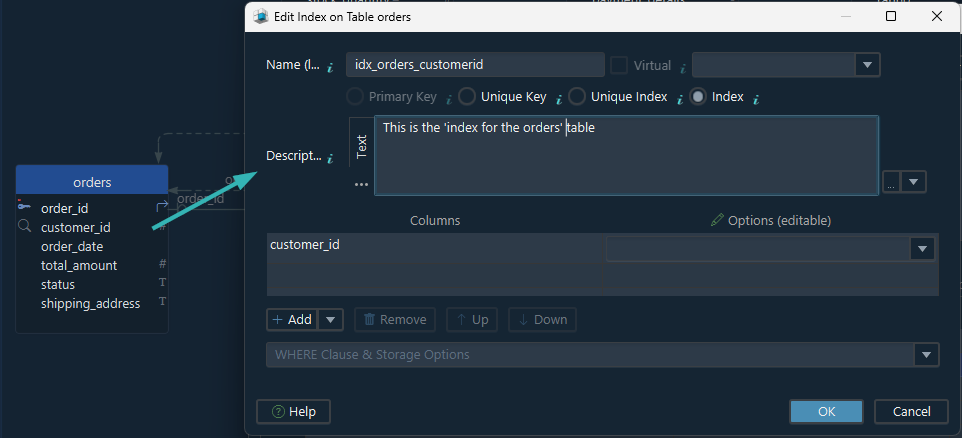
In DbSchema, indexes are on the Primary Key / Unique / Indexes tab of the Edit Table dialog, next to the primary key, so you see the whole set while you decide. The Optimizations tab of the Edit Foreign Key dialog has an option, Optimize deletions by indexing the referring column(s), that adds the index on the child side when you create the foreign key.
Structured data kept in a JSON or JSONB column
A json or jsonb column is a fair choice for fields that are optional, differ from row to row, or still change shape, such as user preferences or the payload of a log entry. PostgreSQL stores the two types differently. json keeps an exact copy of the input text and reparses it on every use. jsonb stores a decomposed binary form that is slightly slower to write, significantly faster to process, and can be indexed[3].
What you give up with either is the type check. Both of these rows go in:
INSERT INTO users VALUES (2, 'grace');

CREATE TABLE user_settings (
  user_id  int PRIMARY KEY REFERENCES users (user_id),
  settings jsonb NOT NULL
);

INSERT INTO user_settings VALUES
  (1, '{"theme": "dark", "page_size": 50}'),
  (2, '{"theme": "dark", "page_size": "50"}');

SELECT user_id, jsonb_typeof(settings -> 'page_size') AS page_size_type
FROM user_settings
ORDER BY user_id;
| user_id | page_size_type |
|---|---|
| 1 | number |
| 2 | string |
page_size is a number in one row and a string in the other[4]. A column of type integer could not hold both. The difference stays hidden until a query trips on it, and this filter finds only one of the two users who chose 50 rows per page:
SELECT user_id FROM user_settings WHERE settings -> 'page_size' = '50';
| user_id |
|---|
| 1 |
Keep structured data in columns
One question decides where a field belongs. A field that appears in a WHERE clause, a join or a report is a column, with a type, and NOT NULL if it is required. A field that is only ever read back with the rest of the document can stay in the document. Use JSON or JSONB for the second kind, and move a field out when a query starts filtering on it.
Where a field has to stay inside the document, a CHECK constraint can still enforce its type. On the table above it is rejected until row 2 is fixed:
ALTER TABLE user_settings
  ADD CONSTRAINT page_size_is_number
  CHECK (jsonb_typeof(settings -> 'page_size') = 'number');
ERROR: check constraint "page_size_is_number" of relation "user_settings" is violated by some row
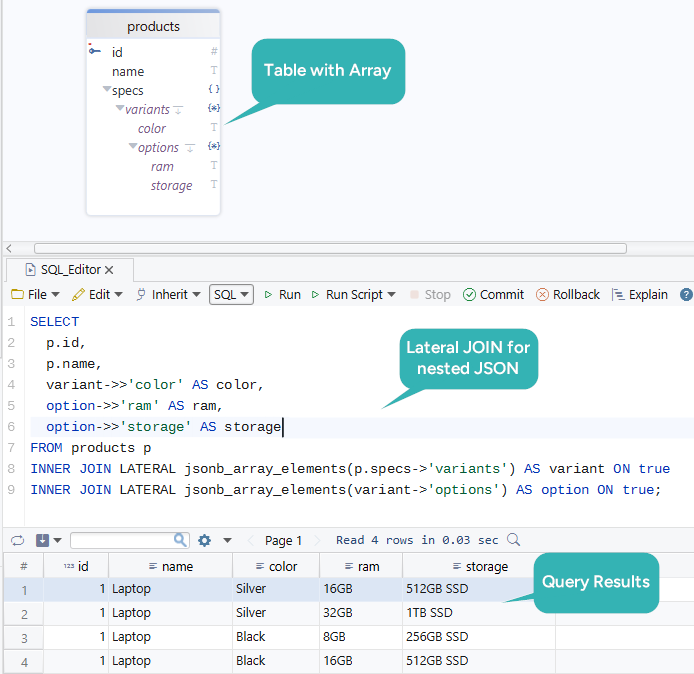
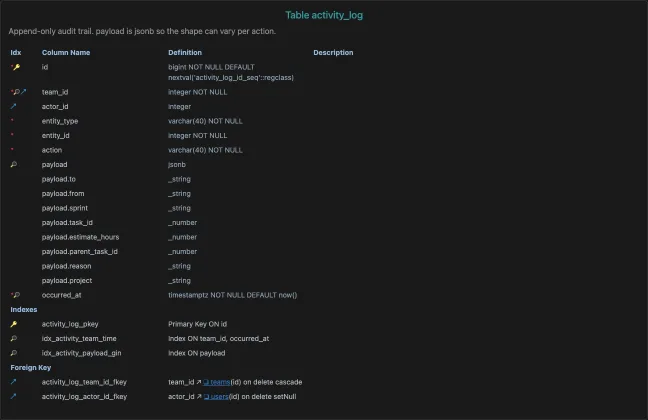
When DbSchema reverse-engineers a PostgreSQL schema, it reads up to ten values of each json or jsonb column and shows the keys it finds as sub-columns, on the diagram and in the generated documentation. That makes the shape of the documents visible, including keys that only some rows carry.
Normalization skipped, or taken too far
A schema drifts toward one wide table when each new field is added where it is first needed:
CREATE TABLE reviews_flat (
  review_id    int PRIMARY KEY,
  user_id      int  NOT NULL,
  user_name    text NOT NULL,
  phone_number text NOT NULL,
  movie_id     int  NOT NULL,
  rating       int  NOT NULL,
  comment      text NOT NULL
);

INSERT INTO reviews_flat VALUES
  (501, 1, 'Alice Martin', '555-342-9752', 101, 5, 'Enjoyed it'),
  (502, 2, 'Ben Carter',   '222-865-9876', 102, 4, 'Well written'),
  (503, 1, 'Alice Martin', '555-342-9752', 103, 3, 'Slow in the middle');
Alice's phone number is stored once for each review she wrote. An update that changes it in one row and misses the other leaves the table with two answers to the same question:
UPDATE reviews_flat SET phone_number = '555-000-1111' WHERE review_id = 501;

SELECT DISTINCT user_id, user_name, phone_number
FROM reviews_flat
ORDER BY user_id, phone_number;
| user_id | user_name | phone_number |
|---|---|---|
| 1 | Alice Martin | 555-000-1111 |
| 1 | Alice Martin | 555-342-9752 |
| 2 | Ben Carter | 222-865-9876 |
The opposite mistake costs differently. A schema split past the point where the split means anything turns an ordinary read into a chain of joins, and each join is one more place to get a condition wrong.
Normalize to 3NF, then stop
A table is in third normal form when every non-key column depends on the key and on nothing else. In reviews_flat, user_name and phone_number depend on user_id rather than on review_id, so they move to a table keyed by user_id. Starting from the table as it was inserted, before the bad update:
CREATE TABLE reviewers (
  user_id      int PRIMARY KEY,
  user_name    text NOT NULL,
  phone_number text NOT NULL
);

CREATE TABLE reviews_3nf (
  review_id int PRIMARY KEY,
  user_id   int NOT NULL REFERENCES reviewers (user_id),
  movie_id  int NOT NULL,
  rating    int NOT NULL,
  comment   text NOT NULL
);

INSERT INTO reviewers
SELECT DISTINCT user_id, user_name, phone_number FROM reviews_flat;

INSERT INTO reviews_3nf
SELECT review_id, user_id, movie_id, rating, comment FROM reviews_flat;
| user_id | user_name | phone_number |
|---|---|---|
| 1 | Alice Martin | 555-342-9752 |
| 2 | Ben Carter | 222-865-9876 |
| review_id | user_id | movie_id | rating | comment |
|---|---|---|---|---|
| 501 | 1 | 101 | 5 | Enjoyed it |
| 502 | 2 | 102 | 4 | Well written |
| 503 | 1 | 103 | 3 | Slow in the middle |
The phone number now has one row to live in, and the primary key of reviewers makes a second version impossible. Run on the table after the bad update, the first INSERT fails on that primary key, which is how the copy step finds the conflicting values for you.
Take 3NF as the default, and denormalize only for a query you have measured, because a denormalized copy is a fact stored twice and something has to keep the copies equal. On a diagram, over-normalization is the easier case to spot: a table split once too often shows up as a chain of one-to-one relations that every query has to walk.
No naming convention
Column names such as id, countryID, Country_id and countryid in one schema make every join start with a guess. In PostgreSQL, quoted names add a trap of their own: unquoted names are folded to lower case, while a quoted name keeps its case exactly[7].
CREATE TABLE countries ("Country_id" int, countryid int);

SELECT Country_id FROM countries;
ERROR:  column "country_id" does not exist
HINT:  Perhaps you meant to reference the column "countries.Country_id" or the column "countries.countryid".
The column created as "Country_id" can only be reached with the quotes, in every query that uses it.
Choose a naming convention and enforce it
Pick one convention and write it down: lowercase names with underscores, such as country_id and country_name, the same choice of singular or plural for every table, and the same suffix for every key column. Which convention you pick matters less than picking it before the tenth table.
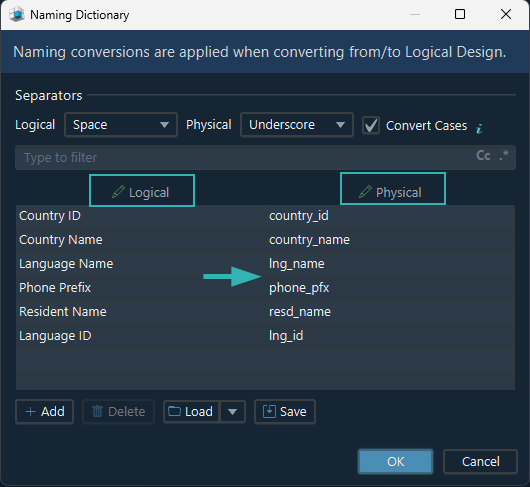
DbSchema can apply and check the rule for you. In logical design, the Naming Dictionary under Model → Dictionaries turns a logical name such as Country ID into the physical name country_id, with your own short forms for long words. Logical design is in DbSchema Architect.
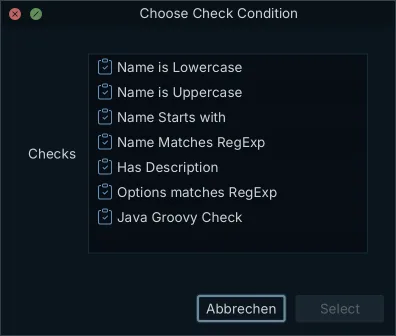
For a schema that already exists, Model Validation checks the convention. Choose Model → Model Validation, add a rule on the + tab, let it iterate over tables or columns, and give it a check such as Name Matches RegExp. Validate opens the Validation Result window, with one row for each name that breaks the rule. Writing and running your own rules needs DbSchema Pro. Validation reads the model rather than the database, so it works on a design that has not been deployed yet.
A schema nobody documented
Columns outlive the reason they were added. Six months later, nobody can say whether a nullable column is optional by design or because the migration that filled it half worked. The next change then either keeps behavior that nothing needs or breaks something that a report depends on. Database documentation generated from the schema answers that question, and it stays current because it is regenerated rather than rewritten.
Document the schema where it lives
A comment on the object travels with the object:
COMMENT ON COLUMN user_settings.settings
  IS 'Display preferences: theme (text), page_size (number of rows per page)';
PostgreSQL stores one comment per object and drops it with the object[6]. psql shows it with the \d+ command, pg_dump writes it into the dump, and anyone who reads the catalog sees it, which a wiki page cannot promise.
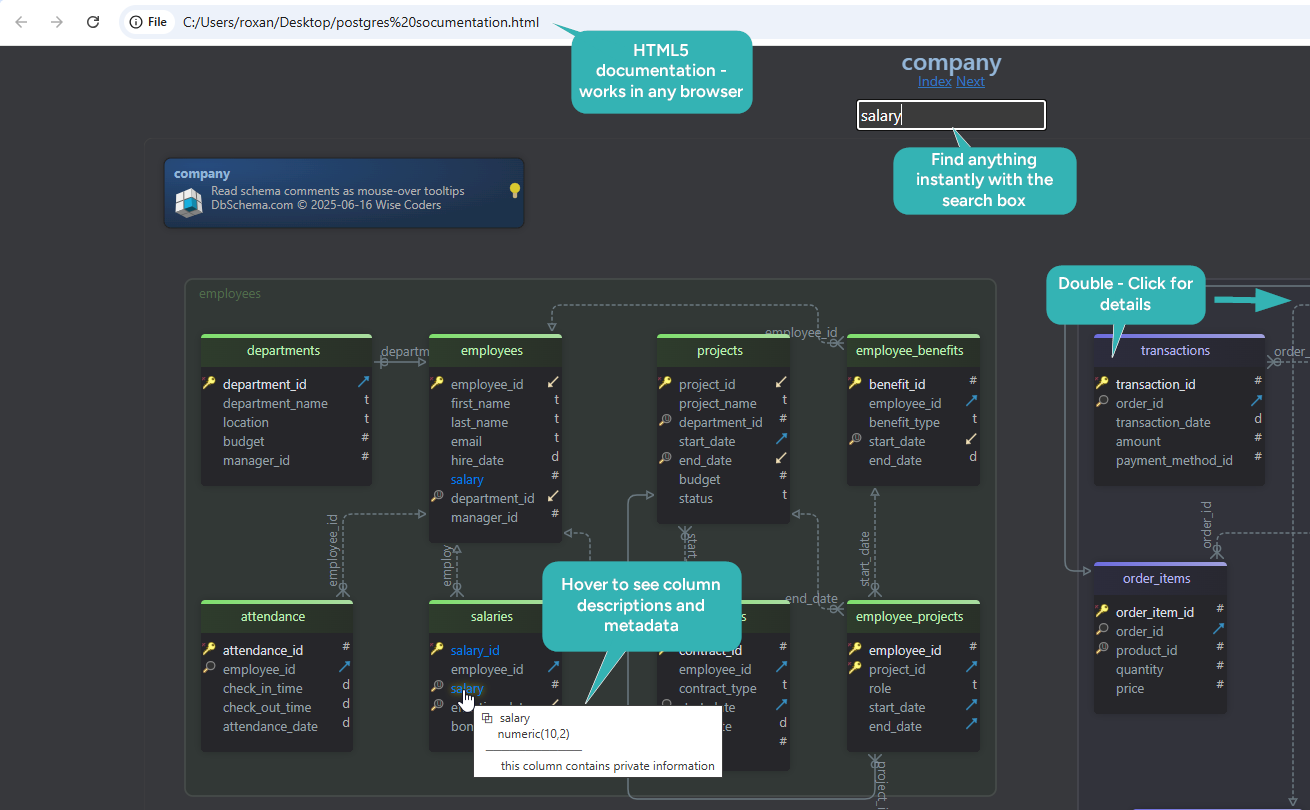
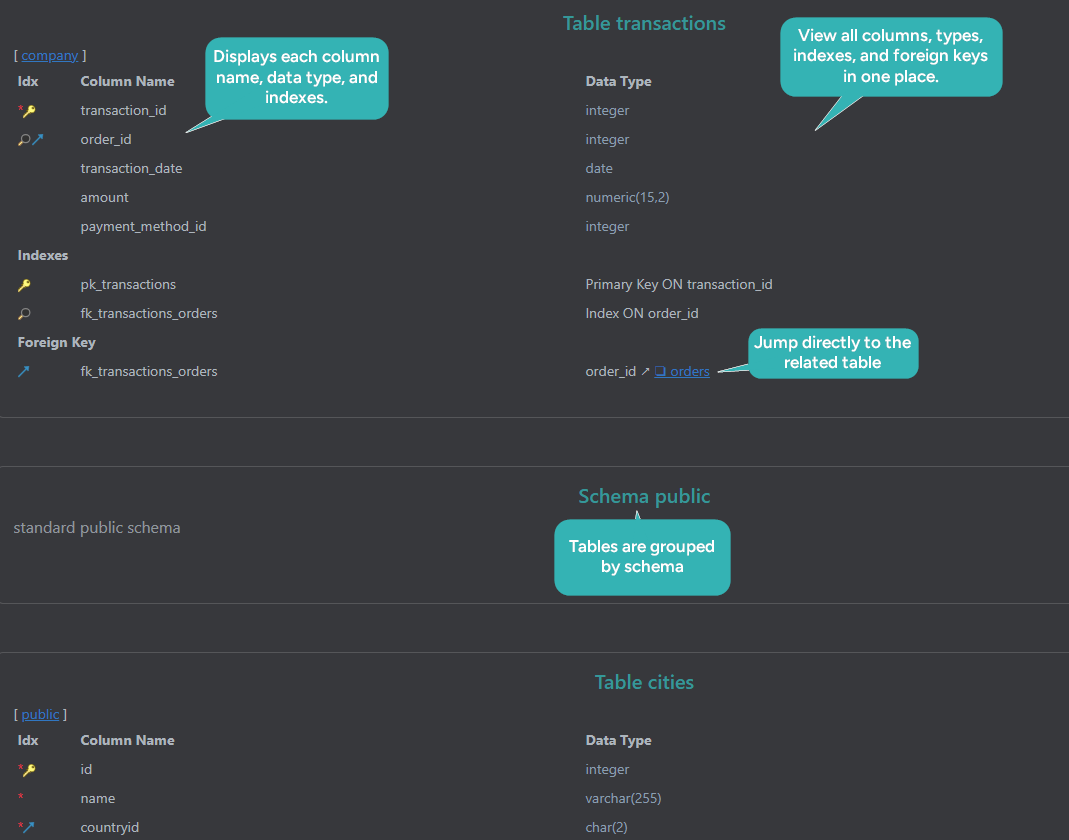
In DbSchema, the Comment box of a table and of each column holds the same text, and DbSchema saves it in the database when you are connected. File → Export As... → HTML5/PDF Documentation writes the model as HTML5, PDF or Markdown. The HTML5 file opens in any browser with no server behind it, and with Image Mouse-Over Tooltips ticked it shows each comment when you point at the column in the diagram. Exporting documentation needs DbSchema Pro, and it changes neither the model nor the database.
The six fixes have one thing in common: each takes minutes while the table is empty and a migration once it is not. A schema design procedure that declares the keys, indexes the referencing columns, settles the naming rule and writes the comments before the first deployment keeps them from piling up. To see which of the six your schema already carries, download DbSchema, connect to the database and reverse-engineer it into a diagram, all of which the free Community Edition covers. Synchronization, your own validation rules and the documentation export are in DbSchema Pro, and logical design with the Naming Dictionary is in Architect.
Sources
- PostgreSQL 18 Documentation, Constraints
- PostgreSQL 18 Documentation, ALTER TABLE
- PostgreSQL 18 Documentation, JSON Types
- PostgreSQL 18 Documentation, JSON Functions and Operators
- PostgreSQL 18 Documentation, Indexes
- PostgreSQL 18 Documentation, COMMENT
- PostgreSQL 18 Documentation, Lexical Structure
Model these fixes on your own schema
DbSchema connects to your database, reverse-engineers it into an interactive ER diagram, and shows the foreign keys, indexes and comments the schema actually carries. The free Community Edition covers connecting, reverse-engineering and the diagram.









