PostgreSQL JSONB: Operators, GIN Indexes, and Query Examples
For SQL users with a JSONB column in front of them, who need to read a field out of it, filter on it and index it.
On this page
One column holds a whole document, the table's DDL says nothing about its shape, and the report you were asked for needs one field out of every row. PostgreSQL answers that with a few operators on the jsonb type: -> and ->> read a field, #>> follows a path, @> filters on a value, jsonb_array_elements turns an embedded array into rows, and a GIN index keeps the filter fast on a large table.
The operators, as PostgreSQL 18 defines them:
| Operator | Returns | What it does |
|---|---|---|
-> | jsonb | object field, or array element by index |
->> | text | the same, as text |
#> | jsonb | value at a path |
#>> | text | value at a path, as text |
@> | boolean | left contains right |
<@ | boolean | left is contained by right |
? | boolean | key or array element exists |
?| | boolean | any of the listed keys exist |
?& | boolean | all of the listed keys exist |
|| | jsonb | concatenate arrays, or merge objects |
- | jsonb | remove a key, a matching string element, or an index |
What JSON is, and how jsonb differs from json
JSON is a text format for data: objects of key and value pairs in braces, arrays in brackets, and strings, numbers, booleans and null as the values. One city looks like this:
{
  "name": "Paris",
  "population": 2148000,
  "area": 105.4
}
PostgreSQL stores such a document in a column of type json or jsonb. The PostgreSQL 18 documentation states the difference in one sentence: json "stores an exact copy of the input text, which processing functions must reparse on each execution", while jsonb "is stored in a decomposed binary format that makes it slightly slower to input due to added conversion overhead, but significantly faster to process, since no reparsing is needed". Cast the same text to each type and you see what the binary form gives up:
SELECT '{"b": 1, "a": 2, "a": 3}'::json  AS as_json,
       '{"b": 1, "a": 2, "a": 3}'::jsonb AS as_jsonb;
| as_json | as_jsonb |
|---|---|
| {"b": 1, "a": 2, "a": 3} | {"a": 3, "b": 1} |
json hands the text back as it was written. jsonb keeps only the last value of the repeated key and stores the keys in its own order, with "shorter keys are stored before longer keys" as the rule.
| Feature | json | jsonb |
|---|---|---|
| Storage format | text as written | decomposed binary |
| Keeps whitespace and key order | yes | no |
| Keeps duplicate keys | yes | last value only |
Containment operator @> | no | yes |
| GIN index on the whole column | no | yes |
| Parsing cost | on every read | once, on write |
Choose jsonb unless the exact bytes are the point. It gives up the whitespace and the key order of the original text, and it gains containment tests, GIN indexes and faster reads. Keep json for a payload you have to hand back character for character, such as one over which a signature was computed.
When a jsonb column is the right choice
A jsonb column earns its place where the attributes differ from row to row: product attributes that depend on the category, an event payload whose fields depend on the event type, settings that gain a key every quarter. It also fits a list that only ever appears together with its parent row, such as the cities of a country on a page that shows each country with its cities. Forcing either into tables gives you a wide table full of nulls, or a child table that every query has to join back.
Customers, orders and invoices are the other case. They carry the same fields in every row, they are joined and aggregated constantly, and they need the foreign keys and type checks that the database enforces. When every document has the same six keys and three of them appear in a WHERE clause, the flexibility costs a cast on every read and buys nothing. Design a Relational Database Schema works through that decision.
Create the example table
The examples below run on PostgreSQL 18 against one table. The identifiers stay in ordinary columns, and only the part that varies is a document:
CREATE TABLE countries (
    id     SERIAL PRIMARY KEY,
    name   TEXT NOT NULL,
    cities JSONB
);
A JSON value goes in as a string literal, and PostgreSQL parses it into jsonb on the way in, so a malformed document fails the insert instead of being stored. Each row holds an array of city objects:
INSERT INTO countries (name, cities) VALUES
('France', '[
  {"name": "Paris",     "population": 2148000, "area": 105.4},
  {"name": "Lyon",      "population": 513000,  "area": 47.9},
  {"name": "Marseille", "population": 861000,  "area": 240.6}
]'),
('Germany', '[
  {"name": "Berlin",  "population": 3769000, "area": 891.8},
  {"name": "Munich",  "population": 1472000, "area": 310.7},
  {"name": "Hamburg", "population": 1841000, "area": 755.2}
]');
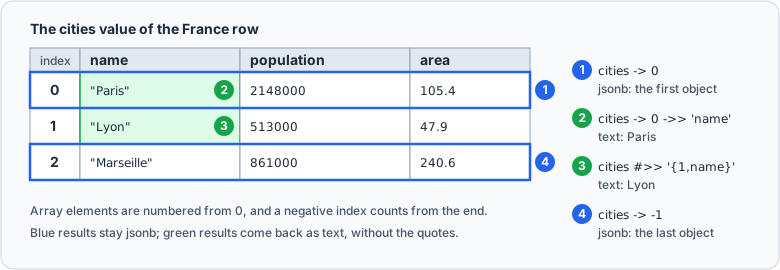
The array is where the shape varies: a country can have three cities or thirty, and a city can carry a key the others lack. Here is the France row's document, with the position of each element and what the expressions of the next section return from it:
Read a field with -> and ->>
-> returns what it finds as jsonb, and ->> returns it as text. The difference shows on a string:
SELECT name,
       cities -> 0 -> 'name'  AS with_arrow,
       cities -> 0 ->> 'name' AS with_double_arrow
FROM countries
ORDER BY name;
| name | with_arrow | with_double_arrow |
|---|---|---|
| France | "Paris" | Paris |
| Germany | "Berlin" | Berlin |
The chain reads left to right: cities -> 0 is the first element of the array, still jsonb, and the next arrow takes its name field. With -> the result is a JSON string, quotes included, ready for another JSON operator. With ->> it is plain text, which is what the application wants, so most chains end with ->>. Array elements are numbered from zero, and a negative index counts from the end, so cities -> -1 is the last city.
Follow a path with #> and #>>
SELECT name, cities #>> '{1,name}' AS second_city
FROM countries
ORDER BY name;
| name | second_city |
|---|---|
| France | Lyon |
| Germany | Munich |
A path lists keys and positions in braces, so one path replaces a chain of arrows, which matters once a document is four levels deep. #> returns jsonb and #>> returns text, as the arrows do.
Filter on a value inside the document
SELECT name
FROM countries
WHERE (cities -> 0 ->> 'population')::INT > 3000000;
| name |
|---|
| Germany |
The cast is required. ->> returns text, and PostgreSQL has no > between text and a number, so the same query without ::INT fails:
ERROR: operator does not exist: text > integer
Comparing the values as text instead gives a wrong answer and no error: '513000' > '2148000' is true, because text is compared one character at a time. Cast to INT, NUMERIC or TIMESTAMPTZ, whichever the field holds, before you compare it.
Filter with containment and key existence
Containment asks whether one document sits inside another. The right side is a fragment, and @> ignores whatever else surrounds the part that matches:
SELECT name
FROM countries
WHERE cities @> '[{"name": "Paris"}]';
| name |
|---|
| France |
The fragment is an array holding one object with one key, so the test asks whether the array holds an object whose name is Paris. The other keys of that object, and the other elements of the array, do not matter.
Existence is a different question. ? asks whether a string is a top-level key, or a top-level element of an array. On a column that holds an array of objects, the two readings come apart:
SELECT name,
       cities ? 'Paris'           AS array_has_paris,
       cities -> 0 ? 'population' AS first_city_has_population
FROM countries
ORDER BY name;
| name | array_has_paris | first_city_has_population |
|---|---|---|
| France | f | t |
| Germany | f | t |
The array holds objects, not the string Paris, so the first test is false for every row. One level down, cities -> 0 is an object, and population is one of its keys. ?| and ?& take an array of strings and ask whether any or all of them exist.
Turn an array into rows
jsonb_array_elements "expands the top-level JSON array into a set of JSON values", one row per element, which is how a document becomes an ordinary result set:
SELECT
    c.name AS country,
    city ->> 'name'              AS city,
    (city ->> 'population')::INT AS population,
    (city ->> 'area')::NUMERIC   AS area_km2
FROM countries c,
     jsonb_array_elements(c.cities) AS city;
| country | city | population | area_km2 |
|---|---|---|---|
| France | Paris | 2148000 | 105.4 |
| France | Lyon | 513000 | 47.9 |
| France | Marseille | 861000 | 240.6 |
| Germany | Berlin | 3769000 | 891.8 |
| Germany | Munich | 1472000 | 310.7 |
| Germany | Hamburg | 1841000 | 755.2 |
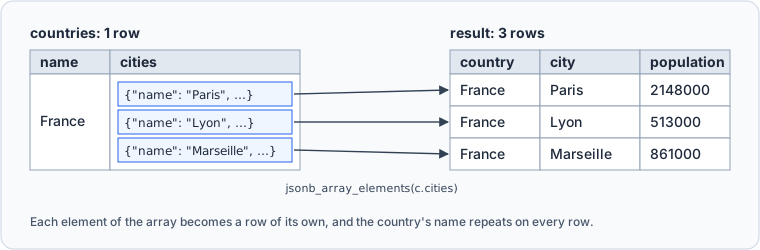
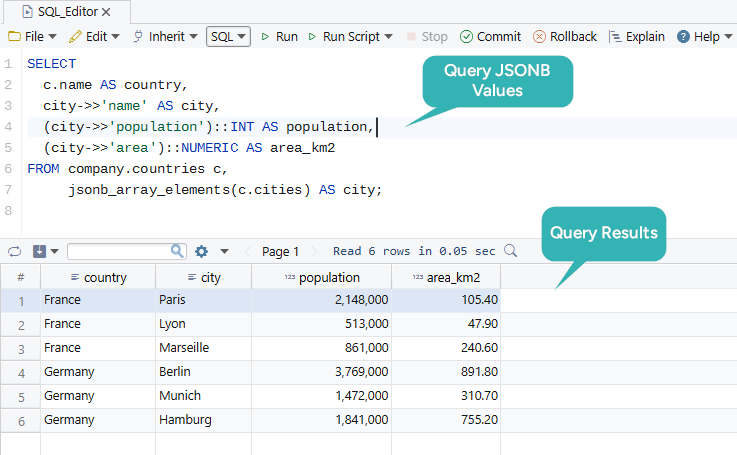
The comma before the function is a lateral join. For functions in FROM, the documentation says, "the key word is optional", so the function runs once for each row of countries and reads that row's cities. Two rows become six, and from there every SQL feature works as usual, including GROUP BY and joins to other tables. Here is the same query in the DbSchema SQL Editor, run against a copy of the table in a schema named company:
jsonb_each does the same for an object, with one row per key:
SELECT key, value
FROM jsonb_each('{"name": "Paris", "population": 2148000, "area": 105.4}'::jsonb);
| key | value |
|---|---|
| area | 105.4 |
| name | "Paris" |
| population | 2148000 |
value is jsonb, which is why the city name keeps its quotes; jsonb_each_text returns the values as text.
Expand nested arrays with one LATERAL join per level
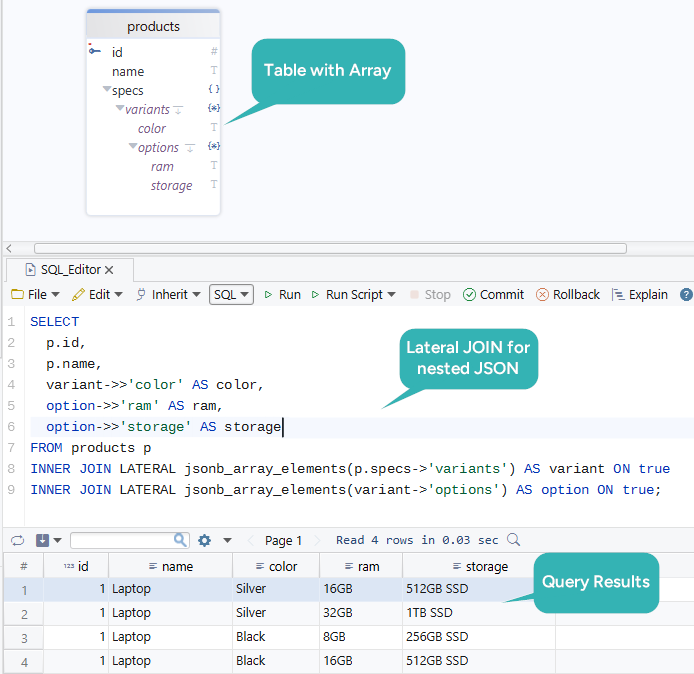
A product sold in several colors, each color with its own list of memory and storage options, is an array inside an array. Each level needs its own expansion, and LATERAL lets the second expansion read the output of the first:
CREATE TABLE products (
    id    SERIAL PRIMARY KEY,
    name  TEXT,
    specs JSONB
);

INSERT INTO products (name, specs) VALUES
('Laptop', '{
  "variants": [
    {"color": "Silver", "options": [
      {"ram": "16GB", "storage": "512GB SSD"},
      {"ram": "32GB", "storage": "1TB SSD"}
    ]},
    {"color": "Black", "options": [
      {"ram": "8GB", "storage": "256GB SSD"},
      {"ram": "16GB", "storage": "512GB SSD"}
    ]}
  ]
}');

SELECT
    p.name,
    variant ->> 'color'  AS color,
    option ->> 'ram'     AS ram,
    option ->> 'storage' AS storage
FROM products p
JOIN LATERAL jsonb_array_elements(p.specs -> 'variants') AS variant ON true
JOIN LATERAL jsonb_array_elements(variant -> 'options')  AS option  ON true;
| name | color | ram | storage |
|---|---|---|---|
| Laptop | Silver | 16GB | 512GB SSD |
| Laptop | Silver | 32GB | 1TB SSD |
| Laptop | Black | 8GB | 256GB SSD |
| Laptop | Black | 16GB | 512GB SSD |
One product row became four. The second jsonb_array_elements takes variant as its argument, a value produced by the join above it, and that dependency is what LATERAL allows. ON true keeps the syntax of a join, because the real condition is the nesting itself. When a product with an empty variants array must still appear, write LEFT JOIN LATERAL at every level: an inner join at either level drops the product, and left joins at both keep it with nulls in the other columns.
Filter inside a document with jsonb_path_query
The SQL/JSON path language arrived in PostgreSQL 12 and reads a filter out of a nested document in one expression:
SELECT c.name AS country,
       jsonb_path_query(c.cities, '$[*] ? (@.population > 1000000).name') AS big_city
FROM countries c
ORDER BY country, big_city;
| country | big_city |
|---|---|
| France | "Paris" |
| Germany | "Berlin" |
| Germany | "Hamburg" |
| Germany | "Munich" |
The path has four parts. $ is the document, [*] is every element of the array, ? (...) filters the elements with @ standing for the element being tested, and .name takes a field from each element that passed. Written with arrows, the same query needs a lateral join, a cast and a WHERE clause, and it grows with every level of nesting.
Update part of a document
Each statement below changes one thing inside the document, and RETURNING shows the outcome without a second query.
Set a nested value with jsonb_set
UPDATE countries
SET cities = jsonb_set(cities, '{0,population}', '2161000')
WHERE name = 'France'
RETURNING cities -> 0 AS first_city;
| first_city |
|---|
| {"area": 105.4, "name": "Paris", "population": 2161000} |
The path uses the same {0,population} notation as #>, and the new value is jsonb, so a string has to arrive with its quotes, as '"Paris"'. A missing key at the end of the path is added, unless you pass false as the fourth argument. A missing parent is different: "All earlier steps in the path must exist, or the target is returned unchanged", and no error tells you so:
SELECT jsonb_set('{"a": {"b": 1}}', '{x,b}', '2') AS missing_parent,
       jsonb_set('{"a": {"b": 1}}', '{a,c}', '2') AS missing_last_step;
| missing_parent | missing_last_step |
|---|---|
| {"a": {"b": 1}} | {"a": {"b": 1, "c": 2}} |
Remove a key or an element with the minus operator
UPDATE countries
SET cities = cities - 2
WHERE name = 'France'
RETURNING jsonb_array_length(cities) AS city_count;
| city_count |
|---|
| 2 |
Marseille was at index 2 and is gone. On an object the same operator takes a key name and removes the key with its value.
Append or merge with the concatenation operator
UPDATE countries
SET cities = cities || '[{"name": "Nice", "population": 342000}]'::jsonb
WHERE name = 'France'
RETURNING jsonb_array_length(cities) AS city_count;
| city_count |
|---|
| 3 |
Two arrays concatenate into one array with the elements of both. Two objects merge into one object, and the right side wins any key they share, which is the usual way to update a document of settings. The merge covers the top level only: a nested object on the right replaces the nested object on the left instead of merging into it.
Each of these statements writes the whole document again, however small the change. A large document is stored out of line, and PostgreSQL skips rewriting it only when the document itself is unchanged: the TOAST chapter says "an UPDATE of a row with out-of-line values incurs no TOAST costs if none of the out-of-line values change". A key that every request updates, such as a counter, is better as a column of its own.
Index JSONB for performance
An index serves a filter only when the filter uses an operator the index supports, so start from the filters your queries run:
| Filter | GIN jsonb_ops, the default | GIN jsonb_path_ops | B-tree on an expression |
|---|---|---|---|
@> | yes | yes | no |
?, ?|, ?& | yes | no | no |
@?, @@ | yes | yes | no |
(cities -> 0 ->> 'population')::INT > 3000000 | no | no | yes, on that expression |
The default operator class "supports queries with the key-exists operators ?, ?| and ?&, the containment operator @>, and the jsonpath match operators @? and @@":
CREATE INDEX idx_countries_cities
ON countries USING GIN (cities);
jsonb_path_ops drops the key-exists operators. In exchange, such an index "is usually much smaller than a jsonb_ops index over the same data, and the specificity of searches is better, particularly when queries contain keys that appear frequently in the data". Choose it when every jsonb filter in the workload is a containment test:
CREATE INDEX idx_countries_cities_path
ON countries USING GIN (cities jsonb_path_ops);
For one field that appears in WHERE on every request, index the expression itself. The index then serves comparisons on exactly that expression, written the same way, and nothing else:
CREATE INDEX idx_first_city_population
ON countries (((cities -> 0 ->> 'population')::INT));
On a two-row table the planner reads the table directly even with these indexes in place, because a sequential scan of two rows costs less than an index lookup. The indexes start to pay off as the table grows. PostgreSQL Create Index covers the index types themselves.
Model JSONB safely in PostgreSQL
PostgreSQL enforces nothing inside a document. Keep the identifiers and the business keys in real columns, where foreign keys, NOT NULL and the planner's statistics apply, and add a CHECK constraint for the shape you rely on:
ALTER TABLE products
ADD CONSTRAINT chk_specs_object
CHECK (jsonb_typeof(specs) = 'object');
An array or a bare number now fails on insert, and specs ? 'variants' as the condition would require a key. When a nested field starts to appear in WHERE and GROUP BY across the application, promote it: add a column, fill it from the document, and leave the rest where it is.
Explore and document a JSONB column in DbSchema

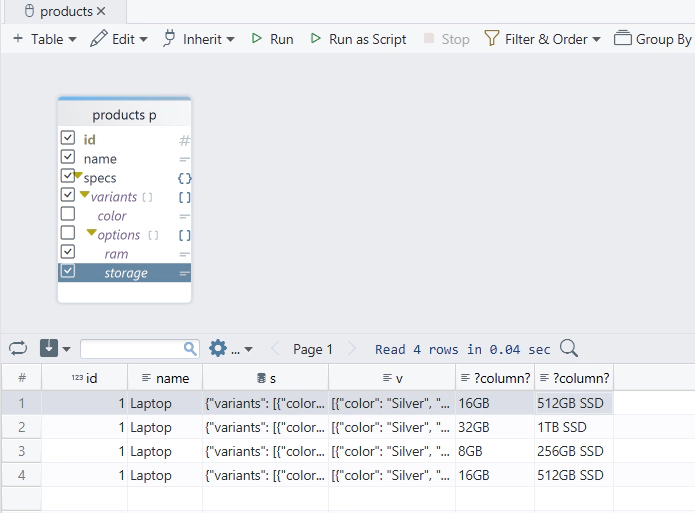
The DDL of a jsonb column is one word, so the schema alone says nothing about what the documents hold. DbSchema connects through the PostgreSQL JDBC driver and reverse-engineers the schema onto an interactive diagram. For each JSON column, DbSchema also reads a sample of the stored values and lists the fields it finds under the column, nested arrays and objects included, as the products diagram in the screenshot of the nested-arrays section shows. The fields come from a sample, so they describe what those documents contain, not a structure that PostgreSQL enforces.
The Query Builder uses those fields to write the nested query for you:
- Click the header of
productsin the diagram, which opens the Query Builder with that table loaded. - Tick the fields you want in the result. The fields of
specsare listed under it, withvariantsandoptionsnested inside. - Read the generated SQL at the bottom of the builder. DbSchema adds one
jsonb_array_elementsper array level and reads each ticked field with->>, so the result has one row per option.
Write down what the document holds in the Description field of the column, and DbSchema carries it into the generated documentation from Diagram → Export HTML5 or PDF Documentation, as content in the HTML5, PDF and Markdown output and as a mouse-over tooltip in HTML5.
The diagram, the column descriptions and the Query Builder stay in the DbSchema model file, a .dbs file on your machine, and change nothing in PostgreSQL. A query you run in the SQL Editor with Execute Query goes to the database as written.
Download DbSchema from https://dbschema.com/download.html, connect to the database that holds your JSONB column, and run one of the queries above in the SQL Editor. Connecting, reverse-engineering, the diagram and the SQL Editor are in the free Community Edition; the Query Builder, saving the model with your column descriptions, and the generated documentation are in Pro.









