Relational Database Schema: Definition and Worked Example
For an architect turning a set of requirements into tables; one example runs from entities through the three normal forms to deployable DDL.
On this page
Requirements arrive as sentences, and every sentence hides a decision: whether the thing it names gets a table of its own, a column on somebody else's table, or nothing at all. A relational database schema is all of those decisions written down, as tables, columns, keys and constraints.
Two words get used as if they meant the same thing. The database is the engine that stores and runs the schema. The instance is the data held inside it at a given moment. The schema changes through migrations, and the instance changes every second.
Designing one takes these stages in order, and the worked example below runs through all of them:
- Name the entities, one per business concept, and the attributes that belong to each.
- Normalize to third normal form, so that each fact is stored in one place.
- Resolve every many-to-many relationship into a junction table.
- Fix the primary keys, the foreign keys, and what a delete does to the child rows.
- Bind the model to one engine, choosing types, defaults and indexes, then generate the DDL.
What a relational schema contains
A relational schema describes five things, and nothing else belongs in it.
- the tables in the database
- the columns inside each table, each with a data type
- the primary keys that identify rows uniquely
- the foreign keys that connect tables
- the constraints that protect integrity, such as NOT NULL, UNIQUE and CHECK
MySQL, PostgreSQL, Oracle and SQL Server all implement that list. The engine changes the syntax and the type names. It does not change the questions you have to answer: what data exists, how it relates, and which rules the database itself should refuse to break.
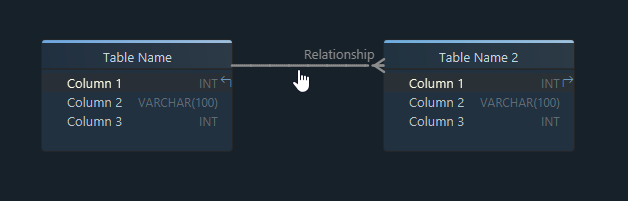
| Term | What it is | In one application |
|---|---|---|
| schema | the definition: tables, columns, keys, constraints | the tables below and the foreign keys between them |
| database | the engine that stores and runs the schema | a MySQL 8 server holding one named database |
| instance | the data held at a given moment | every row stored in it right now |
A schema can exist before any database does, and in design-first work that is the normal order: the model is drawn, reviewed, and only then generated into an engine. For the notation used in the diagrams here, see the guide to entity relationship diagrams, and for the engine-neutral stage on its own, logical database design.
The StreamFlix example
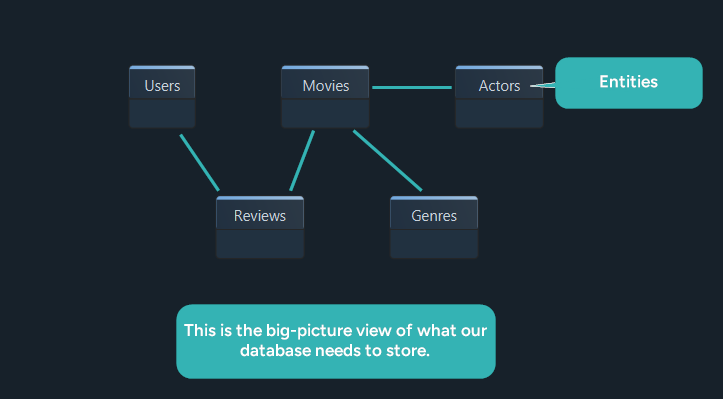
StreamFlix is a movie streaming platform: it stores accounts, films with their release details, reviews written by account holders, performers, and the classifications used to group titles. Five concepts, and seven entities once the relationships are resolved.
Users(user_id, username, email, created_at)
Movies(movie_id, title, release_year, duration_minutes)
Reviews(review_id, user_id, movie_id, rating, comment, created_at)
Genres(genre_id, name)
Actors(actor_id, name, birth_year, country)
MovieGenres(movie_id, genre_id)
MovieActors(movie_id, actor_id, role_name, billing_order)
MovieGenres and MovieActors are the two extra ones. Neither is a concept anybody described; both exist because a film has several genres and a genre covers several films, and the same is true of films and performers.
Reviews connects a user to a film as well, and it is still an entity rather than a link. A review is a thing in its own right: it has its own identifier, it carries a rating and a comment, and you can refer to one without naming the film it belongs to.
Two rules produced that list. An entity holds one business concept, and an attribute holds one fact about it. When something looks like it might belong on the same row, ask whether it always changes at the same moment as the rest of the row. A film's runtime does. A reviewer's phone number does not.
Normalization from 1NF to 3NF
Normalization removes duplication so that one fact is stored in one place. Each form fixes one specific failure, and each failure below is shown as the row before and the rows after.
Where a comma-separated list breaks 1NF
The first draft of Movies packs the genres and the cast into two columns:
| movie_id | title | genres | actors |
|---|---|---|---|
| 1 | The Matrix | Action, Sci-Fi | Keanu Reeves, Carrie-Anne Moss |
Neither column can be queried. Finding every Sci-Fi film means matching inside a string, adding one performer means rewriting a whole cell, and no constraint can be placed on a value that the engine sees as part of a longer one. One value per column splits the row into three tables. Movies keeps what belongs to the film:
| movie_id | title |
|---|---|
| 1 | The Matrix |
MovieGenres keeps one row per classification:
| movie_id | genre |
|---|---|
| 1 | Action |
| 1 | Sci-Fi |
MovieActors keeps one row per performer:
| movie_id | actor |
|---|---|
| 1 | Keanu Reeves |
| 1 | Carrie-Anne Moss |
The partial dependency that 2NF removes
MovieGenres now has a composite key, movie_id and genre_id together, and carrying the genre's name alongside it breaks the second form:
| movie_id | genre_id | genre_name |
|---|---|---|
| 1 | 2 | Sci-Fi |
| 1 | 3 | Action |
The name depends on genre_id alone, which is half of the key, so renaming a genre means updating every row that mentions it. The junction table keeps only the pair:
| movie_id | genre_id |
|---|---|
| 1 | 2 |
| 1 | 3 |
Genres holds the name, once:
| genre_id | genre_name |
|---|---|
| 2 | Sci-Fi |
| 3 | Action |
The transitive dependency that 3NF removes
Reviews starts out carrying the reviewer's details:
| review_id | user_id | user_name | phone_number | movie_id | rating | comment |
|---|---|---|---|---|---|---|
| 501 | U001 | Alice Martin | 555-342-9752 | 101 | 5 | Loved it! |
| 502 | U002 | Ben Carter | 222-865-9876 | 102 | 4 | Well written. |
user_name and phone_number describe the user, not the review, and they reach the review only through user_id. One reviewer changing a phone number would mean updating every review they ever wrote, and the row that gets missed is the one that makes two copies of the same fact disagree. Reviews keeps the reference:
| review_id | user_id | movie_id | rating | comment |
|---|---|---|---|---|
| 501 | U001 | 101 | 5 | Loved it! |
| 502 | U002 | 102 | 4 | Well written. |
Users holds the person:
| user_id | user_name | phone_number |
|---|---|---|
| U001 | Alice Martin | 555-342-9752 |
| U002 | Ben Carter | 222-865-9876 |
Normalization summary
| Normal form | What it fixes | In this schema |
|---|---|---|
| 1NF | repeating groups inside a single column | genres and actors leave Movies |
| 2NF | columns that depend on part of a composite key | genre_name moves into Genres |
| 3NF | columns that depend on another non-key column | user details move out of Reviews |
3NF is the right default for a transactional schema, and stopping there is a decision rather than an omission. Denormalizing comes later, against a query plan you have read: reporting tables, cached aggregates and read replicas are all ordinary answers once you can point at the query that is slow and say why. Designing clean first keeps that option open, because a normalized schema can be denormalized on purpose and a duplicated one cannot be un-duplicated without a migration.
Keys and relationships
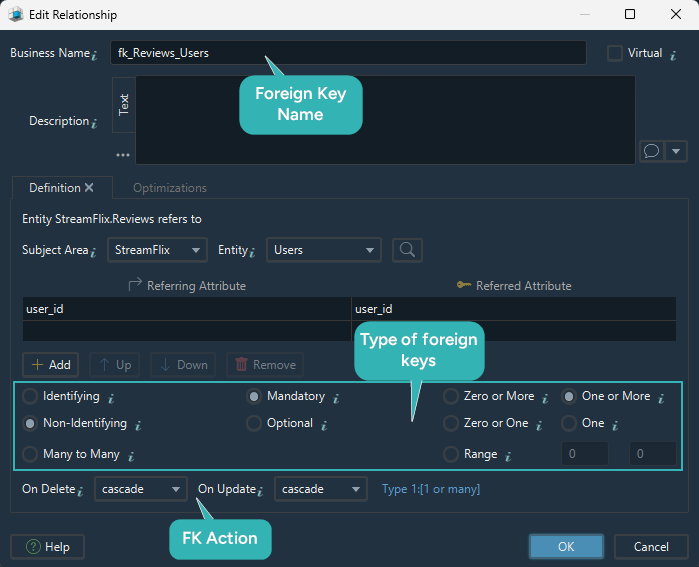
With the tables settled, each line between two tables carries four decisions, and every one of them changes what the database will allow.
- whether the relationship is identifying, which decides if the parent's key becomes part of the child's own identifier
- whether it is mandatory, which decides if the foreign key column may be NULL
- the cardinality, which decides whether a junction table is needed
- the delete and update actions, which decide what happens to the child rows when the parent goes
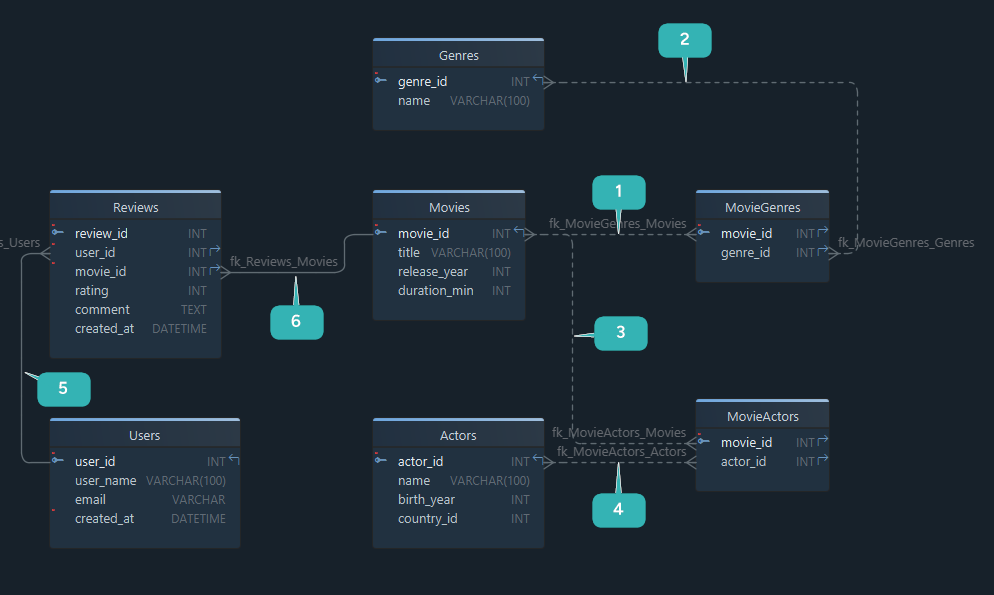
Relationship decisions for StreamFlix
| Relationship | Type | Rule |
|---|---|---|
| MovieGenres.movie_id to Movies.movie_id | one-to-many into a junction table | identifying, mandatory, CASCADE on delete |
| MovieGenres.genre_id to Genres.genre_id | one-to-many into a junction table | identifying, mandatory, RESTRICT on delete |
| MovieActors.movie_id to Movies.movie_id | one-to-many into a junction table | identifying, mandatory, CASCADE on delete |
| MovieActors.actor_id to Actors.actor_id | one-to-many into a junction table | identifying, mandatory, CASCADE on delete |
| Reviews.user_id to Users.user_id | one-to-many | non-identifying, mandatory, CASCADE on delete |
| Reviews.movie_id to Movies.movie_id | one-to-many | non-identifying, mandatory, CASCADE on delete |
Five of the six cascade. A junction row has no meaning once the movie or the performer it links has gone, and a review is unreadable once its author or its film has gone. Genres is the one exception, with RESTRICT, so deleting a genre that films still carry fails loudly instead of quietly stripping the classification off them. The two Reviews relationships are the only non-identifying ones, because a review already has a review_id of its own and needs neither parent to identify it.
Why junction tables matter
MovieGenres and MovieActors exist because no relational engine stores a many-to-many relationship directly. It is resolved through a junction table holding the two keys, with those two keys as its composite primary key, which is also what makes a duplicate pairing impossible.
The moment a junction table gains business columns of its own, it stops being a pure link. MovieActors carries role_name and billing_order, so it records a casting rather than a connection, and it deserves the same attention as any other entity. Deciding that on purpose is cheaper than discovering it when somebody asks which performer had top billing.
For the line notation and the referential action settings, see the foreign key documentation.
The finished StreamFlix model
Seven tables, six foreign keys, and two tables that exist only to resolve a many-to-many relationship.
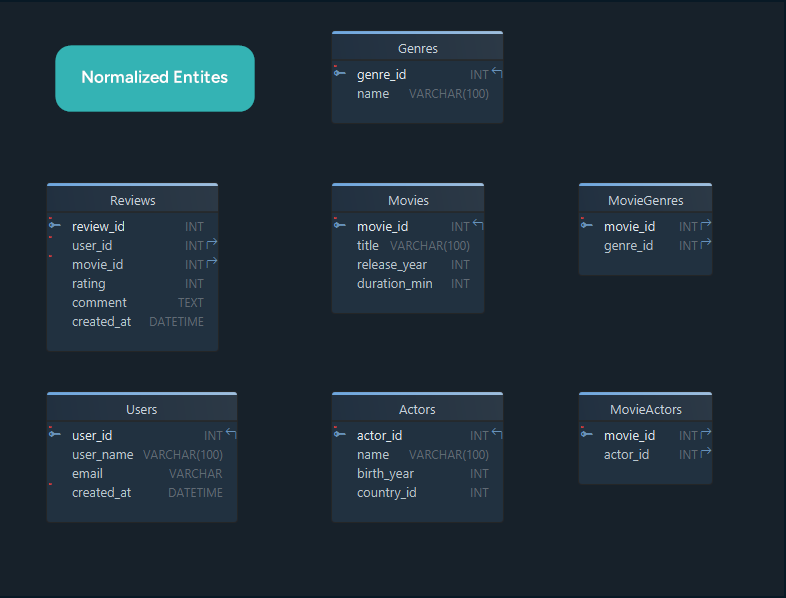
The StreamFlix model: Users, Movies, Genres, Actors, Reviews, and the MovieGenres and MovieActors junction tables.
| Table | What it holds | Primary key | Points at |
|---|---|---|---|
| Users | one row per account | user_id | nothing |
| Movies | one row per title in the catalogue | movie_id | nothing |
| Genres | the classification list | genre_id | nothing |
| Actors | one row per performer | actor_id | nothing |
| Reviews | one row per review, one per user per movie | review_id | Users, Movies |
| MovieGenres | which titles carry which classifications | movie_id + genre_id | Movies, Genres |
| MovieActors | which performers appear in which titles, and as whom | movie_id + actor_id | Movies, Actors |
Four of the seven point at nothing, so those are the tables to create first when the schema is deployed: a foreign key cannot reference a table that does not exist yet. The rows above are already in an order that works for CREATE, because every table comes after the ones it points at. Reading them bottom to top gives the order for DROP.
From logical model to physical DDL
Everything above is a logical design: it says how the data is organized and names no engine. The physical design binds it to one.
| Logical design | Physical design |
|---|---|
| entities | tables |
| attributes | columns |
| relationships | foreign key constraints |
| naming rules | actual SQL object names |
| data concepts | engine-specific types, defaults and indexes |
The choices made in that second column are the expensive ones to reverse: integer widths, string lengths, whether a timestamp carries a time zone, and which columns get an index.
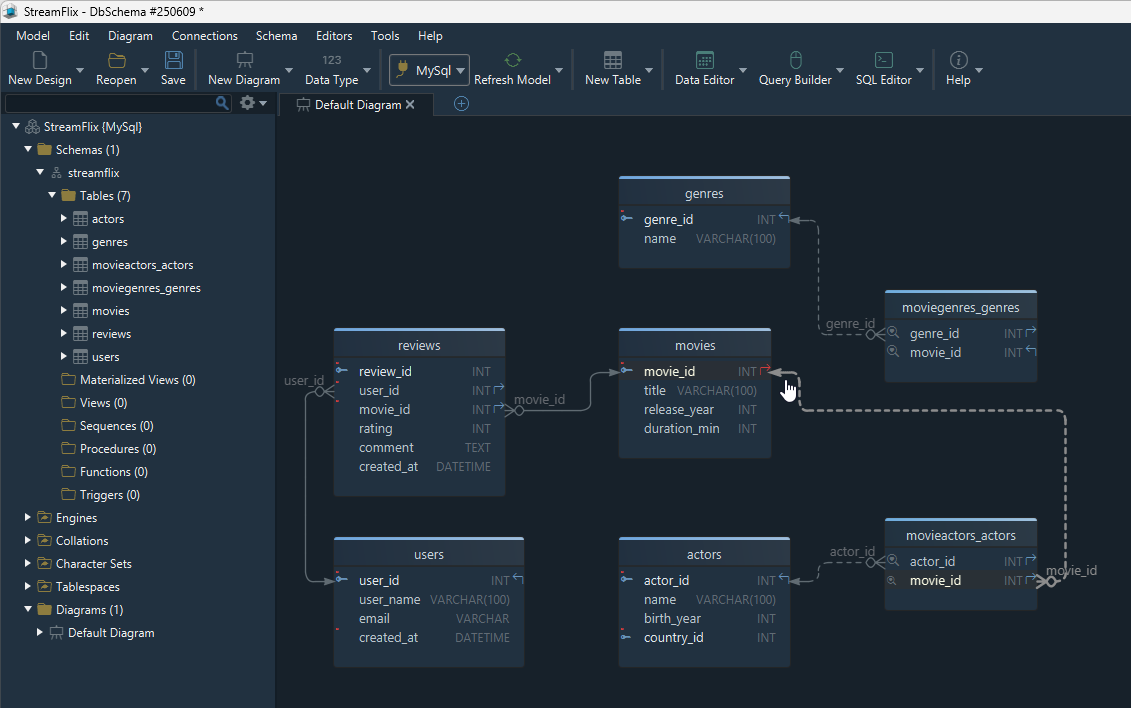
Here is the model as MySQL DDL, with the four independent tables first:
CREATE TABLE Users (
  user_id    INT UNSIGNED AUTO_INCREMENT PRIMARY KEY,
  username   VARCHAR(50)  NOT NULL UNIQUE,
  email      VARCHAR(255) NOT NULL UNIQUE,
  created_at DATETIME     NOT NULL DEFAULT CURRENT_TIMESTAMP
) ENGINE=InnoDB;

CREATE TABLE Movies (
  movie_id         INT UNSIGNED AUTO_INCREMENT PRIMARY KEY,
  title            VARCHAR(255)      NOT NULL,
  release_year     SMALLINT UNSIGNED NOT NULL,
  duration_minutes SMALLINT UNSIGNED NOT NULL
) ENGINE=InnoDB;

CREATE TABLE Genres (
  genre_id INT UNSIGNED AUTO_INCREMENT PRIMARY KEY,
  name     VARCHAR(50) NOT NULL UNIQUE
) ENGINE=InnoDB;

CREATE TABLE Actors (
  actor_id   INT UNSIGNED AUTO_INCREMENT PRIMARY KEY,
  name       VARCHAR(120) NOT NULL,
  birth_year SMALLINT UNSIGNED,
  country    VARCHAR(60)
) ENGINE=InnoDB;

CREATE TABLE Reviews (
  review_id  INT UNSIGNED AUTO_INCREMENT PRIMARY KEY,
  user_id    INT UNSIGNED     NOT NULL,
  movie_id   INT UNSIGNED     NOT NULL,
  rating     TINYINT UNSIGNED NOT NULL,
  comment    TEXT,
  created_at DATETIME         NOT NULL DEFAULT CURRENT_TIMESTAMP,
  CONSTRAINT fk_reviews_user  FOREIGN KEY (user_id)  REFERENCES Users(user_id)   ON DELETE CASCADE,
  CONSTRAINT fk_reviews_movie FOREIGN KEY (movie_id) REFERENCES Movies(movie_id) ON DELETE CASCADE,
  CONSTRAINT chk_reviews_rating CHECK (rating BETWEEN 1 AND 5),
  CONSTRAINT uq_reviews_user_movie UNIQUE (user_id, movie_id)
) ENGINE=InnoDB;

CREATE TABLE MovieGenres (
  movie_id INT UNSIGNED NOT NULL,
  genre_id INT UNSIGNED NOT NULL,
  PRIMARY KEY (movie_id, genre_id),
  CONSTRAINT fk_mg_movie FOREIGN KEY (movie_id) REFERENCES Movies(movie_id) ON DELETE CASCADE,
  CONSTRAINT fk_mg_genre FOREIGN KEY (genre_id) REFERENCES Genres(genre_id) ON DELETE RESTRICT
) ENGINE=InnoDB;

CREATE TABLE MovieActors (
  movie_id      INT UNSIGNED NOT NULL,
  actor_id      INT UNSIGNED NOT NULL,
  role_name     VARCHAR(120),
  billing_order TINYINT UNSIGNED,
  PRIMARY KEY (movie_id, actor_id),
  CONSTRAINT fk_ma_movie FOREIGN KEY (movie_id) REFERENCES Movies(movie_id) ON DELETE CASCADE,
  CONSTRAINT fk_ma_actor FOREIGN KEY (actor_id) REFERENCES Actors(actor_id) ON DELETE CASCADE
) ENGINE=InnoDB;
Four lines in that script carry decisions taken in the sections above.
- the CHECK on rating puts the 1 to 5 range in the database instead of only in the application
- the UNIQUE on user_id and movie_id together is what "one review per user per movie" means in SQL
- MovieGenres uses RESTRICT, so a genre in use cannot be deleted
- each junction table takes its two foreign keys as its own primary key
The same model deploys elsewhere with different types.
- PostgreSQL uses IDENTITY or SERIAL in place of AUTO_INCREMENT, and has no UNSIGNED
- SQL Server uses IDENTITY and NVARCHAR
- Oracle uses NUMBER and VARCHAR2
The tables, the keys and the constraints are unchanged, which is the return on keeping the logical model separate.
To generate this script from a diagram rather than type it, draw the tables in DbSchema and read the DDL it produces; the diagram documentation covers the drawing. Once the schema is deployed, schema synchronization compares the model against the live database and reports the difference per object, so the model file and the database stay one design rather than two. Running DbSchema's model validation first catches a table without a primary key or a broken reference while the fix is still an edit to the model rather than a migration. Both features are in the Pro edition, and both read the model: nothing reaches the database until you apply the generated script.
Name the entities, normalize until each fact sits in one place, decide the keys and the referential actions, and the DDL at the end writes itself in an afternoon. Reversing that order costs a migration against live data for every mistake. Download DbSchema at https://dbschema.com/download.html and draw the seven tables above as a diagram: connecting, reverse-engineering, the diagram and the SQL editor are in the free Community edition, and saving that model to a file, validating it and synchronizing it with a database are in Pro.
FAQ
How do I know whether I need a separate table?
Create one when a value repeats across rows, when the data changes independently of the row it sits in, or when a relationship goes both ways. A genre name repeats across films, so it becomes a table; a film's runtime belongs to that one film, so it stays a column.
Should every schema be normalized to 3NF?
3NF is the default for a transactional system. Analytics and read-heavy workloads denormalize on purpose, but that is an optimization made against a measured query, not a starting position.
Can I design a database schema before the database exists?
Yes, and it is usually the better order: build the model offline, review it with the team, then generate the physical schema. In DbSchema you start from an empty model or one of the samples on the Welcome Screen, and working against a saved model file rather than a live connection is what makes the review possible. Saving the model to a file is in the Pro edition.
What is the best tool for designing a relational database schema visually?
The job needs three things in one place: drawing the model, generating the DDL, and comparing the model against a live database. DbSchema does all three from the same model file, so the diagram you reviewed is the diagram the migration script comes from.
Design your schema before you build it
DbSchema connects to 70+ SQL and NoSQL databases, reverse-engineers the schema, and lets you edit it as an interactive diagram. Community Edition is free.









