Reverse Engineering a PostgreSQL Database
For backend developers who inherited a PostgreSQL database and need to see its tables and relations; catalog terms are explained where they appear.
On this page
In short
To reverse engineer a PostgreSQL database, connect DbSchema to it over JDBC and import the schemas. DbSchema reads the structure from the system catalogs and draws it as an ER diagram, without changing the database. Relations the database never declared go in as virtual foreign keys.
Key takeaways
- PostgreSQL keeps its structure in two layers: the portable information_schema and the engine's own pg_catalog.
- psql -E prints the catalog query behind \dt, and pg_dump --schema-only gives you the DDL as a script.
- DbSchema connects over JDBC, reads the schemas you tick, and changes nothing in PostgreSQL.
- Virtual foreign keys put application-enforced relations on the diagram without an ALTER TABLE.
- Count the tables per schema afterwards: \dt hides schemas outside the search path, and partitions inflate the count.
You've been handed a PostgreSQL database and nobody can tell you how the tables connect. The fastest way in is to reverse engineer it. You read the structure from PostgreSQL's own catalogs and turn it into a diagram. DbSchema does this over a JDBC connection, and the free Community edition covers it. The steps below were run on 25 October 2026 against our 14-table demo schema on PostgreSQL 16.14.
What introspection reads from pg_catalog and information_schema
Introspection means asking the database to describe itself. PostgreSQL answers from two layers.
The first is information_schema. It's defined in the SQL standard[1], so the same views exist in other engines. You'll use information_schema.tables, information_schema.columns and information_schema.table_constraints most.
The second is pg_catalog, the set of system catalogs. The PostgreSQL docs[2] call them "the place where a relational database management system stores schema metadata". This is the engine's own record, table by table.
The two layers don't hold the same things. The information schema views do not "contain information about PostgreSQL-specific features". Indexes are a good example. In our demo database, information_schema has no view for indexes at all. The partial index on tasks shows up only in pg_index:
SELECT c.relname AS index_name, pg_get_expr(i.indpred, i.indrelid) AS predicate
FROM pg_index i
JOIN pg_class c ON c.oid = i.indexrelid
WHERE i.indpred IS NOT NULL;
| index_name | predicate |
|---|---|
| idx_tasks_due_date | (due_date IS NOT NULL) |
That's why a full reverse-engineering pass reads pg_catalog. information_schema is fine for a quick list, but it leaves out parts of the schema.
Introspection reads structure, not rows. It covers tables, views, columns with their types and defaults, constraints, indexes, sequences and comments. It doesn't read your data, and it doesn't change anything.
Reading the schema by hand with psql
You can do a first pass yourself in psql. Start with one query over information_schema.tables:
SELECT table_schema, table_type, count(*) AS objects
FROM information_schema.tables
WHERE table_schema NOT IN ('pg_catalog', 'information_schema')
GROUP BY table_schema, table_type
ORDER BY table_schema, table_type;
| table_schema | table_type | objects |
|---|---|---|
| public | BASE TABLE | 14 |
| public | VIEW | 2 |
The demo database has 14 tables and 2 views, all in public.
To see how psql itself reads the catalog, start it with -E. The psql reference[3] says this option will "Echo the actual queries generated by \d and other backslash commands". Run \dt in that session:
psql -E -d dbschema_demo -c '\dt'
psql prints the query it sent before the table list:
SELECT n.nspname as "Schema",
  c.relname as "Name",
  CASE c.relkind WHEN 'r' THEN 'table' WHEN 'v' THEN 'view' WHEN 'm' THEN 'materialized view' WHEN 'i' THEN 'index' WHEN 'S' THEN 'sequence' WHEN 't' THEN 'TOAST table' WHEN 'f' THEN 'foreign table' WHEN 'p' THEN 'partitioned table' WHEN 'I' THEN 'partitioned index' END as "Type",
  pg_catalog.pg_get_userbyid(c.relowner) as "Owner"
FROM pg_catalog.pg_class c
     LEFT JOIN pg_catalog.pg_namespace n ON n.oid = c.relnamespace
     LEFT JOIN pg_catalog.pg_am am ON am.oid = c.relam
WHERE c.relkind IN ('r','p','')
      AND n.nspname <> 'pg_catalog'
      AND n.nspname !~ '^pg_toast'
      AND n.nspname <> 'information_schema'
  AND pg_catalog.pg_table_is_visible(c.oid)
ORDER BY 1,2;
Note the last condition, pg_table_is_visible. It matters again in the final check below.
For the full DDL, use pg_dump with --schema-only. It dumps only the object definitions[4], as a plain-text SQL script:
pg_dump --schema-only -d dbschema_demo -f schema_dump.sql
Our dump has 1,275 lines:
| Statement | Count |
|---|---|
| CREATE TABLE | 14 |
| FOREIGN KEY | 23 |
| CREATE INDEX | 7 |
| CREATE VIEW | 2 |
| INSERT or COPY | 0 |
The script is complete for what the database declares. But it's text, not a diagram. And it can't show a relation that only your application knows about.
Connecting DbSchema over JDBC to PostgreSQL
DbSchema talks to PostgreSQL through the PostgreSQL JDBC driver. The connection is one URL of the form jdbc:postgresql://host:port/database, as the pgJDBC docs[5] show. You don't have to download the driver yourself. DbSchema "downloads the JDBC driver the first time you connect". On our Mac it saved postgresql-42.7.13.jar under ~/.DbSchema/drivers/PostgreSQL.
The steps follow the Connect to Database page of the DbSchema documentation:
- Choose File → New Model and keep Connect to Database selected.
- Click PostgreSQL, choose New Connection, and press Connect to PostgreSQL.
- Choose the Standard method. Fill in the host, port, user, password and database.
- Press Test Connection, then Connect.
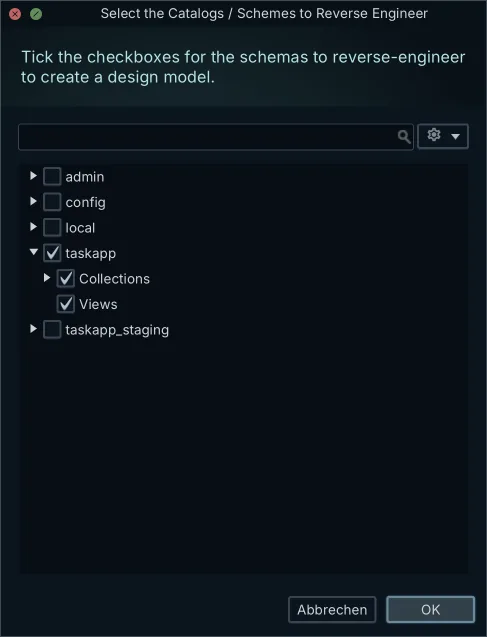
- In Reverse Engineer the Database, tick the schemas to import and press Import.
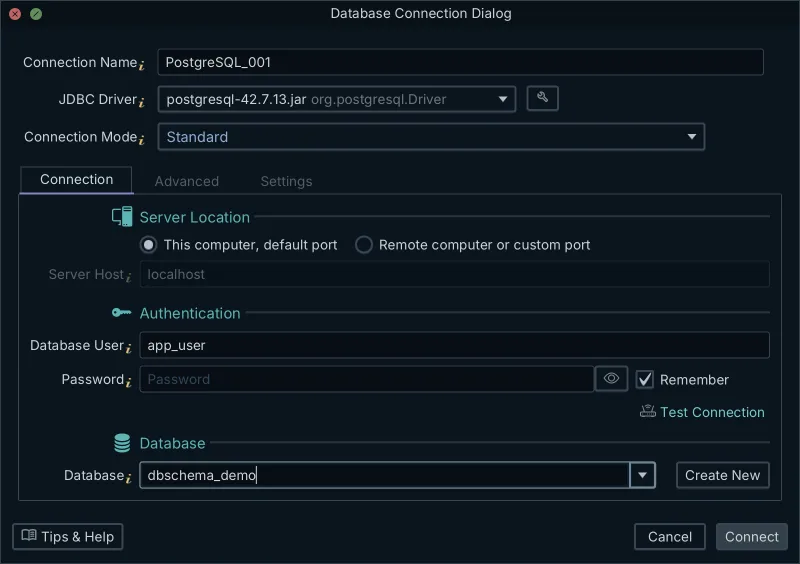
If a cloud console gave you a ready-made URL, choose Paste a JDBC URL instead. The SSL mode sits under Network and Driver, then SSL & Parameters.
Connecting and importing only read from the database. In the words of the docs, they "change nothing in it". DbSchema then draws the imported tables in a new model, with every declared foreign key as a line.
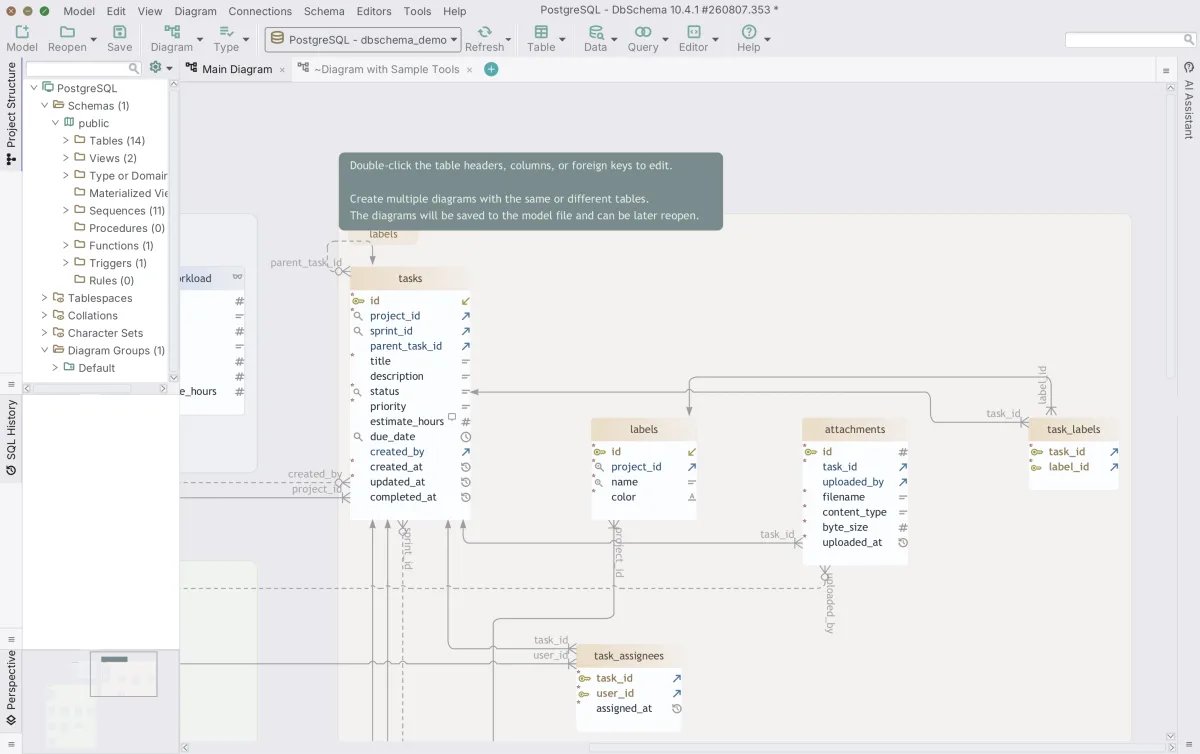
For arranging that diagram and splitting it into smaller ones, see creating ER diagrams in PostgreSQL and handling large schemas.
What the offline design model file holds
DbSchema keeps what it read in a design model. The model is not the database. When you save it, it becomes a .dbs file, and the .dbs file "is a text file in XML, so Git can show what changed between two versions".
The model file DbSchema saved for our demo schema is plain XML, 28,621 bytes. A declared foreign key is three lines:
<fk name="activity_log_actor_id_fkey" to_schema="dbschema_demo.public" to_table="users" delete_action="setNull" options="" >
	<fk_column name="actor_id" pk="id" />
</fk>
The same file also stores the work around the schema. Ours holds two diagrams with the position of every table, a SQL Editor script, a Relational Data Editor and a Query Builder query. It holds no rows from the tables.
A saved model "opens without any database". You can read the diagram on a train or review it in a pull request.
Saving the model to a file needs DbSchema Pro. Community connects, reverse-engineers and draws the diagram, but it can't keep the model as a file. A new installation starts with a 15-day trial of every feature, so you can try saving before you decide.
Drawing relations PostgreSQL never declared
A foreign key in PostgreSQL specifies that the values in a column[6] "must match the values appearing in some row of another table". If nobody declared one, the catalog has no relation to report. The diagram then shows two tables with no line between them.
Our demo schema has a real case. The activity_log table records actions on tasks, comments and projects. Two columns say what a row is about:
SELECT entity_type, count(*) AS rows,
       count(*) FILTER (WHERE entity_type = 'task' AND entity_id NOT IN (SELECT id FROM tasks)) AS orphans
FROM activity_log
GROUP BY entity_type
ORDER BY entity_type;
| entity_type | rows | orphans |
|---|---|---|
| comment | 1 | 0 |
| project | 1 | 0 |
| task | 8 | 0 |
When entity_type is 'task', entity_id holds a tasks.id, and none of the 8 task rows is an orphan. Yet \d activity_log lists foreign keys only on team_id and actor_id. PostgreSQL can't declare this one, because entity_id points at a different table depending on entity_type. The application enforces it.
A virtual foreign key puts that relation on the diagram. It "exists only in the DbSchema model, and DbSchema never creates it in the database". To add one:
- Drag activity_log.entity_id onto tasks.id in the diagram.
- Tick Virtual in the foreign key dialog.
- Press OK.
DbSchema draws the virtual foreign key in another color. No ALTER TABLE runs, so no table is locked and nothing changes in PostgreSQL.
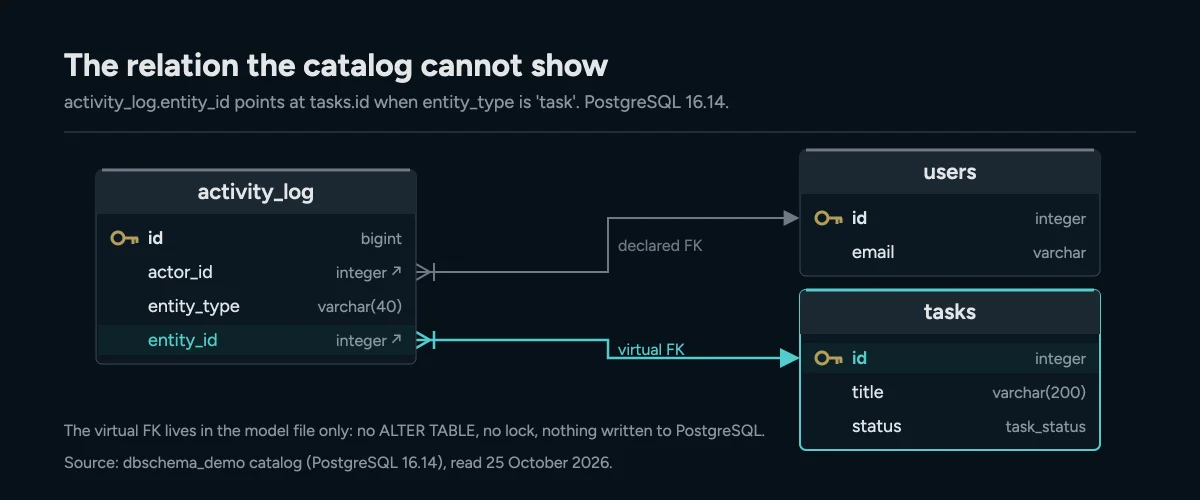
The catalog declares activity_log.actor_id; the link from entity_id to tasks exists only as a virtual foreign key in the model file.
The Data Explorer in DbSchema Pro follows virtual foreign keys like real ones, so you can click from a log entry to its task. Keeping a virtual foreign key means saving the model file, which also needs Pro. For more on the idea, see foreign keys and virtual keys.
Checking every schema landed, not just public
A PostgreSQL database can hold many schemas. A schema is a named folder for tables inside one database. If you tick only public, the model quietly misses everything else.
To show the effect, we added an audit schema with one table to a scratch copy of the demo. We also added a page_views table partitioned by month, with three partitions. Then we ran \dt with the default search path. It listed 18 tables and no audit table. That's documented behavior: without a pattern, \d commands "display all objects that are visible in the current schema search path".
So count over information_schema instead, across all non-system schemas:
SELECT table_schema, count(*) AS tables
FROM information_schema.tables
WHERE table_schema NOT IN ('pg_catalog', 'information_schema')
  AND table_type = 'BASE TABLE'
GROUP BY table_schema
ORDER BY table_schema;
| table_schema | tables |
|---|---|
| audit | 1 |
| public | 18 |
Compare these numbers with the tables in the model. In Reverse Engineer the Database, tick every schema the query lists. For a full listing, see how to list all schemas.
The count of 18 in public is inflated, though. A partitioned table is a "virtual" table[7] "having no storage of its own", and each partition is a table of its own. information_schema lists the parent and all three partitions as BASE TABLE. pg_class can tell them apart:
SELECT count(*) FILTER (WHERE NOT c.relispartition) AS logical_tables,
       count(*) FILTER (WHERE c.relispartition)     AS partitions
FROM pg_class c
JOIN pg_namespace n ON n.oid = c.relnamespace
WHERE c.relkind IN ('r', 'p')
  AND n.nspname NOT IN ('pg_catalog', 'information_schema');
| logical_tables | partitions |
|---|---|
| 16 | 3 |
So the scratch copy has 16 logical tables across both schemas, plus 3 partitions. Expect your model to show partitions as tables too. Check the logical count before you decide something is missing.
Download DbSchema and connect it to the PostgreSQL database you were handed. The free Community edition connects, reverse-engineers and draws the diagram. To keep the model file and the virtual foreign keys you add, use DbSchema Pro.
Frequently asked questions
Is reverse engineering a PostgreSQL database safe on production?
Reading the catalogs is read-only. Connecting and importing in DbSchema change nothing in the database, and virtual foreign keys never reach it.
Why does information_schema miss some objects?
It is defined by the SQL standard and doesn't cover PostgreSQL-specific features. Partial index predicates, for example, are only in pg_index.
Does pg_dump --schema-only create an ER diagram?
No. It writes the DDL as a SQL script. It shows declared constraints only, and no diagram.
Can I see relations that PostgreSQL doesn't enforce?
Yes, as virtual foreign keys in the DbSchema model. They draw a line on the diagram but never become a constraint in PostgreSQL.
Sources
Create ER diagrams in minutes
DbSchema reads your PostgreSQL catalog over JDBC and draws every table, key and index on a diagram you can rearrange. Connecting and reverse-engineering are free in the Community Edition.









