Visual Schema Diff or a Code-Only Migration Library
For the database architect who owns one schema across several environments and reviews each change before it ships.
On this page
DbSchema lets your team review a schema change as a picture, not as a stack of numbered files. A reviewer sees the whole schema and the change in one place. DbSchema keeps the design in a .dbs XML file you commit to Git and reads the live database over JDBC. Then it generates the migration script from the difference and shows every statement before any of them runs. That is why a visual schema diff is the better fit for a team that reviews schema changes.
A migration script changes the database while it is in use
A migration script alters database objects in place. The rows stay where they are while the structure changes. An application container is replaced on deploy, but a database is edited while it runs. That is why the order of the statements matters, and why someone should read each one before it runs.
The DDL itself is the small part. Around it you need version control, a fixed place in a sequence, and a record that the script ran. That way the same statements reach development, staging and production in the same order. All three approaches below give you that. They differ in who writes the DDL, and in what happens when a database stops matching the files.
| Where the script comes from | How it is produced | What catches drift |
|---|---|---|
| DbSchema | Generated from a model-to-database diff | Live comparison against the catalog |
| Liquibase or Flyway | Files you write, replayed in order | The history table of what ran |
| Hand-written SQL | Typed once per change | Nothing |
What to see: only the generated script is checked against the live catalog, so only it catches drift.
A wrong data type or a missing foreign key in a hand-written script shows up when the pipeline stops. That is late. Generating the script from a comparison removes the copying step where those mistakes happen.
A visual schema diff shows drift that no changelog knows about
DbSchema compares a design model with the live state of a database. It shows the result as a list of objects, not as a log. Because it reads the catalog metadata directly, the comparison covers tables, columns, data types, indexes, primary keys and foreign keys as they exist now.
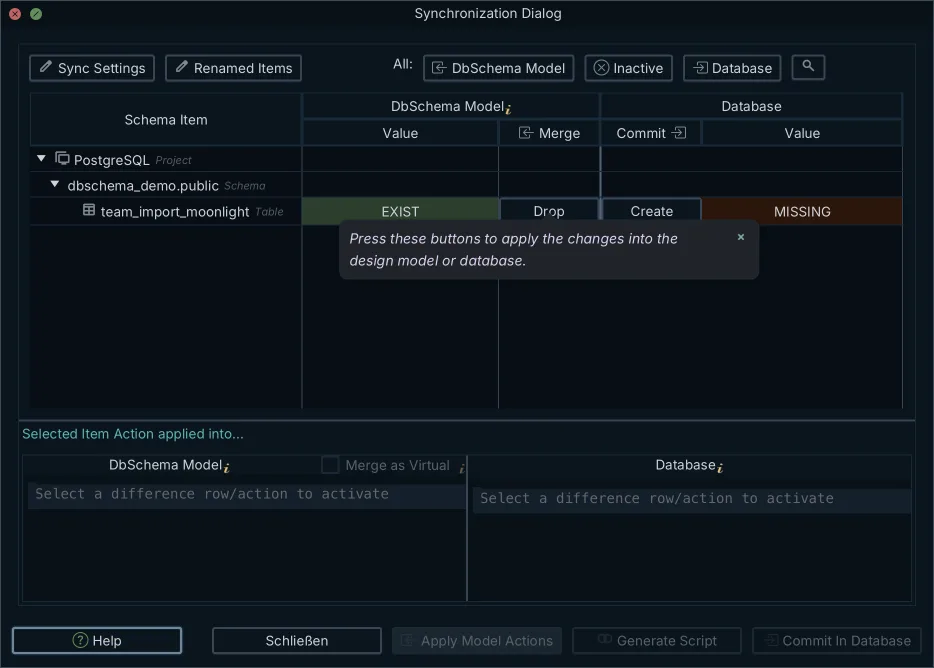
The Synchronization Dialog is where the two states meet. Each difference is one row: a table missing from the database, a column whose type changed, an index that exists only on staging. You set the direction per row. One comparison can push three changes to the database and pull a fourth into the model.
Drift is what this catches. A hotfix applied by hand, a column added during an incident, an index created to rescue a slow query: none of them went through the pipeline. No changelog knows about them, so only a comparison against the live catalog reports them. Tools that pair a changelog runner with a visual schema diff have their own guide.
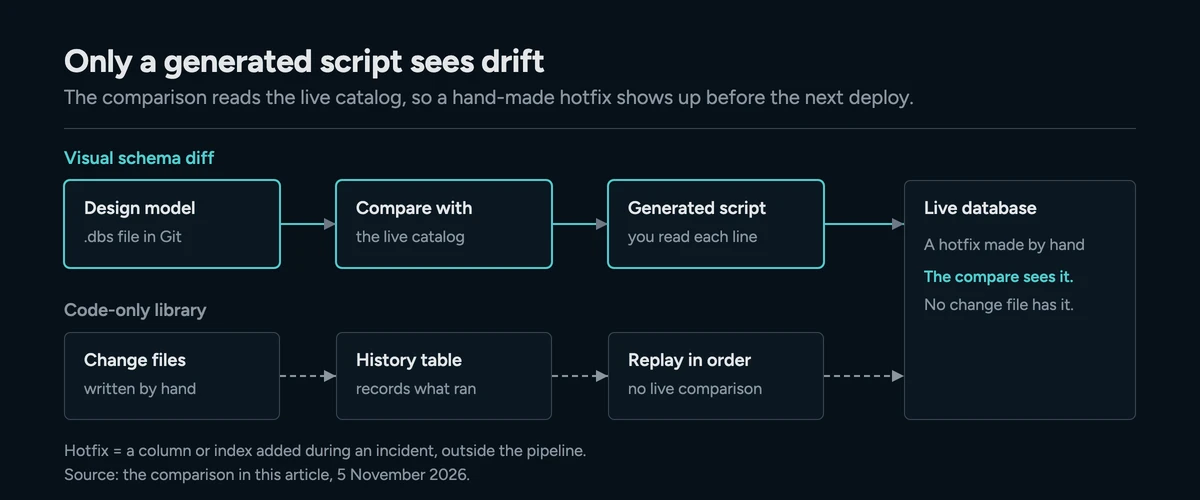
Code-only libraries replay files you write by hand
Liquibase and Flyway keep the history in files and a tracking table. According to the Liquibase documentation, a changelog lists every change in order. It can be written in SQL, XML, YAML or JSON, and changesets run in the order they appear. Flyway orders by version instead. Redgate's Flyway documentation says each versioned migration has a version, a description and a checksum, and runs once per database.
Both guard against editing a file after it was deployed. Liquibase stores an MD5SUM per row in its DATABASECHANGELOG table and uses it to spot a changed changeset. Flyway compares checksums the same way.
Undoing a deployed change is where the two differ. Liquibase has rollback commands. For its XML, YAML and JSON changelogs it generates rollback SQL for many change types. In SQL changelogs you write the rollback for every changeset yourself. A Flyway undo migration is a U script you write by hand, and Redgate lists it as a Teams edition feature.
A third shape lives on the command line. Stripe's pg-schema-diff compares two PostgreSQL schemas and generates the SQL that moves one to the other. Its README says it works as a Go library and as a CLI, and supports PostgreSQL 14 to 17. The comparison is declarative, but there is no entity-relationship model to read it against.
| Attribute | DbSchema | Liquibase or Flyway | pg-schema-diff |
|---|---|---|---|
| Interface | Interactive ER model | CLI over changelogs or SQL files | Go library and CLI |
| Change is stored as | Plain XML .dbs file | Ordered changelog or migration files | Declarative target DDL |
| Drift detection | Live catalog comparison | The history table of what ran | Programmatic diff |
| Engines | 100+ SQL and NoSQL | Liquibase lists 60+ | PostgreSQL 14 to 17 |
What to see: only DbSchema stores the change as a model you can open as a diagram.
Across a few hundred tables, a pull request full of numbered change files says what changed. It does not say what the schema now looks like. A wider survey of the field is in schema migration tools compared.
The design model lives in Git next to your code
DbSchema saves the whole design in one .dbs file. That file holds the schema plus every diagram, layout, group, color, virtual foreign key and comment. It is XML that any text editor opens, so Git versions it like source code.
The file holds structure and no rows, so it belongs in the application repository. A reviewer sees an added column as added lines, in a diff they already know how to read. You also need no connection to design against it. In offline mode DbSchema saves changes to the .dbs file and sends nothing to the database. That lets you work through a refactoring before anything is deployed.
Sharing the model is a Git step inside DbSchema. In the Git dialog you stage the model file, commit it with a message, and push it to the remote your team pulls from.
DbSchema generates the migration script from two states
Generating a script needs two states and a decision for each difference. One state is the approved model. The other is whatever the target database holds right now.
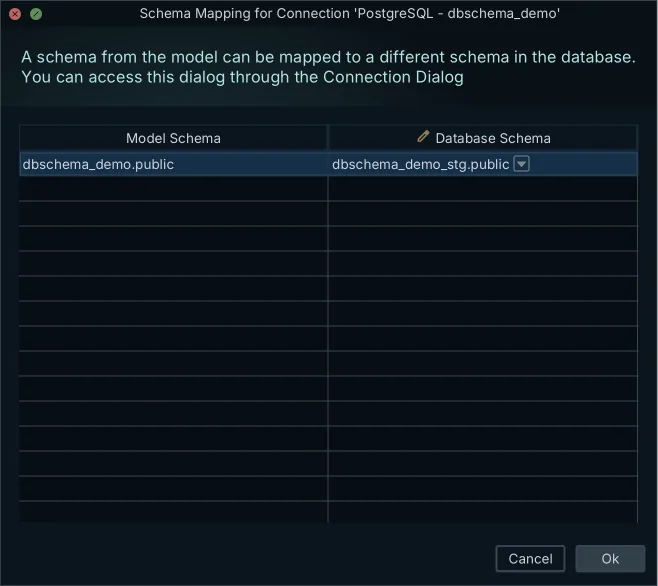
Some databases name their schemas differently from the model. Schema Mapping shows a model schema under the name that database uses. So one model serves staging and production without a second copy. With the mapping set, the comparison takes four steps.
- Open the .dbs model that holds the approved design.
- Connect over JDBC to the target database, whichever environment it is.
- Read the list of differences, object by object.
- Choose per object which way the difference travels, then generate the SQL.
Pushing generates a SQL script for the target database and changes nothing until you run it. Pulling merges live changes back into the design model. It updates the .dbs file and leaves the database alone. Either way, you see the statements before they run, written in the dialect of the connected engine.
| Direction | Source | Target | What comes out |
|---|---|---|---|
| Deploy | .dbs model | Live database | SQL script in the engine's dialect |
| Reverse-engineer | Live database | .dbs model | Updated model file |
| Align environments | Staging | Production | Incremental ALTER script |
What to see: only the deploy and align directions touch a database, and only when you run the script.
A worked example: one column and its foreign key
Take a change with two parts: a column, and the constraint that gives it meaning.
ALTER TABLE orders ADD COLUMN payment_method_id INT NOT NULL;
ALTER TABLE orders ADD CONSTRAINT fk_orders_payment
  FOREIGN KEY (payment_method_id) REFERENCES payments(id) ON DELETE RESTRICT;
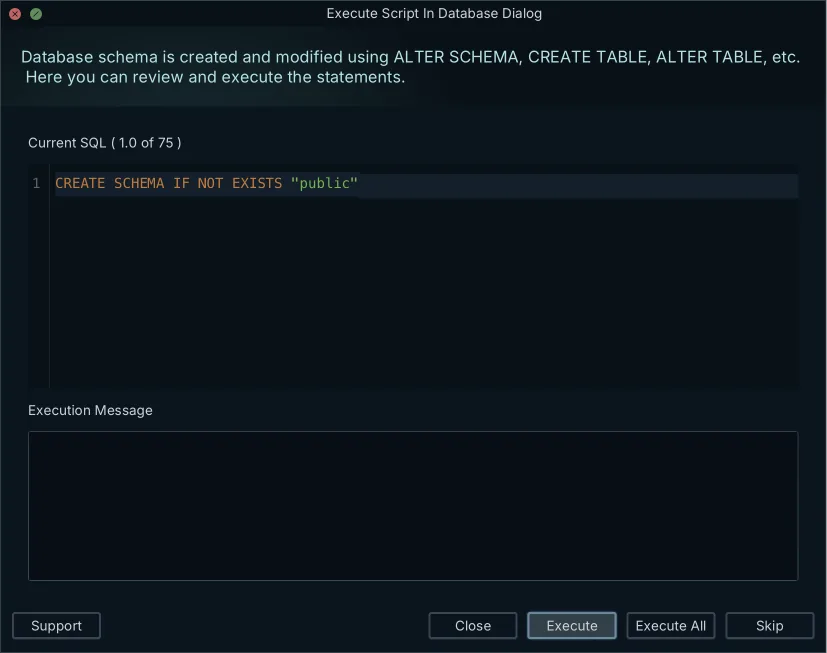
You open the model offline and add payment_method_id to the orders table on the diagram. Then you drag that column onto the referenced column in payments, which is how you create a foreign key in DbSchema. Saving writes to the .dbs file only, so staging still knows nothing about either change.
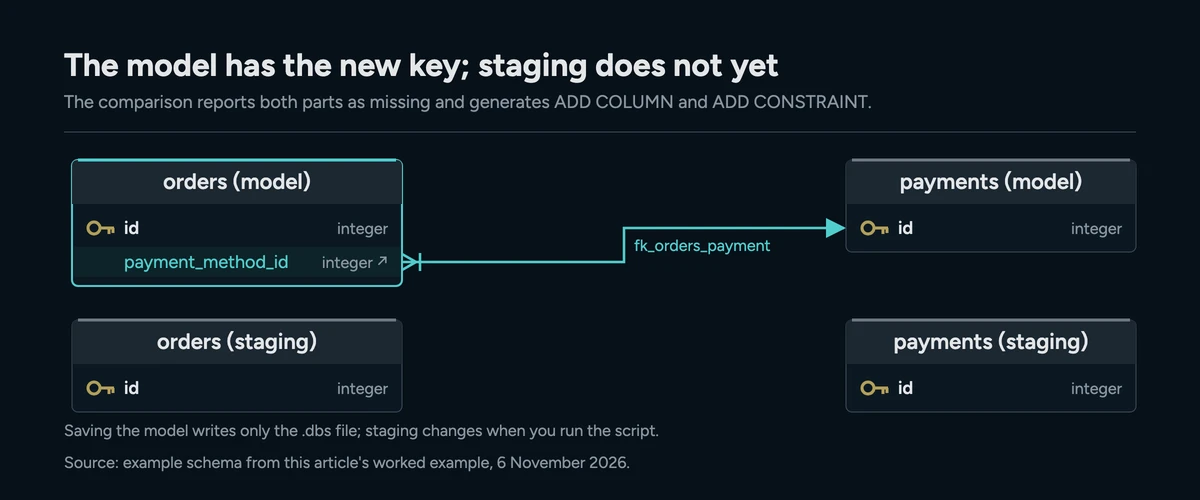
Next you connect to staging and run the comparison. DbSchema reports the column and the constraint as present in the model and missing from the database, and generates the statements that add them. You read them, edit them if needed, and click Execute. At that moment staging matches the model. The statements are ordinary SQL, so you can also save them as a file for your migration pipeline.
Before a script like this reaches production, check it for locks and data loss. That review is covered in turning a schema diff into a safe migration script.
For a team that reviews changes, pick the visual diff
For a team that reviews schema changes, DbSchema gives you the whole schema and the change at once. You get the diagram to reason about and the XML file to review in a pull request. You also get the live comparison to catch drift, and the generated script to read before it deploys. That chain takes a change from model to production without hand-written DDL, on the SQL and NoSQL engines DbSchema supports.
Code-only libraries fit one job: a headless container start-up, where a service applies its own migrations without any interface. Liquibase and Flyway run from build tools and CI runners in exactly that spot. The trade-off is argued side by side in Liquibase, Flyway or a visual schema compare.
You don't have to pick only one. The script DbSchema generates is ordinary SQL. You can commit it as the next numbered migration and let the same runner execute it, with the diff doing the writing.
Pick the environment that has drifted furthest, open your model against it in DbSchema, and read the difference in the Synchronization Dialog. Download DbSchema at https://dbschema.com/download.html. The free Community Edition covers reverse-engineering, interactive diagrams and the SQL editor. Saving the design to a .dbs file and schema synchronization are in DbSchema Pro, and a new installation starts with a 15-day trial.
Frequently asked questions
What is a schema diff tool?
DbSchema compares a design model with a live database, or one database with another, and lists the objects that differ. The sections above show that list and how a difference becomes a migration script.
Is Liquibase a database migration tool?
Yes. Liquibase applies schema changes from versioned changelogs, and its documentation says it works with 60+ databases, including relational, NoSQL and graph databases. The changelog is a text file, so reviewing a change means reading DDL rather than a diagram.
How do you generate a migration script from a schema diff?
In DbSchema the script comes from comparing the .dbs model with the target database as it is now. The four steps, and the Schema Mapping that lets one model serve staging and production, are in the section on generating the script.
What is the difference between state-based and migration-based deployments?
A state-based deployment compares the target state with the current database and derives the change from that comparison. A migration-based deployment replays a sequence of incremental scripts, so the target state is whatever the sequence produces.
Can I version a database schema in Git?
Yes. The .dbs file is plain XML, so Git versions the design the way it versions source code. After you pull a teammate's commit, Diff with Current in the DbSchema Git window compares that version with your model as it is now. Schema synchronization then brings the change into the database.
Are there libraries for schema diffing?
Yes. Stripe's pg-schema-diff marks each statement of its plan with the hazards it carries, such as a concurrent index build. You approve those hazards on the command line before apply runs the plan. The plan arrives as terminal output, not as the object list DbSchema puts on screen.
See the diff before you write the DDL
DbSchema keeps the design model as a plain XML file you can commit to Git, compares it against a live database object by object, and generates the migration script in the target dialect. Schema synchronization is a Pro feature; the download includes a 15-day Architect trial.









