Building a Logical Model From a Reverse-Engineered Database
How to get from the physical model a database connection gives you to a logical model that names the business, and which steps no tool can do for you.
On this page
You inherited a database, and someone wants a clean, database-independent model of it before the next project starts. Connecting and reverse-engineering gives you a physical model: the tables, columns and keys of one engine. Yes, you can build a logical model from it. DbSchema converts the physical model into a logical design in one step, and you then add what the database never stored: business names, many-to-many relations, supertypes and the links the application enforces on its own.
Short answer
- Connect DbSchema to the database and reverse-engineer the schemas you need.
- List the relations without a foreign key, the junction tables and the supertype tables.
- Choose Model → Convert Model, set Target DBMS to LogicalDesign and press Convert.
- Rename entities, turn junction tables into Many to Many relations and model supertypes with Super Table.
- Generate the physical model again and compare it with the reverse-engineered one.
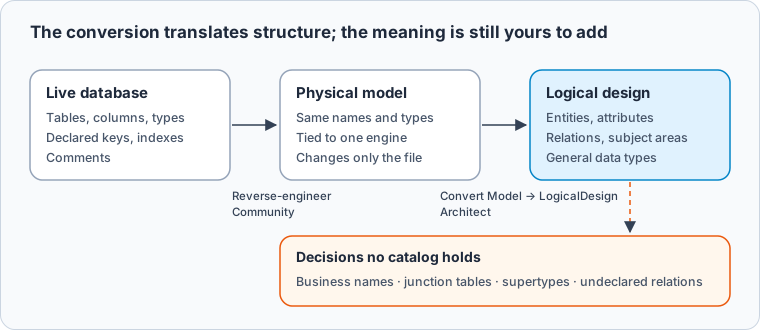
Why a reverse-engineered model is still physical
Data modelling separates a conceptual model of the business, a logical model of entities, attributes and relations, and a physical model for one database. The logical model is expressed independently of any database product or storage technology, while physical design depends on one (Wikipedia: Logical schema). The system catalog that reverse engineering reads describes only the physical level.
Here is the kind of schema you inherit, on PostgreSQL 17.6:
CREATE TABLE cust (cust_id integer PRIMARY KEY, cust_nm varchar(80) NOT NULL, cntry_cd char(2));
CREATE TABLE party (
  party_id  integer PRIMARY KEY,
  party_typ char(1) NOT NULL CHECK (party_typ IN ('P','O')),
  full_nm   varchar(120),
  vat_no    varchar(20),   -- organisations only
  birth_dt  date           -- persons only
);
CREATE TABLE prod (prod_id integer PRIMARY KEY, prod_nm varchar(80) NOT NULL, price_amt numeric(10,2) NOT NULL);
CREATE TABLE cat (cat_id integer PRIMARY KEY, cat_nm varchar(60) NOT NULL, parent_id integer REFERENCES cat(cat_id));
CREATE TABLE prod_cat (
  prod_id integer NOT NULL REFERENCES prod(prod_id),
  cat_id  integer NOT NULL REFERENCES cat(cat_id),
  PRIMARY KEY (prod_id, cat_id)
);
CREATE TABLE ord (
  ord_id    integer PRIMARY KEY,
  cust_id   integer NOT NULL REFERENCES cust(cust_id),
  sales_rep integer,       -- a party, checked only by the application
  ord_dt    date NOT NULL
);
CREATE TABLE ord_line (
  ord_id     integer NOT NULL REFERENCES ord(ord_id),
  prod_id    integer NOT NULL REFERENCES prod(prod_id),
  qty        smallint NOT NULL,
  unit_price numeric(10,2) NOT NULL,
  PRIMARY KEY (ord_id, prod_id)
);
The catalog lists every foreign key constraint, and table_constraints is where PostgreSQL shows them (PostgreSQL 17: table_constraints):
SELECT tc.table_name, kcu.column_name, ccu.table_name AS references_table
FROM information_schema.table_constraints tc
JOIN information_schema.key_column_usage kcu
  ON kcu.constraint_name = tc.constraint_name AND kcu.table_schema = tc.table_schema
JOIN information_schema.constraint_column_usage ccu
  ON ccu.constraint_name = tc.constraint_name AND ccu.table_schema = tc.table_schema
WHERE tc.constraint_type = 'FOREIGN KEY' AND tc.table_schema = 'public'
ORDER BY tc.table_name, kcu.column_name;
Result · PostgreSQL 17.6
| table_name | column_name | references_table |
|---|---|---|
| cat | parent_id | cat |
| ord | cust_id | cust |
| ord_line | ord_id | ord |
| ord_line | prod_id | prod |
| prod_cat | cat_id | cat |
| prod_cat | prod_id | prod |
ord.sales_rep is missing, because no constraint declares it. SQL Server's sys.foreign_keys likewise has one row per FOREIGN KEY constraint (Microsoft Learn: sys.foreign_keys). What party_typ means, or that prod_cat is a pairing rather than a thing, is in no catalog either.
Complete the physical model before converting it
In DbSchema, reverse engineering is a connection and a tick per schema in Reverse Engineer the Database, and it only reads from the database (Connect to a Database). The engine specifics are in the guides for reverse-engineering a PostgreSQL database, reverse-engineering a MySQL database, reverse-engineering an Oracle database and reverse-engineering a SQLite database. Save the model: it is your reference for the check at the end.
Then list what the catalog only hints at. Start with junction tables. A many-to-many relation needs a table of its own in a relational database, an associative table whose primary key is usually made of the foreign keys to both sides (Wikipedia: Associative entity). This query reads the key columns from pg_constraint (PostgreSQL 17: pg_constraint), finds those tables and counts the columns they carry besides the key:
SELECT c.conrelid::regclass AS table_name,
       array_length(c.conkey, 1) AS pk_columns,
       (SELECT count(*) FROM pg_attribute a
        WHERE a.attrelid = c.conrelid AND a.attnum > 0 AND NOT a.attisdropped)
       - array_length(c.conkey, 1) AS other_columns
FROM pg_constraint c
WHERE c.contype = 'p' AND c.connamespace = 'public'::regnamespace
  AND array_length(c.conkey, 1) > 1
  AND NOT EXISTS (
    SELECT 1 FROM unnest(c.conkey) k
    WHERE NOT EXISTS (SELECT 1 FROM pg_constraint f
                      WHERE f.contype = 'f' AND f.conrelid = c.conrelid AND k = ANY (f.conkey)))
ORDER BY 1;
Result · PostgreSQL 17.6
| table_name | pk_columns | other_columns |
|---|---|---|
| prod_cat | 2 | 0 |
| ord_line | 2 | 2 |
prod_cat holds nothing but the pair, so it becomes a Many to Many relation. ord_line carries qty and unit_price, so it stays an entity.
Next come supertypes. A short type code next to columns that are empty for one type is a supertype stored as one table, and the data shows it:
INSERT INTO party VALUES (1,'P','Ana Weber',NULL,'1988-04-02'), (2,'P','Tom Ruiz',NULL,'1990-11-19'),
  (3,'O','Nordlicht GmbH','DE811234567',NULL);

SELECT party_typ, count(*) AS rows, count(vat_no) AS has_vat_no, count(birth_dt) AS has_birth_dt
FROM party GROUP BY party_typ ORDER BY party_typ;
Result · PostgreSQL 17.6
| party_typ | rows | has_vat_no | has_birth_dt |
|---|---|---|---|
| O | 1 | 1 | 0 |
| P | 2 | 0 | 2 |
Relations like sales_rep come from the application code or the people who wrote it. You can record one in the physical model as a virtual foreign key, which DbSchema keeps in the model and never creates in the database. Model → Find Virtual Foreign Keys suggests them between columns with matching names, so a column called sales_rep that points at party_id you link by hand.
Converting the physical model to a logical design
The conversion makes a new model and leaves the reverse-engineered one, and the database, as they are (DbSchema logical design documentation). Reverse-engineering is free in DbSchema Community and saving the model needs Pro; the conversion needs Architect.
-
Convert to a logical design Architect
Open the physical model and choose
Model → Convert Model. Set Target DBMS to LogicalDesign, press OK, check the Model Conversion Rules and press Convert. -
Fill in missing data types Architect
If Convert stops with "Not all LogicalDesign data types are specified. Please edit.", double-click the
???cell in Model Conversion Rules, select the LogicalDesign row, press Edit, choose a type such asINTand press Convert again.
The documentation names smallint as a type with no logical counterpart, and ord_line.qty is a smallint, so expect the second step. DbSchema then translates the structure:
| Physical model | Logical design |
|---|---|
| Schema | Subject Area |
| Table | Entity |
| Column | Attribute, written with spaces: cust_id becomes cust id |
| Foreign key | Relation, Non-Identifying and Optional |
NOT NULL foreign key column | One or More |
| Nullable foreign key column | Zero or More, such as cat.parent_id |
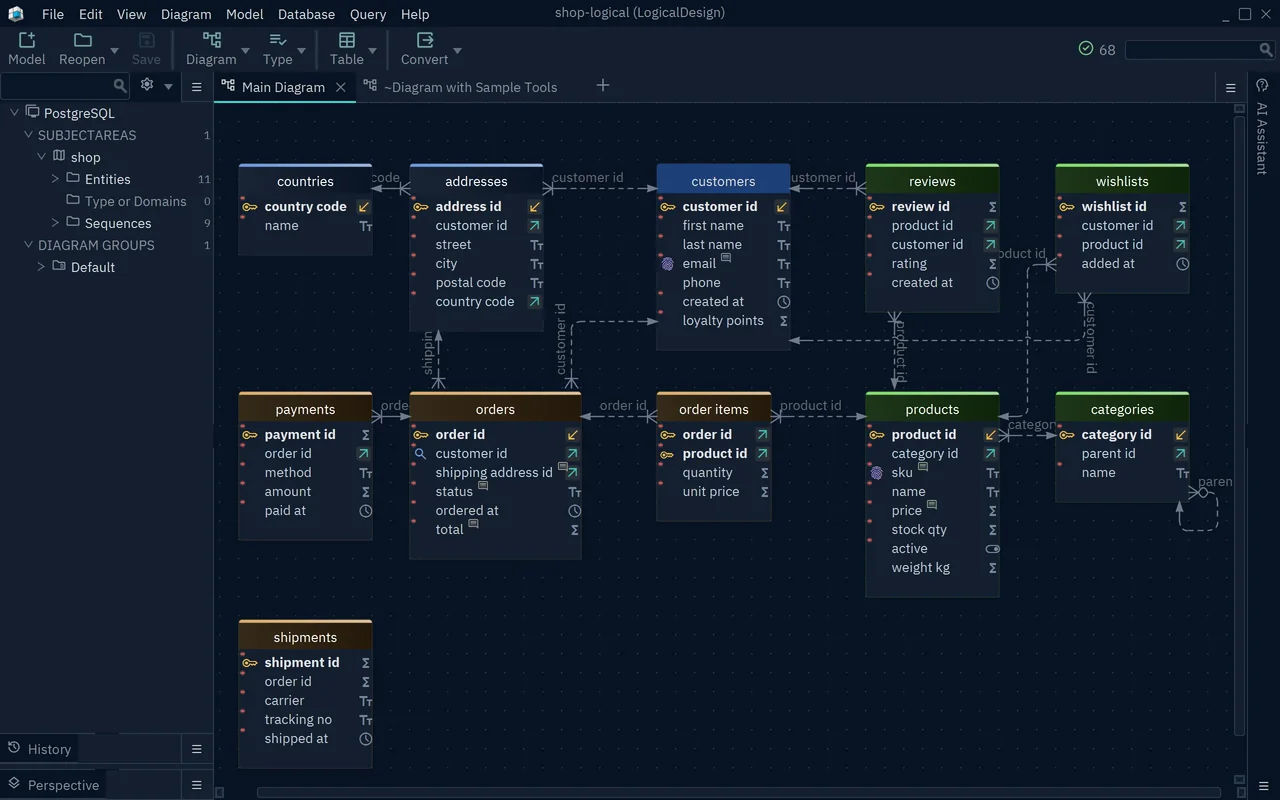
- 1The schema became the subject area shop
- 2Attribute names written with spaces
- 3Relations arrive Non-Identifying and Optional
Turning tables back into entities and relations
The converted model is still the old schema with spaces in the names. Making it logical is your part, and DbSchema has a control for each decision (DbSchema logical design documentation).
Rename entities and attributes into the words the business uses: cust becomes customer. The Naming Dictionary under Model → Dictionaries holds your own pairs of a long word and its short form, and View → Diagram Display → Show Physical Name shows the name each attribute will get in a physical model.
Replace each pure junction entity with a relation. Drop the prod cat entity, open Table → Create Relation between prod and cat, and choose Many to Many in the New Relationship dialog. Keep ord line as an entity, and set its relation to ord to Identifying, since the order is part of its key.
Model the supertype. Create the entities person and organisation, set Super Table to party in each, move birth dt and vat no to the sub-entity they belong to, and tick Discriminator on party typ in party. The three shapes below are what a supertype looks like in a physical schema, so the same reading works on any legacy database:
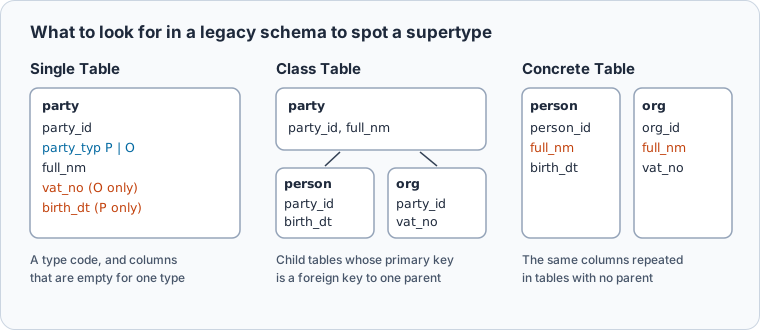
Finally, add the relations the catalog never had, such as sales rep to party, by dragging the child attribute onto the parent key, and set the cardinality of each relation yourself.
None of these decisions can come from the catalog. They need the application code and the people who know the system, which is why the converted model is a starting point, not the deliverable.
Checking the logical model against the database
Generate a physical model for the original engine with Model → Generate Physical Model, Target DBMS PostgreSQL and the Inheritance Model you found (SingleTable for party). The Many to Many relation comes back as an entity named after both sides.
Then compare the generated model with the reverse-engineered one you saved, using Model → Compare Model with Other Model From File (Schema Synchronization). Each difference is either a decision you made or something the logical model lost. One expected difference: the default rules map PostgreSQL integer to BIGINT in the logical design, so it returns as bigint unless you change that rule to INT before converting.
Download DbSchema, reverse-engineer your database in the free Community Edition, then convert it into a logical design with DbSchema Architect and work through the junction tables and supertypes you listed. Every new installation starts with a 15-day Architect trial, so you can run the whole path on your own schema first. For building a logical model from scratch and normalizing it, see logical database design.
Frequently asked questions
Is there any way to build a logical model from a reverse-engineered physical model?
Yes. In DbSchema, open the reverse-engineered model, choose Model → Convert Model and set Target DBMS to LogicalDesign, then complete the result with names, many-to-many relations and supertypes.
Which DbSchema edition includes logical design?
DbSchema Architect, which adds logical and conceptual design to everything in Pro. Reverse-engineering and diagrams are free in Community.
Sources
- Wikipedia: Logical schema
- PostgreSQL 17 documentation: table_constraints
- PostgreSQL 17 documentation: pg_constraint
- Microsoft Learn: sys.foreign_keys
- Wikipedia: Associative entity
- DbSchema documentation: Logical Design
- DbSchema documentation: Foreign Keys
- DbSchema documentation: Connect to a Database
- DbSchema documentation: Schema Synchronization
Turn the database you inherited into a logical model
In DbSchema Architect you reverse-engineer the database, convert it with Model → Convert Model and Target DBMS set to LogicalDesign, and generate a clean physical model for any database from the result. Logical design is in DbSchema Architect, and every new installation starts with a 15-day Architect trial.