SQL Aliases Explained with Examples
For someone learning SQL who can read a SELECT and a JOIN; every alias below is shown with the result grid it produces.
On this page
Put two tables in one query and every column needs its table name in front of it. Add a total to the select list and the engine picks the heading over it for you. An alias fixes both: AS gives a result column the heading you choose, or gives a table a short name for the rest of the statement. The name lasts for that one query and changes nothing in the database.
-- column alias: renames a column of the result
SELECT column_name AS alias_name
FROM table_name;

-- table alias: a short name for the table in the rest of the query
SELECT t.column_name
FROM table_name AS t;
The examples below use these three tables. Every statement was run on PostgreSQL 17.9 and MySQL 9.1.0. The result tables show the headings as MySQL prints them: PostgreSQL folds an unquoted alias to lower case, so it prints First as first.
CREATE TABLE departments (
    DeptID   INT PRIMARY KEY,
    DeptName VARCHAR(30)
);

CREATE TABLE employees (
    EmpID     INT PRIMARY KEY,
    FirstName VARCHAR(30),
    LastName  VARCHAR(30),
    DeptID    INT REFERENCES departments(DeptID),
    ManagerID INT REFERENCES employees(EmpID)
);

CREATE TABLE orders (
    OrderID INT PRIMARY KEY,
    EmpID   INT REFERENCES employees(EmpID),
    Product VARCHAR(30),
    Amount  DECIMAL(8,2)
);

INSERT INTO departments VALUES
    (101, 'HR'),
    (102, 'Finance');

INSERT INTO employees VALUES
    (1, 'Alice', 'Moore', 101, NULL),
    (2, 'Bob',   'Lane',  102, 1),
    (3, 'Carol', 'Diaz',  102, 1);

INSERT INTO orders VALUES
    (1, 2, 'Laptop',  900.00),
    (2, 3, 'Book',     50.00),
    (3, 2, 'Monitor', 150.00);
When you need an alias
On PostgreSQL, MySQL and SQL Server, AS is optional for both kinds: FirstName First means the same as FirstName AS First. The examples write it every time, for a reason the common mistakes section shows. Most aliases only save typing, but four situations call for one:
- A query over several tables, where every column reference would otherwise carry a full table name.
- An aggregate or a calculated column, whose heading the engine invents when you give none.
- A subquery in the
FROMclause, which the outer query has to call something. - A self-join, where the same table appears twice and the two copies need different names.
Column aliases
SELECT FirstName AS First, LastName AS Last
FROM employees;
| First | Last |
|---|---|
| Alice | Moore |
| Bob | Lane |
| Carol | Diaz |
The rename lasts as long as the result set. The column in employees is still called FirstName, and the next query that reads it uses that name.
Practice this: Lesson 2 of the SQL tutorial runs SELECT, AS and DISTINCT on a shop database in your browser, with exercises.
Table aliases
SELECT e.EmpID, e.FirstName
FROM employees AS e;
| EmpID | FirstName |
|---|---|
| 1 | Alice |
| 2 | Bob |
| 3 | Carol |
Once a table has an alias, the alias replaces its name for the rest of the statement[7]. Writing employees.FirstName in the query above fails on both engines, and PostgreSQL points at the fix:
ERROR:  invalid reference to FROM-clause entry for table "employees"
HINT:  Perhaps you meant to reference the table alias "e".
MySQL reports Unknown column 'employees.FirstName' in 'field list'. The short name pays off with the second table, where every column has to say which table it came from:
SELECT e.FirstName, d.DeptName
FROM employees AS e
INNER JOIN departments AS d ON e.DeptID = d.DeptID;
| FirstName | DeptName |
|---|---|
| Alice | HR |
| Bob | Finance |
| Carol | Finance |
Aliases for aggregates and calculated columns
An aggregate function or a calculation produces a column that no table declares, so the engine invents a heading for it, and the two engines invent different ones. These are the headings each returned for the expression alone, without an alias:
| Expression | MySQL 9.1 heading | PostgreSQL 17 heading |
|---|---|---|
COUNT(*) | COUNT(*) | count |
SUM(Amount) | SUM(Amount) | sum |
CONCAT(FirstName, ' ', LastName) | CONCAT(FirstName, ' ', LastName) | concat |
Amount * 2 | Amount * 2 | ?column? |
PostgreSQL documents the function name and the ?column? fallback[4]. Your application reads values back by these headings, so an unnamed aggregate ties the code to one engine's naming. An alias replaces the invented heading with yours:
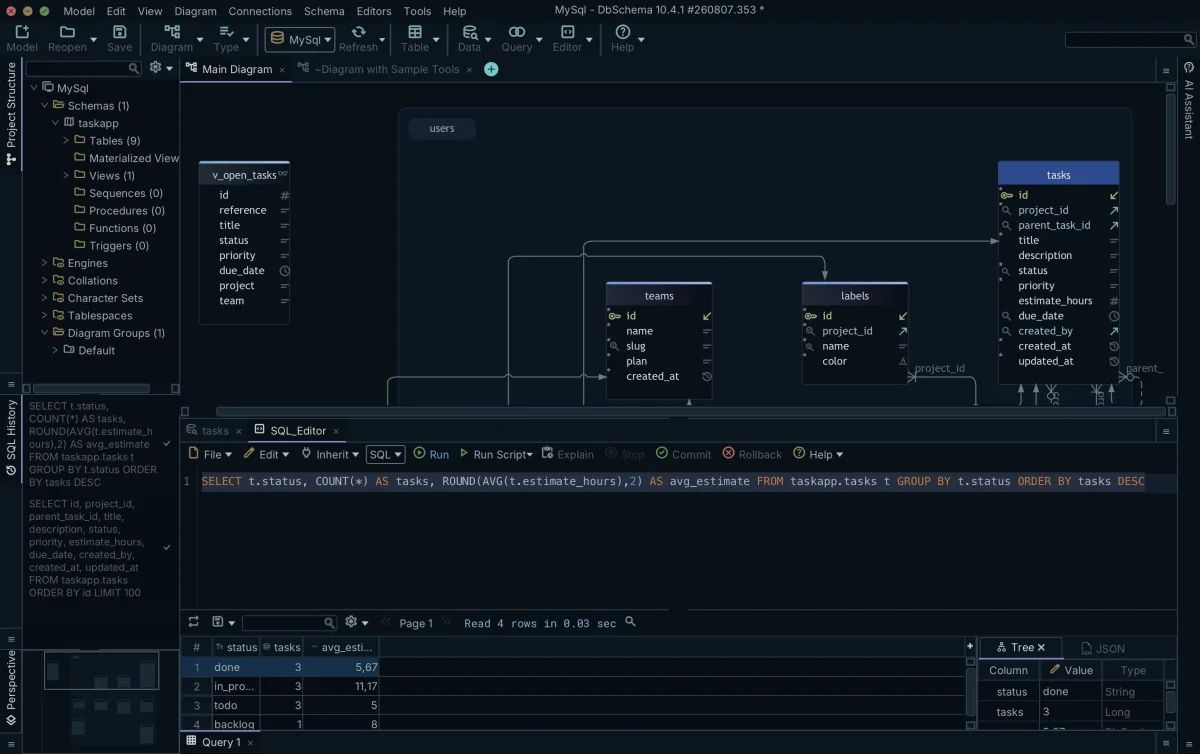
SELECT COUNT(*) AS OrderCount, SUM(Amount) AS TotalSales
FROM orders;
| OrderCount | TotalSales |
|---|---|
| 3 | 1100.00 |
Aliases in subqueries
A subquery in the FROM clause produces a table that exists only inside the statement, and the outer query refers to it by its alias:
SELECT SUM(o.Amount) AS TotalOverFifty
FROM (SELECT Amount FROM orders WHERE Amount > 50) AS o;
| TotalOverFifty |
|---|
| 1050.00 |
The inner query keeps the laptop and the monitor and drops the 50.00 book, and the outer query adds up what is left. Leave out AS o and MySQL refuses the statement, because every table in a FROM clause must have a name[9]:
ERROR 1248 (42000): Every derived table must have its own alias
PostgreSQL 17 runs it without the alias. The SQL standard requires one, and PostgreSQL documents omitting it as its own extension[4], so write the alias and the query runs on both.
Aliases in JOINs and self-joins
In an ordinary join, such as the one in the table aliases section, aliases shorten the query. In a self-join, they are what make it possible. The table appears twice in the FROM clause, and both copies have a column called FirstName. Join employees AS e to employees AS m and select a bare FirstName, and PostgreSQL cannot tell which copy you mean:
ERROR: column reference "firstname" is ambiguous
MySQL reports Column 'FirstName' in field list is ambiguous. Put the alias in front of each column, and give each result column its own name:
SELECT e.FirstName AS Employee, m.FirstName AS Manager
FROM employees AS e
INNER JOIN employees AS m ON e.ManagerID = m.EmpID;
| Employee | Manager |
|---|---|
| Bob | Alice |
| Carol | Alice |
Alice is absent from the result because her ManagerID is NULL, and NULL matches nothing in a join condition. The SQL joins article covers the outer join that keeps her.
Quoting aliases with spaces, case or reserved words
An alias with a space in it, a capital letter that PostgreSQL should keep, or a key word that the parser rejects has to be quoted, and each engine quotes differently:
-- PostgreSQL, and SQL Server with QUOTED_IDENTIFIER ON
SELECT FirstName AS "First Name"
FROM employees;

-- MySQL
SELECT FirstName AS `First Name`
FROM employees;

-- SQL Server, whatever the session settings
SELECT FirstName AS [First Name]
FROM employees;
| First Name |
|---|
| Alice |
| Bob |
| Carol |
PostgreSQL quotes with double quotes, and a quoted name keeps its case[1]. A key word needs no quotes after AS: FirstName AS order runs on PostgreSQL 17, while FirstName order is a syntax error[8].
MySQL quotes identifiers with backticks, and rejects FirstName AS select until the alias is quoted. In the select list it also takes an alias in double or single quotes, but anywhere else a quoted name without backticks is a string literal[2]. This query sorts by the constant 'First Name', so the DESC has no effect on MySQL:
SELECT FirstName AS "First Name"
FROM employees
ORDER BY "First Name" DESC;
| First Name |
|---|
| Alice |
| Bob |
| Carol |
With backticks in the ORDER BY, MySQL returns Carol, Bob, Alice, which is what PostgreSQL returns for the double-quoted query.
SQL Server accepts brackets in any session, and double quotes when QUOTED_IDENTIFIER is on, which is the default for most connections[3]. The SQL Server rules in this article come from Microsoft's documentation; the statements were not run on SQL Server.
Quote only when you have to. An alias made of lower-case letters, digits and underscores, starting with a letter, needs no quotes on any of the three engines and comes back the same from each.
Where an alias can be referenced in SELECT, WHERE, GROUP BY, HAVING and ORDER BY
A table alias is defined in FROM, which the engine evaluates first, so every other clause can use it. A column alias is defined in the SELECT list, which comes after WHERE, GROUP BY and HAVING:
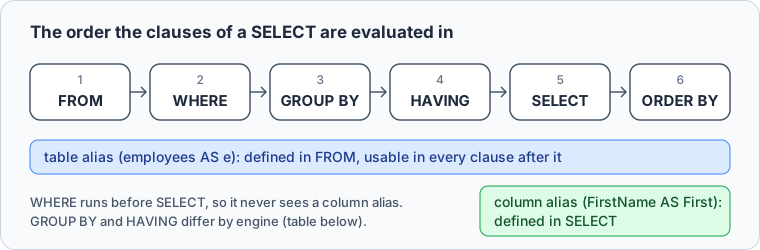
So this statement fails on all three engines:
SELECT FirstName AS First, LastName AS Last
FROM employees
WHERE First = 'Alice';
PostgreSQL reports column "first" does not exist, and MySQL reports Unknown column 'First' in 'where clause'. The MySQL manual gives the reason: the value may not be determined yet when WHERE runs[5]. Repeat the expression and the query runs:
SELECT FirstName AS First, LastName AS Last
FROM employees
WHERE FirstName = 'Alice';
| First | Last |
|---|---|
| Alice | Moore |
Past WHERE, the engines differ:
| Reference a column alias in | PostgreSQL | MySQL | SQL Server |
|---|---|---|---|
| WHERE | No | No | No |
| GROUP BY | Yes | Yes | No |
| HAVING | No | Yes | No |
| ORDER BY | Yes | Yes | Yes |
PostgreSQL accepts an output column name in ORDER BY and GROUP BY, but not in WHERE or HAVING[4]. MySQL accepts it in GROUP BY, ORDER BY and HAVING[5]. SQL Server accepts it only in ORDER BY[6]. HAVING is where PostgreSQL and MySQL part ways:
SELECT EmpID, COUNT(*) AS OrderCount
FROM orders
GROUP BY EmpID
HAVING OrderCount > 1;
MySQL returns the one employee with more than one order:
| EmpID | OrderCount |
|---|---|
| 2 | 2 |
PostgreSQL stops with column "ordercount" does not exist. Write HAVING COUNT(*) > 1 and it returns the same row.
Where an expression is too long to repeat, move it into a subquery or a common table expression and filter on the alias in the outer query. To filter on an aggregate, use a HAVING clause.



Aliases in the DbSchema Query Builder and SQL Editor
DbSchema's Query Builder, which the menus call the Query Editor, writes the SELECT for you. You join tables through their foreign keys and tick the columns, and the SQL at the right changes with every click. DbSchema gives each table a short alias, written without AS, such as tasks t and users u below, so every column in the generated query is already qualified.
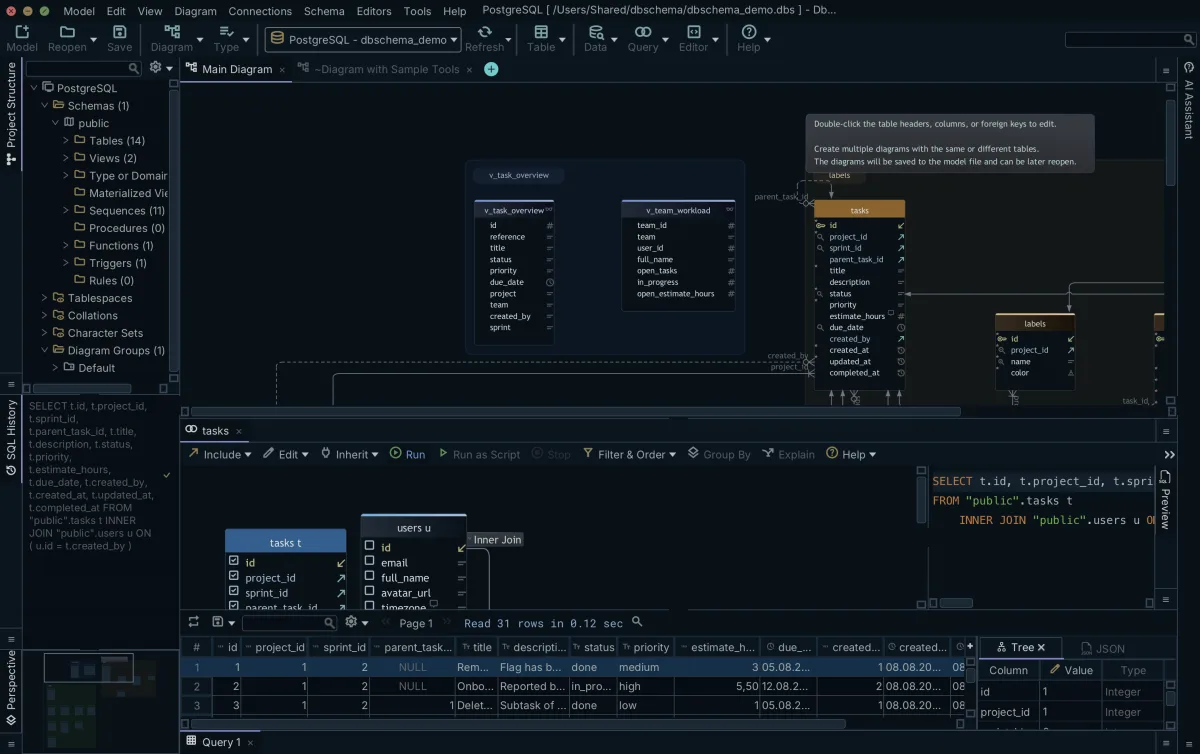
For a statement you wrote yourself, use the SQL Editor. Press Run, and the result grid under the editor takes its headings from your aliases, so a missing comma shows up in the headings. A SELECT run from either one only reads the database, and Save and Close keeps the query in the DbSchema project for Query → Reopen. The SQL Editor is in the free Community Edition; the Query Builder needs DbSchema Pro.
Common mistakes
Leaving out AS is legal in a column alias, which is what makes a missing comma dangerous. The engine reads the second column name as an alias for the first, and the query runs:
SELECT FirstName LastName
FROM employees;
| LastName |
|---|
| Alice |
| Bob |
| Carol |
One column came back, headed LastName, holding first names. If you write AS every time, a bare second name stands out as a missing comma when you read the query.
The other is mixing a table's name and its alias in one statement, which fails as the table aliases section shows.
Practice questions
Four queries to write against the three tables above:
- Return each employee's first and last name as one column headed
FullName. - Return the average amount of the orders over 100, using a subquery in
FROMwith an alias, and head the resultAvgOver100. - Return each employee's first name next to their department name, giving each table a one-letter alias.
- Count the orders per employee, alias that count as
OrderCount, and sort on the alias.
The fourth runs on every engine in the table above, because ORDER BY is the clause that all three accept an alias in.
The SQL Editor that turns your aliases into grid headings is part of the free Community Edition, and the Query Builder that writes the aliased SELECT for you is part of Pro. Get DbSchema from https://dbschema.com/download.html, connect it to a database you already have, and run your longest query in the SQL Editor.
FAQs
Can I use an SQL alias outside the query it is defined in?
Not directly, but a view carries one: create a view whose SELECT list holds the alias, and that name becomes a column name of the view for every query that reads it.
Can I use numerical values as aliases?
Only quoted, if you want it to work everywhere: PostgreSQL rejects FirstName AS 1st with trailing junk after numeric literal, MySQL accepts AS 1st but rejects AS 123[2], and SQL Server requires an unquoted name to start with a letter, an underscore, @ or #[3]. AS "1st" runs on PostgreSQL and MySQL. A bare number in ORDER BY, such as ORDER BY 1, is read as a column position, not as an alias.
Can two tables in the same query have the same alias?
No. Join employees AS e to orders AS e and PostgreSQL reports table name "e" specified more than once, while MySQL reports Not unique table/alias: 'e'. That is why a self-join names the same table twice with two different aliases.
Sources
- PostgreSQL 17 Documentation: Lexical Structure
- MySQL 8.4 Reference Manual: Schema Object Names
- SQL Server: Database Identifiers
- PostgreSQL 17 Documentation: SELECT
- MySQL 8.4 Reference Manual: Problems with Column Aliases
- SQL Server: SELECT Clause (Transact-SQL)
- PostgreSQL 17 Documentation: Table Expressions
- PostgreSQL 17 Documentation: SQL Key Words
- MySQL 8.4 Reference Manual: Derived Tables
Run these aliases against your own schema
DbSchema connects to your database and runs hand-written queries in the SQL Editor, which is part of the free Community Edition. The Query Builder, which builds the SELECT and assigns the table aliases for you, is a Pro feature.









