SQL ANY and ALL Operators Explained with Examples
For someone learning SQL who has met subqueries; every ANY and ALL form is shown with the rows it returns.
On this page
A subquery that returns one row fits straight into a comparison. When it returns several, the
comparison has to say what it means. ANY is true when the comparison holds for at least one of
the rows, and ALL only when it holds for every one of them. Both follow a comparison operator such
as > or =, and both take a subquery that returns one column:
SELECT column_name
FROM table_name
WHERE column_name comparison_operator ANY (SELECT column_name FROM table_name WHERE condition);

SELECT column_name
FROM table_name
WHERE column_name comparison_operator ALL (SELECT column_name FROM table_name WHERE condition);
ANY vs ALL at a glance
The database compares the value on the left with each row the subquery returns, one row at a time,
and folds those comparisons into one answer. ANY is true as soon as one comparison is true, and
ALL is false as soon as one is false
(PostgreSQL 17). SOME is another
name for ANY in MySQL, PostgreSQL, SQL Server and Oracle.
Each comparison operator gives the pair a plain reading:
| Condition | True when the value is | Same as |
|---|---|---|
> ANY (subquery) | greater than at least one row | greater than the smallest |
> ALL (subquery) | greater than every row | greater than the largest |
< ANY (subquery) | less than at least one row | less than the largest |
< ALL (subquery) | less than every row | less than the smallest |
= ANY (subquery) | equal to at least one row | IN (subquery) |
= ALL (subquery) | equal to every row | true only if all rows hold one value |
<> ANY (subquery) | different from at least one row | no shorter form |
<> ALL (subquery) | different from every row | NOT IN (subquery) |
The smallest and largest readings hold while the subquery returns at least one row and none of them
is NULL; the section on NULLs and empty subqueries shows what changes otherwise. >= and <= read
the same way. != works as <> in all four databases, and SQL Server adds !> and !<
(SQL Server SOME and ANY).
The example table
Every query below is a SELECT statement over the same four students, so only the operator changes from one section to the next:
CREATE TABLE Students (
    ID   INT PRIMARY KEY,
    Name VARCHAR(50),
    Age  INT
);

INSERT INTO Students VALUES
    (1, 'Alice',   20),
    (2, 'Bob',     22),
    (3, 'Charlie', 18),
    (4, 'Dave',    21);
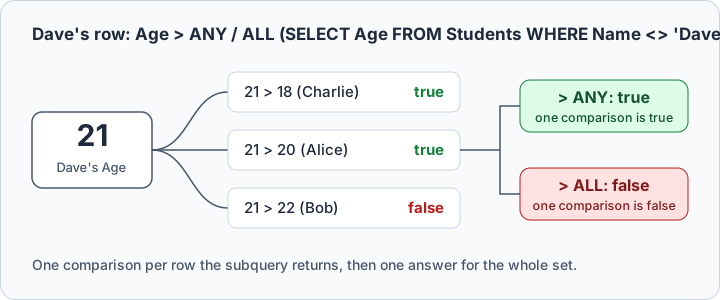
Take Dave's row, and compare his age with the ages of the other three. The subquery returns 18, 20
and 22, so Age > ANY makes three comparisons and needs only one of them, while Age > ALL fails
on Bob's 22:
Greater than and less than ANY or ALL
The students older than Charlie:
SELECT Name
FROM Students
WHERE Age > ALL (SELECT Age FROM Students WHERE Name = 'Charlie');
| Name |
|---|
| Alice |
| Bob |
| Dave |
The subquery returns one row, Charlie's 18, and Alice, Bob and Dave are all older. > ANY in place
of > ALL returns the same three, because over one row "every" and "at least one" mean the same.
> ANY and > ALL differ once the subquery returns more than one row. Compare against Charlie
and Dave together:
SELECT Name
FROM Students
WHERE Age > ANY (SELECT Age FROM Students WHERE Name = 'Charlie' OR Name = 'Dave');
| Name |
|---|
| Alice |
| Bob |
| Dave |
With ALL, only Bob is left:
SELECT Name
FROM Students
WHERE Age > ALL (SELECT Age FROM Students WHERE Name = 'Charlie' OR Name = 'Dave');
| Name |
|---|
| Bob |
> ANY has to beat the smaller value, 18, and three students do. > ALL has to beat the larger,
21, and only Bob does:
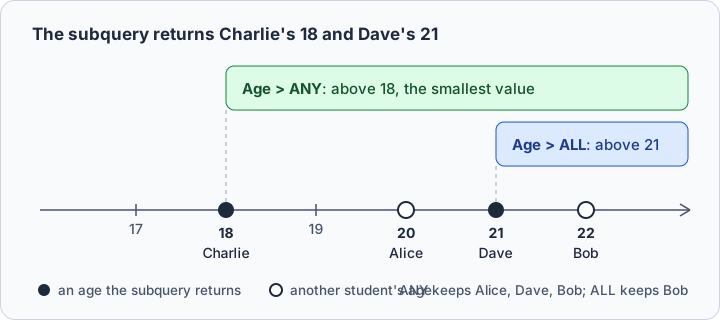
Against Dave alone, Age > ANY (SELECT Age FROM Students WHERE Name = 'Dave') keeps only Bob, the
one student older than 21. Reverse the operator and the reading reverses with it:
SELECT Name
FROM Students
WHERE Age < ANY (SELECT Age FROM Students WHERE Name = 'Alice');
| Name |
|---|
| Charlie |
ALL straight after SELECT is another keyword. SELECT ALL keeps duplicate rows, the opposite
of SELECT DISTINCT, and it is the default
(PostgreSQL 17 SELECT); it compares nothing.
Equal to ALL in WHERE and HAVING
= ALL asks for a value equal to every row the subquery returns. That works only when all the rows
hold the same value, so against two students of different ages nothing passes:
SELECT Name
FROM Students
WHERE Age = ALL (SELECT Age FROM Students WHERE Name = 'Charlie' OR Name = 'Dave');
The query returns no rows, because no age equals both 18 and 21. Against Charlie alone, the
subquery returns one age and = ALL behaves like a plain =:
SELECT Name
FROM Students
WHERE Age = ALL (SELECT Age FROM Students WHERE Name = 'Charlie');
| Name |
|---|
| Charlie |
The same condition works in a HAVING clause, where it filters groups rather than rows:
SELECT Age, COUNT(*) AS Total
FROM Students
GROUP BY Age
HAVING Age = ALL (SELECT Age FROM Students WHERE Name = 'Charlie');
| Age | Total |
|---|---|
| 18 | 1 |
Equal to ANY and IN
= ANY is the membership test. It is true when the value equals at least one row of the subquery:
SELECT Name
FROM Students
WHERE Age = ANY (SELECT Age FROM Students WHERE Name = 'Charlie' OR Name = 'Dave');
| Name |
|---|
| Charlie |
| Dave |
That is what the IN operator does over a subquery. MySQL calls
IN an alias for = ANY (MySQL 8.4),
and PostgreSQL documents the two as equivalent, so over a subquery they return the same rows and
IN is the shorter way to write it.
They differ on written-out values. IN takes a list such as IN (18, 21), but ANY and ALL
take one only in some databases:
| Database | ANY and ALL over a subquery | ANY and ALL over a list of values |
|---|---|---|
| MySQL 8.4 | yes | no |
| PostgreSQL 17 | yes | no, over an array instead |
| SQL Server | yes | no |
| Oracle AI Database 26 | yes | yes |
| SQLite | no | no |
PostgreSQL writes the list as an array, Age = ANY (ARRAY[18, 21])
(PostgreSQL 17 array comparisons).
Oracle takes Age >= ALL (18, 21) as it stands
(Oracle comparison conditions).
SQLite has neither operator: its expression syntax lists
no ANY or ALL, and SQLite 3.50.4 rejects Age = ANY (SELECT ...) with near "SELECT": syntax error. There, use IN, NOT IN, EXISTS, MIN or MAX instead.
Not equal to ALL, NOT IN and not equal to ANY
There is no NOT ALL or NOT ANY operator. To exclude a set of values, put the negation in the
comparison operator. <> ALL is true when the value differs from every row, which is exactly
NOT IN: MySQL documents NOT IN as an alias for <> ALL
(MySQL 8.4), and PostgreSQL states
the same.
SELECT Name
FROM Students
WHERE Age <> ALL (SELECT Age FROM Students WHERE Name = 'Charlie');

SELECT Name
FROM Students
WHERE Age NOT IN (SELECT Age FROM Students WHERE Name = 'Charlie');
Both return the three students whose age isn't 18:
| Name |
|---|
| Alice |
| Bob |
| Dave |
A NOT in front of the whole condition works too. NOT (Age = ANY (...)) returns the same rows as
Age <> ALL (...), here the students who match neither Charlie's age nor Dave's:
SELECT Name
FROM Students
WHERE NOT (Age = ANY (SELECT Age FROM Students WHERE Name = 'Charlie' OR Name = 'Dave'));
| Name |
|---|
| Alice |
| Bob |
<> ANY is the one that surprises. It means "differs from at least one row", while "not equal to
any" in plain English means "equal to none". MySQL's manual points out this trap and suggests
<> SOME, which reads closer to what the query does. Against Charlie and Dave, every student
differs from at least one of the two ages, Charlie and Dave included:
SELECT Name
FROM Students
WHERE Age <> ANY (SELECT Age FROM Students WHERE Name = 'Charlie' OR Name = 'Dave');
| Name |
|---|
| Alice |
| Bob |
| Charlie |
| Dave |
Over a one-row subquery, <> ANY and <> ALL return the same rows, so a test against a single
value can't tell them apart.
ANY and ALL versus IN, EXISTS, MIN and MAX
The conditions below each have a rewrite, and each pair returns the same rows except where the last column says otherwise:
| Condition | Rewrite | Same rows |
|---|---|---|
= ANY (subquery) | IN (subquery) | always |
<> ALL (subquery) | NOT IN (subquery) | always |
> ALL (subquery) | > (SELECT MAX(...) ...) | unless the subquery is empty or returns a NULL |
< ALL (subquery) | < (SELECT MIN(...) ...) | unless the subquery is empty or returns a NULL |
MAX and MIN skip NULLs and return NULL over no rows, which is where they differ from ALL;
the next section shows both cases. The EXISTS operator is the
other rewrite. It ignores what the subquery selects and asks only whether it returned a row, so it
pairs with a correlated subquery, and a NULL among the rows doesn't disturb it.
In MySQL, IN and = ANY over a subquery are the same condition. For the other rewrites, compare
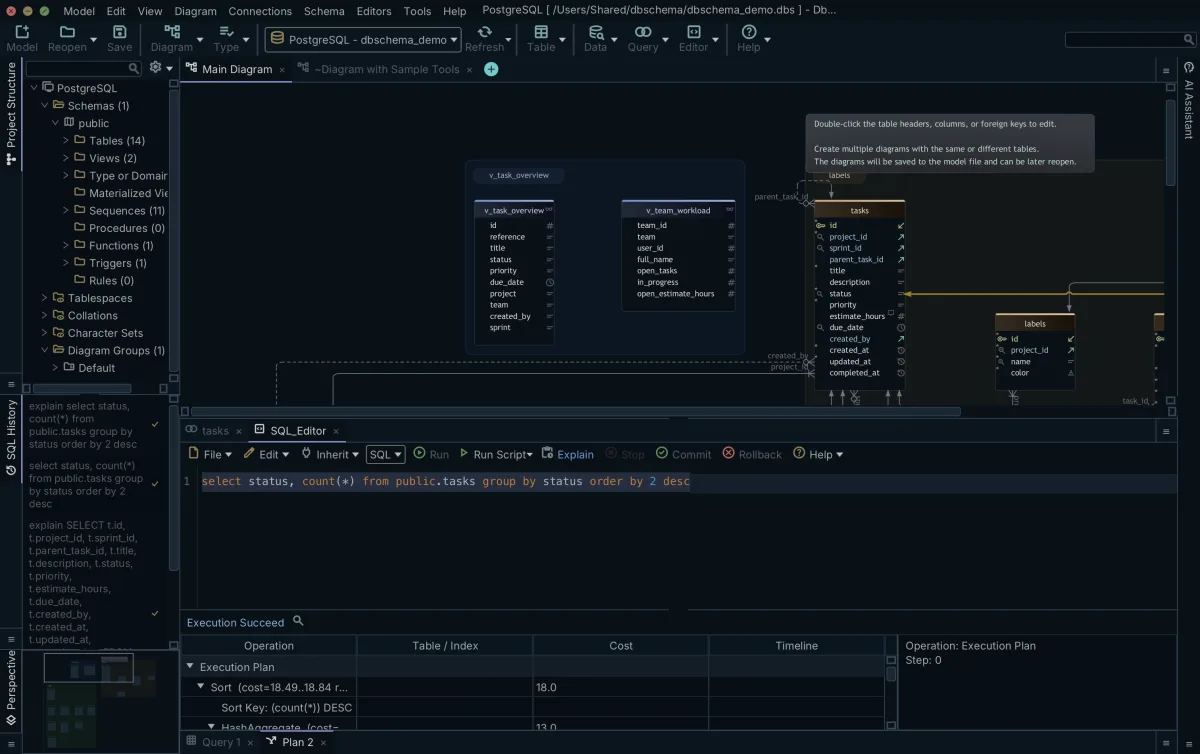
the plans the database picks rather than guess from the keyword. DbSchema's
SQL Editor shows the explain plan
for the statement you typed, so you can compare two rewrites on your own data:
NULLs and empty subqueries
Two edge cases change the answer without changing the query, and the MySQL manual names both:
| The subquery | ANY | ALL |
|---|---|---|
| returns no rows | false | true |
| returns a NULL, and no other row decides the answer | NULL | NULL |
No student is named Zoe, so this subquery returns nothing, and > ALL is true for every row:
SELECT Name
FROM Students
WHERE Age > ALL (SELECT Age FROM Students WHERE Name = 'Zoe');
| Name |
|---|
| Alice |
| Bob |
| Charlie |
| Dave |
Age > (SELECT MAX(Age) FROM Students WHERE Name = 'Zoe') returns no rows, because MAX over no
rows is NULL, and Age > ANY over the same subquery returns none either.
Now give the table a student without an age, and compare against Charlie and her:
INSERT INTO Students VALUES (5, 'Eve', NULL);

SELECT Name
FROM Students
WHERE Age > ALL (SELECT Age FROM Students WHERE Name = 'Charlie' OR Name = 'Eve');
The query returns no rows. Alice's 20 beats Charlie's 18, but 20 against Eve's NULL is unknown, so
ALL is unknown rather than true. A WHERE clause keeps only the rows whose condition is true, and
NOT doesn't bring the unknown ones back: NOT (Age > ALL (...)) returns Charlie alone, the one
student whose comparison came out false. Age NOT IN over the same subquery returns no rows either,
while Age > ANY still returns Alice, Bob and Dave, because one true comparison is enough.
When the NULL values carry no meaning for the comparison, filter them out of the subquery:
SELECT Name
FROM Students
WHERE Age > ALL (
    SELECT Age FROM Students
    WHERE (Name = 'Charlie' OR Name = 'Eve') AND Age IS NOT NULL
);
| Name |
|---|
| Alice |
| Bob |
| Dave |



Test ANY and ALL in DbSchema
An ANY or ALL condition is two queries, one inside the other. When the result looks wrong, run
the subquery on its own first and read its rows: they show whether the set is empty, whether it
holds a NULL, and whether it's the set you meant to compare against. Then run the whole statement.
DbSchema's SQL Editor runs the selected text, or the statement at the cursor, and shows the rows in the result pane below it:

Common mistakes
The first is mixing up the two operators. > ANY is the loose test and > ALL the strict one, so
when a result has more rows than you expected, check which of the two the query uses. The
negations are where the mix-up costs most: NOT IN is <> ALL, never <> ANY, and <> ANY used
to exclude values returns nearly the whole table.
The second is writing a list where the database wants a subquery. = ANY (18, 21) fails in MySQL,
SQL Server and SQLite; IN (18, 21) runs everywhere those do. The third is the reverse habit:
= ANY over a subquery where the shorter IN returns the same rows.
The last two come from the subquery's rows. An empty subquery makes every ALL condition true, so
a filter that suddenly keeps every row may be comparing against nothing. A NULL among the rows
makes the comparison unknown, and the WHERE clause drops those rows even under NOT.
Practice questions
Run them on the four students of the example table:
- Write a query returning the students older than any student named Dave.
- Return the students with the minimum age, using
ALLrather thanMIN. - Return the students whose age equals all the ages in the table, and explain the result.
- Compare
Age <> ANYwithAge <> ALLagainst Bob's age, then against Bob's and Alice's, and explain why they agree on the first and differ on the second. - Add a row with a NULL age, then predict what
Age >= ALL (SELECT Age FROM Students)returns before and after, and check it. - Point an
ALLcondition at a subquery that matches nothing, and explain the result.
Download DbSchema to run them against your own database:
connect, open the SQL Editor, run the subquery, then the full ANY or ALL condition over it.
Connecting, reverse-engineering the database into an interactive diagram and the SQL Editor are in
the free Community Edition.
Run ANY and ALL against your own database
DbSchema connects to your database, reverse-engineers it into an interactive diagram, and opens a SQL editor where you can run the subquery first and the full ANY or ALL condition after it. All three are in the free Community Edition.









