SQLite GUI: Open, View and Query a SQLite File Visually
What to do when a SQLite file shows only text in the command line: see its tables, their links and their rows in DbSchema.
On this page
Words in this article
Words in this article
- SQLite
- A database that lives in one file on your disk, with no server.
- GUI
- A graphical user interface: you work in windows instead of typing commands.
- Foreign key
- A column that points to a row in another table.
- Join
- Combines the rows of two tables, such as each customer with their orders.
- Model
- DbSchema's own copy of the database design, saved as a .dbs file.
- Reverse-engineer
- Read the existing tables and draw them as a diagram.
- JDBC driver
- A small Java library that lets DbSchema talk to SQLite.
- Virtual foreign key
- A link that exists only in the DbSchema model, never in the file.
The short answer
You have a .db or .sqlite file, from your own app, a Python script or a project you inherited without documentation, and the sqlite3 command line shows only text. You want to see the tables, how they connect and the rows inside. DbSchema is a database viewer for SQLite: it opens the file in windows, draws its tables and runs SQL.
See what is in the file
DbSchema lists every table and column of the file, on Windows, macOS and Linux.
See how the tables connect
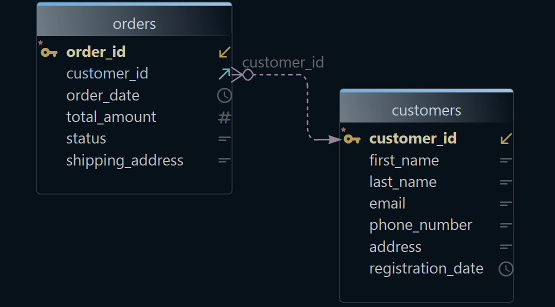
Each foreign key becomes a line on a diagram.
Ask across tables by clicking
The Query Builder writes the join while you tick columns. DbSchema Pro.
SQLite keeps a whole database in one file on your disk, with no server. A GUI, a graphical user interface, lets you work on that file in windows instead of typed commands. Every DbSchema download starts with 15 days of all features, without registration, and the Community Edition stays free for any use.
What DbSchema adds to a SQLite GUI
Why DbSchema
A foreign key is a column that points to a row in another table, such as orders.customer_id. DbSchema draws each one as a line between the two tables.
See how the tables connect
DbSchema reads the file and draws each table as a box and each foreign key as a line (Connect to Database).
Write SQL without looking up names
The SQL Editor suggests table and column names while you type, and saves results as a CSV file, a plain-text table.
Join two tables by clicking
The Query Builder writes the join, the SQL that combines two tables, from the foreign key. DbSchema Pro.
Browse and edit rows like a spreadsheet
In the Data Explorer, double-click a cell to change a value, and click a customer to list that customer's orders. DbSchema Pro.
Test rows and imports
The Data Generator fills tables with rows whose foreign keys stay valid. The Data Importer loads CSV and Excel files. DbSchema Pro.
Then, in DbSchema:DiagramSQL EditorQuery BuilderData Explorer
Key takeaways
- A SQLite file becomes a diagram you can read: tables as boxes, foreign keys as lines.
- Connecting only reads the file. Nothing in it changes until you run a statement that writes.
- Questions across several tables become clicks in DbSchema Pro instead of hand-typed joins.
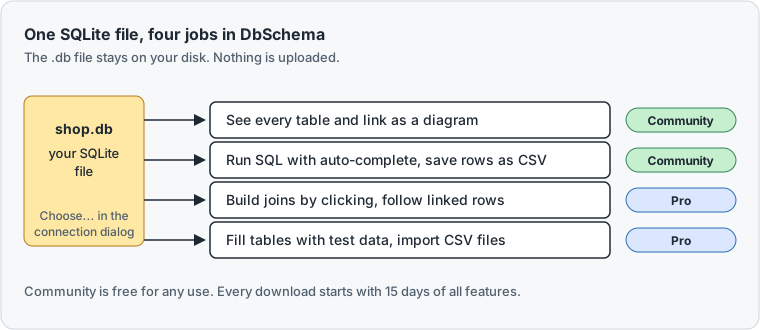
Open a SQLite file in the DbSchema database viewer
You need DbSchema and a SQLite file, such as a .db, .sqlite or .sqlite3 file. Close any program that still writes to the file first. SQLite allows one writer at a time.
-
Start a model Community
Choose
File → New Model. A model is DbSchema's own copy of the database design. Keep Connect to Database selected and click SQLite. On the right, choose New Connection, then press Connect to SQLite. The button names the database you clicked. -
Pick the file Community
In the connection dialog, press Choose... next to the database field and pick the file. DbSchema fills in the JDBC URL with the path. A JDBC URL is the address of a database in one line, such as
jdbc:sqlite:/Users/ana/shop.db. Press Connect. -
Import the tables Community
To reverse-engineer means to read the existing tables and draw them. In Reverse Engineer the Database, tick the schema, the set of tables in the file, and press Import. Connecting and importing only read the file and change nothing in it.
-
Run a query Community
Right-click a table on the diagram and choose SQL Editor. The editor opens with a
SELECTof that table's columns. Press Run, or Ctrl+Enter, and the rows show in a grid under the editor.
DbSchema downloads the JDBC driver the first time you connect. A JDBC driver is a small Java library that lets DbSchema talk to SQLite.
No file at hand? DbSchema ships a sample. On the Welcome screen, the window DbSchema shows at start, open the Learn tab, press Sample Projects and choose SqliteSample. The sample is a music store with 12 tables and its own small SQLite database.
01 TablesThe tree lists what DbSchema read from the file: 12 tables under Default.
02 SampleThe connection to the SQLite file that the model reads through.
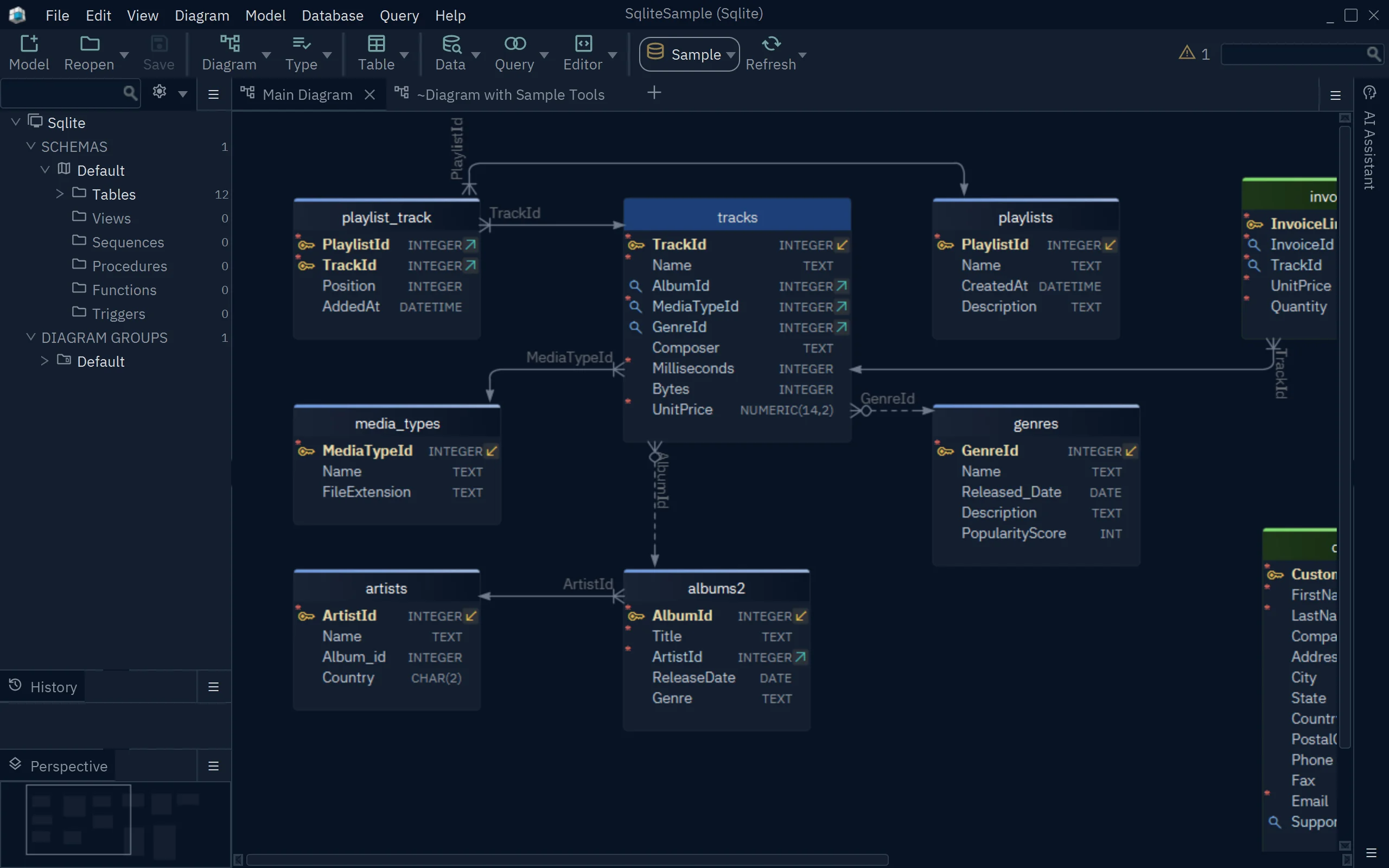
03 ArtistIdEach line is a foreign key. Its label names the column that links the two tables.
04 genresRight-click a table and choose SQL Editor to query its rows.
Answer questions that span several tables
Take "which customers ordered more than 20 items?" The answer needs the customers table and the orders table together. In a plain SQL window, you type that join yourself, with the key columns of both tables.
The DbSchema Query Builder takes the key columns from the foreign key. You drag both tables onto the builder, tick the columns you want, and DbSchema writes the SQL. The SQLite query builder walks through such a join, with real results.
The Data Explorer works the other way round. You start from one row, such as a customer, and click through to the orders, then to the products in each order. Each step opens the linked rows in the next table. A wrong value is fixed in place. Double-click the cell, type the new value and press Enter. DbSchema asks you to confirm before it saves the change to the file.
Many SQLite files declare no foreign keys at all. Then you draw the link as a virtual foreign key, which exists only in the DbSchema model, never in the file. The Query Builder and the Data Explorer follow it like a real one.
What users say
Visual query builder, data explorer and random data generator bundled in, so it doubles as a working client.
We can verify the design with test data generated from the tool, and can create web based pages to show the tables with data, customizable and simple to build.
Designing and versioning a SQLite schema is a job of its own. SQLite database design tools compared covers it.
Which DbSchema edition fits you
DbSchema Pro fits you if you work with the same SQLite file every week: questions across tables become clicks, and the whole design lives in one .dbs model file that you keep in Git, the tool that records each version of a file. Pro also writes the documentation as one HTML5 page, a web page that opens in any browser, with the diagram and every table (Schema Documentation). That suits app developers who ship a SQLite database and want teammates to read it without DbSchema.
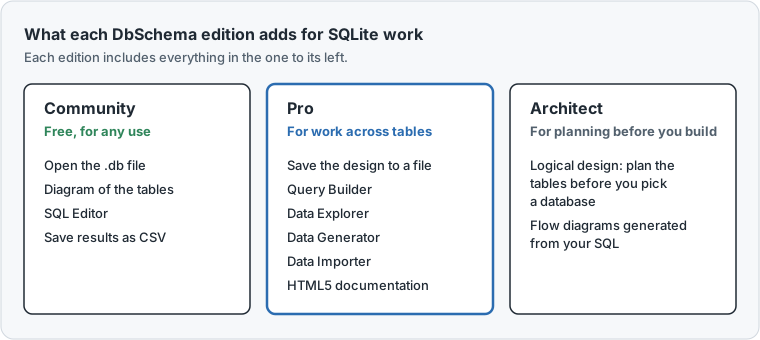
DbSchema Architect fits teams that plan one schema for several databases, with SQLite as one of them. Its logical design plans tables and links before you pick a database, and its flow diagrams show which SQL statements read and write which tables. The pricing page lists the editions and their prices.
Download DbSchema and open your SQLite file. When your questions span several tables, DbSchema Pro is the edition to choose.
Sources
Work across your SQLite tables with DbSchema Pro
DbSchema Pro builds joins while you click, follows a row into its linked tables, fills tables with test data and writes the documentation. Try all features for 15 days.