SQLite Query Builder: Build Joins Visually in DbSchema
How DbSchema builds SQLite joins, filters and counts while you click, and shows the SQL before it runs.
On this page
Words in this article
Words in this article
- Visual query builder
- Writes a SQL query for you while you click tables and columns.
- SQLite
- A database that lives in one file, with no server.
- Foreign key
- A column that points to a row in another table.
- Join
- Combines the rows of two tables, such as each customer with their orders.
- Left join
- Keeps every row of the first table, even without a match.
- NULL
- The value SQL uses for 'nothing here'.
- Aggregate function
- Sums up many rows into one value, such as a count.
- PRAGMA
- SQLite's command for reading or changing a setting.
- Virtual foreign key
- A link that exists only in the DbSchema model, never in the file.
- Model
- DbSchema's own copy of the database design, saved as a .dbs file.
The short answer
You have a SQLite file and need an answer that spans two tables, such as the orders of each customer. Writing that join by hand means looking up the key columns in both tables and getting the condition right every time. DbSchema is a SQLite query builder: it opens the file, draws its tables and builds the query while you click.
An answer from two tables: DbSchema Pro
Tick the columns you want, and the Query Builder writes the join for you.
Not sure the SQL is right?
The query sits next to the tables and changes with every click, before anything runs.
Try every feature first
Every download starts with 15 days of all features, without registration. Afterwards the Community Edition stays free.
SQLite keeps a whole database in one file, with no server. The examples below ran on SQLite 3.54.0, with a small sample of customers and orders.
What DbSchema adds to SQLite queries
Why DbSchema
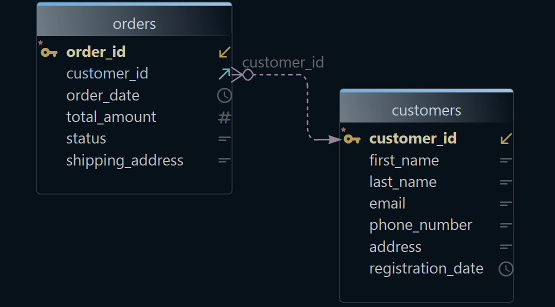
A foreign key is a column that points to a row in another table, such as orders.customer_id. A join combines the rows of two tables, such as each customer with their orders. The model is DbSchema's own copy of the database design, saved as a .dbs file.
No join conditions to type
The Query Builder adds the joined table through its foreign key. You pick it from a list. DbSchema Pro.
The SQL in plain sight
The query sits next to the tables and changes with every click. Run shows the rows in a grid below. DbSchema Pro.
Links the file never declared
A virtual foreign key lives only in the DbSchema model. The Query Builder follows it like a real one. DbSchema Pro.
Rows next to their linked rows
The Data Explorer shows a customer, then that customer's orders, without a query. DbSchema Pro.
Then, in DbSchema:DiagramQuery BuilderData ExplorerSaved model
Key takeaways
- DbSchema takes the join condition from the foreign key, so you never look up key columns.
- The finished query is plain SQL you can copy into a script or a report.
- Filters, left joins, counts and groups are one right-click each.
- Virtual foreign keys let the builder join tables even when the file declares no links.
The sample tables
The examples use two tables. Each order belongs to one customer through orders.customer_id.
CREATE TABLE customers (
  customer_id INTEGER PRIMARY KEY,
  company_name TEXT NOT NULL,
  country TEXT NOT NULL
);
CREATE TABLE orders (
  order_id INTEGER PRIMARY KEY,
  customer_id INTEGER NOT NULL REFERENCES customers (customer_id),
  placed_on TEXT NOT NULL,
  total REAL NOT NULL
);
INSERT INTO customers VALUES (1,'Northwind','DE'), (2,'Acme','FR'), (3,'Contoso','DE');
INSERT INTO orders VALUES (10,1,'2026-03-01',40.00), (11,1,'2026-03-05',12.50), (12,2,'2026-03-02',99.90);
PRIMARY KEY marks the column that identifies each row. NOT NULL means the column can't be left empty. REFERENCES customers declares the foreign key, and DbSchema draws it as a line when it imports the file. Contoso is a German customer without orders.
Build a join in the DbSchema SQLite query builder
First open the SQLite file in DbSchema: choose File → New Model, click SQLite, and press Choose... next to the database field to pick the file. SQLite GUI tools shows that part step by step.
In DbSchema's menus, the Query Builder appears as Query Editor. It writes SELECT queries, which read rows and change nothing in the file. The steps below build the orders of German customers.
-
Open the Query Builder on customers Pro
Right-click
customerson the diagram and choose Query Editor. The Query Builder opens under the diagram. A double-click on its tab gives it the whole area. -
Join orders Pro
Click the small arrow icon at the right of
customer_id. A list opens with the tables linked tocustomers. Choose the entry that starts with Join orders via, followed by the name of the foreign key. -
Pick the columns Pro
Untick every column except
company_name,order_idandtotal. TheSELECTpart of the query, which lists the columns to return, changes as you click. -
Keep German customers only Pro
Right-click
countryand choose Filter. Choose equals, typeDEand press Apply. The filter becomes aWHEREcondition, the part of a query that keeps only matching rows. -
Run it Pro
Press Run. The rows show in the result grid under the Query Builder.
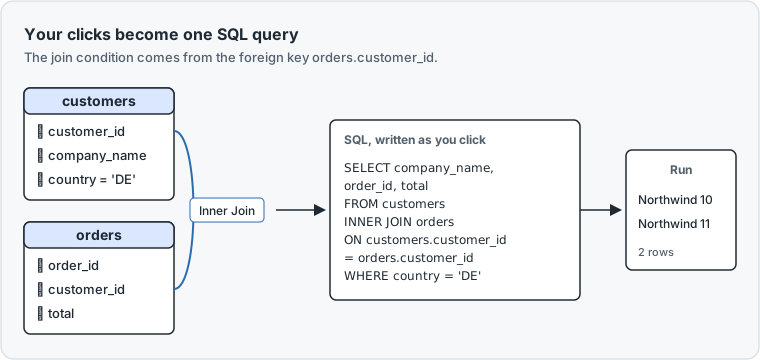
Written out and run on the sample file, the query reads:
SELECT customers.company_name, orders.order_id, orders.total
FROM customers
INNER JOIN orders ON customers.customer_id = orders.customer_id
WHERE customers.country = 'DE';
Result · SQLite 3.54.0
| company_name | order_id | total |
|---|---|---|
| Northwind | 10 | 40.0 |
| Northwind | 11 | 12.5 |
Both rows belong to Northwind, the only German customer with orders.
01 Tick the columnscompany_name, order_id and total are ticked. The filter country = 'DE' sits in the table too.
02 Inner JoinDbSchema took the join from the foreign key on customer_id.
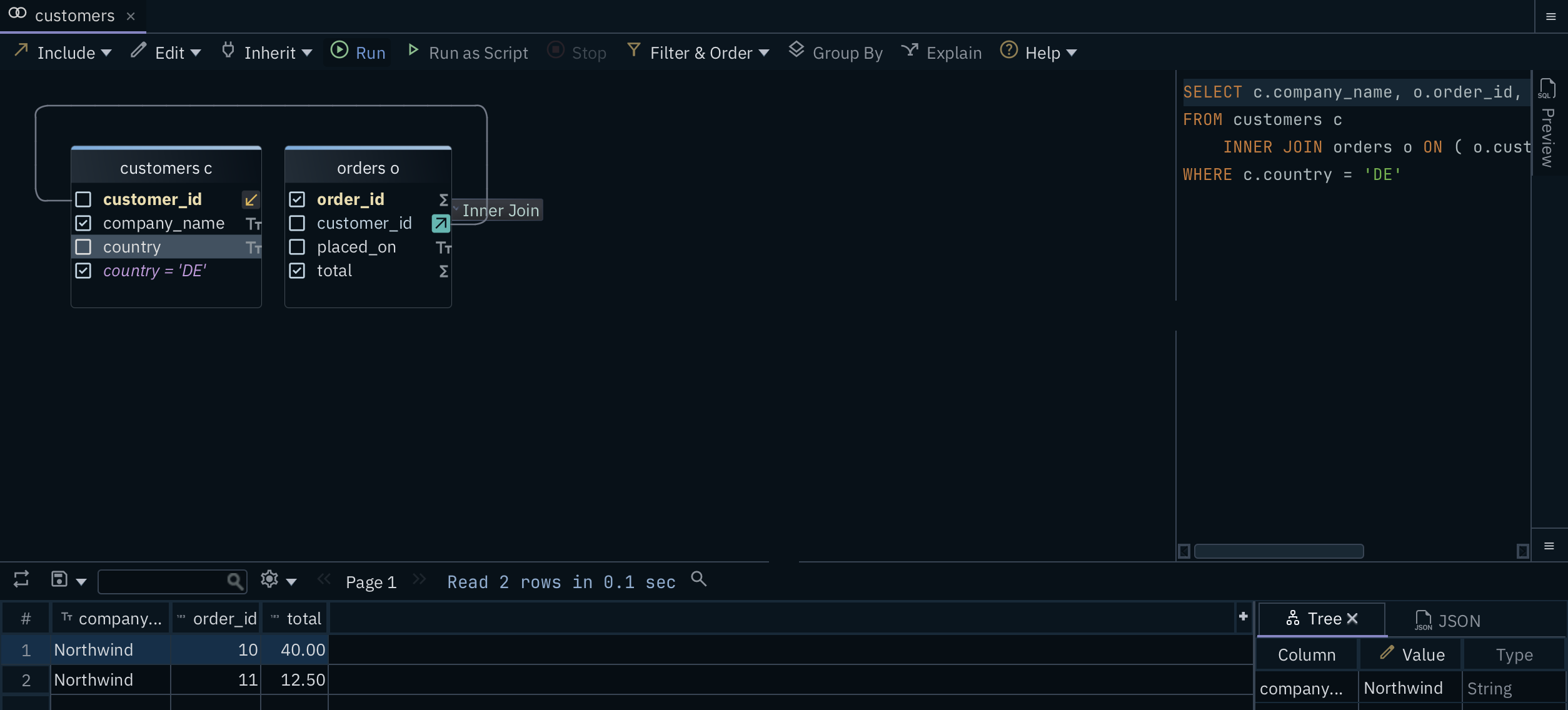
03 Read 2 rowsRun fills the grid: the two German orders, both from Northwind.
04 PreviewThe SQL appears here while you click, before anything runs.
When you close the Query Builder, DbSchema asks whether to save the query to the project, the model file it keeps your design in. Save and Close keeps it, and Query → Reopen brings it back.
Keep customers without orders
An inner join keeps only the rows that match on both sides. A left join keeps every row of the first table, even without a match. On the line between the two tables sits a small label that reads Inner Join. Click it and choose Left Join.
SELECT customers.company_name, orders.order_id, orders.total
FROM customers
LEFT JOIN orders ON customers.customer_id = orders.customer_id
WHERE customers.country = 'DE';
Result · SQLite 3.54.0
| company_name | order_id | total |
|---|---|---|
| Northwind | 11 | 12.5 |
| Northwind | 10 | 40.0 |
| Contoso | NULL | NULL |
Contoso now appears, with NULL, the value SQL uses for "nothing here". SQLite returned the Northwind rows in a different order this time, because the query sets no order.
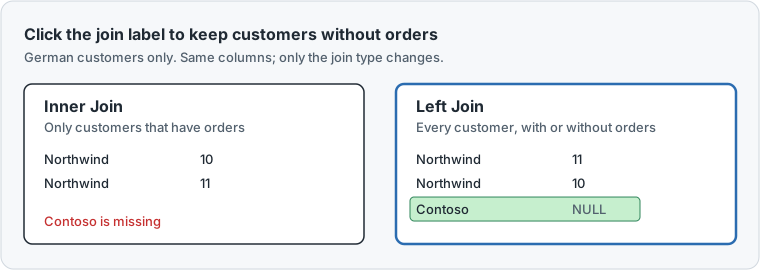
The same label also offers Full Join, which keeps unmatched rows from both tables. SQLite runs it from version 3.39.0, released in June 2022.
Count orders per country
An aggregate function sums up many rows into one value, such as a count. GROUP BY makes one result row for each value of a column, here one per country. Start a new Query Builder for this.
-
Open and join Pro
Right-click
customersand choose Query Editor. Join orders through the arrow icon at the right ofcustomer_id, as before. -
Keep only country Pro
Untick every column except
country. -
Count the orders Pro
Right-click
order_id, choose Aggregate, then Count(*). DbSchema adds aGROUP BYover the other ticked column,country. Press Run.
Written out and run on the sample file:
SELECT customers.country, COUNT(*) AS orders
FROM customers
INNER JOIN orders ON customers.customer_id = orders.customer_id
GROUP BY customers.country;
Result · SQLite 3.54.0
| country | orders |
|---|---|
| DE | 2 |
| FR | 1 |
Germany shows 2. Both German orders belong to Northwind.
When the SQLite file declares no foreign keys
The Query Builder needs a link between the tables. Many SQLite files never declare one, because SQLite doesn't require it. SQLite also doesn't check declared foreign keys unless each connection switches the check on. A connection switches it on with a PRAGMA, SQLite's command for reading or changing a setting.
For the Query Builder, the check doesn't matter. What matters is that the link exists somewhere.
If the file has no link, draw one as a virtual foreign key. Drag the child column, such as orders.customer_id, onto the parent column and tick Virtual in the dialog. DbSchema keeps the link in the model and never writes it into the file. Model → Find Virtual Foreign Keys suggests links between columns with matching names. Saving the model with the virtual foreign key needs DbSchema Pro.
Read the SQL before it runs
The Query Builder is good for anyone who wants the answer without writing the join, and for anyone who wants to check the SQL first. Like any SQL query builder, it leaves you with plain SQL: copy it into the SQL Editor, a script or a report. Need the result in Excel? In the SQL Editor, the save button of the result grid writes the rows to a CSV or Excel file.
What users say
We use DBSchema to visualize the database schema and to build queries using the visual query builder. … DBSchema uses the foreign keys to aid you in writing queries that get data from several tables.
DbSchema is a visual database tool that … can be used to reverse-engineer schemas, edit entity-relationship (ER) diagrams, browse data, visually build queries, and synchronize schemas.
Who DbSchema Pro is for
DbSchema Pro fits you if you ask your SQLite data new questions every week, such as an app developer checking user data or an analyst working from an exported file. Each question across tables then takes a few clicks instead of a hand-written join. Pro also brings the Data Explorer, the Data Generator and HTML5 documentation of the SQLite schema, a web page that people without DbSchema can read. The pricing page lists the editions and their prices.
Download DbSchema, open your SQLite file and build your first join in DbSchema Pro.
Sources
- DbSchema: Query Builder
- DbSchema: Foreign Keys
- DbSchema: Data Explorer
- DbSchema: SQLite JDBC driver
- SQLite, SQLite Release 3.39.0 (sqlite.org/releaselog/3_39_0.html), read 19 November 2026.
- SQLite, SQLite Foreign Key Support (sqlite.org/foreignkeys.html), read 19 November 2026.
- DbSchema: SQL Editor
- DbSchema: Pricing
Build SQLite joins by clicking, and read the SQL first
The Query Builder in DbSchema Pro writes joins from your foreign keys and shows the SQL as you click. Try all features for 15 days.