AI ER Diagram Generators Compared
Compare six AI ER diagram generators on input, output and where the model lives, and see how to draw an ER diagram from your real database instead.
On this page
Six AI ER diagram generators
For developers deciding whether an AI ER diagram generator can stand in for a diagram drawn from the real database. You have a schema already running in PostgreSQL, MySQL or MongoDB, you search for an AI ER diagram generator, and the products you find all start from a text prompt. DbSchema is the exception: it connects to the database itself. This comparison shows what the main generators take in and hand back, where each one stops, and how to draw the diagram from your real database instead.
The short version: the prompt-based generators predict a plausible schema from the words you give them. One tool in this list connects to the database instead, reverse-engineers the catalog into an interactive diagram, and costs nothing. The table below holds only what each vendor page states; every page was read on 30 September 2026.
| Generator | Input | Output | Where the model lives | Writes to a database | Free option | Page read |
|---|---|---|---|---|---|---|
| DbSchema Community Edition | Live database connection (JDBC) | Interactive ER diagram reverse-engineered from the catalog | Local: desktop application on your machine | Yes: generated SQL runs against the connected database | Community Edition is free, with no time limit | 30 Sep 2026 |
| Eraser ERD generator | Plain-English prompt or pasted code (SQL schema, ORM schema) | Diagram-as-code, editable in Eraser, exportable | Vendor cloud | No | Generating an ERD is free without sign-up; editing, saving and export need a free Eraser account | 30 Sep 2026 |
| Workik AI database schema generator | Text description; optional context from a Git repository or uploaded JSON/CSV | SQL and NoSQL schemas, schema documentation, mock data | Vendor cloud | No | A first generation works without an account; more free AI requests and the web, desktop and VS Code apps need sign-up | 30 Sep 2026 |
| ChartDB | One query you run against your database, pasting the JSON result; ChartDB Cloud can also connect to Supabase and re-sync every hour | Editable diagram, SQL script export, AI-assisted DDL in another dialect | Self-hosted or vendor cloud; open source under AGPL-3.0 | No | Self-hosted open-source version free, no account required; the cloud free plan covers one database of up to 10 tables | 30 Sep 2026 |
| Miro AI | Text prompt on a Miro board, or selected board elements | Entity-relationship structure as shapes on the board | Vendor cloud | No | Free plan includes Miro AI | 30 Sep 2026 |
| Visual Paradigm OpenDocs | Text description of the system in the document editor | Editable ERD embedded in a document page | Vendor cloud | No | Requires a Visual Paradigm Online Combo Edition or Visual Paradigm Professional Edition license | 30 Sep 2026 |
Two rows do most of the sorting. ChartDB is the only one of the other five that touches your database at all: its open-source import works through a query you run yourself, and only ChartDB Cloud adds a standing connection, for Supabase. The first row is the only one that connects to whichever supported database you point it at, reads its catalog, and can send SQL back.
What each generator is actually given
The input column is where these products differ most, and the vendor pages are more specific about it than the marketing around them suggests.
- Eraser generates an ERD from a plain-English prompt or from pasted code, and its own tips recommend the second path: paste excerpts from an existing SQL schema or ORM schema instead of writing a prompt from scratch. The best prompts, by its guidance, run at least three to four sentences and name entities, attributes, keys and cardinalities. Editing the result requires signing in.[1]
- Workik generates SQL and NoSQL schemas from a description, with optional context from a connected GitHub, GitLab or Bitbucket repository or an uploaded JSON or CSV file. A first generation works without an account; more free AI requests, and the web, desktop and VS Code apps, need a sign-up.[2]
- Miro proposes an entity-relationship structure on its whiteboard from a text description, or from sticky notes and text blocks you select on the board.[4]
- Visual Paradigm added AI ERD generation to OpenDocs on 20 February 2026. You describe your system in an input box, the AI generates the diagram, and the result embeds into a document page. The feature requires a Visual Paradigm Online Combo Edition or Professional Edition license.[5]
- ChartDB imports an existing schema through a single query. You run the query it gives you in your own database, copy the JSON result, and paste it into ChartDB, which builds the diagram from it. On that path there is no standing connection and no database password involved; ChartDB Cloud's Supabase import is the exception, asking for the database password and re-syncing every hour.[3]
Four of the five accept no connection at all. Eraser, Workik, Miro and Visual Paradigm take text you wrote or code you pasted. ChartDB's open-source import takes the output of a query you ran, and only its cloud version reads a live database, through the Supabase sync. Connecting to the database you point it at, whichever engine that is, is what the first row of the table does.
Inputs, outputs and where the model lives
Group the six by the shape of their pipeline and the comparison gets simpler to hold in your head.
- DbSchema: live connection to a reverse-engineered interactive diagram.
- Miro: text prompt to whiteboard shapes on a shared board.[4]
- Eraser: prompt or pasted code to diagram-as-code you edit and export.[1]
- Workik: description to SQL or NoSQL schema text, plus generated documentation and mock data.[2]
- Visual Paradigm OpenDocs: text description to an ERD embedded in a documentation workspace.[5]
- ChartDB: query result to an editable diagram, self-hostable and open source under AGPL-3.0.[3]
Follow the outputs one step further and the split that matters shows up. Only the first row writes to a database: SQL you generate or edit runs against the connection you opened. ChartDB and Workik stop one step short, producing SQL scripts you copy and run yourself. Eraser, Miro and Visual Paradigm stop at a picture or a file, and nothing in their pipeline ever reaches an engine.
Prompted diagrams against reverse-engineered ones
Here is the distinction the whole page turns on, stated once. A diagram generated from a prompt shows what the model predicted. A diagram reverse-engineered from the catalog shows what the database holds. Those are different claims about what looks like the same picture, and only one of them is checkable.
When a generator builds an ERD from your description, the entities, the columns and the cardinalities are its guess about a schema it has never seen. The output can match what you asked for exactly and still differ from the database, because the database was never asked. We covered the underlying problem in why a chat model cannot draw your schema, and the same limit applies to every prompt-based generator on this page.
ChartDB sits between the two. The schema it draws comes from a query result, so it is your schema, not a prediction. Through the query import it is a snapshot rather than a standing connection; ChartDB Cloud adds automatic sync, every hour for Supabase and through its API on the Teams plan.[3] That is a real middle ground, and it is fair to call it one.
What a generated diagram cannot tell you
Even a diagram that matches the catalog leaves things out, because a drawing of structure is not the structure. Four things no prompt-based output contains:
- The actual column types as the engine stores them, including the ones the prompt never mentioned
- The declared constraints: primary keys, foreign keys, unique and check constraints
- The relations the schema never declared, which are common in MongoDB collections and legacy tables
- The data itself, which is what tells you whether the modeled relationships hold
Bernie Pruss, a data architect with roughly three decades in the field, described this gap on LinkedIn in August 2026. A year of AI-assisted side projects, he wrote, had left his data architecture uninspected. Once he stopped to inspect it, the visual model of the database showed him relationships that needed work. The shape of it is the point: the inspection happened on the real database, through the model, not on a predicted picture.[6]
Which generator fits which job
Each of these products is good at a specific job, and the vendor pages say which.
- Speed from a blank page to a picture: Eraser and Workik both turn a description or pasted code into a diagram or schema text in one step.
- A shared whiteboard for stakeholder feedback: Miro puts the generated structure on a board where a team can comment and iterate.
- Diagram-as-code inside a docs workflow: Visual Paradigm OpenDocs embeds the generated ERD into a document page alongside the text.
- A self-hosted open-source option: ChartDB runs locally or on your own infrastructure under the AGPL-3.0 license.[3]
Then there is the job the rest of the page has been building toward: understanding or documenting a database that already exists. That job has a hard requirement no prompt satisfies. Someone or something has to read the database itself, because the answer lives in its catalog and its data, not in a description of it.
Drawing the diagram from your own database
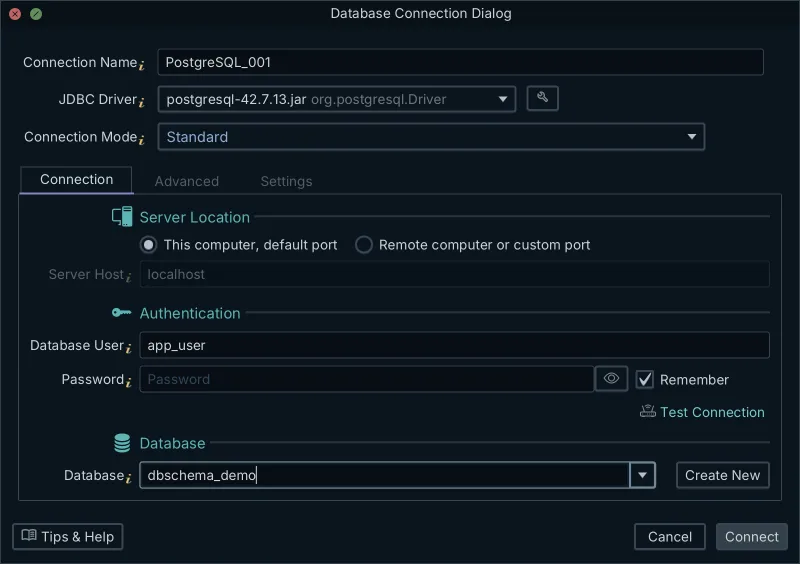
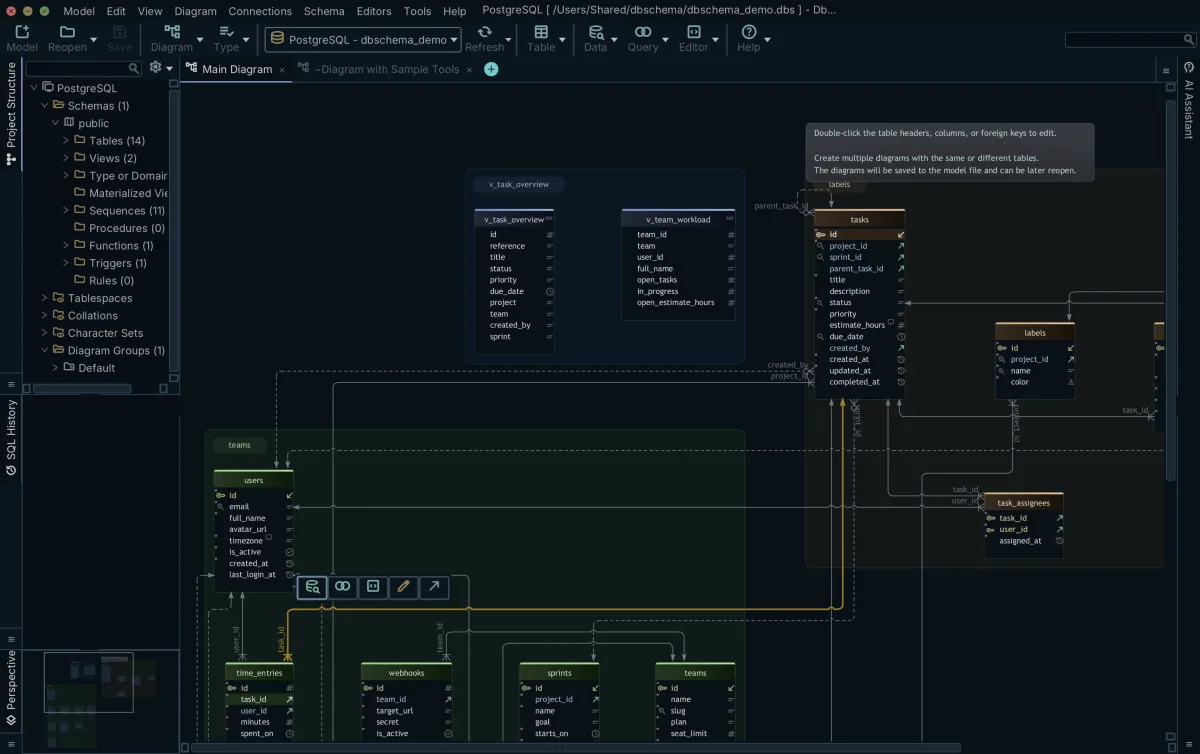
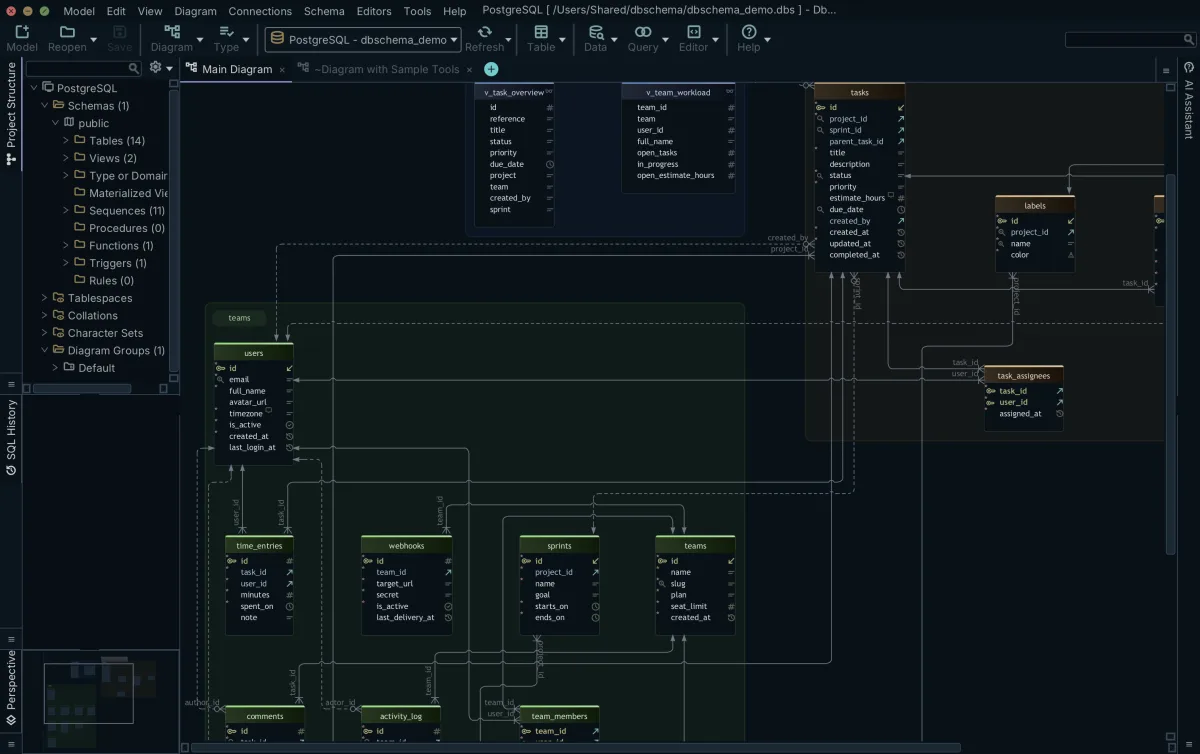
DbSchema Community Edition takes the input none of the prompt-based generators accepts: a connection to the database. You connect over JDBC, DbSchema reverse-engineers the catalog, and the diagram you get is interactive, with tables, columns and declared foreign keys drawn as connector lines you can rearrange. The SQL editor is included, so the queries you run to check a relationship run in the same application as the diagram. All of this is free, with no time limit.
Where relations are not declared (MongoDB collections and old MyISAM tables are the usual cases), virtual foreign keys can be added. They exist only in the model file: no constraint is created in the database, but the query builder and the relational data explorer recognize them for joins and navigation.
The workflow is the same on other engines. The guide on how to create an ER diagram from an existing PostgreSQL database walks it end to end, and a free database diagram tool covers what the diagrams show and how reverse-engineering works.
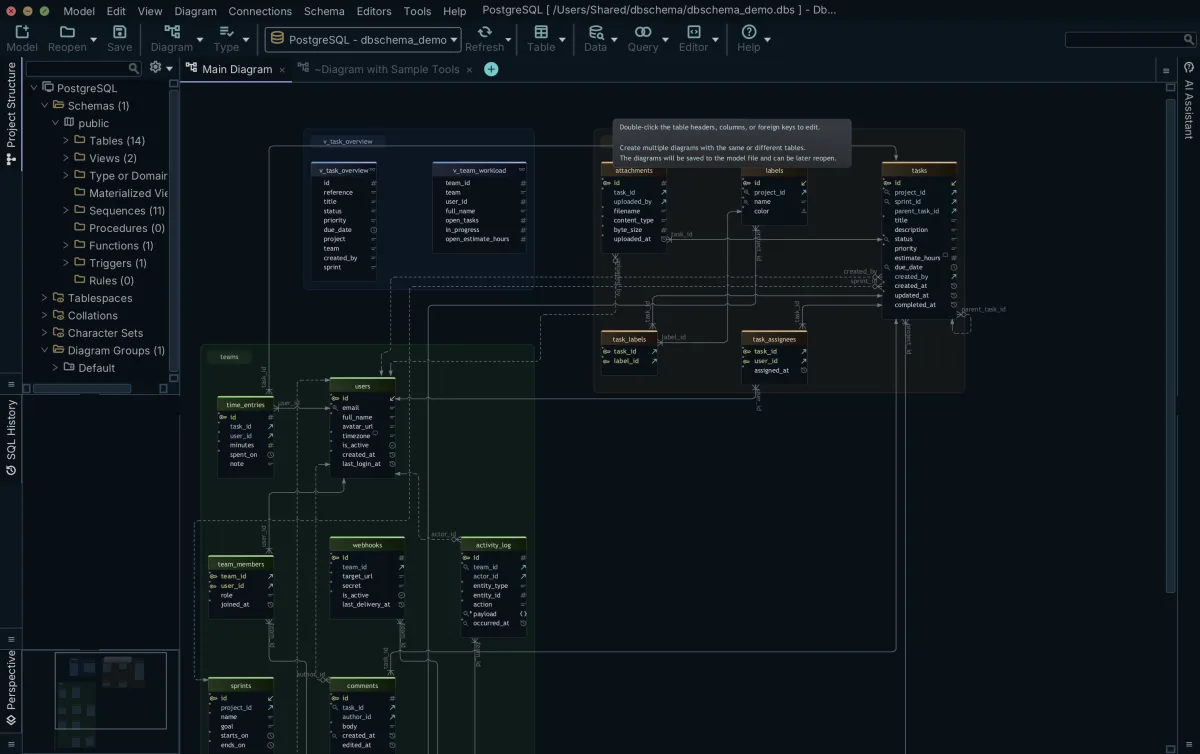
If you want AI in the same workflow, the DbSchema AI Assistant is a panel docked beside the diagram. Its scope is deliberate: only the DDL of the tables you attach is sent, the preview shows the exact text before anything travels, and the assistant never reads table contents. Answers come back as Markdown with SQL in code blocks, and a returned CREATE TABLE can be reviewed and merged into the design model, so the assistant becomes a starting point for the diagram rather than text you retype. The short version of what an AI assistant sees of your database is that it sees the DDL you attach and nothing else. When the assistant proposes a CREATE TABLE, review an AI-proposed schema change before it reaches the database.
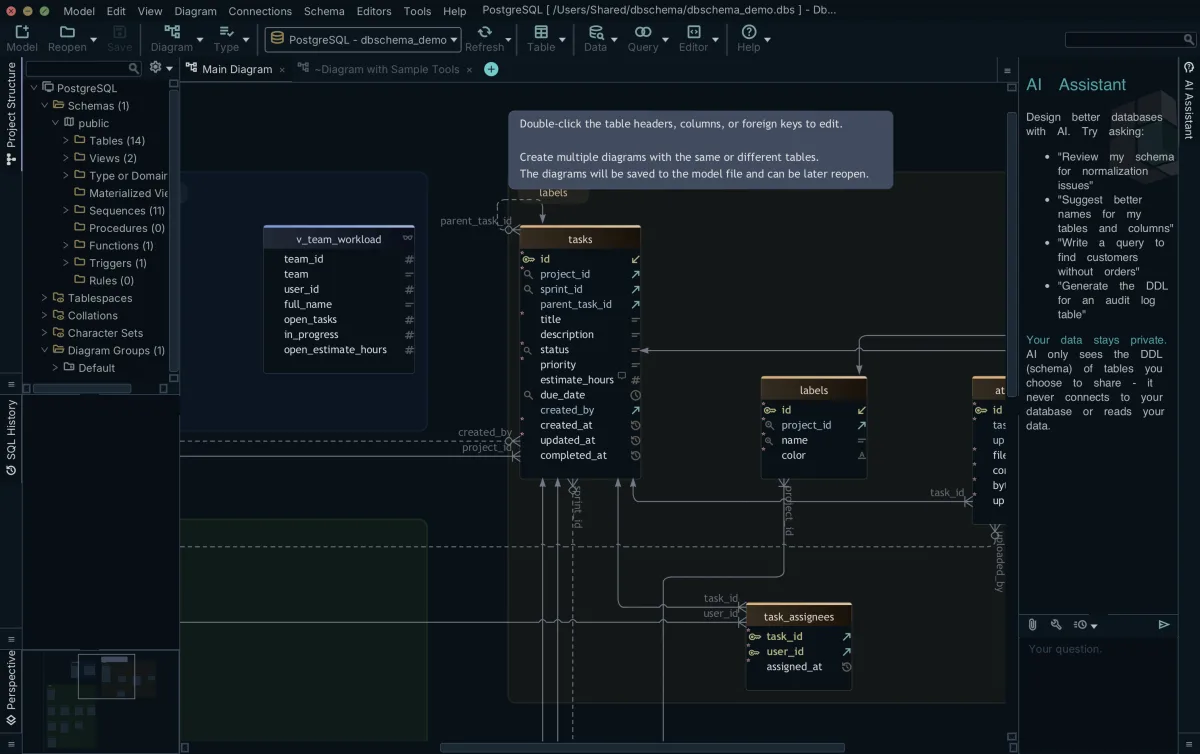
The DbSchema AI subscription works on every edition, including Community. Using your own provider key, OpenAI, Claude, Gemini and the rest, requires the Architect edition. Choosing Ollama runs a local model, and nothing is sent anywhere. A new installation starts with a 15-day trial.
- Community Edition: connect and reverse-engineer for all databases, interactive diagrams, creating tables, and the SQL editor. Free.
- Pro Edition: saving the model to a file for offline design, schema synchronization, and HTML5, PDF and Markdown documentation.
- Architect Edition: your own AI provider key, plus logical and conceptual design.
Download the free DbSchema Community Edition, reverse-engineer the database you already have into an ER diagram, and attach only the tables you choose when you ask the AI Assistant about it.
Frequently asked questions
Can I use AI to generate ER diagrams?
Yes. Eraser, Workik, Miro AI and Visual Paradigm OpenDocs all generate an entity-relationship diagram from a text description or pasted code. The output reflects what the model predicted from your prompt, not what an existing database contains, so it suits sketching a new design rather than documenting a live one.
Which AI can make ER diagrams?
Eraser's ERD generator works from a prompt or pasted SQL or ORM schema; Workik generates SQL and NoSQL schemas from a description; Miro AI proposes an ER structure on a whiteboard; Visual Paradigm OpenDocs generates ERDs inside its documentation tool on paid editions; ChartDB pairs a schema import with AI-assisted DDL export.
Which AI is best for ER diagrams?
For a diagram of a database that already exists, reverse engineering beats prompting, which is what DbSchema Community Edition does for free. Otherwise it depends on the job. For a new design from a blank page, DbSchema lets you start on an empty canvas or ask the AI Assistant for a CREATE TABLE and merge it into the model; Eraser and Workik also turn a description into a diagram or schema text. For a shared whiteboard, Miro. For documentation, DbSchema exports the diagram as interactive HTML5 documentation (Pro); Visual Paradigm OpenDocs embeds a generated ERD in a document page. For a self-hosted open-source option, ChartDB.
Is there a database design tool with a built-in AI assistant?
DbSchema has one. The AI Assistant is a panel docked beside the diagram that receives only the DDL of the tables you attach, shows you the exact text before it is sent, and never reads table contents. The DbSchema AI subscription works on every edition including Community; using your own provider key requires Architect.
How do I create an ER diagram from an existing database?
Connect a design tool to the database and let it reverse-engineer the catalog. DbSchema Community Edition does this for all supported SQL and NoSQL databases at no cost: it reads the schema, lays out an interactive diagram, and runs the SQL editor. Where relations are not declared, it can add virtual foreign keys that live only in the model.
Sources
Draw the ER diagram from your real database
DbSchema Community Edition connects to your database, reverse-engineers it into an interactive ER diagram and runs the SQL editor, free.









