Why Not Just Ask ChatGPT to Draw Your Schema
Discover why asking ChatGPT to draw your database schema requires extra steps. Learn how to generate visual ER diagrams and safely review AI SQL scripts.
On this page
Why asking an AI to draw your schema is tempting
For backend developers who need to design or review relational schemas without relying on ungrounded AI guesses.
You need to sketch a new feature schema or make sense of a legacy database, so you open ChatGPT and type a prompt describing your entities. ChatGPT cannot draw an interactive visual ER diagram: it outputs text or code, lacks a live database connection, and predicts text tokens instead of validating relational integrity. DbSchema draws that diagram from the database itself, by reverse-engineering the catalog over a JDBC connection.
The appeal of prompting a large language model comes from the friction of manual design. Writing raw DDL scripts by hand, calculating foreign key dependencies, and positioning rectangular boxes on a canvas takes time, and the larger the schema, the more of that work there is. Prompting an AI model feels like a shortcut to skip the layout work, but text prompts cannot replace structural database introspection.
- Describe entities and relationships in natural language to a text prompt.
- Copy the generated text syntax or code block from the chat interface.
- Paste the code into an external renderer to inspect the visual layout.
- Review every table constraint and foreign key manually to fix syntax and relationship errors.
Can ChatGPT create a diagram?
ChatGPT cannot render visual diagram files or graphical canvases directly. When you ask ChatGPT to draw a database diagram, it returns a text representation of the schema. That output is usually SQL DDL statements, Mermaid markdown, or Database Markup Language (DBML) code.
To see an actual visual diagram from that text, you must copy the generated code and paste it into a separate web renderer. Tools such as dbdiagram.io accept DBML syntax and draw a graphical layout in your browser, but that layout only ever reflects the text you pasted.
A standard DBML snippet generated by an AI model looks like this:
Table users {
 id integer [primary key]
 email varchar
 created_at timestamp
}

Table orders {
 id integer [primary key]
 user_id integer
 total_amount numeric
 status varchar
}

Ref: orders.user_id > users.id
While this round-trip produces a static visual representation of the tables, the diagram remains disconnected from your actual database engine. If a table definition changes in staging or production, the web diagram does not update automatically.
What are common ER diagram mistakes?
When an AI generates a database schema from a prompt, it operates on token probability rather than relational algebra. It produces structures that look plausible at first glance but fail under real production queries.
Reviews of AI-generated database schemas reveal consistent structural omissions[1]:
- VARCHAR(255) assigned to every string column regardless of domain constraints
- FLOAT used for monetary values instead of DECIMAL or NUMERIC
- Foreign key columns named without declaring FOREIGN KEY constraints
- Missing ON DELETE CASCADE or ON DELETE SET NULL behavior on child records
- No composite or partial indexes defined for frequent query filters
- Hard deletes specified with no audit columns such as created_at or updated_at
The SQL below contrasts an unvalidated AI output with a production-ready schema definition:
-- AI-generated definition with missing constraints
CREATE TABLE invoices (
 invoice_id INT PRIMARY KEY,
 customer_id INT,
 amount FLOAT,
 status VARCHAR(255)
);

-- Corrected relational definition
CREATE TABLE invoices (
 invoice_id INT GENERATED ALWAYS AS IDENTITY PRIMARY KEY,
 customer_id INT NOT NULL REFERENCES customers(customer_id) ON DELETE RESTRICT,
 amount NUMERIC(12, 2) NOT NULL CHECK (amount >= 0),
 status VARCHAR(20) NOT NULL DEFAULT 'draft',
 created_at TIMESTAMPTZ NOT NULL DEFAULT CURRENT_TIMESTAMP
);
CREATE INDEX idx_invoices_customer_status ON invoices(customer_id, status);
How can I generate an ER diagram?
The reliable way to generate an Entity Relationship Diagram is to reverse-engineer your schema directly from the database catalog. Instead of asking a language model to guess tables from a prompt, you connect a design tool to your live instance and read the authoritative metadata.
Reverse-engineering extracts every table, data type, primary key, check constraint, index, and foreign key defined in the database catalog. DbSchema arranges these entities onto an interactive canvas where you can inspect dependencies, split large schemas into focused sub-diagrams, and edit definitions visually.
- Open DbSchema and select the database engine from the connection dialog.
- Enter your host, port, database name, and credentials, or specify a JDBC URL.
- Select the target schemas or table groups you want to inspect.
- Click Connect to reverse-engineer the catalog into an interactive diagram.
When you extend a database, starting from this reverse-engineered model gives any subsequent AI assist the exact catalog context it needs, preventing hallucinations of non-existent columns.
Which tool is best for an ER diagram?
Choosing a diagramming tool depends on whether you need a fast web sketch or a secure desktop environment connected to live databases. Browser-based tools work well for sharing static snippets, but desktop clients provide direct JDBC introspection, offline execution, and local file storage.
| Capability | Browser-Based Diagrammers | Desktop Modelers |
|---|---|---|
| Connection Method | Manual SQL/DBML upload | Direct JDBC driver |
| Data Privacy | DDL uploaded to third-party cloud | Local execution, zero schema upload |
| Offline Availability | Requires active internet connection | Full offline model editing |
| Schema Synchronization | Manual script copy | Automated migration DDL generation |
| Documentation Format | Static PDF or PNG export | Interactive HTML5 vector database documentation |
DbSchema Community Edition is free and provides live reverse-engineering, interactive diagrams, and a SQL editor for all relational and NoSQL engines. DbSchema Pro Edition adds schema comparison, migration script generation, and interactive HTML5 documentation export.
What are the notations for an ER diagram?
Standard ER diagrams use Crow's foot notation to represent the cardinality and optionality of relationships between tables. The notation marks whether a relationship is one-to-one (1:1), one-to-many (1:N), or many-to-many (M:N), and whether the child reference is mandatory or optional.
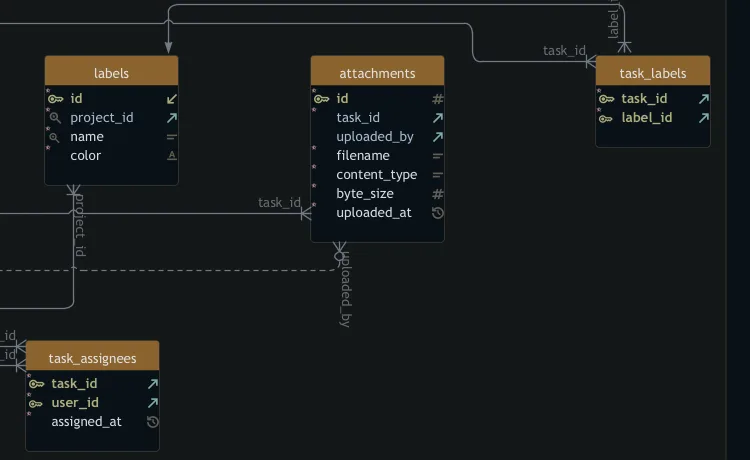
AI prompt generators often misjudge cardinality, linking entities without clarifying whether a parent row can match multiple child rows. In SQL queries, joining across an incorrectly modeled 1:N relationship causes join fanout: the join duplicates rows on the "one" side and the aggregates then count those duplicates as if they were real data[2].
-- Query with unexpected join fanout multiplying revenue
SELECT
 c.customer_id,
 SUM(o.total_amount) AS reported_revenue
FROM customers c
JOIN orders o ON o.customer_id = c.customer_id
JOIN order_items oi ON oi.order_id = o.order_id
GROUP BY c.customer_id;
Because the query joins to order_items without aggregating items first, each order is counted once per line item. Visualizing the Crow's foot notation on an ER diagram exposes these one-to-many branch points before you write queries or migrations.
What is the ER diagram format?
Browser-based diagramming tools store models in temporary web storage or proprietary cloud databases. When a session expires or a cloud workspace is modified, unversioned layouts can be lost.
DbSchema Pro Edition saves your schema design as a plain, indented XML file with the .dbs extension. This file stores the physical and logical structure, layout coordinates, table groupings, comments, and virtual foreign keys in structured text.
- Schema definitions covering tables, columns, data types, defaults, and constraints
- Layout positions and visual arrangements for multiple diagram tabs
- Virtual foreign keys for databases without physical constraints
- Documentation markdown and field-level comments
- Saved visual query builder configurations and data browse layouts
Because the .dbs file is plain XML, you can commit it to Git alongside your application code. Your team can review schema diffs in pull requests, resolve merge conflicts in text, and open the model offline without connecting to external servers.
Why the AI output must arrive as a SQL script
Using artificial intelligence for database design requires strict boundaries around data access and execution. General-purpose AI chats often ask you to paste raw schemas into web forms, exposing internal data models to third-party providers.
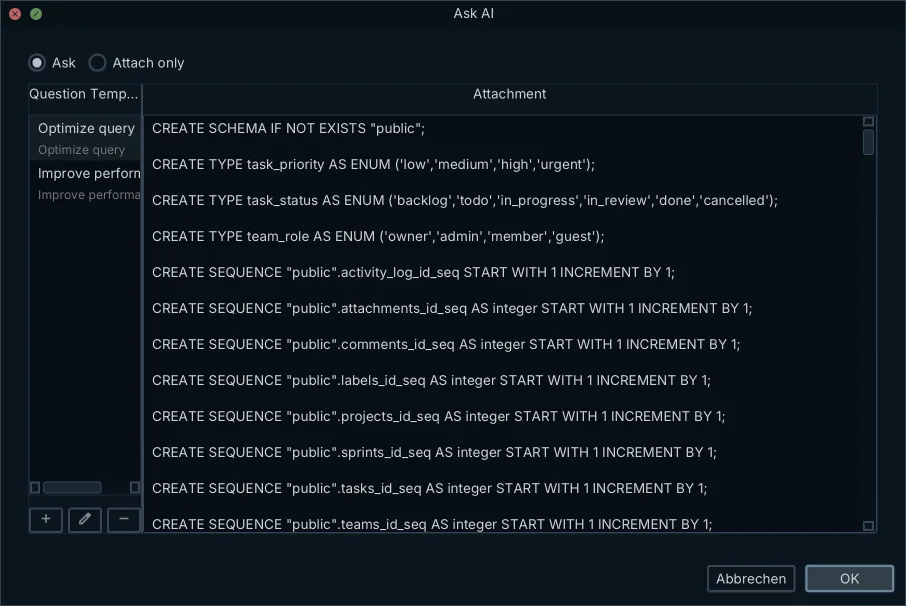
The DbSchema AI Assistant, docked beside the diagram inside the desktop application, works differently. DbSchema sells it as an add-on subscription at $9.00 per month plus tax[3]. The subscription works on every edition, including the free Community Edition, and bills usage in credits for ChatGPT, Claude and DeepSeek. On DbSchema Architect Edition you can instead supply your own provider key for OpenAI, AzureOpenAi, Claude, Gemini, DeepSeek, Grok, Mistral or Venice[4]. Select Ollama as the provider to run a model on your own machine, and then nothing is sent anywhere at all. The assistant has no access to the data stored inside your database and inspects only the DDL of the specific tables you explicitly choose to expose.
Research on Text-to-SQL benchmarks shows that language models need explicit schema information and external context, such as value mappings and domain rules, to generate correct queries; removing that evidence measurably degrades accuracy[5]. Without human verification, AI-generated SQL can fail silently on edge cases or type conversions.
The DbSchema AI Assistant answers in Markdown with the SQL inside a code block, so a CREATE, ALTER or ADD CONSTRAINT statement arrives as text you read before you run it. Nothing it writes reaches your schema on its own. You review a returned CREATE TABLE and merge it into the design model yourself, then run schema synchronization to generate the migration script that reaches the live database.
Download DbSchema and reverse-engineer your database into an interactive ER diagram. DbSchema Community Edition covers visual modeling and SQL execution. DbSchema Pro Edition adds schema synchronization, saving the design model to a versionable .dbs file, and interactive HTML5 documentation.
Frequently asked questions
Does ChatGPT draw visual database diagrams?
ChatGPT cannot natively draw a visual diagram. It generates text formats like SQL or DBML. To see the diagram, you must copy that code into a rendering tool like dbdiagram.io or import it into a database client.
Why is my AI database schema missing foreign keys?
AI models predict text tokens rather than understanding relational logic. This often leads to schema hallucination where the AI creates tables but omits critical foreign key constraints and cardinality rules.
How do I make an ER diagram from an existing database?
Connect DbSchema directly to your database over JDBC. DbSchema reverse-engineers the live schema and draws the exact tables, columns, and relationships as they exist in production.
Is dbdiagram.io completely free to use?
The core dbdiagram.io application is free and allows you to generate visual diagrams by typing DBML code. They also offer paid plans for unlimited diagrams and additional features.
How do I save an ER diagram as XML?
DbSchema Pro saves your database design as a plain XML .dbs file. This format allows you to work offline, version-control your design with Git, and diff structural changes over time.
Can an AI database assistant read my live data?
Not if scoped correctly. A schema-aware assistant only has access to the Data Definition Language (DDL) of the specific tables you explicitly choose to expose. It never reads or transmits the actual rows in your database.
Sources
Draw your schema from the database, not from a prompt
DbSchema reverse-engineers your database into an interactive ER diagram, and its AI Assistant reads only the DDL of the tables you attach and answers with SQL you read before you run it. DbSchema Community Edition is free.









