dbdiagram.io Alternatives That Connect to a Real Database
For the data architect whose DBML diagram has drifted from the database it describes, and who now wants the diagram read out of the catalog instead.
On this page
The DBML file says the orders table has eleven columns and the database says thirteen, and nothing in the workflow was ever going to catch that. DbSchema is the dbdiagram.io alternative that closes it: it connects over JDBC, reverse-engineers the catalog into an interactive diagram, saves the design as a local XML model file you commit to Git, and generates the DDL migration script by comparing that file against the live database.
Two other connected modelers come up on the same shortlist. ChartDB renders a diagram in the browser from the output of a single query. SqlDBM is a hosted platform aimed at cloud data warehouse teams.
What is the alternative to Liquibase?
dbdiagram.io draws the diagram from DBML code, and stops there: it does not run DDL against a database, and it does not compare a design against a catalog to work out what changed. Teams fill that half with a migration runner such as Liquibase, which applies changelogs sequentially across environments, or with a connected modeler that writes the script from a diff. The schema migration tools comparison covers the runners on their own.
DbSchema does the diff. It holds the design in the .dbs model file, compares that file against the target database, and generates the upgrade DDL from the differences it finds, so you read the statements before anything runs. That is the part a code-to-diagram tool leaves open: without a connection there is nothing to compare the design against.
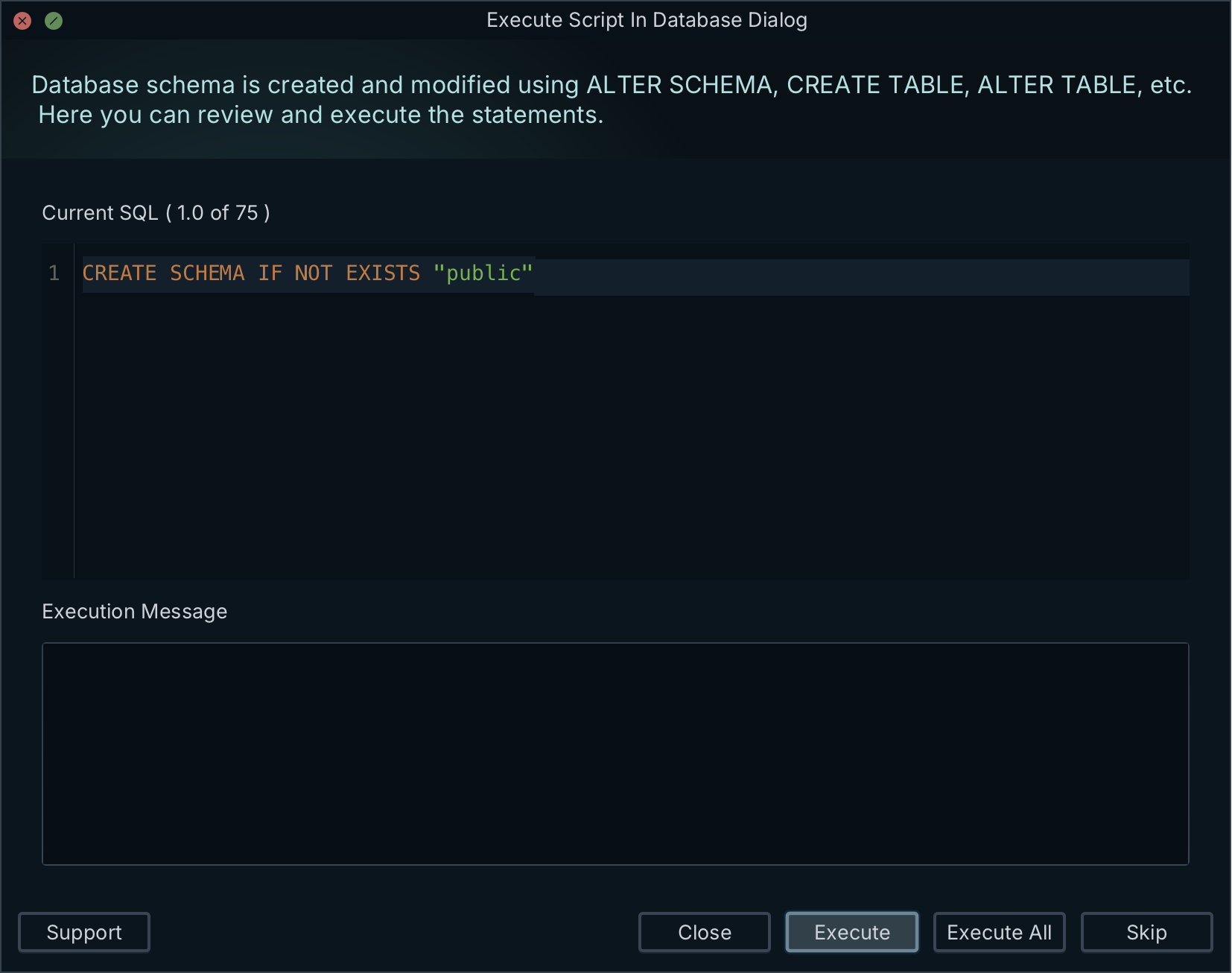
The comparison is object by object. DbSchema lists the tables, columns, indexes and foreign keys that differ, and for each one you choose to update the model file, push the change to the database, or skip it. Everything you do on the diagram writes to the model file; the database changes only when you click Execute in Schema → Synchronize Model with Database. Schema synchronization and saving the model to a file are Pro features.
What is the alternative to Lucidchart?
Lucidchart and dbdiagram.io reach the same diagram by different routes, and neither route reads the catalog for you. Lucidchart's ERD import hands you a query, you run it against your database, and you paste the results back or upload a .CSV, .TSV or .TXT file; its "Export to SQL" dialog then returns the page "with the exception of connections between tables"[1]. dbdiagram.io asks for DBML instead of shapes. Either way the diagram is as current as the last time somebody refreshed it by hand.
DbSchema introspects the catalog directly over a JDBC driver, reading system tables for the columns, primary keys, foreign keys and indexes, and draws the diagram from them with no shape placement and no DBML to type. Connecting, reverse-engineering, interactive diagrams and the SQL editor are in the free Community Edition.
| Workflow | Lucidchart | dbdiagram.io | DbSchema |
|---|---|---|---|
| Schema input | Query results pasted in | DBML code | JDBC catalog introspection |
| Keeping it current | Re-import by hand | Re-import SQL by hand | Refresh and diff |
| Foreign keys on export | Omitted | In generated DDL | In generated DDL |
The shortlist and why each is on it
Architects hire an ERD tool for a handful of separate jobs: drafting a schema, reading a live one, generating the migration script, exporting documentation the rest of the team can open, and browsing data across relations. dbdiagram.io covers the first. The three tools below cover the ones that need a connection, and they split them differently.
DbSchema is a desktop application for SQL and NoSQL engines. It reverse-engineers the catalog, keeps the design in a versionable local XML model file, links tables the database never constrained through virtual foreign keys you drag from one column onto another, browses data across several tables at once in the Relational Data Editor, and exports interactive HTML5 documentation with the diagram as a vector image and column descriptions as mouse-over tooltips. Relational data browse and the documentation export are Pro features.
ChartDB runs in the browser. You run one read-only query against your server, paste the JSON result into ChartDB, and it renders the ER diagram; its paid plans add a DBML editor, database design, schema export and, on the Teams plan, database sync and migration[2]. SqlDBM is a hosted enterprise modeling platform covering conceptual, logical and physical modeling with reverse and forward engineering, alter scripts, version control, lineage and dbt, Confluence, Git and Jira integrations[3].
Where each tool keeps the model, and who that suits
Reading a live database and keeping a design beside it are two different capabilities, and the three tools carry them in different places.
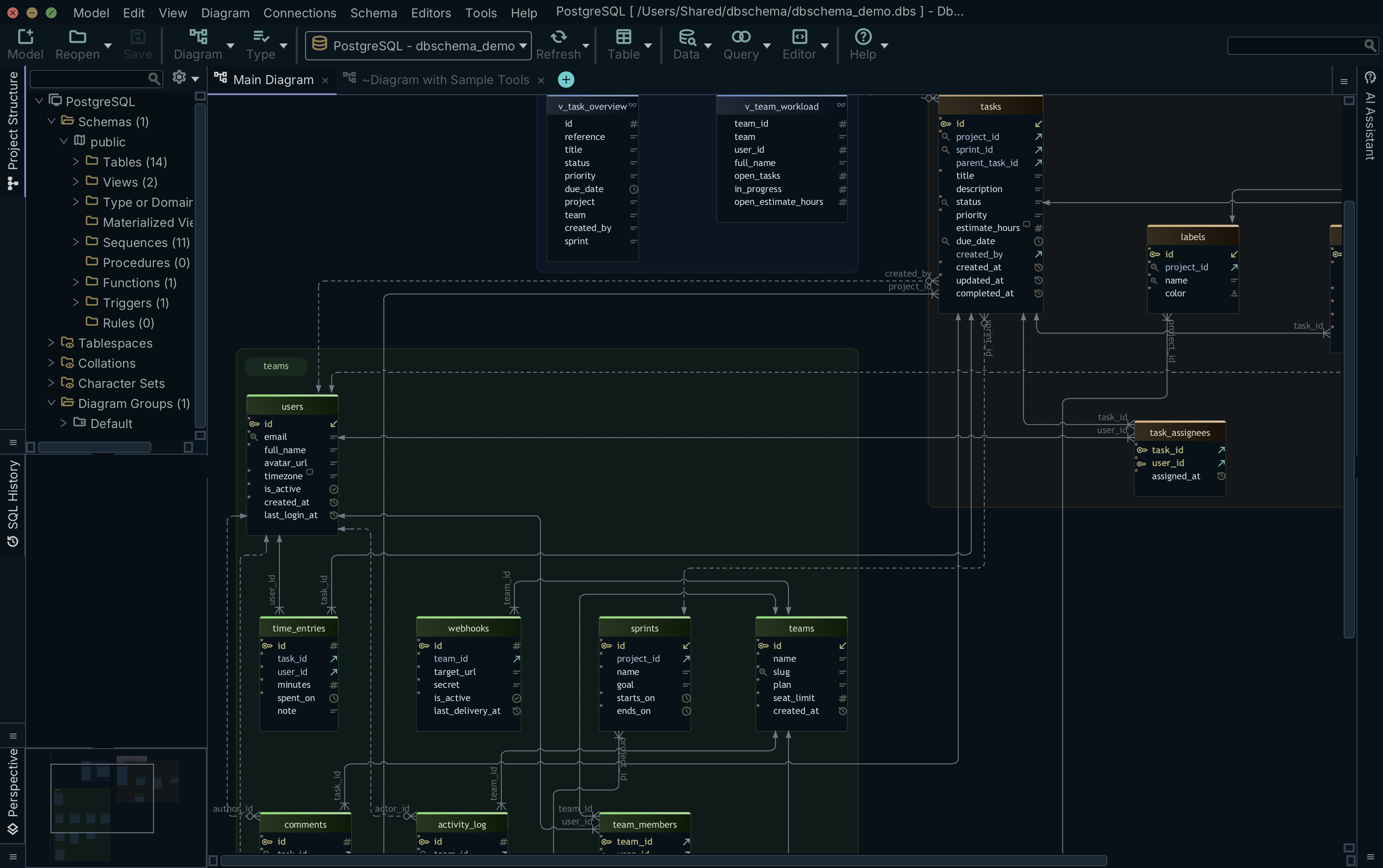
DbSchema keeps both on your machine. The JDBC connection supplies the catalog, and the .dbs XML file holds the layout, the diagrams, the column descriptions and the virtual foreign keys, so the design survives a disconnection and goes into the repository with the application code. ChartDB keeps the diagram in its cloud or in browser storage, and SqlDBM keeps the model in its hosted repository, where the version control and the Git integration run.
| Capability | DbSchema | ChartDB | SqlDBM |
|---|---|---|---|
| Model storage | Local XML file | Cloud or browser | Cloud repository |
| Virtual foreign keys | Yes | Not listed | Not listed |
| Documentation output | Interactive HTML5 | Shared web link | HTML reports |
That difference decides who each one suits. DbSchema fits the architect working across mixed SQL and NoSQL stacks, on a network where a design tool is not allowed to phone home. The model file opens with no connection and diffs like a source file, so the schema review travels through Git with the application code. The same file produces the documentation the team reads and the migration script for the release. SqlDBM fits a data team modeling a cloud warehouse, with project types for Snowflake, Databricks, BigQuery, Amazon Redshift, Azure Synapse and Microsoft Fabric alongside PostgreSQL, SQL Server, Oracle, AlloyDB and MySQL[3]. ChartDB fits a developer who wants a diagram in a browser tab from one query, with no install[2].
Pricing and licensing of each
DbSchema Pro Edition is 294.00 USD one time plus taxes per developer, with the first year of maintenance and upgrades included and an optional renewal at 75.00 USD a year; a monthly subscription is 29.40 USD a month, and the Community Edition is free forever[4]. Every DbSchema figure in this section, here and in the table below, is a Business tab price in US dollars. The pricing page shows the same amount in your own currency, and it carries separate Personal and Universities & Students tabs that price the same editions differently.
dbdiagram.io's free plan covers up to 10 diagrams and doc projects for a single user. Personal Pro is $14 a month, or $8 a month billed annually, and Team is $100 a month, or $75 a month billed annually, with 3 users included and extra users at $5 a month[5]. ChartDB Pro is US$39 a month, or US$25 a month billed yearly, for one user and one database; ChartDB Teams is US$99 a month, or US$59 a month billed yearly, for up to 3 users and 5 databases; the free tier is one user, 2 diagrams and 10 tables per diagram[2]. SqlDBM publishes no list price at all: both its Data Modeling and Context Layer platforms are quoted[3].
| Product | Free tier | Paid entry tier |
|---|---|---|
| DbSchema | Community Edition, free forever | 294.00 USD one time, or 29.40 USD monthly |
| dbdiagram.io | 10 diagrams, single user | $14 per month, or $8 billed annually |
| ChartDB | 2 diagrams, 10 tables per diagram | US$39 per month, or US$25 billed yearly |
| SqlDBM | None published | Quoted |
The difference the table does not show is what the money buys: a DbSchema perpetual licence is bought once and keeps working at the version you own, while the three subscriptions end when the billing does.
Next steps for database architects
Connecting the diagram to the database changes what it is for. Instead of a picture that has to be redrawn after every release, you get a model you can compare against the catalog before the release, and a script that comes out of that comparison.
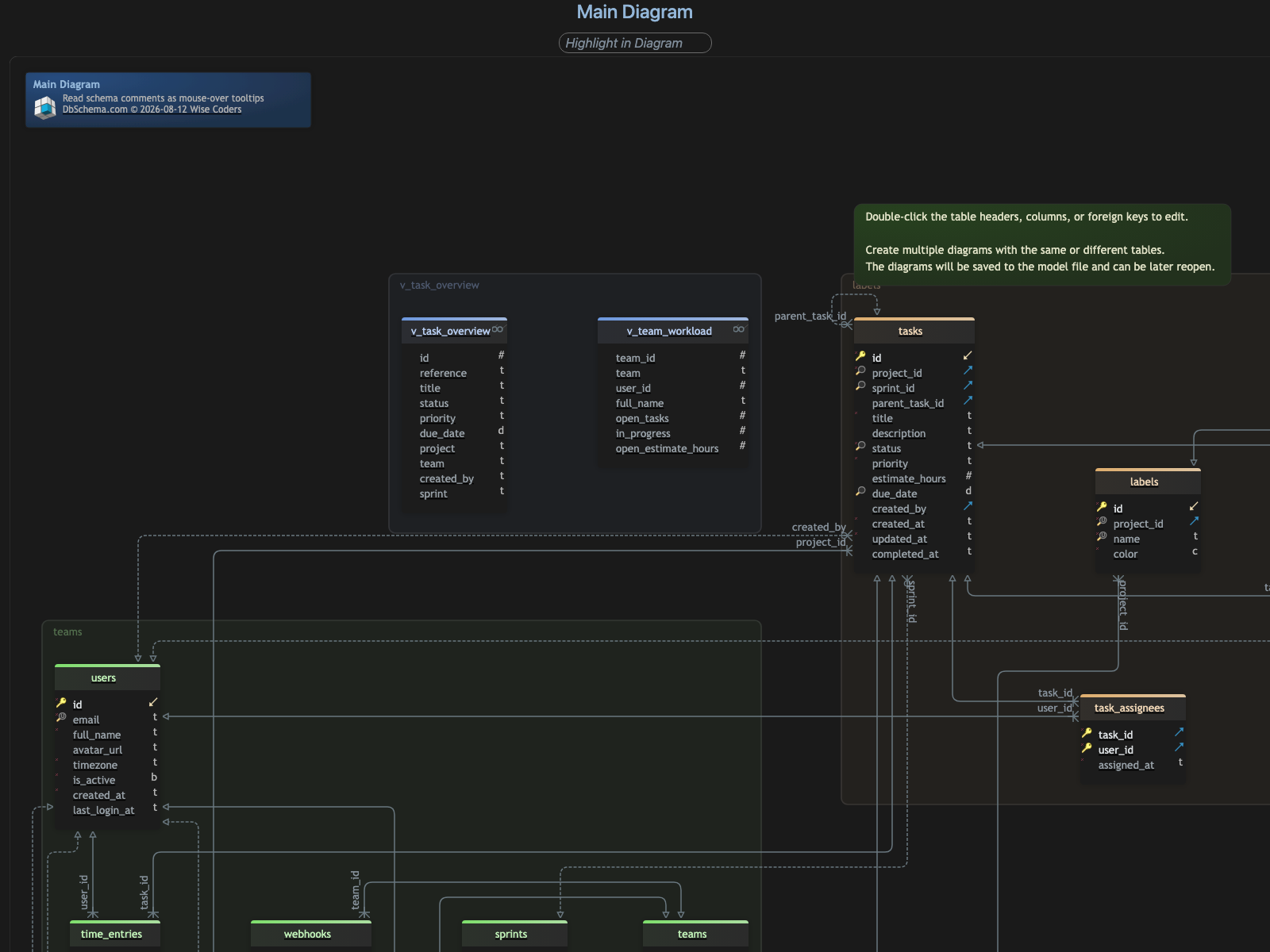
Download DbSchema at https://dbschema.com/download.html and point it at your staging database. Reverse-engineer the tables, views and relationships into a diagram, save the model file into the repository next to the application code, then run Schema → Compare Model with Database before your next release and read the SQL it generates. Connecting, reverse-engineering, the diagrams and the SQL editor are in the free Community Edition; saving the model to a file, the HTML5 documentation and schema synchronization are Pro.
FAQ
Can dbdiagram.io connect to a real database?
dbdiagram.io builds the diagram from DBML or from a SQL file you import, so it reads no live catalog. DbSchema pulls the current state with Schema → Refresh Schema from Database, which prompts you to choose an action when the database has moved since your last sync, for instance because a colleague deployed a migration. That same comparison runs headless from DbSchemaCLI or a Groovy automation script, so a pipeline can report the drift on every build.
How does DbSchema compare to ChartDB for schema synchronization?
ChartDB puts database sync and migration on its paid Teams plan, while DbSchema synchronizes in both directions from the .dbs file. A database that does not carry the schema yet takes Schema → Create or Upgrade Schema in Database, which generates the DDL for the whole model and executes it once you have read the statements.
Can DbSchema visualize a MongoDB database?
DbSchema introspects a configurable sample of documents per collection and infers field names, BSON types, nested objects and arrays, so the diagram is an approximation of what the documents hold rather than a structure MongoDB enforces. Where a collection carries a validation rule, DbSchema reverse-engineers that rule as the authoritative structure instead.
Why should database architects monitor schema drift?
A difference between the design and the catalog surfaces as a failed deployment rather than as a review comment. Running Schema → Compare Model with Database shows the dropped columns, changed data types and missing indexes as a list of objects before the migration runs.
Sources
Diagram a database you are actually connected to
DbSchema reverse-engineers a live SQL or NoSQL database into an interactive ER diagram, keeps the model in a local file you can commit to Git, and generates the migration script for your next release. Community Edition is free.









