Fix 'Public Key Retrieval is not allowed' in MySQL JDBC
Fix MySQL JDBC 'Public Key Retrieval is not allowed': why caching_sha2_password causes it and when to use TLS, a pinned key or allowPublicKeyRetrieval.
On this page
For developers and integration engineers who connect a tool or application to MySQL 8 through JDBC. "Public Key Retrieval is not allowed" means MySQL Connector/J refused to ask the server for its RSA public key: the account authenticates with caching_sha2_password, the MySQL 8 default, over an unencrypted connection. Fix it, safest first, with TLS (sslMode=REQUIRED), a pinned key file (serverRSAPublicKeyFile), or allowPublicKeyRetrieval=true on localhost or a trusted network only. This guide explains why MySQL 8 throws this error, which fix is safe where, and how to apply it in the free DbSchema Community Edition.
Why MySQL 8 refuses to send the RSA public key
MySQL Connector/J throws java.sql.SQLNonTransientConnectionException with this message when three things meet. The account signs in with caching_sha2_password, the connection is unencrypted, and the driver may not ask the server for its RSA public key. According to the MySQL 8.4 manual[1], such an account must use either a secure connection or an unencrypted connection that supports password exchange with an RSA key pair. Connector/J refuses to fetch that key over the wire by default, because an attacker between client and server could intercept the request and supply a forged public key.
In MySQL 8, caching_sha2_password replaced mysql_native_password as the default authentication plugin. The plugin hashes passwords with SHA-256 and keeps an in-memory cache on the server. When a client connects over TLS, the password travels inside the encrypted session, so no separate RSA key exchange occurs. When TLS is disabled or unavailable, Connector/J must encrypt the password with the server's RSA public key before it sends it.
The Connector/J configuration properties[2] reference lists allowPublicKeyRetrieval with a default of false. When Connector/J holds no local copy of the server's RSA public key, it would have to request the key during the authentication handshake. Because allowPublicKeyRetrieval defaults to false, the driver stops the handshake instead of requesting the key over an unencrypted channel. That stop is the MySQL 8 JDBC authentication error this guide fixes.
| Connection state | Connector/J action | Handshake result |
|---|---|---|
| TLS active (sslMode=REQUIRED, or PREFERRED when the server offers TLS) | Sends the password inside the TLS session | Connection succeeds |
| Unencrypted, allowPublicKeyRetrieval=false | Refuses to request the server's RSA public key | Fails with the key retrieval error |
| Unencrypted, allowPublicKeyRetrieval=true | Requests the RSA public key over the unencrypted connection | Connection succeeds, but open to a man-in-the-middle |
| Unencrypted, serverRSAPublicKeyFile set | Encrypts the password with the local key file | Connection succeeds without asking the server for the key |
We reproduced the error on 10 October 2026 against MySQL 8.4.11 in Docker with Connector/J 26.7.0 on Java 25, using a throwaway account created with caching_sha2_password and running FLUSH PRIVILEGES before each attempt to empty the server cache. A small Java program connected with each URL and then ran SHOW SESSION STATUS LIKE 'Ssl_cipher'. The failing attempts printed this:
# MySQL 8.4.11 (Docker), Connector/J 26.7.0, Java 25, 10 October 2026
# account created with caching_sha2_password, FLUSH PRIVILEGES before each run
FAIL sslMode=DISABLED   SQLState=08001 code=0 java.sql.SQLNonTransientConnectionException: Public Key Retrieval is not allowed
FAIL useSSL=false       SQLState=08001 code=0 java.sql.SQLNonTransientConnectionException: Public Key Retrieval is not allowed
| URL parameters (after FLUSH PRIVILEGES) | Result | Ssl_cipher |
|---|---|---|
| sslMode=DISABLED | Fails with the exception shown above, SQLState 08001 | no session |
| useSSL=false | Same error as sslMode=DISABLED | no session |
| none (driver defaults) | Connects | TLS_AES_256_GCM_SHA384 |
| sslMode=REQUIRED | Connects | TLS_AES_256_GCM_SHA384 |
| sslMode=DISABLED&serverRSAPublicKeyFile= | Connects | empty |
| sslMode=DISABLED&allowPublicKeyRetrieval=true | Connects | empty |
How to check the account plugin and session encryption
The account plugin and the encryption state of the session decide whether the error can occur at all, so check both before changing connection strings. Run this query against the mysql.user system table from an existing administrative session:
SELECT user, host, plugin FROM mysql.user WHERE user = 'integration_user';
If the plugin column displays caching_sha2_password, the account needs either an encrypted connection or RSA password encryption. Older accounts migrated from MySQL 5.7 may still use legacy authentication plugins. When provisioning new integration accounts, use CREATE USER followed by GRANT, as described in our guide on MySQL CREATE USER and GRANT, and avoid GRANT ... IDENTIFIED BY, which MySQL 8 removed.
Next, check whether the session you are connected with is encrypted by reading the Ssl_cipher status variable. SHOW STATUS reports session values by default, so the result describes your current connection, not the server as a whole. If the value is empty while you expected TLS, you are in the case this error needs.
SHOW STATUS LIKE 'Ssl_cipher';
| Ssl_cipher value | What it means | Next action |
|---|---|---|
| Empty string | This session is not encrypted: the client switched TLS off, or the server offered no TLS | Look for sslMode=DISABLED or useSSL=false in the URL; without server certificates, pin the server key |
| A cipher name, e.g. TLS_AES_256_GCM_SHA384 | This session runs over TLS | Set sslMode=REQUIRED in the JDBC URL so the connection never falls back to plain text |
How to fix it with TLS (sslMode=REQUIRED)
Connecting over TLS is the safest fix for the key retrieval error. When TLS protects the connection, Connector/J needs no RSA key exchange, because the password travels inside the encrypted session.
Connector/J controls TLS through the sslMode property, which defaults to PREFERRED in the Connector/J reference[2]: the driver encrypts whenever the server offers TLS. If a JDBC URL explicitly sets sslMode=DISABLED or useSSL=false, Connector/J opens an unencrypted connection. The key retrieval error then appears whenever the server has no cached password entry for the account, a cache explained in the restart section below. In our reproduction, a URL with no SSL parameter at all connected over TLS against the stock MySQL 8.4.11 container, while useSSL=false failed with the same error as sslMode=DISABLED. In many copied URLs, the fix is to delete useSSL=false rather than to add allowPublicKeyRetrieval=true. Setting sslMode=REQUIRED makes the driver demand an encrypted connection. The same key=value pairs work in any JDBC URL or connection pool configuration, not only in a GUI client:
jdbc:mysql://dbhost.internal:3306/production?sslMode=REQUIRED
Security settings reach the MySQL JDBC driver as connection parameters. In DbSchema, open the connection dialog, select the Advanced tab and click the pencil next to SSL & Parameters. In the SSL / TLS group, set SSL Mode to Required, and the parameter is appended to the generated JDBC URL. The driver, not the client on top of it, decides which security and sign-in parameters exist, the same pattern the guide to Kerberos authentication describes for ticket-based sign-in on other engines. In the SSL Mode list, Required encrypts without checking the server certificate, while Verify CA and Verify Identity also check it; certificate and truststore setup is a topic of its own.
How to set allowPublicKeyRetrieval=true or a pinned RSA key
allowPublicKeyRetrieval=true on localhost or a trusted network
allowPublicKeyRetrieval=true lets Connector/J request the RSA key from the server, which is acceptable on a trusted network: one where only machines you control can see the traffic, such as a local development instance, a MySQL Docker container on your own machine, or an isolated test database where no TLS certificates are provisioned.
The parameter tells Connector/J to send a handshake packet that requests the server's public key over the unencrypted network. Because that request is exposed to the interception risk described above, reserve allowPublicKeyRetrieval=true for localhost or private container networks where nobody can intercept traffic. In our test the login then worked, but Ssl_cipher stayed empty, so the session itself was not encrypted.
jdbc:mysql://127.0.0.1:3306/devdb?sslMode=DISABLED&allowPublicKeyRetrieval=true
In the connection dialog this parameter sits in the Authentication group of SSL & Parameters on the Advanced tab, not in the SSL / TLS group, because the driver reads it only while the connection is unencrypted. Tick Allow Public Key Retrieval and click the eye button to check that allowPublicKeyRetrieval=true appears in the JDBC URL.
serverRSAPublicKeyFile: a pinned server RSA key
serverRSAPublicKeyFile points Connector/J at a local copy of the server's public key, a pinned key that the driver trusts instead of asking the server, which avoids both the unencrypted key request and the man-in-the-middle risk when the server runs without TLS but traffic crosses a shared network. You set it from the same Authentication group of SSL & Parameters, labelled Server Public Key File.
By default the MySQL server keeps the key as public_key.pem in its data directory. You can also display the key from an active administrative session:
SHOW STATUS LIKE 'Caching_sha2_password_rsa_public_key';
This route needs no shell access to the server. Copy the PEM text, from -----BEGIN PUBLIC KEY----- to -----END PUBLIC KEY-----, and save it to a file on the client system. We tested exactly this route: with the key copied from SHOW STATUS into a local file, a sslMode=DISABLED URL with serverRSAPublicKeyFile connected right after FLUSH PRIVILEGES without asking the server for its key. Then reference the path in your connection URL:
jdbc:mysql://dbhost.internal:3306/appdb?sslMode=DISABLED&serverRSAPublicKeyFile=/etc/mysql/keys/server_public_key.pem
- Retrieve the server RSA public key from the database data directory or through SHOW STATUS LIKE 'Caching_sha2_password_rsa_public_key'.
- Save the key as a PEM file on the client filesystem with restricted read permissions.
- Add serverRSAPublicKeyFile=/path/to/key.pem to the JDBC connection string or client configuration.
- Test the connection to confirm that Connector/J encrypts the password with the pinned file without requesting the key from the network.
Why the error returns after a MySQL server restart
The error comes and goes because caching_sha2_password keeps an in-memory cache of password hashes on the server. A connection fails with the public key retrieval error, works after someone logs in successfully, and breaks again after a maintenance window: that sequence is the cache filling and emptying.
When an account authenticates for the first time, or after the cache has been emptied, the server needs the full authentication exchange, which over an unencrypted connection includes the RSA key. Once the account has authenticated, the server stores a hash of the password in its cache, and later connections by that account are checked against the cache without any RSA key exchange. Our reproduction showed the sequence: after FLUSH PRIVILEGES, a URL with sslMode=DISABLED failed; one login with allowPublicKeyRetrieval=true filled the cache, and the same sslMode=DISABLED URL then connected without any key setting.
The caching_sha2_password documentation[1] states that the server empties this cache at shutdown and on FLUSH PRIVILEGES, so restarting mysqld or its container forces the next unencrypted login through the full exchange again. The table below shows what happens in each cache state.
| Server cache state | Client connection attempt | Outcome without TLS or allowPublicKeyRetrieval |
|---|---|---|
| Cold cache (after server restart) | First authentication attempt | Handshake fails with the key retrieval error |
| Warm cache (after successful login) | Subsequent connection attempt | Handshake succeeds via the in-memory hash cache |
| Flushed cache (FLUSH PRIVILEGES) | Subsequent connection attempt | Handshake fails: requires the full RSA exchange |
Switching to mysql_native_password: a legacy fallback
Switching the account to mysql_native_password is a legacy workaround that no longer works on current MySQL releases without a server change. Older troubleshooting guides recommend it, but that advice causes compatibility problems in modern deployments.
The MySQL 8.4 manual[3] says the mysql_native_password plugin was deprecated in MySQL 8.0.34, is disabled by default in MySQL 8.4, and is removed as of MySQL 9.0.0. In MySQL 8.4, an account configured with mysql_native_password cannot sign in unless the server starts with --mysql-native-password=ON; the login is rejected with ERROR 1045. Check your server version before you consider this route. On the stock MySQL 8.4.11 container we tested, information_schema.plugins lists mysql_native_password with the status DISABLED.
Instead of reverting to the legacy plugin, encrypt the connection with TLS or set the matching JDBC properties in your client. Moving production accounts to a removed plugin creates technical debt that breaks on the next upgrade.
How to confirm the fix with a test connection
A successful test connection confirms the fix: Connector/J completed the authentication handshake with the settings you applied, whether TLS, a pinned key file or allowPublicKeyRetrieval. Run it before reverse-engineering a MySQL database or starting a data pipeline.
Open the MySQL connection dialog and enter the host, port, database user and password. On the Advanced tab, check your parameters under SSL & Parameters and click the eye button to review the assembled JDBC URL. Then click Test Connection; when the parameters are valid, the dialog reports "The connection test succeeded." The same dialog and the same checks apply to every engine across a mixed database estate.
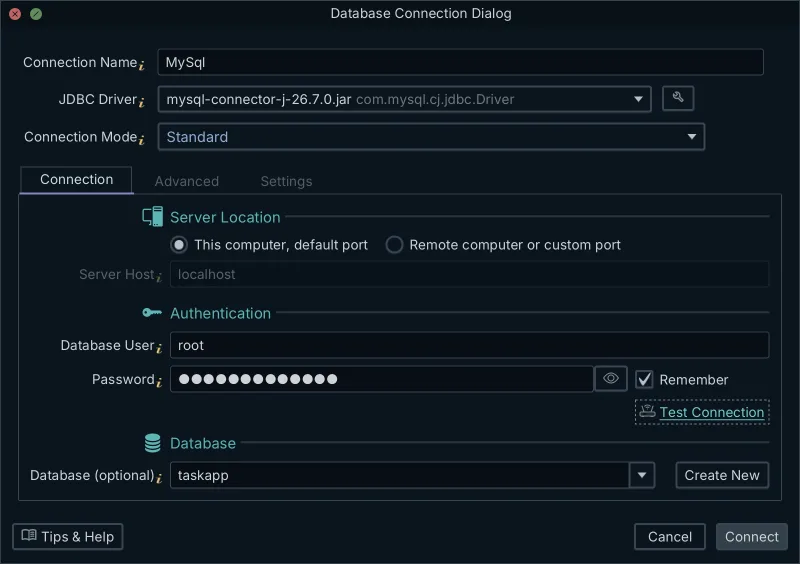
Once you know which fix fits your environment, apply it with the steps above and confirm the handshake with a test connection. Download the free DbSchema Community Edition and connect to your MySQL 8 server with the fix applied.
Frequently asked questions
What does the Public Key Retrieval error mean in MySQL JDBC?
It means MySQL Connector/J refused to request the server's RSA public key over an unencrypted connection. MySQL 8 accounts use caching_sha2_password by default, which needs either TLS or an RSA-encrypted password, and allowPublicKeyRetrieval is false by default, so the driver aborts the login.
Is allowPublicKeyRetrieval=true safe?
Only on localhost or a trusted internal network. On an untrusted network, an attacker could hand the driver a fake RSA public key and read the password, so use TLS (sslMode=REQUIRED) or a pinned serverRSAPublicKeyFile there.
How do I fix Public Key Retrieval is not allowed in MySQL?
Connect over TLS with sslMode=REQUIRED first. If the server has no TLS, give the driver a local copy of the key with serverRSAPublicKeyFile. Use allowPublicKeyRetrieval=true only as a last resort on a trusted network.
Sources
Connect to MySQL 8 with the fix applied
DbSchema connects to MySQL through the Connector/J JDBC driver. SSL & Parameters on the Advanced tab sets sslMode, allowPublicKeyRetrieval or serverRSAPublicKeyFile, and the eye button shows the JDBC URL it will use. Connecting, reverse-engineering and diagrams are in the free Community Edition.









