Kerberos Authentication for Database Connections
Learn how to configure Kerberos authentication for database connections, secure your JDBC URL, and troubleshoot common GSSException failures.
On this page
The situation this solves
For database administrators managing centralized authentication over JDBC; ticket caches, SPNs, and connection properties are explained where they appear.
Database connections in enterprise environments frequently embed cleartext credentials in local configuration files or connection strings. When credentials rotate, administrators update dozens of distributed connection profiles manually, exposing databases to credential leaks and invalid login lockouts. Kerberos version 5 takes a different route: the client obtains renewable tickets from a trusted third party once, then reuses them for every service it touches during the session, so the database never handles a user password[1].
Authentication through Kerberos relies on a three-way exchange between the client, the Key Distribution Center, and the database server:
- The client requests a Ticket Granting Ticket (TGT) from the Authentication Server (AS) within the KDC using the kinit command or operating system domain login.
- The Authentication Server validates user credentials and returns an encrypted Ticket Granting Ticket to the client credential cache.
- The client presents the Ticket Granting Ticket to the Ticket Granting Service (TGS) to request a Service Ticket for the target database Service Principal Name (SPN).
- The Ticket Granting Service issues a Service Ticket encrypted with the database service account secret.
- The client presents the Service Ticket to the database server during the JDBC connection handshake to establish the authenticated session.
Centralizing credential validation on the Key Distribution Center removes database-specific passwords from user machines and enforces corporate password expiration, account revocation, and audit logging in one place.
Which authentication mechanisms are supported
Which mechanisms are available to you is decided by the JDBC driver for your engine, not by DbSchema or any other application sitting on top of it. Kerberos single sign-on, Microsoft Entra ID and Active Directory authentication, certificate and key-pair authentication and plain database credentials are all driver-level features, reached by setting connection properties.
In DbSchema that lands in one of two places. Where an engine's Method list already carries the mechanism (MongoDB's list runs from password and SCRAM through X.509, AWS IAM and Kerberos), you pick it from the dropdown and the dialog builds the URI from the template underneath it. For everything else, including Kerberos on the relational engines, you type the driver's own properties into the free-form Properties field on the connection dialog's Advanced tab. What DbSchema does not have anywhere is a Kerberos configuration screen of its own. It either builds the URI from the Method you picked or passes through the properties you typed; the Kerberos work itself is done by the driver and by the ticket cache on your machine.
All DbSchema licenses include native support for all database engines, so you do not need add-on modules to connect to Oracle, Microsoft SQL Server, PostgreSQL, MySQL, or distributed big data engines like Apache Hive and Databricks. Driver configuration is handled through preconfigured templates for JDBC drivers.
| Authentication Mechanism | Credential Store | Driver Connection Property | Engine |
|---|---|---|---|
| Kerberos V5 (GSSAPI) | OS ticket cache or keytab | integratedSecurity=true;authenticationScheme=JavaKerberos | Microsoft SQL Server |
| Kerberos V5 (GSSAPI) | OS ticket cache or keytab | jaasLogin=true&kerberosServerName=postgres | PostgreSQL |
| Kerberos V5 (GSSAPI) | OS ticket cache or keytab | oracle.net.authentication_services=(KERBEROS5) | Oracle |
| Microsoft Entra ID / Active Directory | Token or integrated Windows login | authentication=ActiveDirectoryIntegrated | Microsoft SQL Server, Azure SQL |
| Standard Database Authentication | Database catalog | user and password connection properties | All supported SQL and NoSQL engines |
There is no single Kerberos property that works everywhere: the mechanism you select determines how the underlying JDBC driver acquires credentials and presents them to the database listener, and each driver spells that out differently. A DbSchema SSH tunnel is a separate concern -- it moves the connection, it does not authenticate you to the database.
Drivers download automatically
Modern JDBC drivers handle the Kerberos handshake directly inside the Java Virtual Machine. Beginning with Microsoft JDBC Driver 4.0 for SQL Server, an application can set the authenticationScheme connection property to connect using Kerberos integrated authentication through the pure Java Kerberos implementation, rather than a native platform library[2].
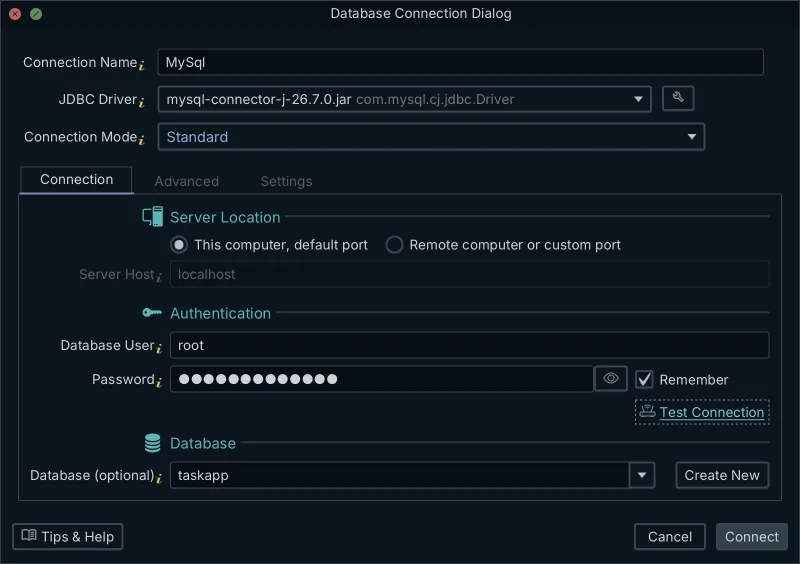
DbSchema downloads the JDBC driver for you, so for the common engines you do not need to fetch standalone JAR archives or copy dynamic link libraries into system directories yourself. Picking the engine is what resolves it: the connection dialog fills in the driver jar and the driver class for that engine and loads its JDBC URL template. The per-engine reference pages, such as the one for the SQL Server JDBC driver, document that URL syntax and the driver files behind it, and DbSchema's JDBC Drivers Manager lets you swap in a jar of your own when you need a specific version.
When you supply no login-module configuration file, the driver picks the defaults itself, and which ones depends on the Java vendor[2]:
- On Sun, Oracle and OpenJDK runtimes the Microsoft JDBC driver sets com.sun.security.auth.module.Krb5LoginModule with useTicketCache=true and doNotPrompt=true.
- On IBM Java runtimes it sets com.ibm.security.auth.module.Krb5LoginModule with useDefaultCcache=true and moduleBanner=false.
Automatic driver resolution puts the right driver classes on the classpath without manual CLASSPATH edits. The GSSAPI and Krb5 login modules are not part of that download: they ship inside the Java runtime DbSchema is already running on.
Is the JDBC connection encrypted?
Kerberos authentication verifies user identity and protects ticket exchange integrity, but it does not automatically encrypt database query and result traffic across the network. The PostgreSQL documentation is explicit about the split: the authentication itself is secure, and if GSSAPI encryption or SSL encryption is used, the data sent along the database connection will be encrypted; otherwise, it will not[3].
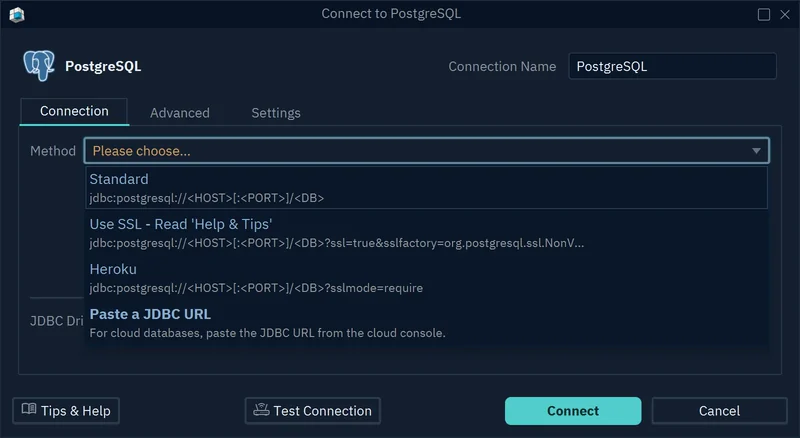
Transport layer encryption requires explicit JDBC parameters. In DbSchema those come from the Method list, whose entries each preview the JDBC URL they build -- the Use SSL mode already carries the SSL parameters -- while Paste a JDBC URL lets you write in any others you need alongside the Kerberos properties.
| Security Layer | Mechanism | JDBC Parameter Example | Protection Scope |
|---|---|---|---|
| Authentication | Kerberos V5 (GSSAPI) | authenticationScheme=JavaKerberos | Identity validation and mutual authentication |
| Wire Encryption (SQL Server) | TLS / SSL | encrypt=true;trustServerCertificate=false | Payload encryption for query and result data |
| Wire Encryption (PostgreSQL) | TLS / SSL | sslmode=require | Transport-level encryption for all traffic |
| GSS Wire Encryption (PostgreSQL) | GSSAPI Native Encryption | gssEncMode=require | Encrypted data streams via Kerberos session key |
Enabling both authenticationScheme and encrypt properties in the connection string guarantees that identity verification and data transmission remain protected.
Configuring the Kerberos JDBC URL
Connecting through Kerberos requires specific URL properties that instruct the JDBC driver to use integrated authentication instead of a user name and password. Microsoft is explicit that if you specify authenticationScheme=JavaKerberos but do not also specify integratedSecurity=true, the driver will ignore the authenticationScheme connection property and will expect to find user name and password credentials in the connection string[2].
For Microsoft SQL Server, set integratedSecurity to true and authenticationScheme to JavaKerberos. If connecting across Kerberos realms, supply the Service Principal Name explicitly using the serverSpn parameter:
jdbc:sqlserver://db-prod.corp.example.com:1433;databaseName=sales;integratedSecurity=true;authenticationScheme=JavaKerberos;serverSpn=MSSQLSvc/db-prod.corp.example.com:[email protected];encrypt=true;trustServerCertificate=false;
For PostgreSQL, the driver exposes the Kerberos service name and JAAS login configuration as connection parameters. The pgJDBC connection parameter reference lists jaasLogin, jaasApplicationName and kerberosServerName among the properties that can be set directly in the JDBC URL[4]:
jdbc:postgresql://pg-prod.corp.example.com:5432/analytics?jaasLogin=true&jaasApplicationName=pgjdbc&kerberosServerName=postgres&sslmode=require
When the driver requires an external JAAS configuration file, create a configuration file named SQLJDBCDriver.conf with these contents:
SQLJDBCDriver {
 com.sun.security.auth.module.Krb5LoginModule required
 useTicketCache=true
 doNotPrompt=true;
};
Pass the configuration paths to the Java process via environment variables or JVM flags -Djava.security.auth.login.config=SQLJDBCDriver.conf and -Djava.security.krb5.conf=/etc/krb5.conf.
The common failure and its fix
Kerberos connection attempts commonly fail when the JVM cannot find a valid Ticket Granting Ticket in the system cache or when domain time synchronization drifts. Microsoft's guidelines for configuring Kerberos with the JDBC driver start from those prerequisites: set AllowTgtSessionKey to 1 in the registry on Windows, make sure the Kerberos configuration (krb5.conf in UNIX environments) points to the correct realm and KDC for your environment, and initialize the TGT cache by using kinit or logging into the domain[2].
A typical driver error appears in the connection log as:
javax.security.auth.login.LoginException: Unable to obtain Principal Name for authentication
Caused by: GSSException: No valid credentials provided (Mechanism level: Failed to find any Kerberos tgt)
Another frequent error indicates clock skew: GSSException: Clock skew too great (37). Kerberos V5 rejects authentication requests if the client clock differs from the Key Distribution Center clock by more than the default tolerance limit of 300 seconds (5 minutes)[5].
Resolve credential and clock synchronization errors in order:
- Run the kinit command in your terminal to initialize a fresh Ticket Granting Ticket for your user principal: kinit [email protected].
- Execute klist to confirm the Ticket Granting Ticket is present in the default cache location and verify the expiration timestamp.
- Verify the client system clock against your domain controller or NTP time source to keep time differences well within 300 seconds.
- Check that the Service Principal Name registered in Active Directory matches the hostname and port configured in your connection string.
- Set the AllowTgtSessionKey registry value to 1 on Windows workstations when accessing ticket session keys from Java.
Running kinit before launching your connection ensures the Java GSSAPI library finds an active ticket in the cache.
What to check afterwards
Before Microsoft JDBC Driver 4.0, integrated authentication used either Kerberos or NTLM depending on what was available, which is why drivers can still land on a fallback protocol when an SPN is unregistered or a realm is misconfigured[2]. Verifying the active session authentication scheme is the only reliable way to confirm the database accepted Kerberos tickets.
In Microsoft SQL Server, execute this query against sys.dm_exec_connections for your current session ID:
SELECT session\_id, auth\_scheme, net\_transport, client\_net\_address
FROM sys.dm\_exec\_connections
WHERE session\_id = @@SPID;
| session_id | auth_scheme | net_transport | client_net_address |
|---|---|---|---|
| 58 | KERBEROS | TCP | 192.168.10.45 |
If the auth_scheme column returns NTLM or SQL, the connection bypassed Kerberos. An NTLM result indicates that the client fell back to legacy Windows authentication because the Service Principal Name was missing or duplicate in Active Directory.
Connecting your database in DbSchema
To establish the connection in DbSchema, pick your target engine in the engine picker; the connection dialog opens with that engine's driver and JDBC URL template already loaded. Standard mode asks for the connection coordinates -- host, port, database, user -- and nothing else.
The Kerberos properties do not belong on that form. Open the connection dialog's Advanced tab and type them into the free-form Properties field, which hands them to the driver as connection properties: authenticationScheme=JavaKerberos for SQL Server, oracle.net.authentication_services=(KERBEROS5) for Oracle, and so on. If you would rather write the whole URL yourself, switch the Method to Paste a JDBC URL instead. Then press Test Connection to run the handshake.
Download DbSchema and open the model against your own database to reverse-engineer tables, explore relational schemas, and design visual ER diagrams. DbSchema Community Edition includes interactive diagrams and the SQL editor, while DbSchema Pro Edition adds schema synchronization, visual query building, and HTML5, PDF and Markdown documentation.
Frequently asked questions
Is the JDBC connection encrypted when using Kerberos?
Kerberos secures the authentication process by verifying identity through a Key Distribution Center, but it does not automatically encrypt the data stream. If you want wire encryption (SSL/TLS), you have to add the parameters for it to the JDBC URL yourself.
What causes a GSS initiate failed error in JDBC?
A GSSException or 'GSS initiate failed' error usually means the client lacks a valid Ticket Granting Ticket (TGT). You fix it by running kinit on the client machine to request a new ticket from the Key Distribution Center.
Do I need a special driver for Kerberos authentication?
For SQL Server you need a driver that supports the JavaKerberos authentication scheme, which means Microsoft JDBC Driver 4.0 or newer; other engines expose their own Kerberos properties instead. DbSchema downloads the driver for your engine automatically, but the Kerberos properties themselves are still typed by hand into the Properties field on the connection dialog's Advanced tab.
How do I check if my SQL Server connection is actually using Kerberos?
After connecting, you can query the sys.dm_exec_connections view. Running a select for the auth_scheme where the session_id equals @@spid will confirm if the active session relies on Kerberos or if it fell back to another protocol.
What happens if the client and server clocks are out of sync?
Kerberos relies on synchronized time to prevent replay attacks. The default maximum clock skew in Kerberos V5 is 300 seconds, or five minutes; if the difference between the client clock and the KDC exceeds it, the authentication request is rejected.
Sources
Connect over Kerberos and see the schema
DbSchema downloads the JDBC driver for your engine, takes your Kerberos properties on the connection dialog's Advanced tab, and draws the schema as an ER diagram. Every edition covers every supported database engine, and the Community Edition is free.









