MySQL Create User: CREATE USER, GRANT, Roles, and Host Examples
For someone whose application still connects to MySQL as root and who wants an account with only the privileges that application uses.
On this page
Your application still logs in to MySQL as root, and you want it to stop. Two statements replace that login: the first creates an account, the second lets it work on one database and nothing else.
CREATE USER 'app_user'@'localhost' IDENTIFIED BY 'your_password';
GRANT SELECT, INSERT, UPDATE, DELETE ON shopdb.* TO 'app_user'@'localhost';
Run them as root. The account works as soon as the GRANT returns, because account management statements reload the grant tables themselves, so no FLUSH PRIVILEGES is needed. Every statement here ran on MySQL 8.0.29 and 9.1.0; the links go to the 8.4 manual.
MySQL create user syntax by version
The basic statement is the same on every version since 5.7. What changes is around it:
| MySQL 5.7 | MySQL 8.0 | MySQL 8.4 | |
|---|---|---|---|
| Default authentication plugin | mysql_native_password | caching_sha2_password | caching_sha2_password |
IF NOT EXISTS | yes | yes | yes |
IDENTIFIED BY RANDOM PASSWORD | no | from 8.0.18 | yes |
| Roles | no | yes | yes |
The plugin row explains why root connects and a new account sometimes does not: a client library that predates caching_sha2_password cannot log in to accounts that use it. Update the library. MySQL 8.4 keeps mysql_native_password disabled by default, and 9.0 removed it: on 9.1.0, IDENTIFIED WITH mysql_native_password fails with ERROR 1524 (HY000): Plugin 'mysql_native_password' is not loaded.
IF NOT EXISTS lets a setup script run twice. On the second run, MySQL keeps the account and adds note 3163, "Authorization ID 'app_user'@'localhost' already exists", where the plain statement stops with ERROR 1396:
CREATE USER IF NOT EXISTS 'app_user'@'localhost' IDENTIFIED BY 'your_password';
With IDENTIFIED BY RANDOM PASSWORD, MySQL generates the password and returns it once as a result set, so it never sits in a script.
Create a user for localhost
mysql -u root -p
CREATE USER 'app_user'@'localhost' IDENTIFIED BY 'your_password';
The host after the @ is part of the account's name. Add a second account with the same user name:
CREATE USER 'app_user'@'%' IDENTIFIED BY 'other_password';
Now app_user logging in on the server itself is app_user@localhost, as SELECT CURRENT_USER(); shows. From another host, 172.17.0.3 in the run, the same name is app_user@%: a separate account with its own password and none of the shopdb privileges. The localhost password is refused there with ERROR 1045 (28000).
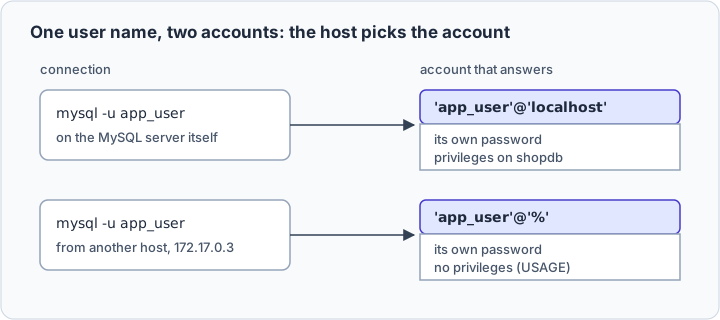
So write the host every time. A name with no host means '%': CREATE USER app_user IDENTIFIED BY 'your_password' opens the account to every host.
Grant database privileges
GRANT names the privileges, what they apply to, and the account. shopdb.* is every table in one database you created; *.* is every table on the server, including the mysql schema that stores the accounts.
Read/write access to one database
GRANT SELECT, INSERT, UPDATE, DELETE
ON shopdb.*
TO 'app_user'@'localhost';
SELECT, INSERT, UPDATE and DELETE cover what an application does with rows. Creating a table is refused:
CREATE TABLE shopdb.audit (id INT);
ERROR 1142 (42000): CREATE command denied to user 'app_user'@'localhost' for table 'audit'
Read-only reporting user
CREATE USER 'report_user'@'localhost' IDENTIFIED BY 'your_password';
GRANT SELECT ON analytics.* TO 'report_user'@'localhost';
Full privileges on a single schema
GRANT ALL PRIVILEGES
ON shopdb.*
TO 'app_user'@'localhost';
ALL PRIVILEGES ON shopdb.* suits an application that runs its own migrations: anything inside shopdb, nothing outside it.
Allow remote access safely
First the server has to listen on the network. If SHOW VARIABLES LIKE 'bind_address' returns 127.0.0.1, it accepts TCP connections from itself only; the default, *, accepts them on every interface.
Then the account's host has to match the remote address. A subnet is often written 'api_user'@'10.0.%', which still works on 9.1.0, but the 8.4 manual marks % and _ in host values as deprecated. CIDR notation needs no wildcard:
CREATE USER 'api_user'@'10.0.0.0/16' IDENTIFIED BY 'your_password';
GRANT SELECT, INSERT, UPDATE, DELETE ON shopdb.* TO 'api_user'@'10.0.0.0/16';
CIDR works for IPv4 only. Where the address is unknown, as with an outside integration, open the host and narrow the privileges:
CREATE USER 'integration_user'@'%' IDENTIFIED BY 'your_password';
GRANT SELECT ON integrationdb.* TO 'integration_user'@'%';
Use roles in MySQL 8.0 and 8.4
A role is a named collection of privileges: grant privileges to it once, then grant it to each account.
CREATE ROLE 'reporting_readonly';
GRANT SELECT ON analytics.* TO 'reporting_readonly';

CREATE USER 'analyst'@'%' IDENTIFIED BY 'your_password';
GRANT 'reporting_readonly' TO 'analyst'@'%';
SET DEFAULT ROLE 'reporting_readonly' TO 'analyst'@'%';
The last line is the one people forget. A granted role is inactive until something activates it. Without SET DEFAULT ROLE, the analyst logs in, SELECT CURRENT_ROLE() returns NONE, and every query on analytics fails with ERROR 1142.
SHOW GRANTS lists the role, not its privileges, unless you name it in USING:
SHOW GRANTS FOR 'analyst'@'%' USING 'reporting_readonly';
GRANT USAGE ON *.* TO `analyst`@`%`
GRANT SELECT ON `analytics`.* TO `analyst`@`%`
GRANT `reporting_readonly`@`%` TO `analyst`@`%`
Show grants, revoke access, and drop a user
Right after the read/write grant, SHOW GRANTS prints:
SHOW GRANTS FOR 'app_user'@'localhost';
GRANT USAGE ON *.* TO `app_user`@`localhost`
GRANT SELECT, INSERT, UPDATE, DELETE ON `shopdb`.* TO `app_user`@`localhost`
USAGE means "no privileges", and every account has that line. The second line is the earlier grant, so the account holds nothing else. REVOKE takes privileges back, leaving SELECT here:
REVOKE INSERT, UPDATE, DELETE ON shopdb.* FROM 'app_user'@'localhost';
DROP USER 'app_user'@'localhost';
DROP USER removes the account with its privileges. It gives no warning when the account is connected and leaves open sessions open; the next login fails with ERROR 1045. Revoke first, watch what breaks, then drop.
Use the account in DbSchema



Give DbSchema the report_user account. In DbSchema, choose File → New Model, keep Connect to Database selected, click MySQL and press Connect. Type the Server Host, the Port, and report_user as Database User with its Password, then press Test Connection and Connect, as Connect to Database shows.
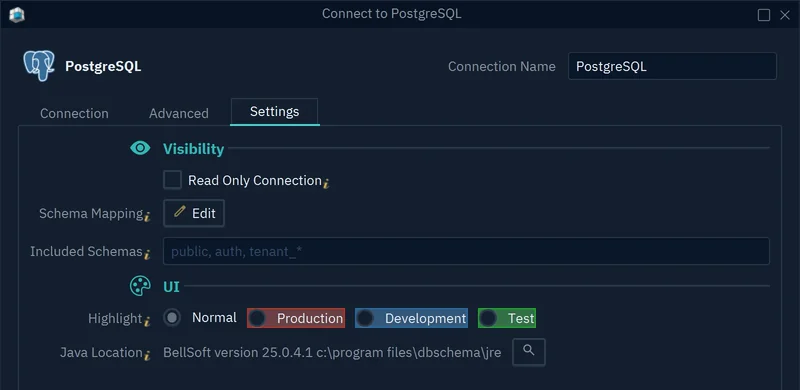
On the Settings tab, tick Read Only Connection, and the database refuses every change made through DbSchema, on top of the SELECT grant. DbSchema reads tables, columns and keys into a diagram, and reads data only when you open a table or run a query.
Download DbSchema and connect with report_user instead of root. Connecting and diagrams are in the free Community Edition; saving the model to a file and schema documentation need DbSchema Pro.
FAQ
How do I create a MySQL user for localhost?
CREATE USER 'user_name'@'localhost' IDENTIFIED BY 'your_password';. On Unix, a client given localhost connects through a socket file; use --protocol=TCP for TCP.
How do I grant privileges to a MySQL user?
GRANT privileges ON database_name.* TO 'user_name'@'host';. GRANT also takes one table or named columns: GRANT SELECT (order_id) ON shopdb.orders TO 'report_user'@'localhost';.
Do I need FLUSH PRIVILEGES after CREATE USER or GRANT?
No, only after changing the grant tables directly with INSERT, UPDATE or DELETE.
Can I create roles in MySQL 5.7?
No, 5.7.41 rejects CREATE ROLE with ERROR 1064. Grant the privileges to each account.
Should I grant ALL PRIVILEGES ON *.* to application users?
No, it includes the CREATE USER privilege and write access to the mysql schema, so the account could change any account on the server.
How do I see what privileges a user already has?
SHOW GRANTS FOR 'user_name'@'host';, or SHOW GRANTS; for your own account. Reading another account's grants needs SELECT on the mysql schema.









