Designing a Schema for a Collaborative Task App
For the backend developer who owns a multi-tenant task app schema and shares it with the team through Git; the tables run on PostgreSQL 17.
On this page
Two engineers add a column to the same table on two branches in the same week. Nobody finds out until one of the migrations fails on staging. Keeping the design in a DbSchema model file moves that collision earlier: the file is XML, it sits in the repository next to the application code, and the two changes meet as a text diff in a pull request instead of as a failed deployment.
Where the schema lives while the team works on it
A collaborative task app loads one schema with tenants that must not see each other's rows, roles per tenant, tasks nested inside tasks, assignment to more than one person, and links that are public to people with no account. Each of those is a table somebody will change while somebody else changes another.
DbSchema keeps the whole design in one file with the extension .dbs: tables, columns, foreign keys, diagram positions, and the queries saved with them. The file is plain XML, so Git records an added column as an added element and shows it in an ordinary diff. Each developer branches, edits the model, and opens a pull request that a colleague reads as text or opens in DbSchema as a diagram, which is what makes team collaboration on schema design reviewable at all.
Editing the model while disconnected changes only the file. Nothing is sent to a database until you open Schema → Synchronize Model with Database, review the generated statements and click Execute, or until you make a change with a connection open, in which case DbSchema applies it to the database immediately. Saving the model to a file is a Pro edition feature.
Creating the baseline logical design
Start above the database. Before a task app has a data type it has boundaries: who owns what, and which rows belong to which tenant. DbSchema's Logical Design is where that is drawn without committing to an engine, and it uses its own vocabulary, which is worth learning before the first entity goes on the canvas.
| Physical design | Logical design |
|---|---|
| Schema | Subject Area |
| Table | Entity |
| Column | Attribute |
| Foreign Key | Relation |
Choose Design from Scratch on the DbSchema welcome screen, then Logical Design, and right-click the canvas to create the first entity. A relation is drawn by dragging an attribute in one entity onto an attribute in another, and DbSchema lets you mark that relation identifying, which is the case where the parent key is part of the child key and the child cannot exist without the parent. A workspace membership is exactly that: it has no meaning apart from the workspace and the user it joins. Logical and conceptual design come with the Architect edition.
Converting that to physical tables is where nullability and keys become decisions rather than notes:
CREATE TABLE workspaces (
  workspace_id bigint PRIMARY KEY,
  name         text NOT NULL
);
CREATE TABLE users (
  user_id bigint PRIMARY KEY,
  email   text NOT NULL UNIQUE
);
CREATE TABLE workspace_members (
  workspace_id bigint NOT NULL REFERENCES workspaces,
  user_id      bigint NOT NULL REFERENCES users,
  role         text NOT NULL,
  PRIMARY KEY (workspace_id, user_id)
);
CREATE TABLE projects (
  project_id   bigint PRIMARY KEY,
  workspace_id bigint NOT NULL REFERENCES workspaces,
  name         text NOT NULL,
  is_private   boolean NOT NULL DEFAULT false
);
INSERT INTO workspaces VALUES (1, 'Acme');
INSERT INTO projects VALUES (10, 1, 'Billing', false);
The composite primary key on workspace_members is doing real work: it stops the same person being added to the same workspace twice, and it makes the role a property of the pair rather than of the user. A surrogate key there would need a unique index on the same two columns to say as much. Settling this before data arrives is the point of logical database design, since splitting a table after ingestion costs a data migration as well as a DDL one.
The task tables that carry assignment and subtasks
Three requirements shape the task tables. A task can be dragged into a new position on a board. A task can nest under another task. A task can be assigned to several people. Each of them is a column or a table, and skipping any one of them means a rewrite later:
CREATE TABLE tasks (
  task_id        bigint PRIMARY KEY,
  project_id     bigint NOT NULL REFERENCES projects,
  parent_task_id bigint REFERENCES tasks,
  position       int NOT NULL,
  status         text NOT NULL,
  title          text NOT NULL
);
CREATE TABLE task_assignees (
  task_id     bigint NOT NULL REFERENCES tasks ON DELETE CASCADE,
  user_id     bigint NOT NULL REFERENCES users,
  assigned_at timestamptz NOT NULL,
  PRIMARY KEY (task_id, user_id)
);
CREATE TABLE task_dependencies (
  blocking_task_id  bigint NOT NULL REFERENCES tasks ON DELETE CASCADE,
  dependent_task_id bigint NOT NULL REFERENCES tasks ON DELETE CASCADE,
  PRIMARY KEY (blocking_task_id, dependent_task_id)
);
INSERT INTO tasks VALUES
  (100, 10, NULL, 1, 'open', 'Ship the billing page'),
  (101, 10, 100,  1, 'open', 'Draft the copy'),
  (102, 10, 100,  2, 'open', 'Wire the API'),
  (103, 10, 101,  1, 'done', 'Proofread the copy');
The position column is what lets a client reorder a board by writing one row instead of locking the project's tasks to renumber them. The nullable parent_task_id pointing back at tasks is what makes a subtask a task rather than a second kind of record, so a subtask can be assigned, closed and depended on with the same code. Assignment lives in task_assignees rather than in an array column on the task, which keeps the foreign key to users and is the reason normalization is worth the extra join here. The cascade goes one way on purpose: deleting a task removes its assignment and dependency rows, while deleting a user is refused for as long as that person is assigned to anything.
Reading a subtask tree back is a recursive query. In PostgreSQL 17 the RECURSIVE modifier lets a WITH query refer to its own output, with a non-recursive term, UNION or UNION ALL, and a recursive term that references the query[1]:
WITH RECURSIVE subtree AS (
  SELECT task_id, parent_task_id, title, 1 AS depth
  FROM tasks
  WHERE parent_task_id IS NULL AND project_id = 10
  UNION ALL
  SELECT t.task_id, t.parent_task_id, t.title, s.depth + 1
  FROM tasks t
  JOIN subtree s ON t.parent_task_id = s.task_id
)
SELECT title, depth
FROM subtree
ORDER BY depth, title;
| title | depth |
|---|---|
| Ship the billing page | 1 |
| Draft the copy | 2 |
| Wire the API | 2 |
| Proofread the copy | 3 |
The same page carries the warning that decides whether this query is safe to expose: the recursive term has to stop returning rows, or the query loops indefinitely. A parent_task_id chain that ever points back up at an ancestor is a cycle, and the query above will spin on it, so either the application refuses to set a parent that is already a descendant, or the query uses the CYCLE clause PostgreSQL 17 provides to detect one.
Splitting the model into focused diagrams
One canvas holding every table stops being readable once the model outgrows the screen, and a task app gets there as soon as billing and audit arrive. DbSchema holds many diagrams in one model, each with its own layout and its own set of visible tables, while the schema definition underneath stays single. Add one from the Diagram menu or by clicking the plus tab at the top of the diagram area.
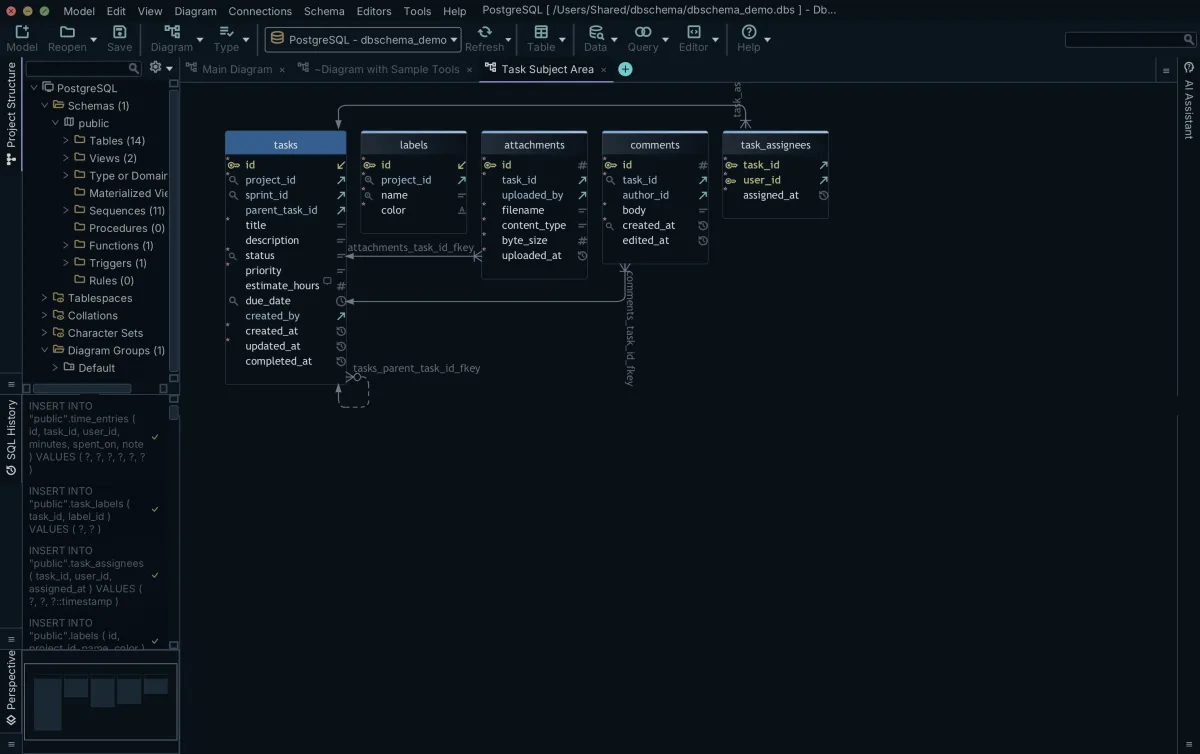
The split that works follows the teams rather than the alphabet: identity, holding users, workspace_members and the invitation tables; execution, holding projects, tasks, task_assignees and task_dependencies; sharing, holding the public link and guest permission tables; audit, holding the event and webhook tables. The same table appears in as many of them as it belongs to, so tasks can sit at the center of the execution diagram and also appear in a billing diagram next to the tables that count hours against it.
Editing a column on any of those diagrams changes the one definition in the model, so the others show the change the moment you look at them. The split is therefore a set of views over one schema rather than four schemas to keep in agreement. Positions and groups are stored in the same .dbs file, which is why a visual model survives a Git checkout intact.
A feature branch that adds two tables
Shipping a list-sharing feature means two new tables that must not reach the shared database until the code that uses them is reviewed. The branch does that work, and DbSchema stays offline for all of it.
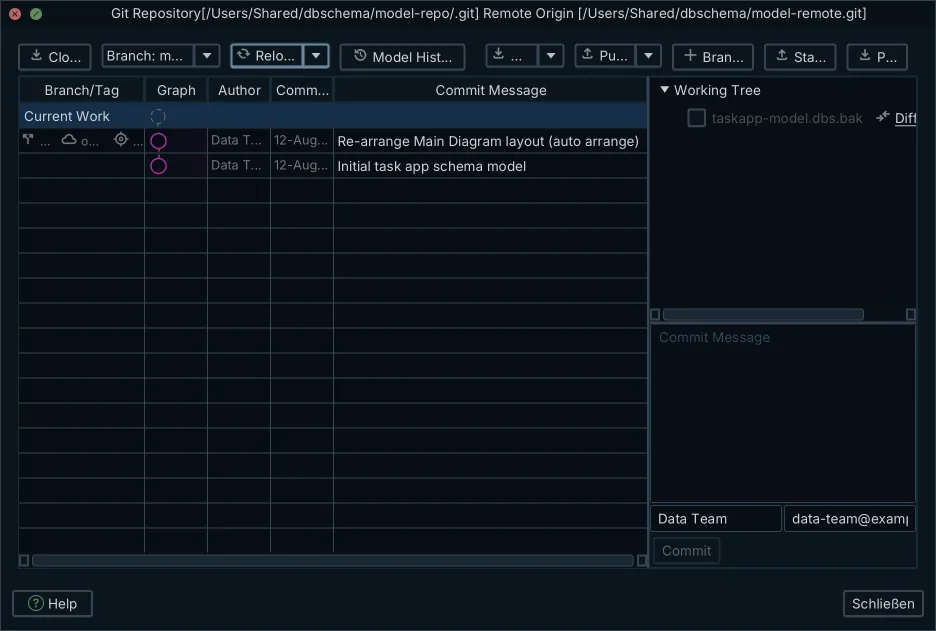
- Create a branch, either with
git branch feature/list-sharingor with Create Branch in DbSchema, underGit — Collaborative Designin the Model menu. - Open the .dbs model file in DbSchema and switch the connection to Disconnected, so every edit goes to the file and nothing reaches a database.
- Add the two tables and their foreign keys on the diagram, in offline design mode.
- Stage the model file in
Git — Collaborative Design, enter a commit message, click Commit, and click Push to send the branch for review.
The file that lands in the pull request carries the diagram coordinates, the foreign key routes and the saved queries as well as the two tables, so a reviewer who opens it in DbSchema sees the picture the author saw. When the branch merges, the database still knows nothing about it: Schema → Synchronize Model with Database compares the merged model against the live schema and generates the migration, and Execute runs it.
The common failure and its fix
The failure that actually happens is two branches editing the same table. One developer adds estimated_hours to tasks; another adds priority_level to tasks; both add an index on their own column. Git reports a conflict, because both edits changed lines inside the same table element in the XML.
| What conflicts | Branch A | Branch B | Resolution |
|---|---|---|---|
| Table | tasks | tasks | tasks |
| New column | estimated_hours numeric(5,2) | priority_level varchar(20) | Keep both |
| New index | on estimated_hours | on priority_level | Keep both |
| Foreign keys | None added | None added | Unchanged |
Both edits are additions, so keeping both elements resolves nearly every conflict of this shape, and the merge is a text merge like any other. What earns a careful read is the pair that is not additive: two columns with the same name and different types, or two indexes on the same column with different names.
Open the merged file in DbSchema before you push it, because an XML file that parses is not the same as a model that makes sense, then compare it against the staging database and read the generated script. That comparison is what catches a resolution that dropped an element, since the script will simply not contain the statement that adds the column somebody lost.
What to check afterwards
A multi-tenant schema fails in production in ways a development database never shows, because the development copy has one workspace in it and production has thousands. Four checks are worth running once the migration lands:
- Confirm that a composite index exists on the tenant columns the queries filter on,
(workspace_id, project_id)rather thanworkspace_idalone, so a project board does not scan every project in the workspace. - Run EXPLAIN ANALYZE on the recursive subtask query for the deepest tree in the data, and read whether the recursive term uses an index on
parent_task_id. PostgreSQL creates one for a primary key or a unique constraint, never for a foreign key. - Delete a task in a transaction and roll it back, checking that the rows in
task_assigneesandtask_dependencieswent with it. - Insert a subtask whose parent sits in a different project, and watch the row go in.
The fourth check fails, which is the point of running it. parent_task_id references tasks on its own, so nothing above keeps a subtask inside its parent's project. Two statements move that rule into the database:
ALTER TABLE tasks ADD UNIQUE (project_id, task_id);
ALTER TABLE tasks ADD FOREIGN KEY (project_id, parent_task_id)
  REFERENCES tasks (project_id, task_id);
A root task still inserts cleanly. Under the default MATCH SIMPLE, any foreign key column may be null, and a row with a null in one of them is not required to match anything in the referenced table[2], which is the case a task with no parent is in.
Saving the model to a file, Git — Collaborative Design and schema synchronization are Pro edition features, and logical design is in the Architect edition; connecting, reverse-engineering, the interactive diagrams and the SQL editor are free in the Community edition. Get DbSchema from https://dbschema.com/download.html, reverse-engineer the database your task app already runs on, and commit the .dbs file into the repository the application lives in. The next schema change then arrives as a pull request.
Frequently asked questions
How do teams collaborate on database schema design?
The team commits the DbSchema model file to the same Git repository as the application code and branches for each schema change. The reviewer reads the XML diff in the pull request or opens the model in DbSchema to see the diagram, and the approved change reaches the database through Schema → Synchronize Model with Database.
What is the best way to handle schema merge conflicts?
Because the DbSchema model file is XML, a conflict appears in the ordinary Git conflict markers, inside the element of the table both branches touched. Resolve it in a text editor, open the merged file in DbSchema to confirm the model still parses and still makes sense, then compare it against the staging database before generating the migration.
How many tables does a typical task management app require?
More than a first sketch suggests. The DbSchema demo model of a task app, the one behind the diagrams on this page, holds 14 tables, 2 views, 25 indexes and 23 foreign keys, and that is before multi-tenant billing, custom fields and audit history are added.
Can a single database table appear in multiple ER diagrams?
Yes, DbSchema lets one table appear on as many diagrams of the same model as you like, each diagram keeping its own layout and its own set of visible tables. Editing a column on any of them changes the single definition in the model, so the diagrams cannot drift apart.
Sources
Open the model against your own database
DbSchema reverse-engineers your database into an ER diagram and lets one table sit in several focused diagrams of the same model. The Community Edition is free; saving the model to a file for Git and schema synchronization are Pro features.









