Database Design Best Practices: Principles, Normalization and Keys
For an architect setting the rules a new schema will follow; every practice here is shown on a small customers-and-orders example.
On this page
The schema review comes back with three notes: a table with no primary key, a customer's address copied onto every order row, and an index on a column no query filters by. None of the three was decided on purpose. Database design is the set of decisions that prevents them, and it comes down to giving every fact one place to live, every row one key that identifies it, and every rule one constraint that enforces it.
- Model the entities before the tables, and translate the relationships into columns afterwards.
- Give every table a primary key, and every relationship a foreign key.
- Normalize to third normal form, then denormalize only where a measured query demands it.
- Index the columns you filter, join and sort on, rather than every column.
- Keep names, data types and conventions consistent across the whole schema.
- Version the model in Git, so a schema change is reviewed like code.
Dr. Veikko Krypczyk wrote the German original of this article for PHP Magazin, and this page is its English adaptation.

Fundamentals of database design
Database design decides how data is stored, organized and reached. What it produces is a logical model, the tables, columns, keys and constraints, which one specific engine then implements. A relational database schema built that way keeps stored data accurate while it changes, holds its query times as volumes grow, absorbs new requirements without a rewrite, and stays readable to whoever maintains it after you. Five principles carry most of that work.
Clarity and simplicity
A design is clear when each table holds one kind of thing and its name says which. Customers and orders belong in two tables joined by a key, not in one table carrying both, and the test is whether you can name a table's contents in three words.
Data integrity
Three rules keep data correct while it changes. Entity integrity means every table has a primary key that identifies each row exactly once. Referential integrity means every relationship is declared as a foreign-key constraint, so an order cannot point at a customer that does not exist; PostgreSQL 18 puts it as values that must match some row of another table[1]. Domain integrity means data types, CHECK constraints and ranges keep invalid values out of a column in the first place.
Avoiding redundancy
Redundancy is the same fact stored in more than one place, and the cost of it is not storage but contradiction: two copies, one update, and no way to tell afterwards which one is right. Normalization removes it by splitting the data into separate tables and declaring the relationships between them, so a customer's name is stored once in the customers table rather than on every order.
Flexibility and scalability
A schema should absorb a new requirement without a rewrite. Adding a column or a table should leave unrelated tables alone, and the design should still hold when the row count grows tenfold. In an online shop, a new product category is a row someone inserts, and a design in which it is a schema change is a design that will be changed under time pressure.
Performance
Three decisions set the ceiling on query speed, and all three are made here rather than later. An index on the columns you filter and join on is the first, written with CREATE INDEX[2]. Confirm it by reading the query plan, because an index the planner ignores costs writes and buys nothing. A clean model is the second, since it makes the obvious SQL the fast SQL. Partitioning is the third: splitting a large table[3] lets a query read one partition instead of the whole table, which PostgreSQL 18 calls partition pruning, and an orders table split by year is the standard case. Indexes and foreign keys pull against each other on write cost, so settle that trade-off per table.
The database design process, step by step
Four steps take a requirement to a running schema, and each one hands the next an artefact it consumes.
| Step | What it produces | Example |
|---|---|---|
| requirements analysis | the data to store and the queries that will run | customers, products, orders, categories |
| conceptual model | a diagram of entities and their relationships | a customer places several orders (1:n) |
| logical model | tables, columns, primary and foreign keys | an orders table with a key into customers |
| physical model | engine DDL, indexes, storage settings | an index on the customer key in orders |
Skipping the middle two is what produces a schema nobody can explain a year later. The diagram is the artefact the business side can read and correct, and the logical model is the one a reviewer can check against it before a single type name has been chosen. The full schema design procedure adds the checks that belong between the steps.
Normalization up to the third normal form
Normalization splits a database into smaller tables, each about a single subject, so that a fact is stored once. It buys integrity and cheap updates, and it costs joins at read time, which is why how far to take it is a decision rather than a default. The stages are the normal forms, and the first three carry the work. What lies past them is covered in logical database design.
First normal form (1NF)
A table is in 1NF when every value is atomic, every column has one data type, and no column holds a repeated group or a list. This one holds a list:
| customer_id | name | products |
|---|---|---|
| 1 | Müller | Laptop, Mouse |
| 2 | Schmidt | Keyboard, Monitor |
Splitting the list across rows puts one product in each cell:
| customer_id | name | product |
|---|---|---|
| 1 | Müller | Laptop |
| 1 | Müller | Mouse |
| 2 | Schmidt | Keyboard |
| 2 | Schmidt | Monitor |
Second normal form (2NF)
A table is in 2NF when it is in 1NF and every non-key column depends on the whole primary key rather than on part of it. Here the customer's name hangs off the order:
| order_id | customer_name | product | price |
|---|---|---|---|
| 101 | Müller | Laptop | 1000 |
| 102 | Schmidt | Mouse | 20 |
The name belongs to the customer, so it moves to a table of customers:
| customer_id | customer_name |
|---|---|
| 1 | Müller |
| 2 | Schmidt |
and the order keeps a reference to it:
| order_id | customer_id | product | price |
|---|---|---|---|
| 101 | 1 | Laptop | 1000 |
| 102 | 2 | Mouse | 20 |
Third normal form (3NF)
A table is in 3NF when it is in 2NF and no non-key column depends on another non-key column. The address below depends on customer_id, not on order_id:
| order_id | customer_id | customer_address | product |
|---|---|---|---|
| 101 | 1 | Berlin | Laptop |
| 102 | 2 | Hamburg | Mouse |
Moving it next to the customer it describes leaves the order with the reference alone:
| customer_id | customer_address |
|---|---|
| 1 | Berlin |
| 2 | Hamburg |
| order_id | customer_id | product |
|---|---|---|
| 101 | 1 | Laptop |
| 102 | 2 | Mouse |
Primary, foreign and secondary keys
Keys are how a row is identified and how two tables are joined, and three kinds do that work.
Primary key
A primary key is the column, or the combination of columns, that identifies each row of a table. Its values are unique and none of them is NULL, which is why an editable business value makes a poor one: correcting a typo in it means updating every row that references it.
CREATE TABLE Customers (
  customer_id INT PRIMARY KEY,
  name VARCHAR(255),
  address VARCHAR(255),
  phone VARCHAR(20)
);
Two rows of that table, with customer_id as the key:
| customer_id | name | address |
|---|---|---|
| 1 | Müller | Berlin |
| 2 | Schmidt | Hamburg |
The full SQL definition covers the syntax on each engine.
Foreign key
A foreign key is a column that points at the primary key of another table, and the database refuses any value with no match there. That refusal is referential integrity: without the constraint, an order can name customer 7 forever after customer 7 is deleted.
CREATE TABLE Orders (
  order_id INT PRIMARY KEY,
  customer_id INT,
  date DATE,
  FOREIGN KEY (customer_id) REFERENCES Customers(customer_id)
);
| order_id | customer_id | date |
|---|---|---|
| 101 | 1 | 2023-01-01 |
| 102 | 2 | 2023-01-05 |
Secondary key
A secondary key is a column, or group of columns, indexed to speed up searching. It carries no uniqueness requirement, so two customers may share a phone number and both are still found by it:
CREATE INDEX idx_phone ON Customers(phone);
| customer_id | name | phone |
|---|---|---|
| 1 | Müller | 0723-731-652 |
| 2 | Schmidt | 0723-731-631 |
Designing and documenting a schema in DbSchema



A schema with hundreds of tables stops fitting in anyone's head, and the questions asked of it are visual ones: what does this table depend on, which tables would a delete cascade into, what changed since the last release. DbSchema answers them from a diagram. It connects to 70+ SQL and NoSQL databases, reverse-engineers the live schema into an ER diagram, and keeps the design in a local .dbs model file of human-readable XML that it can compare against the database to generate a migration script.
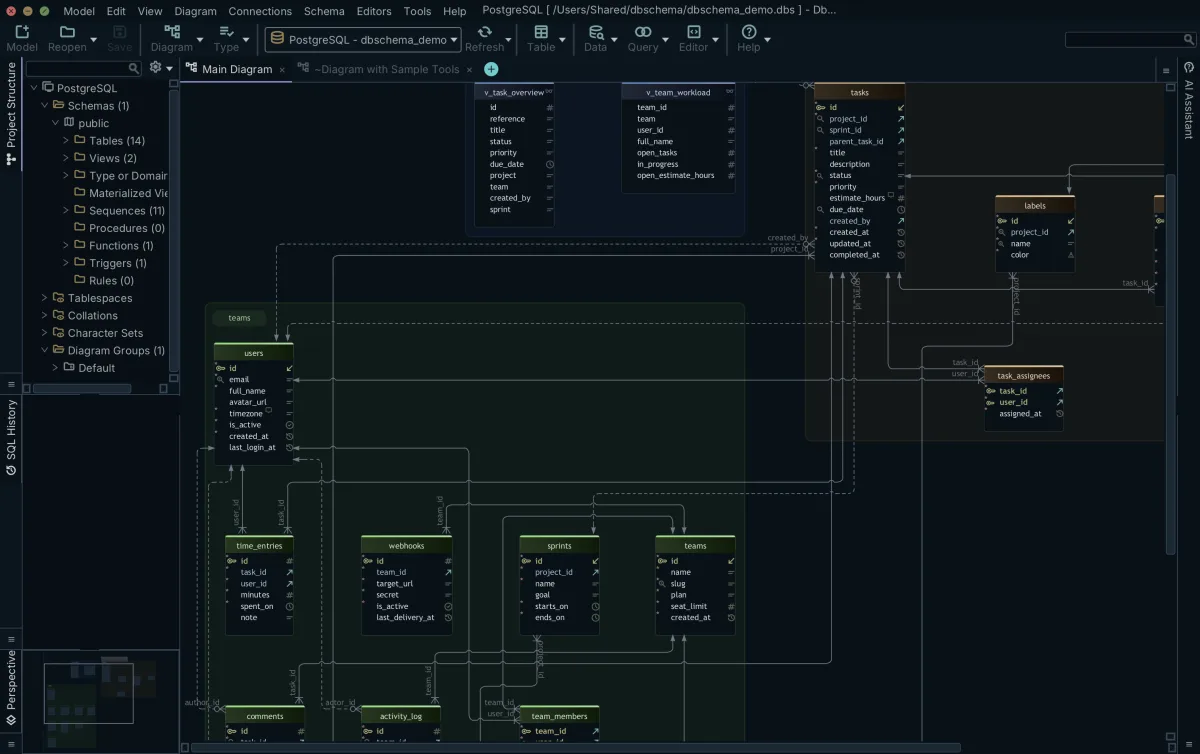
Which of those steps touches the database is worth keeping straight. Designing offline edits the model file with nothing connected, and the changes reach the database only when you reconnect and apply them. Exporting interactive HTML5 documentation, where table and column comments become mouse-over tooltips over the diagram, reads the model and writes nothing back. Committing the .dbs file to Git puts a schema change in a diff a colleague can review, which is the answer to the harder half of team design: two people editing the same schema without overwriting each other.
Two more parts of DbSchema work on the data rather than the structure. The Relational Data Editor opens a parent table and its children side by side and follows the foreign keys between them, so a row and everything hanging off it are one click apart instead of a hand-written join, and edits become permanent when you commit them to the database. The Query Builder builds a SELECT from ticked columns and shows the SQL it generated. For work that repeats, Groovy scripts run schema synchronization and model comparison from DbSchemaCLI, using the samples that ship with the product.
Connecting, reverse-engineering, the interactive diagrams and the SQL editor are in the free Community edition. Saving the model to a file is in Pro, together with the offline design, the HTML5 documentation, schema synchronization, relational data browse and the Query Builder. Logical and conceptual design are in Architect.
On the compliance side, the design lives in a local model file and whichever Git remote you choose, so a schema need not leave your own infrastructure, and we are ISO/IEC 27001:2022 certified. The questions worth putting to anything that writes to a production database are collected in security questions to ask about a schema sync tool.
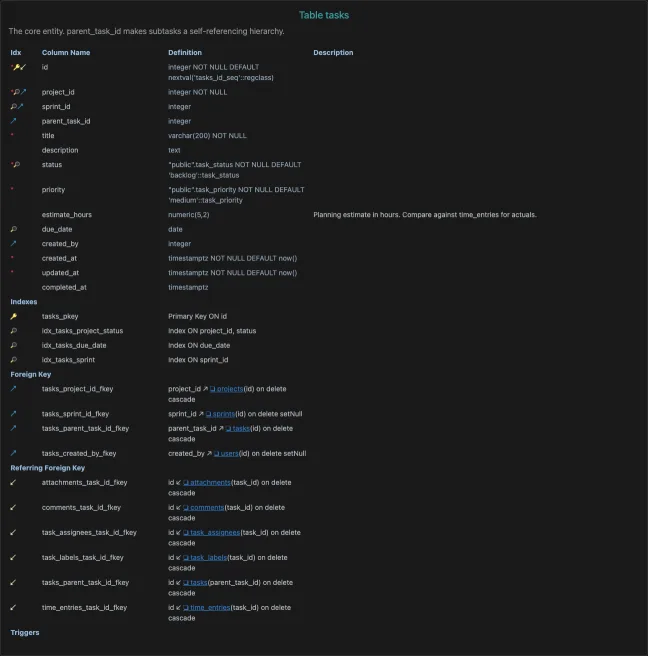
A schema is the hardest part of a system to change once it carries data, and the four things that keep it cheap to live with, clear structure, one place per fact, integrity rules the database enforces and indexes that match the queries, are all settled before the first row is inserted. Download DbSchema at https://dbschema.com/download.html, reverse-engineer the schema you have, and check it against the six practices at the top of this page: a table with no primary key and a column with no constraint both show up in the diagram in the first minute. Connecting, reverse-engineering, the diagram and the SQL editor are in the free Community edition; the model file, the HTML5 documentation and schema synchronization are in Pro.
Sources
See your own schema as an ER diagram
DbSchema reverse-engineers a live database into an interactive diagram, keeps the design in a versionable .dbs model file, and generates the migration script from the difference. Connecting, reverse-engineering, interactive diagrams and the SQL editor are in the free Community Edition; saving the model to a file, HTML5 documentation and schema synchronization are Pro.









