Text-to-SQL Tools and When to Trust Them
Text-to-SQL tools compared by what they see of your schema, BIRD and Spider 2.0 scores read 11 Oct 2026, and five checks before AI-written SQL runs.
On this page
Text-to-SQL turns a question in plain language into a SQL statement, and the model can only use the schema and business rules it is given. This guide compares the four kinds of text-to-SQL tool by what they are shown of your schema, and shows how to try the DbSchema AI Assistant, which reads only the table definitions you attach.
A text-to-SQL tool is worth trusting on a real company schema only when you control what it sees and check what it returns before it runs. You type a question, a model returns SQL, and the risk is rarely the syntax. The risk is context: the model can only use the schema and the business rules it was given, and a wrong answer shows up as numbers nobody questions or as a statement that changes production data.
What text-to-SQL is, and what it cannot know
Text-to-SQL turns a question in plain language into a SQL statement. The model writes the joins, filters and aggregations from the schema context and the business rules you supply, and from nothing else. If a value in a category column means footwear only inside your company's classification, the model cannot know that unless you tell it. The quality of the answer is decided less by the model than by what you put in front of it.
Google Cloud's engineering blog (techniques for improving text-to-SQL[1], May 2025) names the three problems a text-to-SQL model has to be complemented for: providing business-specific context, understanding user intent, and managing differences in SQL dialects. Every tool type below differs mainly in how much of that context it lets you supply.
- Business-specific context: what the schema looks like, what the relevant columns mean, and what a value stands for in your business.
- User intent: a plain-language question is less precise than SQL, and the model tends to answer anyway instead of asking back.
- SQL dialect: the same question needs different SQL in BigQuery, MySQL, PostgreSQL or Snowflake.
Missing context produces wrong answers that look right. A model that writes flawless SQL against the wrong tables, or that guesses what "active customer" means, produces a query that runs and returns wrong numbers. So the two questions for any text-to-SQL tool are how much of the context you control, and which checks catch the answers that get past it.
Text-to-SQL tools: four kinds compared
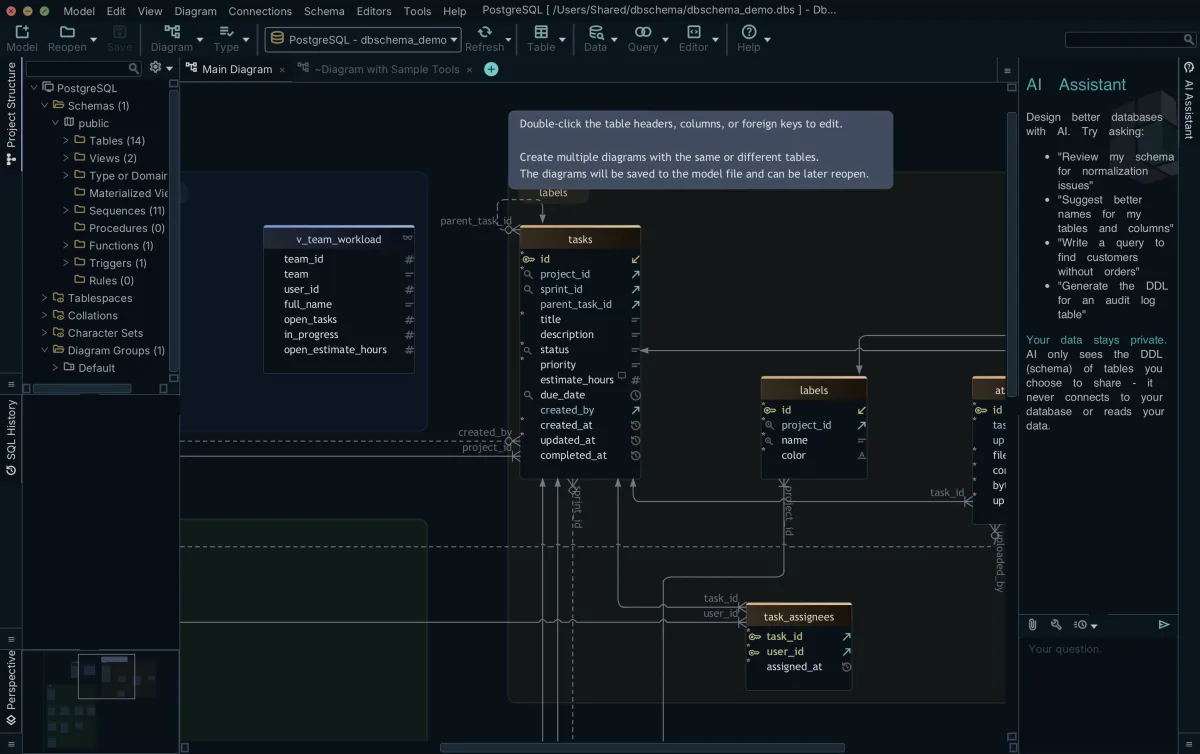
For daily work against a real schema, the text-to-SQL tool type to test first is an AI inside a database client. In the AI Assistant described in the AI Assistant documentation, schema reaches the model only through Attach to AI, so it sees the CREATE TABLE statements of the tables you select and nothing else. The other three types each trade context control for convenience.
A general chat assistant is the model's own web chat. You paste DDL or describe the schema in the prompt, the model answers with SQL in the same window, and nothing is connected to a database. It suits one-off questions, and its weakness is that the schema context lives and dies with what you pasted this morning.
A dedicated text-to-SQL web tool, often sold as a text-to-SQL converter, is a product whose main purpose is converting questions to queries. You paste or upload a schema, sometimes connect a database, and read the generated statement in the browser. It is built for people who want SQL without installing anything, and it shares the chat assistant's weakness: the tool knows only the schema text you gave it.
An AI inside a database client sits next to a live connection. Chat2DB is another example of this type. It is a free, cross-platform, local-first database client and SQL workspace for Windows, macOS and Linux. It connects to more than 40 databases and lets you bring your own AI model to generate, explain and optimize queries, per its GitHub page[2] (read 11 October 2026). This type serves developers who ask questions about the database they already have open, so the schema context can come from the client's own metadata instead of a paste.
A warehouse-native semantic layer is the text-to-SQL feature of a cloud data platform, built on modeled metadata such as metric definitions inside the warehouse. It is built for organizations that standardize metrics centrally, and it answers only as well as that modeling was done. AI tools that draw ER diagrams instead of writing queries are a separate category, covered in AI ER diagram generators compared.
What each tool is shown of your schema
Text-to-SQL tools differ most in what they are shown of your schema, whether they can execute what they produce, and where the model runs. Those three facts decide both your privacy exposure and how much context the model has.
| Tool type | What it is sent | Can execute the query | Where the model runs | Main failure mode |
|---|---|---|---|---|
| DbSchema AI Assistant (AI inside a database client) | The DDL of the tables you attach; never table rows, query results, passwords or connection details | Only when you click Run, on your own computer | Cloud model through the AI subscription's credits, or, on Pro or Architect, your own provider key or a local Ollama model | Tables the question needed but you did not attach |
| General chat assistant | Text you paste into the prompt | No, it returns text | The vendor's cloud | Schema context missing or stale, because it depends on what you pasted |
| Dedicated text-to-SQL web tool | Pasted schema text, sometimes sample rows | Some tools, against a connection you hand them | The vendor's cloud | Guessed business rules, because nothing ties the schema to your data's meaning |
| Warehouse-native semantic layer | The warehouse's modeled metadata | Yes, inside the warehouse | The platform's cloud | Metrics that were never modeled, so the layer cannot answer |
In the AI Assistant, Attach to AI decides what the model sees. You select the tables on the diagram, Ctrl+click to add more, right-click one of them and choose Attach to AI. The Ask AI dialog then shows the Attachment: the CREATE TABLE statements of those tables, which you can edit before anything is sent. You can attach a whole schema or just the tables the question is about. What goes to the model is your question, the conversation so far, the attached DDL and the system message. With a Pro or Architect licence you can point the assistant at a local Ollama model, and then nothing leaves your computer.
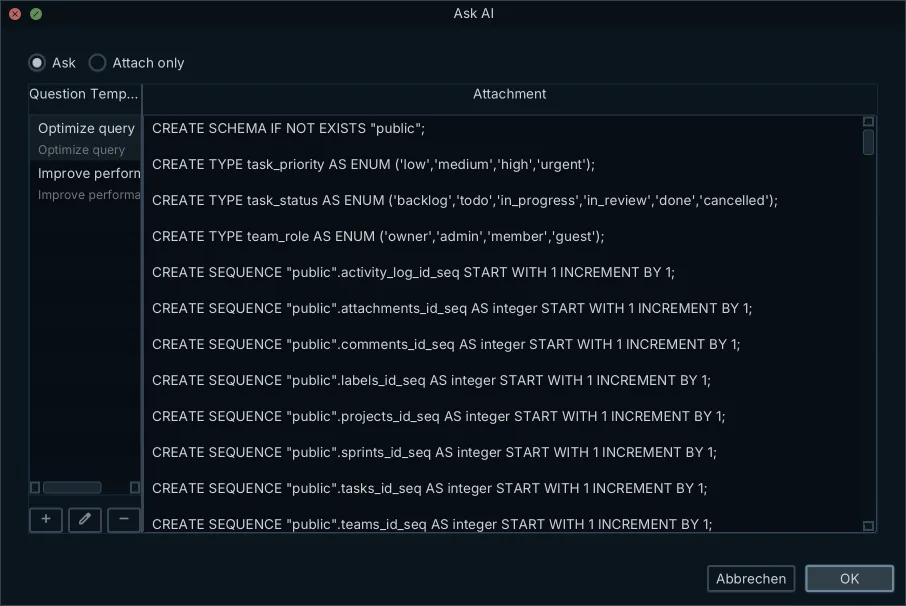
The full picture of what an AI assistant sees of your database is covered in its own article, including what that means for data that should stay in-house. The short version is the design rule behind Attach to AI: the assistant reads structure, not data.
Text-to-SQL benchmark scores against real, large schemas
Text-to-SQL benchmarks show accuracy dropping as schemas get bigger and more real. BIRD, the large-scale text-to-SQL benchmark, contains 12,751 question-SQL pairs across 95 databases totalling 33.4 GB, covering more than 37 professional domains. On the BIRD leaderboard[3], read 11 October 2026, human performance is 92.96 percent and the highest listed system test score is 82.95 percent execution accuracy.
Enterprise reality is harder still. The Spider 2.0 paper[4] (2024) evaluates models on 632 real-world text-to-SQL workflow problems from enterprise databases, which often contain over 1,000 columns and live in local or cloud systems such as BigQuery and Snowflake. An o1-preview-based agent solved 21.3 percent of those tasks, against 91.2 percent on the older Spider 1.0 benchmark and 73.0 percent on BIRD. The same agent dropped from 73.0 percent on BIRD to 21.3 percent on Spider 2.0, which shows what a real enterprise schema does to accuracy. Working with large PostgreSQL schemas is hard for people for the same reason.
A benchmark score is a guide to how the technology is trending, not a score for your schema. Your accuracy depends on the tables you attach, the dialect you ask for and the business rules the model is told, which no leaderboard measures. Test on your own schema, with your own questions, before you trust any number.
Checks a generated SQL query must pass before it runs
A generated SQL query passes five checks before it runs, whatever tool wrote it. Each check costs minutes, and each catches a different kind of mistake.
- Read the statement. Check the tables and columns it names against the schema you attached, and check the join conditions and filters say what the question meant.
- Run it under a role that holds only SELECT on the tables it needs. A read-only role makes a mistyped UPDATE or DROP fail instead of execute.
- Dry-run it or run EXPLAIN on it. In PostgreSQL, EXPLAIN plans the statement without running it, so the plan shows which tables and indexes the statement would touch, and an invented column fails before any row is read.
- Compare row counts with an answer you already know. A total you can verify by hand, even a rough one, tests accuracy without any extra tooling.
- Review any generated DDL or DML before it touches a database. A wrong SELECT wastes a minute; a wrong ALTER is a migration.
We ran this check list on PostgreSQL 16 against a 14-table demo schema on 11 October 2026. EXPLAIN SELECT t.id, t.title FROM tasks t WHERE t.assignee_id = 3 stopped with ERROR: column t.assignee_id does not exist before any row was read, because that schema keeps assignees in a separate task_assignees table. A throwaway role holding SELECT on projects and tasks only got ERROR: permission denied for table tasks on a DELETE, and permission denied for table users on a SELECT. All 31 tasks were still there afterwards.
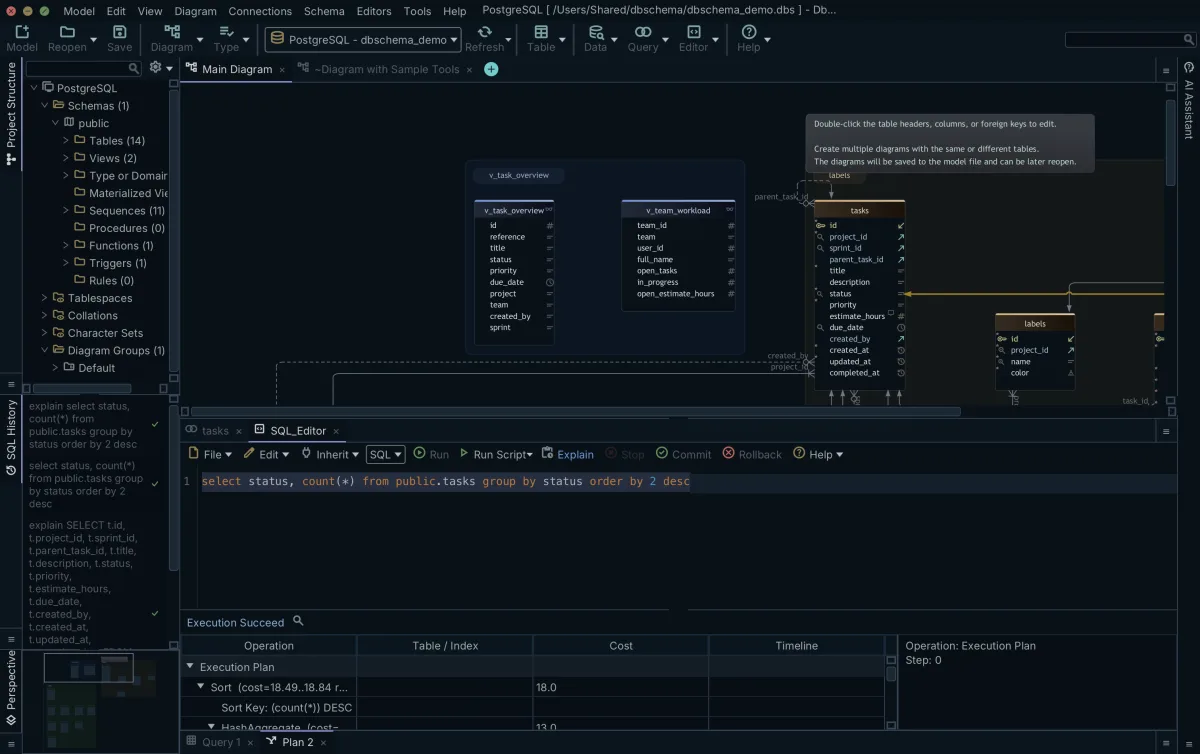
The privilege check takes two statements in PostgreSQL, whose privileges documentation[5] lets SELECT be granted per table: create a role and grant it exactly what the question needs.
CREATE ROLE report_reader LOGIN;
GRANT SELECT ON customers, orders TO report_reader;
Connect as report_reader for AI-generated queries and the worst a bad statement can do is return rows; it cannot break production data. The rule is the same one OWASP gives for LLM01, Prompt Injection[6] (2025 list): restrict the model's access privileges to the minimum necessary for the intended task, because a prompt or an attached document can steer a model's output in ways you did not intend, even when you type the question yourself.
The AI Assistant keeps the review in your hands by how it delivers the answer. It answers with SQL in code blocks, and each block carries buttons: Copy, Run, Editor, Merge and Preview. Run is documented for SELECT statements: it runs one on your own computer and the result stays there. For anything else, connect under a role that holds only SELECT. Editor opens the statement in the SQL Editor under a connection you chose, so you read it first and run it when it passes the checks. Merge and Preview belong to schema changes, and reviewing an AI-proposed schema change before it reaches the model is its own topic.
Where generated SQL fails without an error
Generated SQL fails without an error when it returns rows that answer a different question. Three kinds show up repeatedly, and none of them raises an error.
- Ambiguous intent. Google Cloud's example: "best-selling shoes" can mean the most ordered or the most revenue, and the model tends to answer anyway instead of asking which you meant.[1]
- Dialect differences. Google Cloud's example: month extraction is EXTRACT(MONTH FROM column) in BigQuery and MONTH(column) in MySQL. A model that answers in the wrong dialect either errors, which is harmless, or silently uses a function that means something else, which is not.
- Invented structure. When the model was never shown a table it needs, it guesses plausible column names and join keys from the tables it did see. The query parses, runs, and joins on nothing real.
Two wrong queries on the same demo schema returned rows and no error. Asked for estimated hours per project, a query that joins task_assignees before SUM(t.estimate_hours) returned 6 projects instead of 7 and 267.00 hours instead of 252.00. Four tasks have more than one assignee, so their estimates count twice, and unassigned tasks drop out, including the only task of one project. Summing on tasks alone gives the known answer. Asked for projects without tasks, the plain LEFT JOIN returned 0 rows, and the version that ignores cancelled tasks returned 1 row, Brand Refresh 2025. EXPLAIN planned both pairs without complaint; only the count against a known answer separated them.
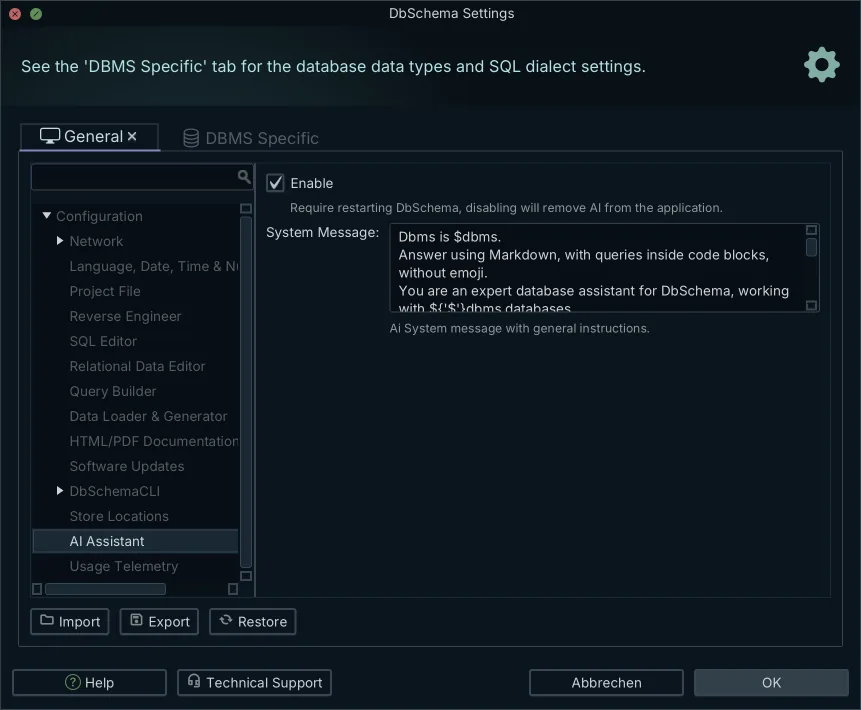
All three come back to context, so attaching the right tables comes first. The system message carries part of that context on every question. It holds the instructions that go with each question, such as the SQL dialect to answer in. You can add your own rules there, such as a naming convention. Write the rules your queries keep tripping over once, and every later question inherits them.
Which text-to-SQL tool type fits which team
The chat assistant fits throwaway questions on a schema you can paste in full. You describe two tables, you get a query, you are done. It stops fitting the moment the schema is bigger than a prompt or the question depends on business rules nobody pasted.
The dedicated web tool fits one-off queries for people who do not have a database client open. The limits are the same as the chat assistant's, plus whatever the tool's free tier does not cover, so it earns its place on occasional use rather than daily work.
The client-side assistant fits developers doing daily work against a real schema. The client already holds the connection and the model, so attaching the right tables is a right-click instead of a paste, and the generated SQL lands next to an editor you already use. If you prefer building a query by clicking rather than by asking, the visual query builder covers that case, and querying a database without writing SQL is its own article.
The warehouse-native semantic layer fits an organization standardizing metrics across teams. It fits when the definitions live centrally and the questions come from people who should not each maintain their own.
The AI Assistant is billed as a separate add-on subscription at $9.00 per month, plus taxes (purchase page read 11 October 2026), and it is not part of any licence. It works with Community, Pro and Architect alike, and the purchase page describes it as credits for ChatGPT, Claude and DeepSeek. You can start with a free AI trial unlocked by an emailed activation code, and Purchase Credits extends it after the trial. A Pro or Architect licence adds the option to use your own provider key, with OpenAI, Azure OpenAI, Claude, Gemini, DeepSeek, Grok, Mistral, Venice or Ollama as the choices. Every download starts with a 15-day trial of all features.
How to try text-to-SQL on your own schema
The tool type decides how much of your schema the model ever sees, and the checks decide whether the SQL it returns is safe to run. Both are in your control, and the AI Assistant is built around that: it reads only the DDL of the tables you attach, answers with SQL in code blocks, and runs nothing until you click Run or open it in the SQL Editor.
Download DbSchema, open your database, and attach only the tables your question needs before you ask the AI Assistant for SQL. Select the tables on the diagram, right-click and choose Attach to AI, check the CREATE TABLE statements in the Ask AI dialog, then ask your question and read the SQL it returns. The AI subscription works on every edition, the free Community edition included, and every download starts with a 15-day trial of all features.
Frequently asked questions
How can I convert text to SQL?
Give a text-to-SQL tool two things: your question in plain language, and the schema context it needs, usually the CREATE TABLE statements of the relevant tables. The model returns a SQL statement built from those table and column names. It cannot invent your business rules, so the more precise the schema context and the question, the better the SQL.
How to convert text to SQL query?
In DbSchema, select the tables on the diagram that the question is about, right-click and choose Attach to AI, and the Ask AI dialog shows their CREATE TABLE statements, which you can edit before asking. Type the question and press Send. The answer comes back with SQL in code blocks; Run executes it as a SELECT on your own computer, or Editor opens it in the SQL Editor so you can read and change it first. As covered above, table rows, query results, passwords and connection details are never sent.
Which model is best for text to SQL?
No single model is best for every schema. On the BIRD leaderboard, human performance is 92.96 percent and the highest listed system test score is 82.95 percent execution accuracy (leaderboard read 11 Oct 2026), and the Spider 2.0 paper reports an o1-preview agent solving 21.3 percent of 632 enterprise tasks. Those scores are guides, not scores for your schema: test any model on your own tables, with your own naming and business rules attached, before trusting it.
Can I ask AI to improve database queries and immediate run the query in DbSchema?
Yes. The AI Assistant answers with SQL in code blocks, and under each block Run runs a SELECT directly on your own computer, with the result staying there, while Editor opens the statement in the SQL Editor for review or changes. The assistant needs the AI subscription, which starts with a free trial unlocked by an emailed activation code, or, with a Pro or Architect licence, your own provider key or a local Ollama model.
Sources
Ask for SQL with only the tables you attach
The DbSchema AI Assistant reads the DDL of the tables you attach, never the rows, and returns SQL you review and run yourself. The AI subscription works in every edition, the free Community Edition included.









