Querying a Database Without Writing SQL
For the analyst who is asked for a report out of a database and does not write SQL; joins, filters and grouping are explained where they appear.
On this page
A report needs one column that lives in one table and another that lives in a second table, and the person who has to produce it does not write SQL. DbSchema's Query Builder covers that case: you tick the columns you want on the diagram, follow a foreign key to the next table, and the SELECT is built while you click. It is a Pro edition feature.
The alternative is to raise a ticket and wait for someone who does write SQL, which turns a five-minute question into a queue. Two things decide how far the mouse gets you: whether the foreign keys are declared in the database, because DbSchema reads them to work out the joins, and what the connection is allowed to do, because the same window that reads rows can also edit them.
What replaces writing the SQL by hand
Three things read rows out of a relational database: a SQL editor, an object-relational mapper (ORM) inside application code, and a visual query builder. They ask for different skills, and only one of them assumes you can already name the join keys.
| Approach | Who works this way | What you handle | SQL you type |
|---|---|---|---|
| DbSchema Query Builder | Analysts, developers | Diagram, checkboxes, filter dialogs | None |
| SQL editor | DBAs, developers | Text and a schema tree | All of it |
| ORM framework | Backend developers | Application code | The mapper's own query API |
An ORM maps tables onto classes in the language the application is written in, which helps while you are building that application and gets in the way when you only want a number: the project, the build, and the framework's query API all stand between you and the answer. A SQL editor asks less of your toolchain and more of your memory, because you supply the table names, the columns, the join keys and the dialect. The visual query builders on the market differ in how much of that they take off your hands, and the DbSchema one reads the foreign keys already declared in the database and draws the joins from them.
How the DbSchema Query Builder assembles a SELECT
The example below runs on PostgreSQL 17 against two tables linked by a foreign key:
CREATE TABLE customers (
  customer_id int PRIMARY KEY,
  company_name text NOT NULL
);
CREATE TABLE invoices (
  invoice_id int PRIMARY KEY,
  customer_id int NOT NULL REFERENCES customers,
  invoice_date date NOT NULL,
  total numeric(10,2) NOT NULL
);
INSERT INTO customers VALUES (1, 'Northwind'), (2, 'Contoso');
INSERT INTO invoices VALUES
  (100, 1, '2026-07-03', 240.00),
  (101, 1, '2026-07-19', 60.00),
  (102, 2, '2026-08-02', 125.00);
Open the Query Builder by clicking a table header in the diagram, by dragging a table into an empty builder, or from the Editors menu with New Query Builder. Tick the checkbox next to each column you want in the SELECT list; the unticked ones stay out. To reach the second table, click the small arrow icon next to a column: DbSchema follows the foreign key and adds the related table, which is how a query across joined tables grows one hop at a time.
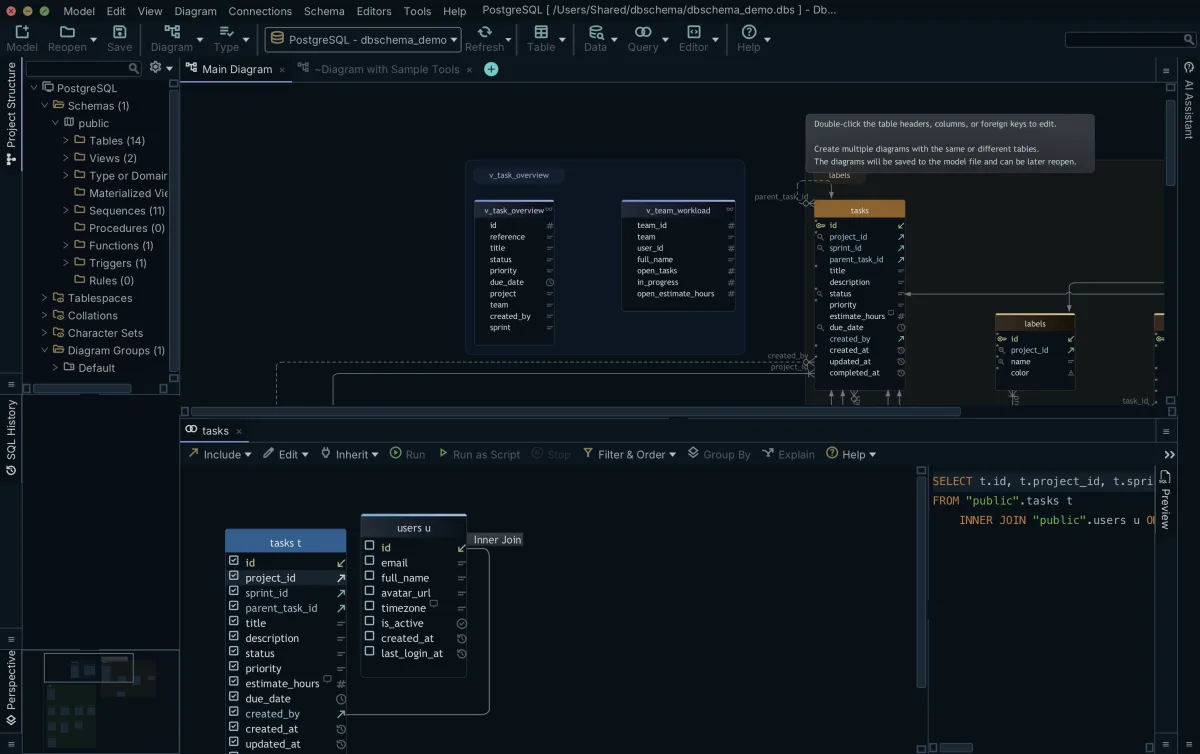
Tick company_name on customers, then invoice_date and total on invoices, and DbSchema has assembled the join a SQL editor would have made you type:
SELECT customers.company_name, invoices.invoice_date, invoices.total
FROM customers
INNER JOIN invoices ON invoices.customer_id = customers.customer_id;
The statement has no ORDER BY, so the order of the three rows is PostgreSQL's to choose:
| company_name | invoice_date | total |
|---|---|---|
| Northwind | 2026-07-03 | 240.00 |
| Northwind | 2026-07-19 | 60.00 |
| Contoso | 2026-08-02 | 125.00 |
Click the join type label on the connecting line to switch between INNER JOIN, LEFT JOIN and EXISTS. Right-click a column and choose Filter to put a WHERE condition on it, with the operator and the value set in the filter dialog. The generated SQL sits at the bottom of the Query Builder and is rewritten as you make each change, so you can read the statement before you run it.
A report rarely stops at one row per invoice, so the Query Builder also aggregates. Switch on Group By with the toggle button in the Query Builder toolbar: ticked columns without an aggregate become the GROUP BY list, and right-clicking a column and choosing Aggregate applies MIN, MAX, SUM, AVG or COUNT. The same two tables then answer what each customer has been billed:
SELECT customers.company_name, SUM(invoices.total)
FROM customers
INNER JOIN invoices ON invoices.customer_id = customers.customer_id
GROUP BY customers.company_name;
This statement has no ORDER BY either, so the same holds for the two rows it returns:
| company_name | sum |
|---|---|
| Northwind | 300.00 |
| Contoso | 125.00 |
Building a query changes nothing in the database. The statement is a SELECT, and the Query Builder itself belongs to the design model: close one and DbSchema asks whether to keep it in the design model or drop it, and the ones you keep are written into the .dbs file together with the diagram layout, the join conditions and any virtual foreign keys. That file is plain XML, so the model version-controls with the rest of the project. Running the query is the step that reaches the database, and the Save button in the result pane re-executes it and writes every row to a file, which is the way out for a result too large to read on screen.
Reading related tables side by side in the Relational Data Editor
A query result is a flat grid, and a flat grid is the wrong shape for tracing one record through the tables that hang off it. Following a single order into its line items, its shipments and its invoice means writing a new join for each hop, or writing one wide join whose rows repeat the order on every line.
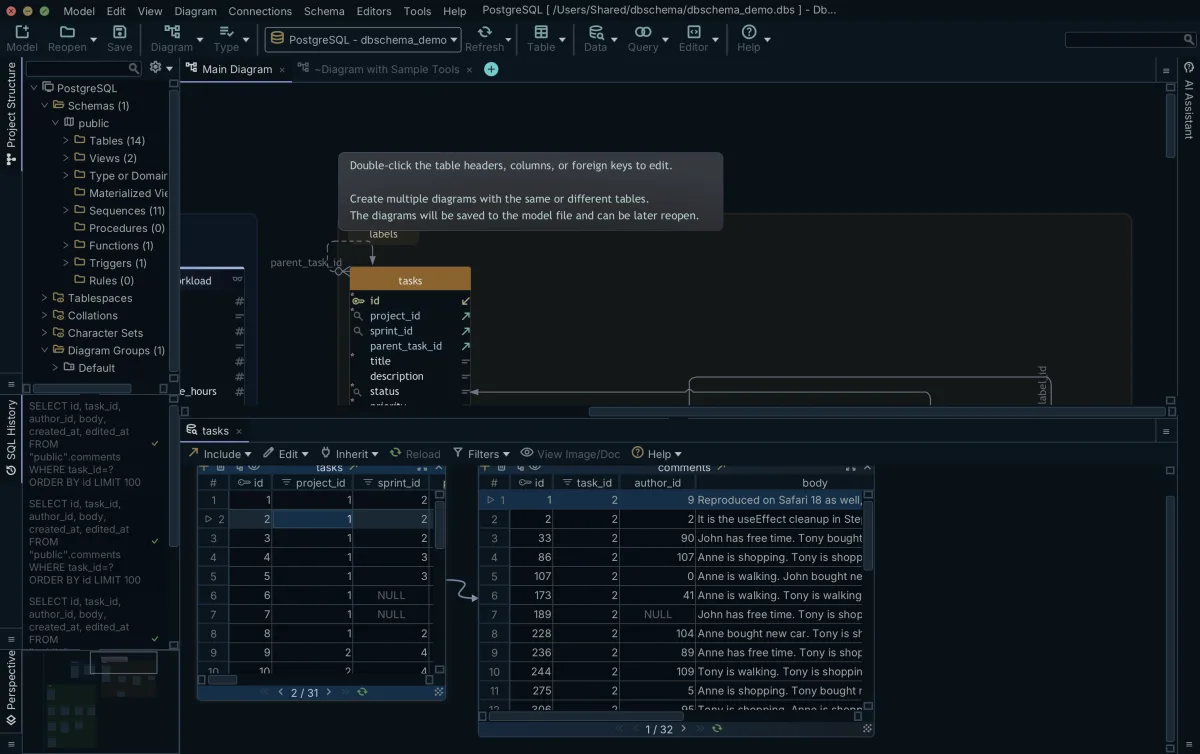
The Relational Data Editor opens those tables side by side instead. Start it from the Editors menu with New Relational Data Editor, or right-click a table header in the diagram and choose Open in Relational Data Editor; it opens in the Tools panel at the bottom of the window. Click the foreign key button on a table header panel to descend into a child table, and the child arrives as another pane, filtered to the row selected above it. Click a different parent row and every child pane reloads underneath it. There is no limit on the depth, so a chain of four or five tables is browsed the same way as one. Clicking a column header in any pane opens the filter dialog for that column.
Here the direction of travel reverses: the Relational Data Editor writes to the database, not to the model. Insert, Edit and Delete stage a change in the pane, Commit sends it to the database, and Rollback throws away what has not been committed. Browsing related data this way is in the Pro edition, alongside the Query Builder.
Why data ends up in NoSQL instead of a relational table
The data an analyst is asked about is not always in a table, and the reason is in the storage choice. MongoDB's documentation puts the two growth paths side by side: vertical scaling increases the capacity of a single server with a faster CPU, more RAM or more storage, and available hardware imposes a practical maximum, while horizontal scaling divides the dataset and the load over multiple servers and adds servers as capacity is needed[1]. Sharding is how MongoDB does the second one.
The other reason is the shape of the records. MongoDB uses a flexible schema model, and by default documents in one collection do not need the same fields or the same data types[2]. An application team gets to add a field without a migration; you get a collection whose column list nobody can hand you, because there isn't one. Before a document store can be queried by mouse, its structure has to be worked out from the documents that are in it.
The four kinds of NoSQL database
NoSQL covers four storage shapes, and which one you have been pointed at decides how much of your work is querying and how much is discovery. A key-value store such as Redis or Valkey holds an opaque value under a key, and gives you no way to filter on what is inside the value, so pulling a report out of one is an export followed by processing somewhere else. A document store such as MongoDB or Couchbase holds JSON or BSON documents with nested objects and arrays, and it is the shape a diagram can represent, because the fields can be read back from the documents themselves. A wide-column store such as Apache Cassandra or HBase spreads sparse columns across rows and is queried in its own language, CQL in Cassandra's case, which has no join. A graph database such as Neo4j or Amazon Neptune stores nodes and edges, and its questions are traversals rather than joins.
| Kind | Structure | Example engines | What is missing for ad-hoc reporting |
|---|---|---|---|
| Key-value | Key and opaque value | Redis, Valkey | Filtering on anything inside the value |
| Document | Nested JSON or BSON | MongoDB, Couchbase | A field list that every record honors |
| Wide-column | Sparse columns per row | Cassandra, HBase | Joins between tables |
| Graph | Nodes and edges | Neo4j, Amazon Neptune | A query language you already read |
Querying a document store without putting production at risk
DbSchema builds the missing field list itself. It introspects a configurable sample of documents per collection and infers field names, BSON types, nested objects and arrays, then draws each collection as a node on the diagram. The result is an approximation of what the documents hold, never a structure MongoDB enforces. Where a collection carries a validation rule, DbSchema reverse-engineers that rule instead and treats it as the authoritative structure, which is the stricter answer: once a validation rule is on a collection, MongoDB rejects any insert or update that would produce a document the rule disallows[2]. Creating or editing a collection in DbSchema writes the validation rule to the database and to the model file at the same time.
Collections have no foreign keys to follow, so you draw the links yourself: drag one field onto another in the diagram and DbSchema records a virtual foreign key. Virtual relations live in the .dbs model file only, and the database neither declares nor enforces them, which is what makes them safe to create against a running system. Once they exist, the Relational Data Editor cascades through collections exactly as it does through tables, and the Query Builder treats a virtual foreign key like a real one. What DbSchema offers a document store is that whole chain rather than one link of it: a structure inferred from the documents, the validation rule where a collection has one, the virtual relations you draw, browsing several collections over those relations, and interactive HTML5 documentation of the result. Comparing that against the other MongoDB tools is a question of how far along the chain each one goes.
Two settings on the connection decide what any of this is allowed to do to a live system, and you choose them when you create the connection. Tick Read Only Connection on the connection dialog's Settings tab and DbSchema opens the connection in read-only mode, so the database refuses every schema and data change made through it. Choosing Disconnected from the connection menu goes further and detaches the model from the database altogether: changes are saved to the .dbs file and no statement is sent anywhere. Designing a query offline and connecting only to run it is the combination worth setting up on a production database.
Download DbSchema at https://dbschema.com/download.html, connect to your own database, and click a table header in the diagram to open the Query Builder on it. Connecting, reverse-engineering the schema and the diagrams are in the free Community edition; the Query Builder, browsing related data in the Relational Data Editor, saving the model to a file and the HTML5 documentation are in Pro.
Frequently asked questions
Can you query a database without knowing SQL?
DbSchema's Query Builder writes the SELECT from the tables and columns you tick on the diagram, and it follows the declared foreign keys to work out the join conditions. Where a schema declares no foreign keys, drag one column onto another in the diagram to create a virtual foreign key, and the Query Builder joins on it the way it joins on a real one.
What can be used instead of SQL to query databases?
A visual query builder and an object-relational mapper are the two routes that avoid hand-written SQL, and they suit different jobs. The ORM needs a project and a build around it, so it belongs inside an application; DbSchema's Query Builder needs only a connection and the diagram, so it suits a question asked once.
How do you query a NoSQL database visually?
DbSchema samples the documents in each collection and infers the fields, then draws them as a diagram you can build queries on. Because MongoDB declares no foreign keys, you drag one field onto another to create a virtual foreign key, which DbSchema stores in the model file and uses to link collections.
What are the 4 types of NoSQL database?
Document, key-value, wide-column and graph. Only the document kind carries a per-record field structure that can be drawn as a diagram, which is why the sampling step above applies to MongoDB and has no equivalent for a key-value store.
Why use NoSQL instead of SQL?
Horizontal scaling is the usual reason: the dataset and the load are divided over several servers, and capacity grows by adding servers rather than by buying a bigger one. MongoDB's documentation names the price of that in the same paragraph, as increased complexity in infrastructure and maintenance[1].
Are visual query builders safe to use on live databases?
DbSchema's Query Builder produces SELECT statements, and the builder itself is stored in the .dbs model file rather than in the database catalog, so designing a query leaves nothing behind on the server. Ticking Read Only Connection on the connection dialog's Settings tab makes the guarantee explicit, because the database then refuses every change made through that connection.
Does DbSchema save my query builder progress?
A Query Builder you keep when you close it is stored in the .dbs model file with the diagrams and the layout, and it is reopened from the Editors menu the next time you open that model. Saving the model to a file is a Pro edition feature.
Sources
Query your own schema without writing SQL
DbSchema draws the joins from your foreign keys, rewrites the generated SQL as you tick columns, and cascades the Relational Data Editor from a parent row to its children. The Query Builder, relational data browse and saving the model to a file are Pro edition features; the Architect trial runs 15 days and can be extended by another 15.









