Best MongoDB Tools (2026): 8 GUI Clients Compared on Price, Free Tier and Schema
Eight MongoDB tools grouped by the job they do, with their prices, free tiers and one test that shows why field types matter.
On this page
You need a MongoDB client for a project where several people have to understand the same collections, and every list you find puts a different tool first. For that job, use DbSchema: it infers each collection's structure from its documents, reads validation rules, draws the relations MongoDB never declares and exports documentation a colleague opens in a browser. The seven other tools below are grouped by what they are built for, each with its licence and free tier.
Short answer
DbSchema is the MongoDB tool to choose when the structure of your collections has to be seen, checked and shared. MongoDB Compass, VisuaLeaf, Studio 3T, NoSQL Manager, NoSQLBooster and Navicat are query and administration clients, and Retool builds internal applications over MongoDB data.
- Design, documentation and shared understanding of the collections: DbSchema.
- Free MongoDB-only administration from the vendor: MongoDB Compass.
- Internal apps on top of MongoDB data: Retool, which is an app builder and not a database client.
Three kinds of MongoDB tool do three different jobs
mongosh, the MongoDB Shell, is where every deployment is queried and administered, and each tool here sits on top of it rather than replacing it (MongoDB Shell documentation). A graphical client adds what the shell cannot show at once, and the tools differ in which part they add.
Design and documentation clients read the documents, show each collection's fields and types as a diagram, keep the links between collections and turn the result into something other people can read. DbSchema is in this group, and it is the one this article recommends when the question is "what is actually in these collections, and who else needs to know".
Query and administration clients give you a document browser, a query and aggregation editor, import and export, and index and user management. Compass, VisuaLeaf, Studio 3T, NoSQL Manager, NoSQLBooster and Navicat are built for this work.
Application builders such as Retool connect to MongoDB as a data source and put forms and tables in front of it for people who will never write a query. They answer a different question, so they are listed last.
Free tiers range from any use to non-commercial only
The values below come from each vendor's own pricing page, read on 3 November 2026. Prices are per user and exclude tax.
Five tools have a free tier you may use for commercial work; VisuaLeaf, NoSQLBooster and Retool limit theirs:
| Tool | Built for | Engines besides MongoDB | Free tier | Paid licence |
|---|---|---|---|---|
| DbSchema | Design, documentation, data browsing | Relational and NoSQL engines | Community Edition, for any use | Pro 294 USD one-time or 29.40 USD a month |
| MongoDB Compass | Query and administration | None | Free | None |
| VisuaLeaf | Query and administration | PostgreSQL, MySQL, MariaDB, SQL Server, Oracle, SQLite, ClickHouse | Community, 3 MongoDB connections | Basic 79 USD, Professional 149 USD, one-time |
| NoSQLBooster | Query, including SQL SELECT | None | Free edition with fewer functions after a 30-day trial | Paid editions |
| Retool | Internal applications | Other data sources | Up to 5 users | Team from 9 EUR per builder a month, billed yearly |
The other three start with a paid or a non-commercial licence, which matters as soon as the work is for an employer:
| Tool | Built for | Engines besides MongoDB | Free tier | Paid licence |
|---|---|---|---|---|
| DbSchema | Design, documentation, data browsing | Relational and NoSQL engines | Community Edition, for any use | Pro 294 USD one-time or 29.40 USD a month |
| Studio 3T | Query and administration | MongoDB-compatible only | Community, non-commercial, 3 connections | Professional 499 USD, Ultimate 699 USD a year |
| NoSQL Manager | Administration on Windows | None | None | 180 USD one-time |
| Navicat for MongoDB | Query, modelling, administration | Atlas, DocumentDB, Cosmos DB (Navicat Premium adds relational) | None | Non-Commercial, Standard or Enterprise, perpetual or subscription |
Two lines are easy to misread. Studio 3T is billed yearly only, so its Professional edition costs 1,497 USD over three years, where a DbSchema Pro licence stays usable after the first year and its optional updates cost 75 USD a year. Retool's prices are per builder and per internal user, because it is priced as an application platform.
One mistyped field drops an order from every join
The difference between the two kinds of client shows up as soon as the documents disagree with each other. This collection has three orders, written by code that did not agree on types:
db.orders.insertMany([
  {_id: 101, customer_id: 1,   total: 49.9,    items: [{sku: "A1", qty: 1}]},
  {_id: 102, customer_id: "2", total: "19.00", items: [{sku: "B7", qty: 2}]},
  {_id: 103, customer_id: 3,   total: NumberDecimal("120.50"), shipping: {city: "Lyon"}}
])
Grouping the two fields by their BSON type shows that each holds more than one type:
db.orders.aggregate([
  {$project: {f: {$objectToArray: "$$ROOT"}}}, {$unwind: "$f"},
  {$match: {"f.k": {$in: ["customer_id", "total"]}}},
  {$group: {_id: {field: "$f.k", type: {$type: "$f.v"}}, docs: {$sum: 1}}}
])
Result · MongoDB 7.0.39
| field | type | docs |
|---|---|---|
| customer_id | int | 2 |
| customer_id | string | 1 |
| total | decimal | 1 |
| total | double | 1 |
| total | string | 1 |
The string in customer_id is not a cosmetic problem. A $lookup from orders to customers compares "2" with the number 2 and finds nothing, so order 102 drops out of every report that joins the two collections, without an error:
db.orders.aggregate([
  {$lookup: {from: "customers", localField: "customer_id", foreignField: "_id", as: "c"}},
  {$project: {customer_id: 1, matched: {$size: "$c"}}}
])
Result · MongoDB 7.0.39
| _id | customer_id | matched |
|---|---|---|
| 101 | 1 | 1 |
| 102 | "2" | 0 |
| 103 | 3 | 1 |
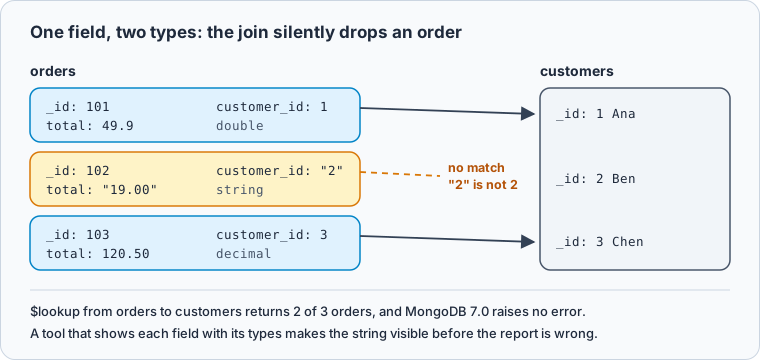
A $jsonSchema validator stops the next bad document. After collMod added a validator that requires customer_id as int, inserting {customer_id: "4"} failed with MongoServerError: Document failed validation. The validator does not touch the three documents already stored, so you still have to find order 102 yourself (MongoDB schema validation).
DbSchema shows, checks and shares what your collections contain
DbSchema is a desktop design and query client for relational and NoSQL databases, MongoDB included, on Windows, macOS and Linux. On MongoDB it does the whole chain the example above needs, from finding the drift to telling other people about it (DbSchema MongoDB documentation).
DbSchema reads a sample of documents from each collection, 100 from the start and 100 from the end by default, and lists every field it finds with its type, nested documents and arrays under their parent field. The result approximates what the documents contain; it is not a schema MongoDB enforces, and a field that appears only in other documents can be missing until you raise the Schema Scan Depth to medium or full. Where a collection has a $jsonSchema validator, DbSchema reads the fields from the validator instead and treats it as the structure.
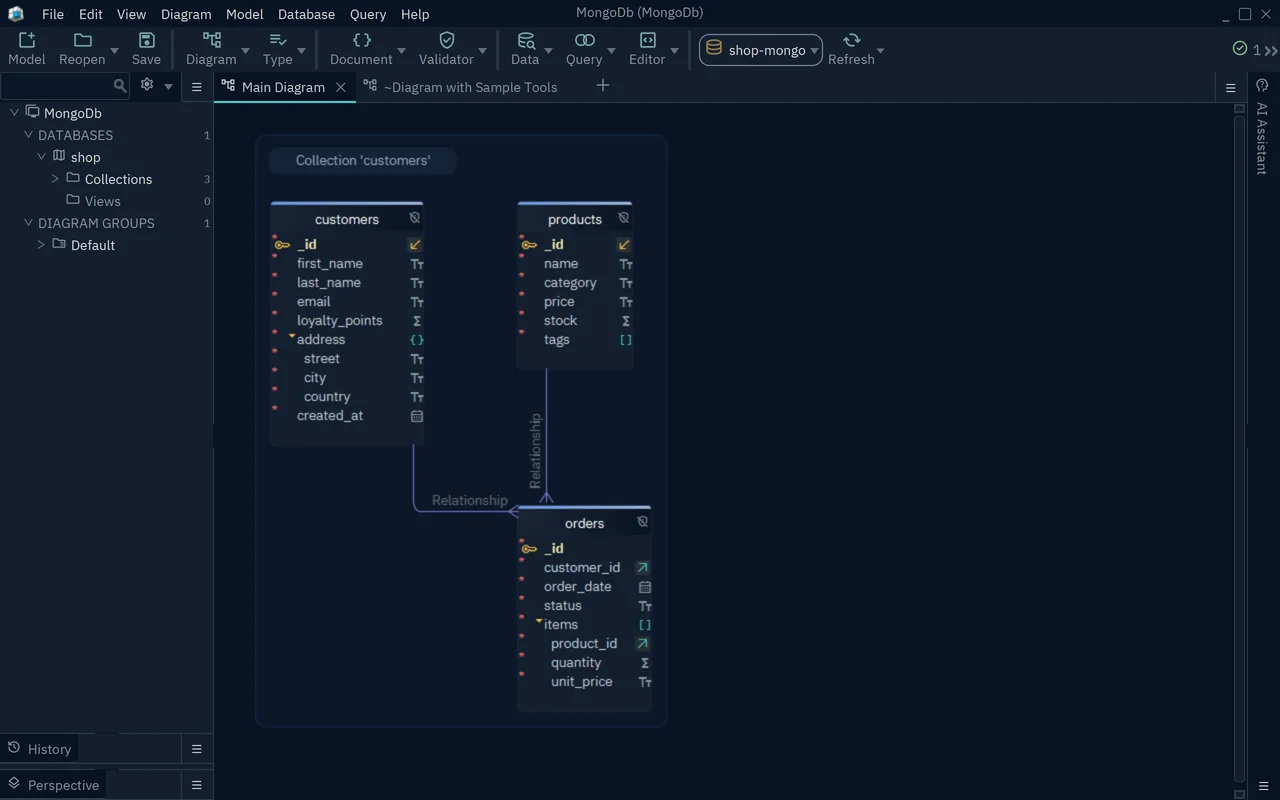
- 1Nested document address with its own fields
- 2Array items with the fields of its documents
- 3Virtual relation from orders to customers
MongoDB declares no relations, so DbSchema draws a line where a field holds an ObjectId that matches an _id in another collection. A reference stored as a string or a number, such as customer_id above, gets no line until you drag the field onto the field it refers to. These virtual relations live in the DbSchema model file and MongoDB never sees them.
The rest of the chain is in DbSchema Pro. The Relational Data Explorer opens a customer and, beside it, only that customer's orders, following the virtual relation. Saving the model to a file puts the design in Git, and a collection you create or edit in DbSchema writes its validator to MongoDB and to the model file. HTML5 documentation exports the diagram as a vector image with collection and field comments as mouse-over tooltips, for colleagues who have no database credentials.
DbSchema Community Edition is free for any use and covers connecting, reverse-engineering and the interactive diagram. Pro costs 294 USD one-time with the first year of updates, or 29.40 USD a month (DbSchema purchase page).
MongoDB Compass is MongoDB's free query and admin GUI
MongoDB Compass is the free GUI that MongoDB publishes for its own database. It explores documents, builds aggregation pipelines stage by stage, shows a visual Explain Plan, and its schema analysis samples documents to report frequent values and inconsistent types per field. It also generates queries from natural language. Compass connects to MongoDB only, so a project that also runs PostgreSQL or MySQL needs a second client beside it.
VisuaLeaf puts MongoDB and SQL databases in one client
VisuaLeaf is a desktop client for MongoDB and SQL databases in one workspace. Its free Community edition allows three saved MongoDB connections and includes all its SQL features. The visual query and aggregation builders and query profiling start in Basic, at 79 USD one-time; Professional, at 149 USD one-time with a year of updates, adds replica set and sharded cluster management and data compare and sync between MongoDB and SQL.
Studio 3T is a query client billed yearly per user
Studio 3T is a MongoDB client built for writing and running queries. Its paid editions add SQL statements against MongoDB data, aggregation building and schema and data tools. Professional costs 499 USD and Ultimate 699 USD per user a year, billed yearly only. The Community edition is free for non-commercial use with up to three connections.
NoSQL Manager administers MongoDB on Windows
NoSQL Manager for MongoDB is a Windows GUI client for administering and developing against MongoDB, with a shell built into the GUI. A single-user perpetual licence costs 180 USD and includes a year of support, and a site licence covers unlimited users.
NoSQLBooster runs SQL SELECT statements against MongoDB
NoSQLBooster for MongoDB is a shell-centred client that runs SQL SELECT statements, including joins, against MongoDB collections. Its free edition works for personal and commercial use but loses functions after a 30-day trial, and its AI services require active software assurance on a paid licence.
Navicat for MongoDB builds aggregation pipelines visually
Navicat for MongoDB is a MongoDB client with a visual aggregation pipeline builder, data modelling and reporting, and it connects to Atlas, Amazon DocumentDB and Azure Cosmos DB for MongoDB. It comes as Non-Commercial, Standard and Enterprise editions, sold as a perpetual licence or a subscription. Navicat Premium covers MongoDB together with relational engines in one licence.
Retool builds internal apps on top of MongoDB data
Retool connects to MongoDB as a resource and runs finds, inserts, updates, deletes and aggregation pipelines behind the forms and tables of an internal application. Its pricing page lists a free plan for up to five users and a Team plan from 9 EUR per builder a month, billed yearly.
An index turns a collection scan into an index scan
Every client's profiling view shows the same thing explain() returns in the shell, so it is worth knowing what to look for. On the orders collection from the example, a filter on customer_id without an index scans the whole collection:
db.orders.find({customer_id: 3}).explain("executionStats")
db.orders.createIndex({customer_id: 1})
db.orders.find({customer_id: 3}).explain("executionStats")
The winning plan changes from a collection scan to an index scan:
Result · MongoDB 7.0.39
| run | winning plan | docs examined | keys examined | returned |
|---|---|---|---|---|
| before the index | COLLSCAN | 3 | 0 | 1 |
| after the index | IXSCAN, then FETCH | 1 | 1 | 1 |
Compass shows the same plan as a tree in its visual Explain Plan, and VisuaLeaf adds query profiling from its Basic edition. The fields to read are the stage names and the two counts: an IXSCAN with docs examined close to returned means the index does the work (MongoDB explain results).
Pick the tool by the job you need done
DbSchema covers the two jobs that depend on knowing the structure of the collections:
| Job | Tool |
|---|---|
| Understanding, documenting and sharing the structure of existing collections | DbSchema |
| One project that mixes MongoDB with PostgreSQL, MySQL or another relational engine | DbSchema |
| Free administration and browsing, MongoDB only | MongoDB Compass |
| SQL SELECT statements against MongoDB | NoSQLBooster or Studio 3T |
| Internal applications for colleagues who will not write queries | Retool |
To check your own collections the way the example above does, download DbSchema, connect it to MongoDB and reverse-engineer the database: the Community Edition shows every collection's fields and types on a diagram. Browsing related documents, saving the model to Git and exporting HTML5 documentation are in DbSchema Pro, which you can try for 15 days.
FAQ
What is the best MongoDB GUI for schema visualization?
DbSchema infers each collection's fields, types, nested documents and arrays from a sample of its documents, reads $jsonSchema validators where they exist, and draws virtual relations between collections, as the DbSchema section shows.
Are there good free MongoDB tools?
DbSchema Community Edition is free for any use and covers connecting, reverse-engineering and diagrams for MongoDB and every other supported engine. MongoDB Compass is free, VisuaLeaf Community allows three MongoDB connections, NoSQLBooster has a free edition with fewer functions after its trial, and Studio 3T Community is for non-commercial use.
Which MongoDB tool is best for teams?
DbSchema, because the design lives in a model file rather than in one person's client. With Pro, the file goes into the same Git repository as the application code, so a change to a collection's structure is reviewed in a pull request, and the HTML5 documentation opens for colleagues without database credentials.
Sources
See what your MongoDB collections really contain
DbSchema infers each collection's fields and types from its documents, reads validation rules and draws the relations MongoDB never declares. Connecting, reverse-engineering and diagrams are free in the Community Edition, with a 15-day trial of every feature.









