Are Visual Query Builders Safe on Production
For the DBA who lets developers and analysts query a production database; the connection settings that decide what they can do to it are explained where they appear.
On this page
A developer asks for a login on the production database so they can pull their own numbers, and the answer has to be more exact than yes or no. A visual query builder is safe there on one condition: the connection is configured for it before anyone opens it. The DbSchema Query Builder constructs SELECT statements and nothing else, and it is saved to the local model file rather than to the server, so designing a query leaves no scratch objects in a production catalog. Ticking Read Only Connection on the Settings tab of the connection dialog makes the database refuse every schema and data modification that arrives through DbSchema.
What is a visual query builder?
A visual query builder is a graphical interface for assembling a SELECT statement out of tables, joins, and ticked columns instead of typing the syntax. DbSchema's Query Builder is the one this article works through. It opens inside the diagram, reads the foreign keys already in the schema, and rewrites the generated SELECT under the canvas every time you change something on it.
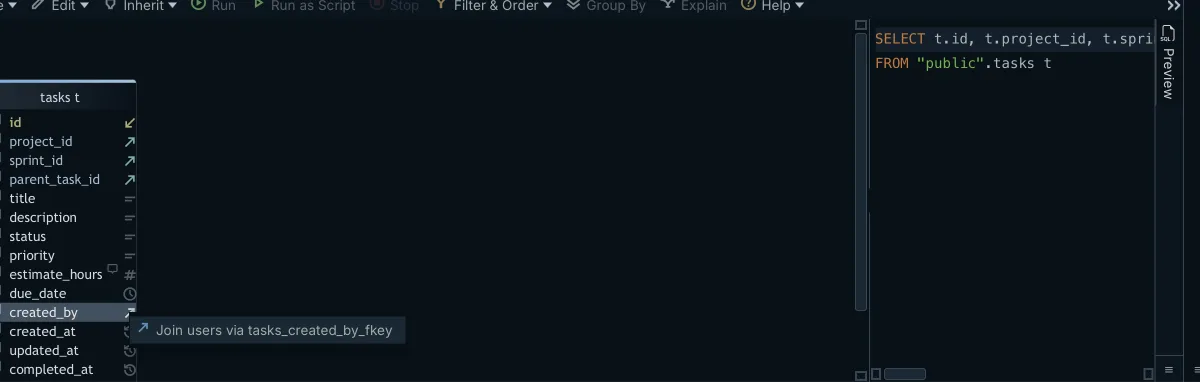
- Click a table header in the DbSchema diagram to open the Query Builder loaded with that table, or choose New Query Builder from the Editors menu to start on a blank canvas.
- Click the small arrow icon next to a column to follow a foreign key, and DbSchema adds the related table with the join already written.
- Click the join type label on the connecting line and DbSchema switches that join between INNER JOIN, LEFT JOIN and EXISTS.
- Tick the checkbox next to a column and DbSchema puts it in the SELECT list.
- Right-click a column, choose Filter, and DbSchema writes a WHERE condition on it.
Nothing in those five steps reaches the database. The canvas, the columns you ticked, and the filter values are held in the DbSchema model file, and the generated SQL is text at the bottom of the builder until you execute it. A schema with no declared foreign keys still joins: drag one column onto another in the diagram and DbSchema stores a virtual foreign key in the model file, which the Query Builder then follows exactly like a real one.
How can I visualize a SQL query?
Visualizing a query means seeing the tables, the join conditions, and the projected columns as objects you can move, rather than as text you have to parse line by line. On the DbSchema canvas each table is a box carrying its column names, its primary key markers, and its data types, and the connector lines between the boxes are the joins. Reading the generated SELECT back under the canvas is how you confirm that the picture says what you meant.
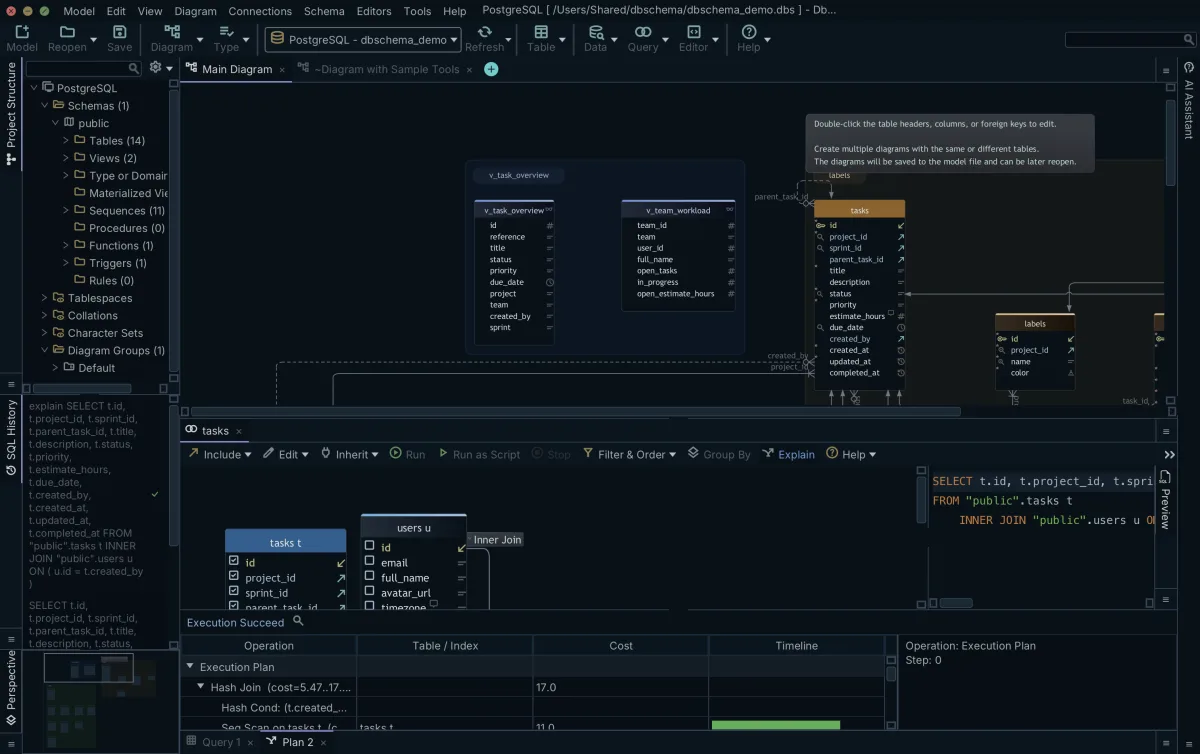
Measuring a query before it runs on production
Elapsed time is the wrong number to judge a query by, because it moves with the cache, the storage, and whatever else the server is doing that second. The count of pages the query read does not move. On SQL Server 2022, SET STATISTICS IO reports it:
SET STATISTICS IO ON;
SELECT *
FROM Production.ProductCostHistory
WHERE StandardCost < 500.00;
SET STATISTICS IO OFF;
The server answers with a message naming the table and the page counts:
Table 'ProductCostHistory'. Scan count 1, logical reads 76, physical reads 0,
page server reads 0, read-ahead reads 0, page server read-ahead reads 0,
lob logical reads 0, lob physical reads 0, lob page server reads 0,
lob read-ahead reads 0, lob page server read-ahead reads 0.
| Output item | What it counts |
|---|---|
| logical reads | Pages read from the data cache |
| physical reads | Pages read from disk |
| read-ahead reads | Pages the query put into the cache before using them |
Those definitions come from the SET STATISTICS IO reference[1], and every page in SQL Server is 8 KiB[2]. The 76 logical reads above are therefore 608 KiB of data touched to answer one query, and that figure is the same on the second run even though the elapsed time is not. A six-digit read count on a lookup that returns one row means the query is scanning, and a scan that costs nothing on a development copy costs the buffer pool on a production server.
What does query builder do?
The Query Builder turns clicks into a SELECT statement written for the database you are connected to. DbSchema reads the catalog when you connect, so it knows which columns exist, which foreign key joins two tables, and how the engine wants an identifier quoted, and it writes the aliases and the quoting into the statement for you. That work is the same across the 70+ SQL and NoSQL databases DbSchema connects to, which is why the same canvas produces PostgreSQL SQL against one connection and SQL Server SQL against another.
Where the query lives while you design it
Query design happens in the DbSchema model file, a plain XML file on your workstation with the extension .dbs. The Query Builder opens inside the diagram, is saved into that file, and is reopened from the Editors menu; when you close one, DbSchema asks whether to keep it in the design model or drop it permanently. No temporary view, scratch table, or session object is created on the server to make that work, so a query you spent an afternoon shaping leaves the production catalog exactly as it found it.
Because the file is XML, it goes into Git next to the application code, and a colleague who pulls the branch opens the same canvas with the same joins and filters. Saving the model to a file is part of the Pro edition. The database sees nothing of any of this until you execute the statement the builder generated, and then it sees a SELECT.
Why use query builder?
The reason to build the query visually on a production connection is that the two mistakes that hurt are both structural, and both are visible on the canvas. Forgetting a join condition turns the query into a cross join. Joining through the wrong column multiplies rows in a way that still returns a plausible-looking number. Each shows up as a missing or misplaced connector line before it shows up as a stalled server.
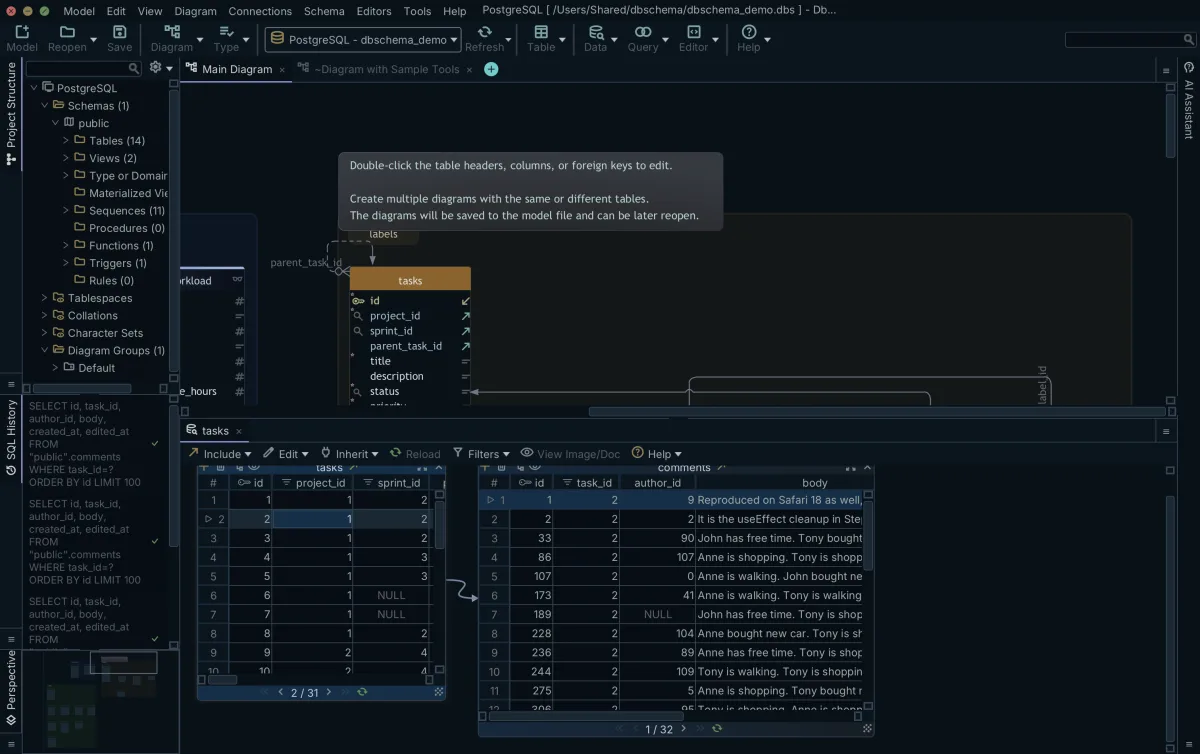
Browsing several tables at once in the Relational Data Editor
Checking a handful of related records is a different job from writing a report, and it does not need a query at all. DbSchema's Relational Data Editor opens a parent table in one pane and its children in further panes, and clicking a row in the parent refilters every child pane to the records whose foreign key values match. You can keep descending, as many levels deep as the foreign keys reach, and virtual foreign keys drawn in the diagram work the same way in the editor.
Each pane is filtered by the row you selected, so a child table arrives as the rows belonging to one parent rather than as the whole table. The editor also writes: Insert, Edit and Delete are buttons on the pane, and a change is sent to the database when you press Commit, while Rollback discards it. On a connection with Read Only Connection ticked the database refuses those writes, which is what makes the editor safe to hand to someone who only needs to look. The Relational Data Editor is part of the Pro edition.
What are database query tools?
Database query tools split into three kinds by what they leave behind on the server, and that is the property that matters when the server is production. DbSchema keeps the diagram, the Query Builder, the virtual foreign keys, and the filter values in a local model file, so the only thing the database ever receives is the statement you choose to execute. A SQL IDE keeps its work in a text buffer and sends whatever is in that buffer when you press run, which is the same freedom on a staging copy and on production. A command-line client sends every line as you type it, with no structure between you and the catalog.
The difference shows up in what a reviewer can inspect. A query built in DbSchema is in the model file in the repository, with the joins it used, so a colleague can read it without a database. A query typed into a console exists in the shell history of one machine. For the requirements behind that, see enterprise query tools.
| Tool category | Where the query is kept | What it sends to the server |
|---|---|---|
| DbSchema | The .dbs model file on your workstation | The SELECT you execute |
| SQL IDEs | An editor buffer or IDE project | Whatever the buffer holds |
| Command-line clients | Shell history | Each line as you type it |
Which is the best SQL query tool?
For a DBA who has to give people query access to a production database, DbSchema is the one to reach for: the Query Builder generates SELECT statements and is saved to the model file, the Relational Data Editor cascades through related tables without a hand-written join, and Read Only Connection blocks writes at the connection itself. DataGrip is JetBrains' SQL IDE, with code completion and refactoring for people who write SQL as text all day. Aqua Data Studio is a cross-platform database IDE with administration consoles for server maintenance.
What separates them for this job is where the query ends up. In DbSchema the query definitions, the diagram layouts, and the virtual relations are all in the .dbs model file on your workstation, which is why a comparison of SQL query tools comes down to what each one leaves on the server.
| Tool | Primary job |
|---|---|
| DbSchema | Visual schema design, query building, relational data browse |
| DataGrip | SQL IDE with code completion and refactoring |
| Aqua Data Studio | Cross-platform database IDE with administration consoles |
Configuring the connection before anyone opens it
The problem a DBA is actually solving is access: developers and analysts need to read production data, and the account they are given has to make the destructive cases impossible rather than merely unlikely. Two settings on the DbSchema connection do that work, and both are set once, when the connection is created.
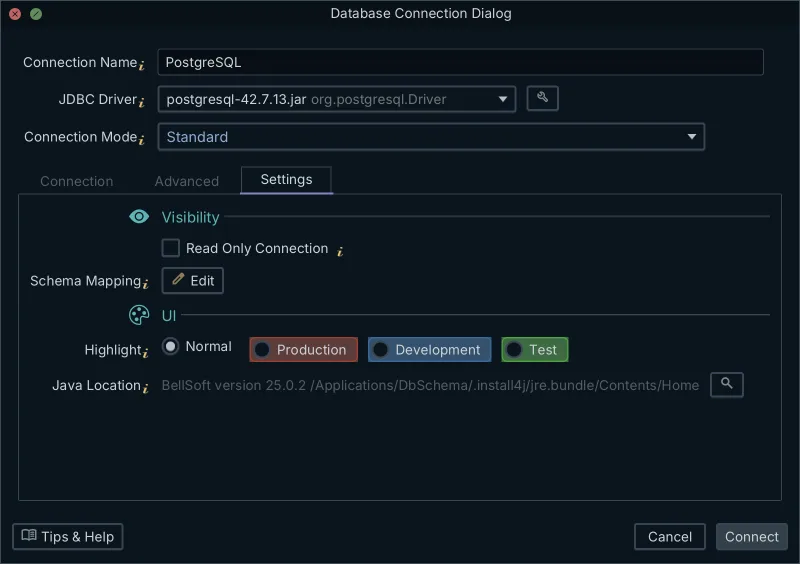
Read Only Connection is the one the database enforces. Tick it on the Settings tab and DbSchema opens the connection in read-only mode, so every schema and data modification made through it is refused by the database server rather than by DbSchema. Highlight is the one your eyes enforce: it colors the connection in the application as Normal, Production, Development or Test, so a production connection is recognizable before anyone starts working in it.
Both settings matter because DbSchema applies a schema edit to the database as soon as you make it while the connection is open, rather than staging it, as the design model documentation describes. The same documentation gives the third option: switch the connection to Disconnected and the same edits go only to the model file, which is how a schema change is designed and reviewed before it is executed anywhere. The visual query builder narrows the question further, since its canvas only ever produces a SELECT.
The Query Builder, the Relational Data Editor and saving the model to a file are Pro edition features; connecting, reverse-engineering, the interactive diagrams and the SQL editor come with the free Community edition. Download DbSchema at https://dbschema.com/download.html and set up the production connection first, with Read Only Connection ticked, before anything is reverse-engineered through it.
Frequently asked questions
How does a visual query builder protect against table locks?
DbSchema saves the Query Builder into the model file rather than onto the server, so designing a query creates no temporary view or scratch table in a production catalog. A connection with Read Only Connection ticked cannot take the write locks an UPDATE or a DELETE would need. Neither of those stops a badly shaped SELECT from scanning a large table, which is why the read counts are worth checking first.
Can I explore multiple related tables without writing JOINs?
Yes, DbSchema's Relational Data Editor cascades through related tables in one view. It follows the foreign keys in the schema, or the virtual foreign keys you draw in the diagram yourself, so you can browse, filter and sort across several child levels side by side without writing a join.
Why avoid testing SQL queries directly on production?
An UPDATE or a DELETE run against production is committed against real rows, and getting those rows back means restoring from a backup. A SELECT that scans instead of seeking competes for the same buffer pool as the application. On a connection with Read Only Connection ticked in DbSchema, the first of those two is refused by the server before it changes anything.
What should I measure to tell whether a query is safe for production?
Measure the pages the query read rather than the seconds it took. SET STATISTICS IO on SQL Server 2022 reports logical reads, each one an 8 KiB page taken from the data cache, and that count is stable across runs while elapsed time is not.
Sources
Open your own database in DbSchema
Reverse-engineer the schema into a local model, build SELECT statements on the diagram canvas, and tick Read Only Connection before you point it at production. The Query Builder and the Relational Data Editor are Pro features; connecting, reverse-engineering, interactive diagrams and the SQL editor are in the free Community edition.









