Building a Query Across Joined Tables Visually
For the analyst who needs four or five tables in one answer and would rather draw the joins than hand-write the conditions; every query here is shown with the rows it returns.
On this page
You can ask the question in one sentence. Answering it takes four tables, and half an hour later the join conditions are still not right. Building the same query on a canvas removes that half hour: you pick the tables, follow the foreign keys already declared between them, tick the columns you want, and read back the SELECT that DbSchema writes underneath. The queries in this article run on PostgreSQL 17, and each one is shown with its result.
What is a visual query builder?
A visual query builder is a graphical surface that turns tables, connector lines and ticked checkboxes into a SELECT statement, instead of asking you to type the statement. It reads the schema from the catalog first, so it knows which columns each table has and which foreign key connects two of them, and it uses that to write join conditions you would otherwise have to remember.
The gain is largest where the query spans several tables. A four-table join asks you to keep four sets of column names, three join conditions, and a set of aliases straight at once, and one mismatched condition returns a result that looks like data but counts the wrong rows. On the canvas the join condition is a line between two columns, so a wrong one is visible rather than buried in the middle of a FROM clause.
The DbSchema Query Builder works this way, and it opens inside the diagram you already have. Choose New Query Builder from the Editors menu for a blank canvas, or click a table header on the diagram and DbSchema opens the builder with that table already loaded. Either way the builder is saved into the model file rather than onto the server, so a half-finished query survives closing the application and reconnecting the next morning. For how the same idea is handled elsewhere, see visual query builders compared.
How can I visualize a SQL query?
Visualizing a query means putting each table on a canvas as a box of columns and drawing the join conditions between them as lines. The examples below use three tables from a small task tracker:
CREATE TABLE users (
  id        int PRIMARY KEY,
  full_name text NOT NULL
);
CREATE TABLE projects (
  id   int PRIMARY KEY,
  name text NOT NULL
);
CREATE TABLE tasks (
  id         int PRIMARY KEY,
  project_id int NOT NULL REFERENCES projects,
  created_by int NOT NULL REFERENCES users,
  title      text NOT NULL,
  status     text NOT NULL
);
INSERT INTO users VALUES (1, 'Ada'), (2, 'Grace'), (3, 'Linus');
INSERT INTO projects VALUES (10, 'Website'), (11, 'Billing');
INSERT INTO tasks VALUES
  (100, 10, 1, 'Draft the copy', 'open'),
  (101, 10, 2, 'Review the copy', 'done'),
  (102, 11, 1, 'Add the invoice export', 'open');
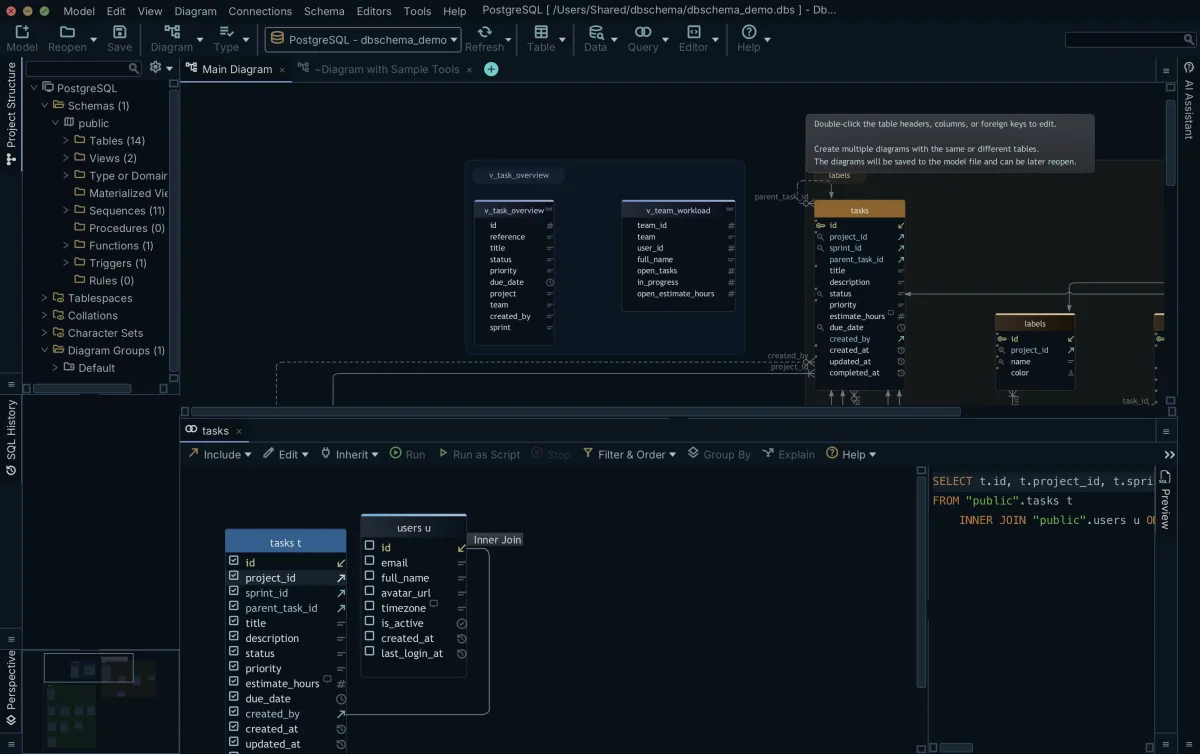
Open the Query Builder on tasks, click the small arrow icon next to created_by, and DbSchema adds users with the join condition already written from the foreign key. Tick id, title and status on tasks and full_name on users, and the statement under the canvas reads:
SELECT t.id, t.title, t.status, u.full_name
FROM tasks t
INNER JOIN users u ON u.id = t.created_by
ORDER BY t.id;
| id | title | status | full_name |
|---|---|---|---|
| 100 | Draft the copy | open | Ada |
| 101 | Review the copy | done | Grace |
| 102 | Add the invoice export | open | Ada |
Adding the third table is the same gesture from the other column. Click the arrow next to project_id and DbSchema joins projects, so the report gains the project name without your writing a second ON clause:
SELECT p.name, t.title, u.full_name
FROM tasks t
INNER JOIN users u ON u.id = t.created_by
INNER JOIN projects p ON p.id = t.project_id
ORDER BY p.name, t.id;
| name | title | full_name |
|---|---|---|
| Billing | Add the invoice export | Ada |
| Website | Draft the copy | Ada |
| Website | Review the copy | Grace |
Where the database declares no foreign key, drag one column onto another in the diagram and DbSchema saves a virtual foreign key in the model file. The Query Builder follows it exactly like a declared one, and the database is not touched, since nothing is written to the catalog.
What does a query builder do?
A query builder assembles a table expression and a select list. In PostgreSQL 17 terms a table expression is a FROM clause optionally followed by WHERE, GROUP BY and HAVING, and those clauses form a pipeline whose virtual table is passed to the select list to compute the output rows[1]. Each thing you do on the canvas lands in one of those clauses.
DbSchema handles the parts of the syntax that are mechanical rather than interesting. It aliases each table, quotes identifiers the way the connected engine wants them quoted, and writes the ON condition from the foreign key. Right-click a column, choose Filter, and DbSchema puts a WHERE condition on it, with the comparison operator and the value taken from the filter dialog. Turn on Group By from the toggle button in the Query Builder toolbar and the ticked columns without an aggregate become the GROUP BY list, while right-clicking a column and choosing Aggregate applies MIN, MAX, SUM, AVG or COUNT to it.
| What you do on the canvas | Where it lands in the statement |
|---|---|
| Tick a column checkbox | The SELECT list |
| Follow a foreign key arrow | A FROM entry and its JOIN condition |
| Right-click, Filter | A WHERE condition |
| Right-click, Aggregate | An aggregate in the SELECT list |
| Turn on Group By | The GROUP BY list |
Schemas with thousands of tables are the case where the canvas earns its place, and where an unfiltered diagram stops being readable. DbSchema holds several named diagrams in one model, so you can put one subject area on its own diagram and grow it outwards along the foreign keys, which is what enterprise schemas need from a modeling surface.
Which IDE is best for SQL?
For an analyst with access to a reporting replica, the SQL environment worth having is the one that keeps exploratory work off the server until the statement is ready. DbSchema separates the local design model from the live connection: the Query Builder, the diagram layout and the virtual foreign keys live in the .dbs model file on your workstation, and shaping a query there sends nothing to the database. Working on offline model files is how you evaluate a data path before any statement leaves the machine.
Being exact about what does reach the server matters more than a feature list. The Query Builder canvas produces SELECT statements, so a table cannot be dropped, altered or truncated from it. DbSchema will run DDL that you type yourself into the SQL Editor, and what protects you there is the transaction: INSERT, UPDATE and DELETE need an explicit Commit to become permanent, the Commit and Rollback buttons sit in the editor toolbar, and Auto-Commit is an option you turn on deliberately from the Run Script dropdown. Schema changes take a separate path through Schema → Synchronize Model with Database, which lists the generated SQL and waits for you to click Execute.
Driver coverage decides whether any of this applies to your database at all. DbSchema connects to 70+ SQL and NoSQL databases over JDBC and downloads the driver for the one you choose.
Why use a query builder?
The expensive mistake in a multi-table query is a missing join condition, because the query still runs and still returns numbers. List two tables in FROM without one and PostgreSQL cross-joins them: for every combination of rows from the two tables the joined table gets a row, so tables of N and M rows produce N * M rows[1]. With three users and two projects that is six:
SELECT u.full_name, p.name
FROM users u, projects p
ORDER BY u.full_name, p.name;
| full_name | name |
|---|---|
| Ada | Billing |
| Ada | Website |
| Grace | Billing |
| Grace | Website |
| Linus | Billing |
| Linus | Website |
Six rows are easy to spot as wrong. Run the same shape across two tables of a million rows each and the result set is a trillion rows, which fills the memory of whatever is reading them long before anyone gets a total. The canvas removes the chance to make it: DbSchema writes the ON condition from the foreign key at the moment you follow the arrow, so the condition arrives with the table rather than after it.
The other half of the win is picking the join type, which decides which rows survive. An inner join keeps only the rows that match on both sides; a left outer join performs the inner join first, then adds a row with nulls on the right for every left row that matched nothing[1]. Linus has no tasks, so an inner join drops him and a left join keeps him:
SELECT u.full_name, t.title
FROM users u
LEFT JOIN tasks t ON t.created_by = u.id
ORDER BY u.full_name, t.id;
| full_name | title |
|---|---|
| Ada | Draft the copy |
| Ada | Add the invoice export |
| Grace | Review the copy |
| Linus |
Click the join type label on the connecting line in DbSchema and the join switches between INNER JOIN, LEFT JOIN and EXISTS, with the statement under the canvas rewritten as you switch. Making the same change in text means finding the right JOIN keyword inside a FROM clause that somebody else may have written.
What is the best SQL visualization tool?
Generating a statement is half the job; the other half is reading the rows it would return, across the same relationships, without writing a query at all. DbSchema does both, and the second one is the Relational Data Editor.
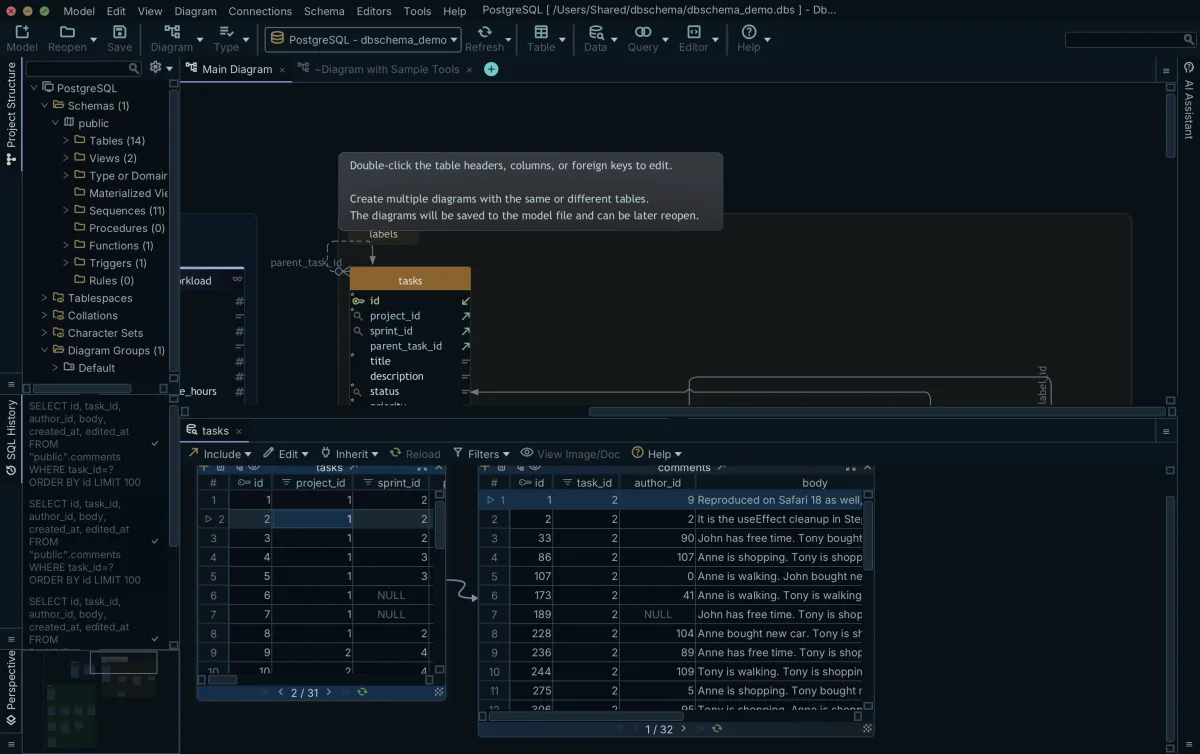
Open it from the Editors menu with New Relational Data Editor, or right-click a table header in the diagram and choose Open in Relational Data Editor, and DbSchema opens the table in the Tools panel at the bottom of the screen. Click the foreign key button on the table header panel and DbSchema descends into the child table, which arrives as a further pane filtered to the row you selected in the parent. Click a different parent row and every child pane reloads against it, level after level, for as long as the foreign keys lead somewhere.
Tracing one account to its orders, each order to its line items, and each item to its shipment record is therefore a sequence of clicks rather than three subqueries. The Relational Data Editor also writes: Insert, Edit and Delete are buttons on the pane, a change reaches the database when you press Commit, and Rollback discards it. DbSchema drives the same browsing from virtual foreign keys, which is what makes this work against a schema whose constraints were never declared. The Query Builder and the Relational Data Editor are both part of the Pro edition.
What are the 5 basic SQL commands?
The five clauses a reporting query is built from are SELECT, FROM, WHERE, GROUP BY and ORDER BY. PostgreSQL 17 does not evaluate them in the order they are written: the FROM list is computed first and ORDER BY sorts last, with WHERE, GROUP BY and the select list in between[2]. That order is why an alias invented in the select list cannot be used in WHERE, since WHERE has already run by the time the alias exists.
| Clause | What it decides | Step |
|---|---|---|
| FROM | Which tables and joins | 1 |
| WHERE | Which rows survive | 2 |
| GROUP BY | How rows are collected | 3 |
| SELECT | Which columns come back | 4 |
| ORDER BY | The order of the output | 5 |
The generated statement stays visible at the bottom of the builder while you work, and it updates live as you tick, filter and group. Copy it into the DbSchema SQL Editor when you want to keep going in text: add a subquery, a window function, or a second condition the canvas has no control for, and run it there against the same connection. For the clause on its own, see the SELECT clause.
Download DbSchema at https://dbschema.com/download.html, reverse-engineer a schema you already have, and open the Query Builder on the table your report starts from, with the three example tables above replaced by your own. The Query Builder and the Relational Data Editor come with the Pro edition; connecting, reverse-engineering, the interactive diagrams and the SQL Editor are in the free Community edition.
Frequently asked questions
Does a visual query builder generate standard SQL?
Yes, DbSchema writes an ordinary SELECT statement for the engine you are connected to, quoting identifiers the way that engine wants them. The statement is visible under the canvas and updates live as you change the query, so you can copy it out at any point.
How do visual builders handle complex joins?
Click the join type label on the connecting line in DbSchema and it switches between INNER JOIN, LEFT JOIN and EXISTS. The condition itself comes from the foreign key, or from a virtual foreign key you drew in the diagram, which is what keeps a four-table join at the correct grain.
Can I edit the SQL after building it visually?
Yes, copy the generated statement into the DbSchema SQL Editor and edit it as text to add a subquery, a window function or an expression the canvas has no control for. The editor runs it against the same connection and shows the result as a table.
Is it safe to use query builders on a live database?
Partly, and it is worth being precise. The DbSchema Query Builder canvas produces SELECT statements only, so a table cannot be dropped or altered from it. The Relational Data Editor does write, through its Insert, Edit and Delete buttons, and nothing it changes reaches the database until you press Commit.
Do I need to know SQL to explore related data?
No SQL is needed for browsing. DbSchema's Relational Data Editor walks the real and virtual foreign keys for you: clicking a parent row refilters every child pane, as many levels deep as the relationships reach.
Sources
Build multi-table queries on a canvas
DbSchema draws the joins from your foreign keys and rewrites the generated SELECT as you tick columns, so a four-table report is a sequence of clicks. The Query Builder and the Relational Data Editor are Pro edition features.









