One SQL Client for the Whole Team: PostgreSQL, MySQL, SQL Server and MongoDB
How a team picks one SQL client for PostgreSQL, MySQL, SQL Server and MongoDB, what to check first, and how to set it up the same way on every laptop.
On this page
DbSchema gives your whole team one client for PostgreSQL, MySQL, SQL Server and MongoDB. Everyone installs the same program on Windows, macOS or Linux, and one per-developer licence covers every database. Every production connection can be marked read-only in the same place, whatever the engine. That is the point of standardizing: one tool, one set of habits, and one safeguard on every database.
Short answer
Pick one client that connects to all four engines and runs on every laptop in the team. DbSchema connects to 100+ databases in every edition, downloads each JDBC driver the first time you connect, and lets you mark any connection Read Only and colour it as Production.
- Standardize on a client that covers every engine you run, MongoDB included, on every operating system your team uses.
- Check the licence model, how drivers are installed, and whether production connections can be locked.
- DbSchema does all of this in one install; the SQL editor and diagrams are free, and the query builder, model file and schema compare are in Pro.
One client replaces four tools on every laptop
Most mixed teams grow a tool per engine. One person uses the PostgreSQL tool, another the MySQL one, a third works on MongoDB in its own GUI, and the SQL Server work happens on the one Windows laptop. Each tool has its own connection settings, its own shortcuts and its own idea of a safe connection.
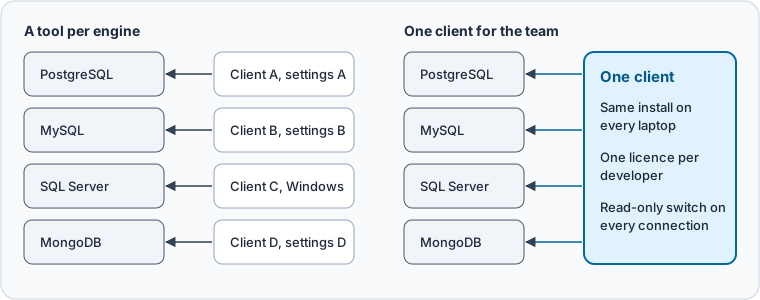
One client changes three things. New people learn one program. A connection is set up the same way on every laptop. And the rule "production is read-only" becomes a setting, not a habit.
Five checks before you standardize
| Check | Why it matters | DbSchema |
|---|---|---|
| All four engines, MongoDB included | One gap sends a developer back to a second tool | 100+ databases in every edition |
| Windows, macOS and Linux | One laptop on another OS breaks the standard | Installers for all three |
| Licence per person, not per machine | People switch laptops and work from home | Per developer, two computers, one at a time |
| Drivers handled for you | Driver setup is where most first connections fail | JDBC driver downloaded on first connect |
| A lock for production | One wrong window can change a live schema | Read Only Connection and Highlight on every connection |
What to see: the first two checks decide whether everyone can use the client at all. The last three decide whether everyone uses it the same way.
Price comes after these checks. A free tool that misses one engine or one operating system costs a second tool and a second set of habits.
A read-only session behaves differently on each engine
The production lock is where engines differ most. We set a session read-only on PostgreSQL 17.6 and MySQL 8.4, using the same four-table shop schema on both, and tried to change it.
On PostgreSQL, the session setting stops both the DDL and the DML:
SET SESSION CHARACTERISTICS AS TRANSACTION READ ONLY;
CREATE TABLE audit_note (id int);
UPDATE customers SET email = email;
Result · PostgreSQL 17.6
| statement | result |
|---|---|
| CREATE TABLE audit_note | ERROR: cannot execute CREATE TABLE in a read-only transaction |
| UPDATE customers | ERROR: cannot execute UPDATE in a read-only transaction |
On MySQL, the syntax and the error are different:
SET SESSION TRANSACTION READ ONLY;
INSERT INTO customers VALUES (9, '[email protected]');
CREATE TABLE audit_note (id int);
Result · MySQL 8.4.11
| statement | result |
|---|---|
| INSERT INTO customers | ERROR 1792 (25006): Cannot execute statement in a READ ONLY transaction. |
| CREATE TABLE audit_note | ERROR 1792 (25006): Cannot execute statement in a READ ONLY transaction. |
MongoDB has no read-only session at all. There, read-only comes from the user: a user with the built-in read role can query but not write. SQL Server uses its own permissions model again.
So "connect read-only" means a different statement, or a different user, on each engine. Ask each developer to remember all of them, and one day someone forgets. A team client puts one switch on every connection instead.
Set up DbSchema the same way for everyone
-
Install on each laptop Community
Download DbSchema for Windows, macOS or Linux and run the installer for that system (installation guide).
-
Connect each engine Community
Choose
File → New Model, pick the engine's tile under Connect to Database and enter the server. DbSchema downloads the JDBC driver the first time you connect (connect to a database). -
Lock every production connection Community
On the Access and Model tab, tick Read Only Connection and set Highlight to Production.
-
Register each seat Pro
Each developer chooses
Help → Register License, picks DbSchema Account and types the email their seat was assigned to (licensing).
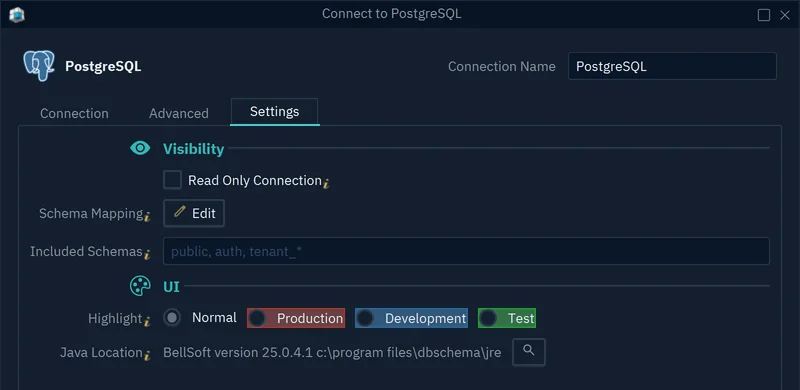
- 1Refuses schema changes on this connection
- 2Colours the connection as Production
With Read Only Connection ticked, DbSchema refuses to change the schema through that connection, and asks the JDBC driver to open it read-only. Highlight colours the connection button, so everyone sees at a glance which database they are on.
Pro adds what the team shares beyond the client. The design lives in one model file that you keep in Git. The query builder writes joins from the foreign keys. Schema compare shows every difference before a script runs.
How the usual clients fit a mixed team
The pages that rank for this search name a handful of clients. These facts decide whether each one can be the team's only client. We read them on each vendor's site on 6 November 2026.
- DbSchema connects to relational and NoSQL engines, MongoDB included, in every edition, on Windows, macOS and Linux.
- DBeaver has its MongoDB driver in the Lite, Enterprise and Ultimate editions only, not in Community.
- DataGrip has a free licence for non-commercial use only; use at work needs a commercial licence.
- SQL Server Management Studio is available only for Windows.
- MongoDB Compass works with MongoDB only.
Single-engine tools still have a place for the admin work they were built for. The standard is about the one client every developer opens first.
Count seats before you buy
DbSchema licences are per developer: one person installs a seat on up to two computers and uses one at a time. People who only connect and query can stay on the free Community Edition. A floating licence lets a group that uses Pro now and then share a number of seats.
DbSchema Pro costs 294 USD once per developer, or 29.40 USD a month, before tax, on the purchase page on 6 November 2026. Rolling out DbSchema to a team shows how to assign seats by email. Database management software for a team on several engines covers the wider choice.
Download DbSchema, connect it to your production database with Read Only Connection ticked, and give the same setup to the next developer. Connecting, diagrams and the SQL editor are free in the Community Edition; the model file, the query builder and schema compare need DbSchema Pro.
FAQ
Can DbSchema query MongoDB and SQL databases in the same session?
Yes. Each database is its own model, and DbSchema keeps several windows open, so a developer can work on a PostgreSQL model and a MongoDB model side by side. The Window menu lists them.
Does Read Only Connection need a read-only database user?
No. DbSchema refuses schema changes on that connection by itself. A read-only user on the server adds a second lock that also covers other tools.
Does a seat move when a developer gets a new laptop?
Yes. Choose Help → Unregister License on the old computer, then register on the new one.
Sources
Give the whole team one client for every database
The same DbSchema install connects to PostgreSQL, MySQL, SQL Server and MongoDB on Windows, macOS and Linux. The query builder, model file and schema compare are in DbSchema Pro.